Issue adding AP & YW Callings as Editors to Calendar

11 postsstarted by EarloftheWest 3,379 viewsoriginal topic

#1
We have setup our Young Women classes according to the new rules and have 3 classes.
We have also called 3 Young Women Class Advisors (1 for each class).
When I attempt to add the position Young Women Class Advisor as an editor for one of our Ward Calendars, the item is added to the list, but after I click save and go back to the calendar, the Young Women Class Advisor entry is not on the list. (I've added the advisors by name in the meantime until this is fixed.)
I see the same issue with the Young Women Specialist calling.
Also, I don't see an entry to add Aaronic Priesthood Quorum Specialists to the list.
Can others try this to confirm that it's not just me?
Thanks!
Community Moderators
#2
EarloftheWest wrote:I don't see an entry to add Aaronic Priesthood Quorum Specialists to the list.
That calling hasn't been added to the list of callings yet but should be there around the turn of the year.
JD Lessley
Have you tried finding your answer on the ChurchofJesusChrist.org Help Center or Tech Wiki?
#3
Another item I found was that I don't appear to be able to add any of the Young Women in the Class Presidencies as Editors to the Calendar.
Thanks!
Senior Member
#4
EarloftheWest wrote:Another item I found was that I don't appear to be able to add any of the Young Women in the Class Presidencies as Editors to the Calendar.
Thanks!
Unless I'm mistaken, I don't think youth class presidencies ever had access to be calendar editors by calling. If this functionality is desired, I recommend the 2 official ways to request features:
1. provide feedback from the Calendar page (or any page on churchofjesuschrist.org if there is no feedback link on the calendar page).
2. ask your stake president to bring it up in his correlating council.
Community Administrator
#5
How are you searching for the calling? I don't have access at a ward level, but at the stake level "YW" doesn't find anything. I have to enter "young".
Have you searched the Help Center? Try doing a Google search and adding "site:churchofjesuschrist.org/help" to the search criteria.

So we can better help you, please edit your Profile to include your general location.
#6
davesudweeks wrote:
EarloftheWest wrote:Another item I found was that I don't appear to be able to add any of the Young Women in the Class Presidencies as Editors to the Calendar.
Thanks!
Unless I'm mistaken, I don't think youth class presidencies ever had access to be calendar editors by calling. If this functionality is desired, I recommend the 2 official ways to request features:
1. provide feedback from the Calendar page (or any page on churchofjesuschrist.org if there is no feedback link on the calendar page).
2. ask your stake president to bring it up in his correlating council.
The Calendar will allow me to add the callings for Priests, Teachers & Deacons presidencies including secretaries.
Prior to the change in Young Women Class Presidencies, I had the Laurel's class secretary as an editor.
#7
russellhltn wrote:How are you searching for the calling? I don't have access at a ward level, but at the stake level "YW" doesn't find anything. I have to enter "young".
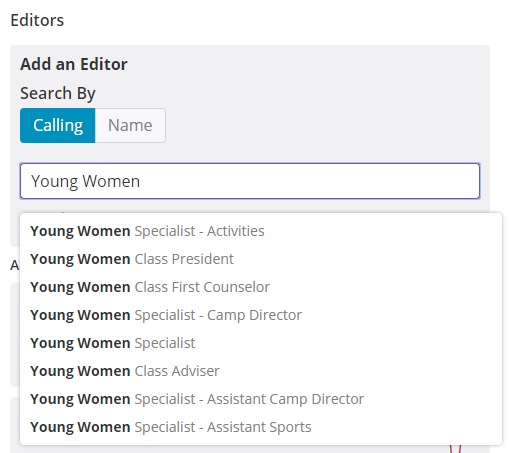
I've tried several variations including Young Women. I've attached a screenshot to this post for your reference.
Even though some of these show up in the search, when I add several of these entries, they don't stick. Meaning, once I save and go back into the Editor's screen, the entry I previously added is no longer there.
Thanks!
YoungWomen.jpg
YoungWomen.jpg (46 KiB)
Church Employee
#8
The top issue for the calendar now is to get it updated for the calling changes. We are working on it.
New Member
#9
We are having the same problem with our Deacons Calendar. The Default Calendar has the Presidency already added as Editors by default. However none of the boys can add events. Does it have anything to do with the Age of the boys. The teachers have access.
Community Administrator
#10
adabling wrote:We are having the same problem with our Deacons Calendar. The Default Calendar has the Presidency already added as Editors by default. However none of the boys can add events. Does it have anything to do with the Age of the boys. The teachers have access.
It has to do with adding editors to the calendar. I'm unclear by what you mean by "boys". If you're talking about the Deacons, it's not designed to allow any member of the quorum to add to the calendar. If you're talking about Deacon quorum presidency, they may need to be added as an editor (preferably by calling) by a calendar administrator (bishopric, clerk, Executive secretary, or designated Admin).

Please keep in mind that the calendar isn't all that "smart". It knows it has a calendar, and that callings x, y, and z can edit it. The name is just a free-form text label with no meaning to it. The calendar has to be configured it work. It doesn't automatically know who/what calling is supposed to have rights to a specific calendar. But once configured properly, it should take very little maintenance beyond the events themselves.
Have you searched the Help Center? Try doing a Google search and adding "site:churchofjesuschrist.org/help" to the search criteria.

So we can better help you, please edit your Profile to include your general location.
New Member
#11
I'm running into the same problem! What follows is the long story. If you want to skip that and just get to my summary and workaround, scroll to the bottom of the post.

Back Story
I created a private calendar back at the beginning of January called "Ward Youth Council". I assigned all members of the bishopric and the presidencies of the Young Women organization, Young Women class, and Aaronic priesthood quorums by calling. I saved the calendar with no problem, but I didn't check to see if the YW class presidency callings were still there at that time.

Fast forward to today when I went in to double check that all of the correct members were assigned before I created an event. Imagine my surprise when I found all of the other callings listed with the members assigned in LCR except the YW class presidency. My first thought was "How could I, as the Bishop, forget to include the YW class presidency on this calendar?" So, quickly repenting of my error, I added the entire YW class presidency, except the class secretary (I know, right? :oops: ), by calling.

I saved the calendar without any errors appearing and began to create the event. Just before saving the event I decided to triple check myself and went back to the Manage Calendars page to ensure that all of the correct callings were listed as (at least viewers) of the calendar. I read the list, re-read the list, and then re-re-read the list and no YW class presidency callings appeared. :shock:

Believing I was losing my mind, I re-added the Young Women class presidency callings and saved the calendar. When I re-opened the Calendar Details page again, poof, they were gone. :o

What began next was a frantic test of the calling assignments.
  1. I removed all of the AP quorum callings, saved the calendar, and then re-added them. No problems there.
  2. I created a new private calendar and added just the "Young Women Class President" calling to the list of editors and tried to save the calendar. No luck. The calendar never saved; I only saw the "Give us a moment..." message at the bottom of the page, but the calendar never saved.
  3. I then added another calling to this new calendar and was able to save, but when I went to view the list of assigned callings, you guessed it, the YW Class President calling was gone.
Summary
So, long story short, it appears that the following callings cannot be added to any calendar:
  • Young Women Class President
  • Young Women Class First Counselor
  • Young Women Class Second Counselor
  • Young Women Class Secretary
Workaround
I added all of the YW class presidency by name, saved the changes, and verified that they do in fact appear on the list now; though still not by calling.
Regards,
Gordon