"Calling already exists in organization" when trying to record setting apart

9 postsstarted by jrsand 2,825 viewsoriginal topic

New Member
#1
Here are the steps to reproduce the bug:
- Go into a member-profile page of someone with a calling that isn't marked as set apart.
- Click edit and check the check box for the calling being set apart.
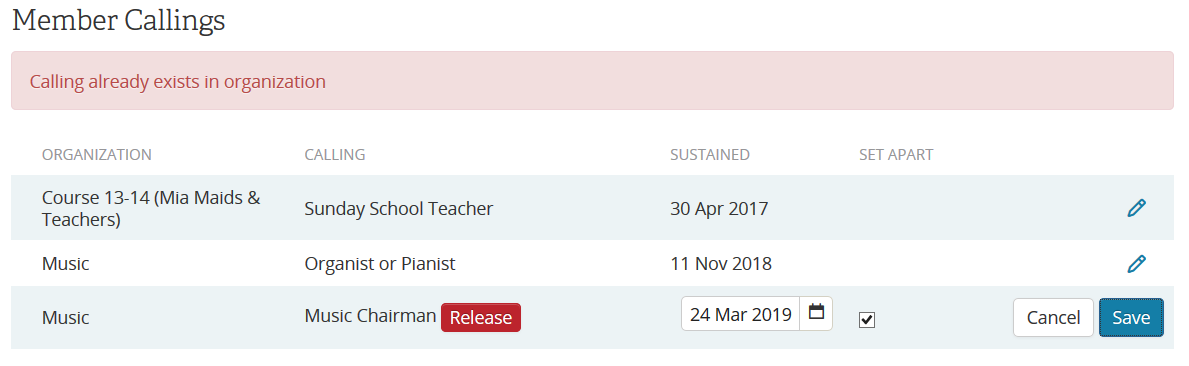
- Click save. The error then pops up as in the attachment.
Capture.PNG
Picture of callings with the error message showing
(37.04 KiB) Not downloaded yet
I don't know what callings exactly the person needs to have to make this happen. I tried on several different people in my ward and it didn't happen. However, when I went to the member in the screen shot, the error showed there. They had 3 callings and the error only showed when I tried to set the apart for the last calling. I wish I could give exact repro steps but I can't. :(
Community Moderators
#2
Have you reported this via an official bug reporting channel? This is a user-to-user mutual-support discussion forum. If any Church employee ever sees your post, it will be by happenstance. Please make sure the problem is reported via an official bug reporting channel in addition to being posted here.
New Member
#3
Where are the official bug reporting channel(s)?
Community Moderators
#4
kclemans wrote:Where are the official bug reporting channel(s)?
The feedback link found at the bottom of the page with the issues. If that page does not have the link then use the home page link and make sure to identify the page in question in your description of the problem.
JD Lessley
Have you tried finding your answer on the ChurchofJesusChrist.org Help Center or Tech Wiki?
New Member
#5
I've seen this issue also, just as jrsand reported. I've sent a message using the Feedback link as jdlessley recommended.
Senior Member
#6
jrsand wrote:Here are the steps to reproduce the bug:
- Go into a member-profile page of someone with a calling that isn't marked as set apart.
- Click edit and check the check box for the calling being set apart.
- Click save. The error then pops up as in the attachment.

Capture.PNG

I don't know what callings exactly the person needs to have to make this happen. I tried on several different people in my ward and it didn't happen. However, when I went to the member in the screen shot, the error showed there. They had 3 callings and the error only showed when I tried to set the apart for the last calling. I wish I could give exact repro steps but I can't. :(
A bit late in the day, but I have come across this issue as well. I found an answer by going to the Organisation tab and selecting the Organisation the individual has been called to, rather than going to the member profile, you tick the Set Apart box then Save.

This I discovered about a year ago and has worked each time since then.
New Member
#7
Biggles wrote:
jrsand wrote:Here are the steps to reproduce the bug:
- Go into a member-profile page of someone with a calling that isn't marked as set apart.
- Click edit and check the check box for the calling being set apart.
- Click save. The error then pops up as in the attachment.

Capture.PNG

I don't know what callings exactly the person needs to have to make this happen. I tried on several different people in my ward and it didn't happen. However, when I went to the member in the screen shot, the error showed there. They had 3 callings and the error only showed when I tried to set the apart for the last calling. I wish I could give exact repro steps but I can't. :(
A bit late in the day, but I have come across this issue as well. I found an answer by going to the Organisation tab and selecting the Organisation the individual has been called to, rather than going to the member profile, you tick the Set Apart box then Save.

This I discovered about a year ago and has worked each time since then.
Ahhh thank you! Just had this same issue and that did the trick.
New Member
#8
Biggles wrote: by going to the Organisation tab and selecting the Organisation the individual has been called to, rather than going to the member profile, you tick the Set Apart box then Save.
This worked for me as well.
Member
#9
Just wanted to report that this bug still exists. Went in today to a member's record to try to mark her as Set Apart and got this error. When in through the organization to do it that way and it worked fine. So, workaround still exists, but clearly there is still a bug.

I'll report it again too.