Blank Video no Sound for Scheduled Event

21 postsstarted by johnshaw 4,252 viewsoriginal topic

Senior Member
#1
So I was testing my setup this morning, we were upgraded to HDMI at the cabinet and I need to get this new dedicated receiver beta tested.

Scheduled my event like usual (I was also part of the beta for auto config so that has been up and running for a while)

When the event started, I saw blank video (black screen) and no audio

I took the HDMI cable plugged into the teradek and plugged it into a TV, I saw Audio and Video at the TV. And when I unplugged the HDMI from the teradek, I saw the Teradek indicate that 'no video' on the LED front panel, as well as seeing the 'successful video message' when I plugged it back in.

So it appears the Event was scheduled and working ok (I was getting telemetry data for both upload and download), the audio and video were being received by the Teradek. BUT what I was receiving from the webcast solution was a blank screen with no audio.

Anyone experience something like this in the past. I called into the GSC and the helpful frontline person wanted to know if I'd followed the instructions correctly and whether I'd plugged the Teradek into a computer, and attempting to get to Tier 2 was unsuccessful. I'm wondering if the Microsoft stuff was just jacked up, anyone know how to tell or have experienced something similar?
“A long habit of not thinking a thing wrong, gives it a superficial appearance of being right, and raises at first a formidable outcry in defense of custom.”
― Thomas Paine, Common Sense
Community Administrator
#2
I was doing a test last night. I think I experienced the same thing, but the video started up when I plugged the camera back in. You might want to make sure you're feeding from a camera and not something like a DVD as there might be DRM or some compatibility issue that messes things up. I was also using auto config for the first time.

I was also using my phone to connect to the Teradek. I was seeing the blank video there, so it was something with the Teradek, not SLC (unless it was something in the auto config). Depending on your phone, you can use the VidiU app or connect to the unit via IP (if you leave a AP running).
Have you searched the Help Center? Try doing a Google search and adding "site:churchofjesuschrist.org/help" to the search criteria.

So we can better help you, please edit your Profile to include your general location.
Senior Member
#3
Ya, I was connected, originally, to the Teradek with the IP on a computer and downloaded the app just to see if It was seeing the same thing. I was using the satellite as the input, and because it was 5am I'm now not remembering whether I had the camera on for 100% certain, but I'm positive I started with the camera and when I didn't have anything I switched the input to the satellite - So I'm pretty sure I used both. But I unhooked the HDMI cable connected to the Teradek and plugged it back in several times during that period.

My feed comes from an HDMI Switch, it has two outputs, one that goes to a small LED/TV mounted at the cabinet, and the other is the Teradek. What do you mean by 'plug the camera back in' does that mean your equipment is more ad-hoc and not centralized at a cabinet in the library or something?
“A long habit of not thinking a thing wrong, gives it a superficial appearance of being right, and raises at first a formidable outcry in defense of custom.”
― Thomas Paine, Common Sense
Community Administrator
#4
Definitely more ad-hoc. In my test setup, I go direct from camera to Teradek. At this point, what I'm suspecting is that SLC's config file (which is what makes the auto-config work) sets us up for failure. I think it was my unplugging the HDMI cable that forced the Teradek to "update" the connection that fixed it. (Much like unplugging a LAN cable will force the NIC to re-initialize the connection.) However, I might have done that while not broadcasting. The Teradek "locks down" while streaming so it might not have re-initialized for you.

I'll add that if upload is interrupted, the beta webcast receiver will switch back to the pre-roll video until the broadcast resumes. So the fact you were seeing blank points to the Terakek sending "blank".

All in all, I'm really happy with the receiver (although I do have suggestions for improvement) - the broadcast side, not so much. That was the source of all my frustration during the test.
Have you searched the Help Center? Try doing a Google search and adding "site:churchofjesuschrist.org/help" to the search criteria.

So we can better help you, please edit your Profile to include your general location.
Senior Member
#5
Edited 1 time, last by danpass on
I was also testing the new receiver last night. We also are using auto config, but not for the first time. We started using it in August for our stake conference broadcasts.

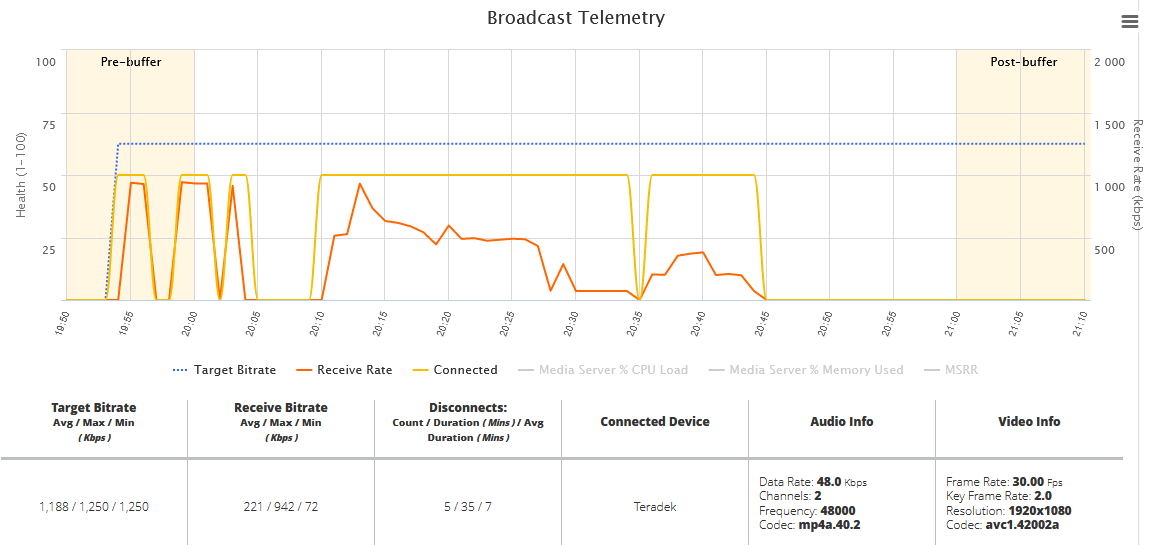
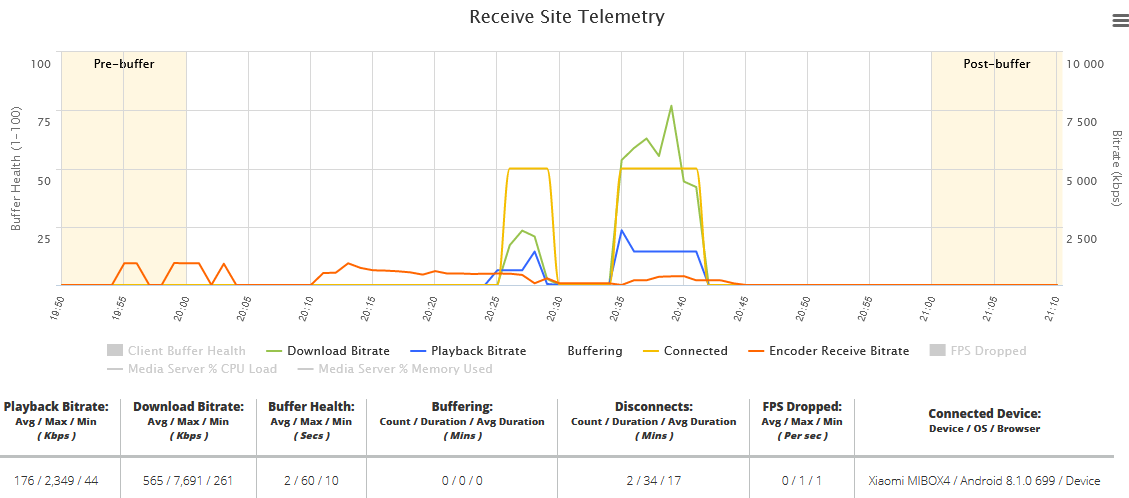
During the first half hour of our test window, everything was fine. At about 8:30 PM PDT, our screen also went black. The vidiU display showed that it was in a ready state. I pushed the start/stop button to start broadcasting again. Telemetry data shows that the vidiU was connected during that time, but the receive rate dropped significantly.
Capture.PNG
(52.45 KiB) Not downloaded yet
Receive Telemetry.PNG
(46.08 KiB) Not downloaded yet
I power-cycled the vidiU and we completed our test with no other issues.
Community Administrator
#6
Assuming that everyone got their receiver when I did (two Mondays ago), it's amazing that so many of us were testing only now. <grin>
Have you searched the Help Center? Try doing a Google search and adding "site:churchofjesuschrist.org/help" to the search criteria.

So we can better help you, please edit your Profile to include your general location.
Senior Member
#7
russellhltn wrote:Assuming that everyone got their receiver when I did (two Mondays ago), it's amazing that so many of us were testing only now. <grin>
I was surprised when mine was delivered by FedEx on Saturday (9/21). I've been feeling bad that it took me so long to test. I see I'm in good company... ;)
Community Administrator
#8
danpass wrote:I've been feeling bad that it took me so long to test. I see I'm in good company... ;)
Well, company anyway. :D
Have you searched the Help Center? Try doing a Google search and adding "site:churchofjesuschrist.org/help" to the search criteria.

So we can better help you, please edit your Profile to include your general location.
Senior Member
#9
So, I decided to take off early from work and try and do some troubleshooting before my daughter's volleyball game. I didn't make the game.

A second call to the GSC, this time the helpful frontline employee again asked me if I'd followed the instructions, after explaining that I had good signal up to the point the cable plugged into the teradek (see above - I can take the same cable and see the audio/video on a TV, using the SAME CABLE that plugs into the teradek) - The front line employee then asked to put me on hold so he could speak to his supervisor, 10 minutes later he came back on the line and asked me if I had followed the instructions correctly. By this time I'm livid and asked to speak to his supervisor, and finally made enough stink that I got second line support. Why is it so hard to get through that first group? They can't even follow what I'm saying. He kept asking if I knew where the documents were - dude I knew where those documents were when it was LDSCLERKWIKI. He started to walk me through setting up an event.... So, Like I said, I have an event LIVE up and broadcasting right now, which you could see if you took 30 seconds of not assuming it's my fault.

OK, so finally got to 2nd tier, who was also focused on my setup. You see, I admitted to them that I had a new HDMI setup in the building since my last recording, so obviously, it must be that,. THE SAME CABLE, THE SAME CABLE. Which Unit do you have, why is there a HDMI Digital Amplifier? I don't know, All I know is that I see the picture from the CAMERA in the TV, but not at the Teradek. Well, sir, do you know how to access to Teradek from a web browser? Uh duh, of course, what do you need to know? Well, what does it say along the left side, oh, it says LIVE, connected, shows a video signal and that you have 100% battery... yes, yes, it's broadcasting an EVENT right now. If I reboot I get the fun Bible Video, then back to the blank signal.

I'm picking up a new Teradek tomorrow, hopefully that fixes the issue.

-John (I've done over one hundred webcasts don't ask me if I've read the paperwork on how to set it up)

<rant over>
“A long habit of not thinking a thing wrong, gives it a superficial appearance of being right, and raises at first a formidable outcry in defense of custom.”
― Thomas Paine, Common Sense
Community Administrator
#10
So you see a picture from the video on the web page? When mine acted up, it showed black screen and apparently sent black screen.
Have you searched the Help Center? Try doing a Google search and adding "site:churchofjesuschrist.org/help" to the search criteria.

So we can better help you, please edit your Profile to include your general location.
Community Administrator
#11
russellhltn wrote:At this point, what I'm suspecting is that SLC's config file (which is what makes the auto-config work) sets us up for failure.
I noticed the link for the Teradek was a https and there were indications it was just a XML file. So, for grins and giggles I pasted that into my web browser. here's a part of what I got back:

Code:

<video>
<quality>Custom</quality>
<custom_resolution>1280x720</custom_resolution>
<custom_bitrate>1250000</custom_bitrate>
<aspect>auto</aspect>
<frame_rate_fraction>full</frame_rate_fraction>
</video>
720? Considering the camera I'm using is 1080, that's suspect. Granted, that seems to match some settings in the encoder, but it does make me suspicious. (Apparently it only does 1080 if you select "Full HD" in the encoder. However, that doesn't seem to match the "Full HD" setting in the portal.

Sure sounds like a setup for failure.

A spot check of other people's configuration (3-digit ID makes that easy) showed they were all set to 720 as well.

While I'm not a fan of having to paste in the URL, I think the local control beats what's going on at the moment. I'm going back to manual until I know I have the broadcast side down solid.

John, you might want to give that a try.
Have you searched the Help Center? Try doing a Google search and adding "site:churchofjesuschrist.org/help" to the search criteria.

So we can better help you, please edit your Profile to include your general location.
Community Moderators
#12
John, a thought just occurred to me. I've used HDMI [over CAT6] extenders for stake conference with good success, except once in a while the receiving end (usually a TV near the back) will show a black screen. If I swap the TV with another brand, it will often work. I think some extenders might distort the data stream enough that some receivers can't decipher it. I'm wondering if something like that is happening to your signal; the TV can decode it, but it's a bit too distorted for the Teradek. Pure speculation on my part.
So we can better help you, please edit your Profile to include your general location.
Community Administrator
#13
I did some more testing tonight. I didn't have the same issue, but then I had the encoder running manually before I allowed to connect to the servers.
Have you searched the Help Center? Try doing a Google search and adding "site:churchofjesuschrist.org/help" to the search criteria.

So we can better help you, please edit your Profile to include your general location.
Community Administrator
#14
Looks like we need to let these things run a bit to really test them. The receiver suddenly paused for no reason after half an hour. I had to exit the stream and go back in to get it to resume. I'm going to need to set up a three hour test (two hour plus one hour pre) to see if it's stable.
Have you searched the Help Center? Try doing a Google search and adding "site:churchofjesuschrist.org/help" to the search criteria.

So we can better help you, please edit your Profile to include your general location.
Senior Member
#15
russellhltn wrote:So you see a picture from the video on the web page? When mine acted up, it showed black screen and apparently sent black screen.
No, it was a black screen there, same screen being sent to the webcast event.
“A long habit of not thinking a thing wrong, gives it a superficial appearance of being right, and raises at first a formidable outcry in defense of custom.”
― Thomas Paine, Common Sense
Senior Member
#16
Mikerowaved wrote:John, a thought just occurred to me. I've used HDMI [over CAT6] extenders for stake conference with good success, except once in a while the receiving end (usually a TV near the back) will show a black screen. If I swap the TV with another brand, it will often work. I think some extenders might distort the data stream enough that some receivers can't decipher it. I'm wondering if something like that is happening to your signal; the TV can decode it, but it's a bit too distorted for the Teradek. Pure speculation on my part.
ya, but it's coming off an HDMI distribution Amplifier, I'd assume it was enhancing the signal a bit (speculation on my part) - But I should probably try another cable, I'll have to do something if the replacement Teradek experiences the same thing.
“A long habit of not thinking a thing wrong, gives it a superficial appearance of being right, and raises at first a formidable outcry in defense of custom.”
― Thomas Paine, Common Sense
Senior Member
#17
russellhltn wrote:
russellhltn wrote:At this point, what I'm suspecting is that SLC's config file (which is what makes the auto-config work) sets us up for failure.
I noticed the link for the Teradek was a https and there were indications it was just a XML file. So, for grins and giggles I pasted that into my web browser. here's a part of what I got back:

Code:

<video>
<quality>Custom</quality>
<custom_resolution>1280x720</custom_resolution>
<custom_bitrate>1250000</custom_bitrate>
<aspect>auto</aspect>
<frame_rate_fraction>full</frame_rate_fraction>
</video>
720? Considering the camera I'm using is 1080, that's suspect. Granted, that seems to match some settings in the encoder, but it does make me suspicious. (Apparently it only does 1080 if you select "Full HD" in the encoder. However, that doesn't seem to match the "Full HD" setting in the portal.

Sure sounds like a setup for failure.

A spot check of other people's configuration (3-digit ID makes that easy) showed they were all set to 720 as well.

While I'm not a fan of having to paste in the URL, I think the local control beats what's going on at the moment. I'm going back to manual until I know I have the broadcast side down solid.

John, you might want to give that a try.
I reconfigured my teradek with the manual config with the same results.
“A long habit of not thinking a thing wrong, gives it a superficial appearance of being right, and raises at first a formidable outcry in defense of custom.”
― Thomas Paine, Common Sense
Community Administrator
#18
russellhltn wrote:720? Considering the camera I'm using is 1080, that's suspect. Granted, that seems to match some settings in the encoder, but it does make me suspicious. (Apparently it only does 1080 if you select "Full HD" in the encoder. However, that doesn't seem to match the "Full HD" setting in the portal.
Well, that apparently doesn't affect it. I guess it sets the encoding or quality level, not what to expect. I'll have to try some other things to see what happens.

Something I did discover is that the encoding level determines if I can see audio levels in the app. Apparently, that feature gets scarified the harder the encoder has to work. That happens when you set higher quality levels.
Have you searched the Help Center? Try doing a Google search and adding "site:churchofjesuschrist.org/help" to the search criteria.

So we can better help you, please edit your Profile to include your general location.
Senior Member
#19
So back at it this morning. Very interesting, SLC provided me a 2nd Teradek and I have the SAME problem.

I then took the suggestion to plug a camera directly into it, and there was the picture, loud and clear through the Teradek, I also plugged in my computer, so two different input sources went through the teradek and were sent via the webcast solution....

FM is sending Mashall out again to look at it. So there is an Exetron Switch that sends a single through a HDMI Digital Amplifier, somewhere in there it's sending HDMI protocol that the Teradek doesn't like. I was playing around with the switch but I didn't want to break anything, but no settings I changed seemed to help at this point.

I'll report back on what is going on!
“A long habit of not thinking a thing wrong, gives it a superficial appearance of being right, and raises at first a formidable outcry in defense of custom.”
― Thomas Paine, Common Sense
Community Administrator
#20
As I understand it, HDMI tends to be a two-way negotiated connection. Not unlike 10/100/1G lan connections. I'm not sure how that distribution amp works. It may connect the source to "output 1" and everyone else gets whatever that turns out to be.

You might try some things to make the VidiU one of the negotiators via the port it's connected to and power up sequence.
Have you searched the Help Center? Try doing a Google search and adding "site:churchofjesuschrist.org/help" to the search criteria.

So we can better help you, please edit your Profile to include your general location.
Senior Member
#21
It's basically the local output at the cabinet. there is a small 7in tv and the teradek that get the output from that HDMI amplifier.
“A long habit of not thinking a thing wrong, gives it a superficial appearance of being right, and raises at first a formidable outcry in defense of custom.”
― Thomas Paine, Common Sense