Meetinghouse Webcast 2.0

19 postsstarted by natet 9,933 viewsoriginal topic

Member
#1
I was wondering if someone had more information on the upcoming beta test of the Meetinghouse Webcast 2.0. We are evaluating the church's webcast solution for our upcoming stake conference to replace a home grown system we've used for a few years now. What I'd like to know is whether or not the new system will make the communicator/receiver boxes obsolete in the near future, and basically negate our investment in them. Any information I can get would be helpful.
Community Administrator
#2
natet wrote:I was wondering if someone had more information on the upcoming beta test of the Meetinghouse Webcast 2.0. We are evaluating the church's webcast solution for our upcoming stake conference to replace a home grown system we've used for a few years now. What I'd like to know is whether or not the new system will make the communicator/receiver boxes obsolete in the near future, and basically negate our investment in them. Any information I can get would be helpful.
I assume you've read the announcement at Invitation to Participate in Meetinghouse Webcast 2.0 Software Beta Test. I don't know of any information beyond that announcement that has been made publicly available. But as I read it, it appears that the main thrust of Webcast 2.0 is to use software and a computer to replace the Communicator box. Under Webcast 1.0, the Receiver boxes are optional anyway.

If Webcast 2.0 is successful, it will provide an alternate means for webcasting that doesn't require the Communicator box (which is rather expensive). The Communicator box would still work and might well have some advantages over Webcast 2.0 in terms of simplicity and ease of use, so I don't know if "obsolete" is the right term, but if you're looking to avoid the significant cost of a Communicator box, you might want to wait and see how Webcast 2.0 turns out.

In any case, the post I linked to has an e-mail contact link where you might be able to get some more information on your specific question.
Questions that can benefit the larger community should be asked in a public forum, not a private message.
Member
#3
Thanks Alan,

I've sent an email to the address listed in the announcement, but haven't gotten a reply yet. I'm not sure we're too worried about the cost of the communicator (at least the stake president hasn't communicated that to me). Mostly my concern is whether or not we're making an investment into equipment that won't be used within a short period of time. Hopefully I'll hear back from the beta test group soon.

Thanks again.
Community Moderators
#4
Regardless of how the beta 2.0 turns out the hardware version or Communicator will continue to be used and will continue to work as it now does. As it was pointed out, it may have some advantages it has over the software version for some and vice-versa. The two will co-exist into the foreseeable future.
Troy
#5

What has become of the Webcast Communicator 2.0?

Has this project been canceled? Or, is it still in dev and not ready for field testing?
Church Employee
#6

Meetinghouse Webcast Software Coming Soon

Greetings,

The Meetinghouse Webcast Software Beta will be available soon. We are currently finishing documentation and final tweaks to the software. If you have registered for the beta, an email with detailed instructions will be sent to you once we go live. If you have not yet registered, please send an e-mail to webcastbeta@sites.ldschurch.org, including your name, preferred e-mail address, telephone number, and stake.

Cheers,
Jacob
#7
Thanks for the update Jacob. I was talking with Pete Naylor of AV services today and we were wondering what was happening with that project.
New Member
#8

Webcast 2.0 Hardware

I have been testing the software based solution and decided to also build a machine to run it. I based the config on the current Communicator shipped by Church Headquarters. So far it seems to work well with the software. I need to do some more testing, but wanted to put out the config for anyone interested in trying this and for general comments.

Doug
๐Ÿ“Ž CustomCommunicator.pdf (280.19 KiB)
Senior Member
#9
I might as well jump in here. I have decided to participate in the webcasting software beta. However, I'm having a difficult time right now.

I have a P4 2.8 single core processor with 3 gigabytes of RAM. The video card is a ATI Radeon 9700 Pro, this is a great card. I also have a TV Wonder 550 PCI. I need to get the TV card working again, because of the issue that I have come across.

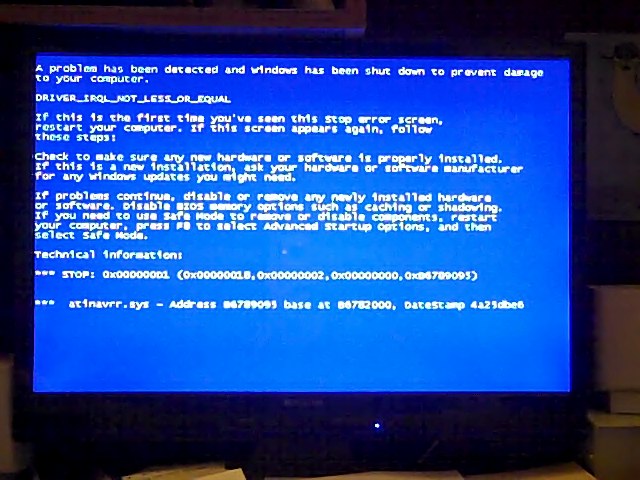
When I put the latest drivers on the card, everything works great with the card and I have also installed the necessary software from Microsoft. I am able to boot the software without a problem and everything looks good. I then look at Tools, settings, I think and when it goes there, I get the dreaded Blue Screen of Death. It says that the error is in the ATINVRY.SYS. I think that is the file.

I have decided to try to put the original drivers that came with the card to see if that will solve the issue, but has anyone else had this problem of the dreaded Blue Scrreen of Death. I will include a picture of the error.

Just want to let you know that I'm having issues with the hardware.
๐Ÿ“Ž VID00006.jpg (82.23 KiB)
New Member
#10

Driver issue

harddrive747 wrote:I might as well jump in here. I have decided to participate in the webcasting software beta. However, I'm having a difficult time right now.

I have a P4 2.8 single core processor with 3 gigabytes of RAM. The video card is a ATI Radeon 9700 Pro, this is a great card. I also have a TV Wonder 550 PCI. I need to get the TV card working again, because of the issue that I have come across.

When I put the latest drivers on the card, everything works great with the card and I have also installed the necessary software from Microsoft. I am able to boot the software without a problem and everything looks good. I then look at Tools, settings, I think and when it goes there, I get the dreaded Blue Screen of Death. It says that the error is in the ATINVRY.SYS. I think that is the file.

I have decided to try to put the original drivers that came with the card to see if that will solve the issue, but has anyone else had this problem of the dreaded Blue Scrreen of Death. I will include a picture of the error.

Just want to let you know that I'm having issues with the hardware.

Have you tried the capture card in Microsoft Windows Media encoder? Just to make sure it works period? Since both of your cards are ATI chipset based, you may have a conflict where both are trying to use the same driver at the same time.
Senior Member
#11
Thanks for the suggestion. Over the weekend, I took time to completely uninstall all ATI drivers and software.

Tonight, I went ahead and reinstalled the Radeon drivers and the TV Wonder 550 PCI drivers. I did not install the media center that came with the ATI card. I was able to see it in Windows Media encoder. I then checked out the webcasting software. I got it to work and there was no blue screen of deal. ;) I used the original drivers that came with the capture card. I may try to update them and see what happens.

I was able to send the video/audio stream to the server and everything was looking good at least on the computer that I was using as my the broadcasting server. I put the URL into the my browser and was able to view the video pretty well. It wasn't crystal clear, that is probable because I'm using analog and a video tape, but the sound was very choppy and sounded like it was really slow.

I am using the on board sound that came with the Gigabyte motherboard. When I get time, I will plan on putting in a SoundBlaster PCI sound card. I don't think there is anyway of putting the sound directly into that card, but I will see.

Otherwise, the stuff worked, not great, but I didn't get a hard crash. So more testing to come. Wish me luck.

#12
Watch this new video: Meetinghouse Webcast Overview.

http://stream.lds.org/ICS/Training/Meet ... erview.wmv
Senior Member
#13
I just want to take a minute to bring you up to date on the testing with this.

I took the TV Wonder 550 PCI card and put it in my generically built computer running Windows 7 64-bit. I also am using the Windows Media Encoder 64-bit. I tested it and all speeds for video was good. At the lower speeds, video was poor, but as the speed increased so did the video clarity.

However, I was still not able to get clear sound at any speed. I was using a VCR/DVD combo and either one the sound was awful.

So I then thought about using the Auxiliary in port on the sound card. When I did that, I got crystal clear sound and video was terrific. I tested on all speeds and everything was terrific.

So I decided to take it back to my P4-2.8ghz machine and set it up with the video into the capture card and sound into my soundblaster auxiliary port and it worked as well. I tested the speed up to 300K, because at that point the sync between audio and video was getting very notable.

I discovered that on the 2.8 ghz single processor machine that I can't really go much above 100K upstream.

So for me using the coax cable for both video and audio didn't work. However, when I used the aux in on the sound card and video from the capture card, things worked terrific.
Community Administrator
#14
harddrive747 wrote:So for me using the coax cable for both video and audio didn't work. However, when I used the aux in on the sound card and video from the capture card, things worked terrific.
Just so I understand this right, you were using a RF input and setting the tuner to that channel? Perhaps the modulator isn't adjusted well. (Since you used a VCR, then maybe it was the recording?)

However, using separate video and audio channels would be preferable for quality as it saves an unnecessary modulation/demodulation step in the signal processing.
Have you searched the Help Center? Try doing a Google search and adding "site:churchofjesuschrist.org/help" to the search criteria.

So we can better help you, please edit your Profile to include your general location.
Senior Member
#15
RussellHltn wrote:Just so I understand this right, you were using a RF input and setting the tuner to that channel? Perhaps the modulator isn't adjusted well. (Since you used a VCR, then maybe it was the recording?)

However, using separate video and audio channels would be preferable for quality as it saves an unnecessary modulation/demodulation step in the signal processing.
You are correct, I am using the RF (coax) input and setting the tuner in Windows Media Encoder to channel 3. As I say, I'm able to see video without a problem, just the audio is terrible. Not sure where I can set the modulator and if you have suggestion and can tell me where to make the changes, I can try it.

Using the separate channels was good. I plan on doing a test at our stake conference Adult Session on Saturday 13 Feb 2010. it will be an informal test, but a test nonetheless.

I will let you know how it goes.
Community Administrator
#16
harddrive747 wrote:Not sure where I can set the modulator and if you have suggestion and can tell me where to make the changes, I can try it.
If you are using a directly connected VCR as a source, then there is no adjustment. I'd be leery about adjusting the modulators in the church satellite system as it could cause problems.
Have you searched the Help Center? Try doing a Google search and adding "site:churchofjesuschrist.org/help" to the search criteria.

So we can better help you, please edit your Profile to include your general location.
Senior Member
#17
RussellHltn wrote:If you are using a directly connected VCR as a source, then there is no adjustment. I'd be leery about adjusting the modulators in the church satellite system as it could cause problems.
I don't plan on adjusting anything with the church satellite system or even the audio system at the stake center. That is why I'm going to test this month at stake conference, at least on Saturday night. I want to see which way is the best.
#18
Watch this new video: Meetinghouse Webcast Overview.

http://stream.lds.org/ICS/Training/M...t_Overview.wmv
__________________


I heard in the film that there was webcast software to use a laptop as the broadcast source. Is that correct, and if so where do I get it? I would love to set that up for our Stake President so I don't have to go set everything up for him.
Community Administrator
#19
stevenkblack wrote:I heard in the film that there was webcast software to use a laptop as the broadcast source. Is that correct, and if so where do I get it? I would love to set that up for our Stake President so I don't have to go set everything up for him.
You can learn how to obtain and use the Meetinghouse Webcast software on the wiki at Meetinghouse Webcast Software User Guide, and related pages linked from that article.
Questions that can benefit the larger community should be asked in a public forum, not a private message.