Sophos - new security software for FHC computers

9 postsstarted by jdlessley 6,885 viewsoriginal topic

Community Moderators
#1
Several weeks ago in June I completed the software updates from LANDesk Manager for computers in one of our family history centers. Symantec Antivirus has been replaced by Sophos. There are two new icons in the system tray that identify the antivirus component and a firewall. Since I am not familiar with Sophos I checked the internet for some more information on this security software provider. I could not find anything that provides any more information other than marketing overviews. My reason for this post is to see if anyone has some hands on experience with Sophos that can give some insight into it's capabilities, strengths, or possible weeknesses.

From what I can tell Sophos is a corporate level product providing remote security management of networked computers. There is very little control available on the PC. It appears to take the security management of FHC computers out of the hands of local users. To do this two new profiles appeared in the users group as part of the install of the software. One is a guest account and the other is ... well ... I can't tell since it does not belong to any local computer users groups.

Does anyone know anything about Sophos?
JD Lessley
Have you tried finding your answer on the ChurchofJesusChrist.org Help Center or Tech Wiki?
Community Administrator
#2
Not a lot. It is security software. You have to add yourself to it's admin group to be able to look inside of it. However, CHQ does reset the profiles periodically, so you'll need to work with the Family History Department if you need anything opened up. The Family History Department is much more active in the management of machines then anything I've seen on the administrative computer side.

So far, the only reports of problems I've seen have been because it blocks 80 inbound which defeats any local webservice installed. That's being worked on.

Also, when this was first announced, it was claimed that this was a church-wide thing. So so far I've seen no indications that it's anything outside of a FHC.
Have you searched the Help Center? Try doing a Google search and adding "site:churchofjesuschrist.org/help" to the search criteria.

So we can better help you, please edit your Profile to include your general location.
Member
#3
RussellHltn wrote:
Also, when this was first announced, it was claimed that this was a church-wide thing. So so far I've seen no indications that it's anything outside of a FHC.
I don't know much about its strengths and weaknesses, but I can provide a bit of insight to this question. It is currently being tested on select HQ employees' computers to make sure it is compatible with all HQ software (as well as MLS). The plan is to release it to local units (not just FHCs) in the near future.

I've found it doesn't slow down my computer as often as Symantec did. The virus definition updates are supposed to be smaller, and therefore easier to push down to local units even if they are on dial-up. I haven't personally verified that.
Member
#4
13thfloorrocks wrote:The virus definition updates are supposed to be smaller, and therefore easier to push down to local units even if they are on dial-up.
So, this implies to me that when the Admin computers are shifted to Sophos, there will be automatic definition file updates. This would be a VERY welcome change from manually updating Symantec definitions.
JLR
Community Moderators
#5
13thfloorrocks wrote:I don't know much about its strengths and weaknesses, but I can provide a bit of insight to this question. It is currently being tested on select HQ employees' computers to make sure it is compatible with all HQ software (as well as MLS). The plan is to release it to local units (not just FHCs) in the near future....
Does this go for units/stakes that are still using the Desktop 5 software?
Have you read the Code of Conduct?
Community Administrator
#6
Everybody.
Have you searched the Help Center? Try doing a Google search and adding "site:churchofjesuschrist.org/help" to the search criteria.

So we can better help you, please edit your Profile to include your general location.
Community Administrator
#7
Techgy wrote:Does this go for units/stakes that are still using the Desktop 5 software?
Everybody.
Have you searched the Help Center? Try doing a Google search and adding "site:churchofjesuschrist.org/help" to the search criteria.

So we can better help you, please edit your Profile to include your general location.
#8

Sophos Security is replacing Symantec Antivirus

Symantec Antivirus is being replaced by Sophos Security Suite

The overall install took about 15 minutes to download and install with one (1) reboot which removed Symantec Antivirus

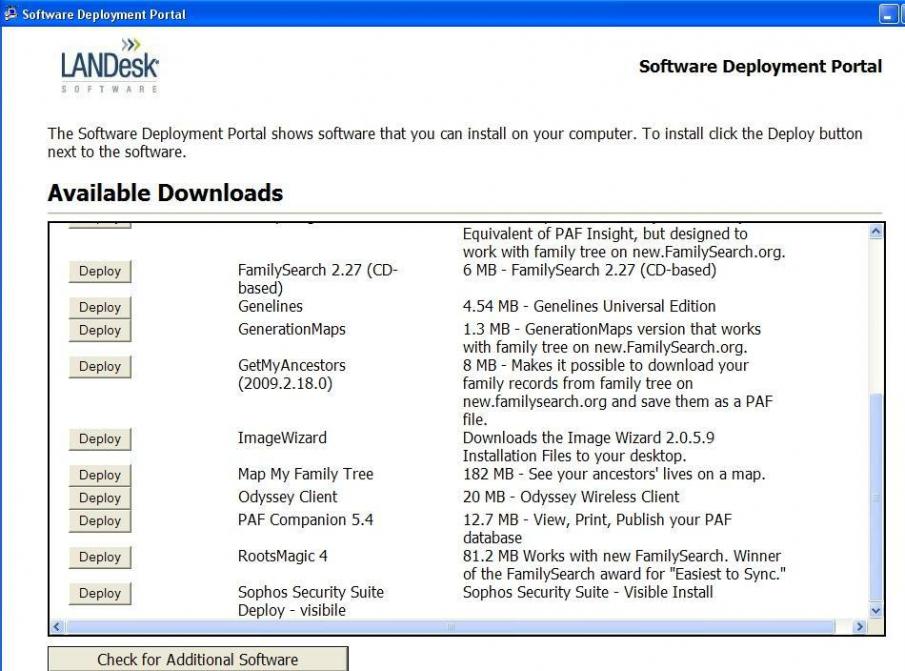
FHC: The anti-virus upgrade is available from the FHC LANDesk Software Deployment Portal (see attached image, “FHC LANDesk Software Deployment Portal 2009 07 22.jpg”)

MLS: The anti-virus upgrade is not available at this time from http://www.lds.org/mls/login

Headquarters staffs are working on the process and documentation for church wide deployment

Also, see the group LDSClerk for additional information at http://groups.yahoo.com/group/ldsclerks/
FHC Start LANDesk Software Deployment Portal 2009 07 22.jpg
FHC Start LANDesk Software Deployment Portal 2009 07 22.jpg (31.71 KiB)
:cool: Your Fellow Servant,
Porter (Pete) Lee Arnett Jr.
USA
Church Employee
#9

Sophos Q&A

The primary decision in selecting Sophos was because it provided very small virus definitions, unlike our current Symantec product. Sophos is several kilobytes, whereas Symantec was up to 35 MB if you were out of sync with the updates longer than a week or so.


Sophos seems to be a much better product overall, and provides lower resource usage on workstations than other products that were looked at.