No longer able to download Gospel Library app

25 postsstarted by jstrahl 9,408 viewsoriginal topic

New Member
#1
My iPad is iOS 9.3.5 and Gospel Library had been working ok (slow but still working) . I noticed that I could not download April 2019 General Conference, so I decided to reinstall....big mistake. Now I cannot download Gospel Library at all. Help!! Is there anything I can do. My iPad won't support any newer version of iOS.
Community Moderators
#2
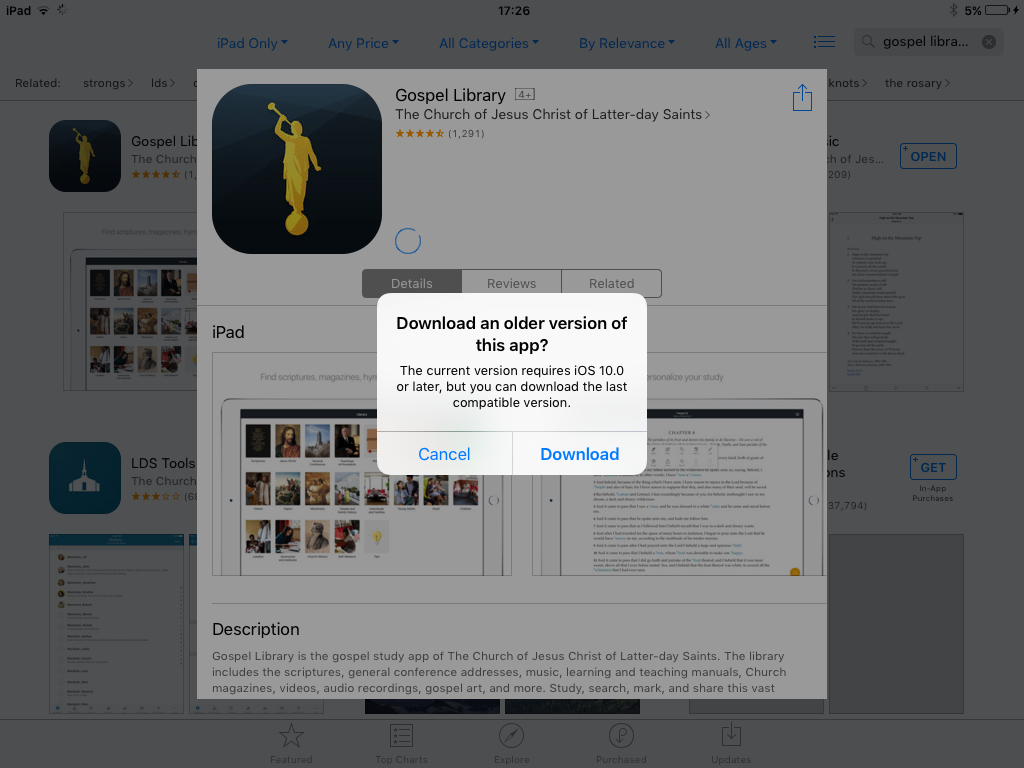
If you've downloaded Gospel Library while signed into your Apple ID before, you should get a message that says "Download an older version of this app? The current version requires iOS 10.0 or later, but you can download the last compatible version."
Do you get a message when you try to download the app?
📎 IMG_0066.PNG (246.54 KiB)
Samuel Bradshaw • If you desire to serve God, you are called to the work.
#3
My sister in law had the exact same problem. The message she gets is unable to purchase, gosepel library is not compatible with this iPad. We don’t get any message to download older versions.
#4
I also have this problem and it does not give the option to down load older version. I love gospel library and wish I hadn't deleted it
Community Moderators
#5
Try going to the "Purchased" tab of the App Store, and tapping the download icon next to Gospel Library there – does that let you download it? It should let you download Gospel Library 4.4.0, if you have iOS 9. After installing Gospel Library 4.4.0, you may need to force close and reopen the app to get the latest catalog, before it will let you download books.
Samuel Bradshaw • If you desire to serve God, you are called to the work.
New Member
#6
I also had the same problem. I have an older IPad 9.3.5. I did get gospel library downloaded on my IPad but it will not update with conference talks April 2019. Are updates not going to be available for 4.4.0 anymore? If I want to get the latest content will I need to buy a new IPad?
Community Administrator
#7
tebrian wrote:Are updates not going to be available for 4.4.0 anymore?
According to the Supported Android versions for Gospel Library, it doesn't look like it. (Versions are generally in step between the two platforms.)
Have you searched the Help Center? Try doing a Google search and adding "site:churchofjesuschrist.org/help" to the search criteria.

So we can better help you, please edit your Profile to include your general location.
New Member
#8
I also deleted the app because I couldn't get April 2019 GC. I did find this forum, and followed what SBradshaw recommended:

"Try going to the "Purchased" tab of the App Store, and tapping the download icon next to Gospel Library there – does that let you download it? It should let you download Gospel Library 4.4.0, if you have iOS 9. After installing Gospel Library 4.4.0, you may need to force close and reopen the app to get the latest catalog, before it will let you download books."

It is important to NOT click on Gospel Library and then try to click on the download icon, that won't work. You have to click on the download icon NEXT to Gospel Library. It just finished downloading, but so far I only have up to Oct 2017 GC. Hopefully it will update between now and church tomorrow, but it looks like I will need to get a newer tablet if I want the most recent GC.
Hope this helps!
New Member
#9
I have the same problem. Deleted the app because I couldn't get April 2019. Now can't download new app because my iPad is not compatible. Nothing comes up telling me that I candolnload an earlier version.
New Member
#10
I have the same problem. 2019 GC wasn't there and my app was "up-to-date" so I deleted it thinking I could reinstall. There is no option to download previous version. And yes, I tried going through "purchased" and still get the same road block, "unable to download." How is it this hasn't been fixed?
Community Moderators
#11
binogore wrote:I have the same problem. 2019 GC wasn't there and my app was "up-to-date" so I deleted it thinking I could reinstall. There is no option to download previous version. And yes, I tried going through "purchased" and still get the same road block, "unable to download." How is it this hasn't been fixed?
Someone on another thread reported that if they went to Purchased and tapped the download icon from there, it worked, but if they went to Purchased, then tapped on Gospel Library, then tapped the download icon, it didn't work. Maybe that will help?
Samuel Bradshaw • If you desire to serve God, you are called to the work.
New Member
#12
Samuel, I have an older iPad and do not get the message that I can download an older version. I have the same issue as everyone else on this forum in that April 2019 isn't showing up in my Gospel Library. Is there a work around for this glitch yet? Thank you..
New Member
#13
Okay, so we all missed the apparent message that Gospel Library would no longer be supported for older iPads. The decision to delete the app hoping that we could obtain General Conference and Come Follow Me would be fixed by re-downloading the app was incredibly shortsighted and uninformed. I'm sure there's a great reason why this decision was made by the Church but it seems equally shortsighted and uninformed. All of my notes, study helps, class lessons (both my own as well as those I teach) are lost unless I scrimp, save and buy a new iPad. Surely, there's a solution for this given the amazing tech power in the church.
New Member
#14
I agree, thank you. Samuel, please let us know if anything is hopefully in the works to resolve this in the near future?
Community Moderators
#15
tdrod1 wrote:Okay, so we all missed the apparent message that Gospel Library would no longer be supported for older iPads. The decision to delete the app hoping that we could obtain General Conference and Come Follow Me would be fixed by re-downloading the app was incredibly shortsighted and uninformed. I'm sure there's a great reason why this decision was made by the Church but it seems equally shortsighted and uninformed. All of my notes, study helps, class lessons (both my own as well as those I teach) are lost unless I scrimp, save and buy a new iPad. Surely, there's a solution for this given the amazing tech power in the church.
Cmrnfmly6 wrote:I agree, thank you. Samuel, please let us know if anything is hopefully in the works to resolve this in the near future?
Did you try going to the "Purchased" tab in the App Store, then tapping the download icon next to Gospel Library in the list of apps (note that tapping on Gospel Library, then tapping download may not work)?
Samuel Bradshaw • If you desire to serve God, you are called to the work.
New Member
#16
Yes, we tried all the suggestions noted in the forum and have never had any messages pop up. Thank you for replying.
New Member
#17
Just tried to reinstall Gospel library this morning. Big mistake!!! Now trying to download bits and pieces from other sources. It's not going very well. So sad
New Member
#18
I was able to find an older version of Gospel Library today and download it onto my Ipad. Go to the apps store, then to purchased (at the bottom) and tap ALL. I found everything I had ever downloaded onto my Ipad. I searched for the oldest Gospel Library and tried downloading it. It asked if I wanted an older version. IT WORKED. I now have my older version back on. It isn't updated after 2018, but everything I had is there.
New Member
#19
I deleted the app and then reinstalled the app. Now it’s all good in the neighborhood. I can download whatever I need. :)
New Member
#20
Thanks, growmp! Your suggestion helped me to get it to work.

I had to click the download symbol on the "not on this ipad" section in "Purchased" and it worked for me.
New Member
#21
My wife has a new iPad. Everything was transferred but Gospel Library would not open. Went to App Store and went through the download process. When it says open...only get the Moroni picture and after 12 seconds kicks back to iPad home screen. Tried this several times. Gospel Library still on old iPad and on my iPad. But cannot get it to load on new iPad.
New Member
#22
It seems many are having this same problem, but none of the solutions suggested work. Surely someone knows how to solve this problem.
New Member
#23

Re: Unable to open or download content to Gospel Library

The Gospel library app works fine on my old phone, iPhone 6. But the links don’t work on my new phone, iPhone XS. I don’t have an internet app to uninstall. So I can’t use that advice. My husband’s android phone works fine with the Library app, and he uses the same internet I do. The only solution I can think of to get the Library links to work is to go back to my old iPhone 6. I don’t want an android phone.

[moderator note: Post moved from an Android thread to this thread with a somewhat similar topic.]
Community Moderators
#24
akrnshaw wrote:My wife has a new iPad. Everything was transferred but Gospel Library would not open. Went to App Store and went through the download process. When it says open...only get the Moroni picture and after 12 seconds kicks back to iPad home screen. Tried this several times. Gospel Library still on old iPad and on my iPad. But cannot get it to load on new iPad.
Are you still seeing this problem today (able to download Gospel Library, but unable to open it)?
Samuel Bradshaw • If you desire to serve God, you are called to the work.
Community Moderators
#25

Re: Unable to open or download content to Gospel Library

kandiceriser wrote:The Gospel library app works fine on my old phone, iPhone 6. But the links don’t work on my new phone, iPhone XS. I don’t have an internet app to uninstall. So I can’t use that advice. My husband’s android phone works fine with the Library app, and he uses the same internet I do. The only solution I can think of to get the Library links to work is to go back to my old iPhone 6. I don’t want an android phone.

[moderator note: Post moved from an Android thread to this thread with a somewhat similar topic.]
Are you still seeing the problem where links don't work today? I think it may have been fixed with a content update.
Samuel Bradshaw • If you desire to serve God, you are called to the work.