Calendar 3.0 released

190 postsstarted by RBeatse 85,624 viewsoriginal topic

Member
#1

Re: Calendar 3.0 - new major version coming

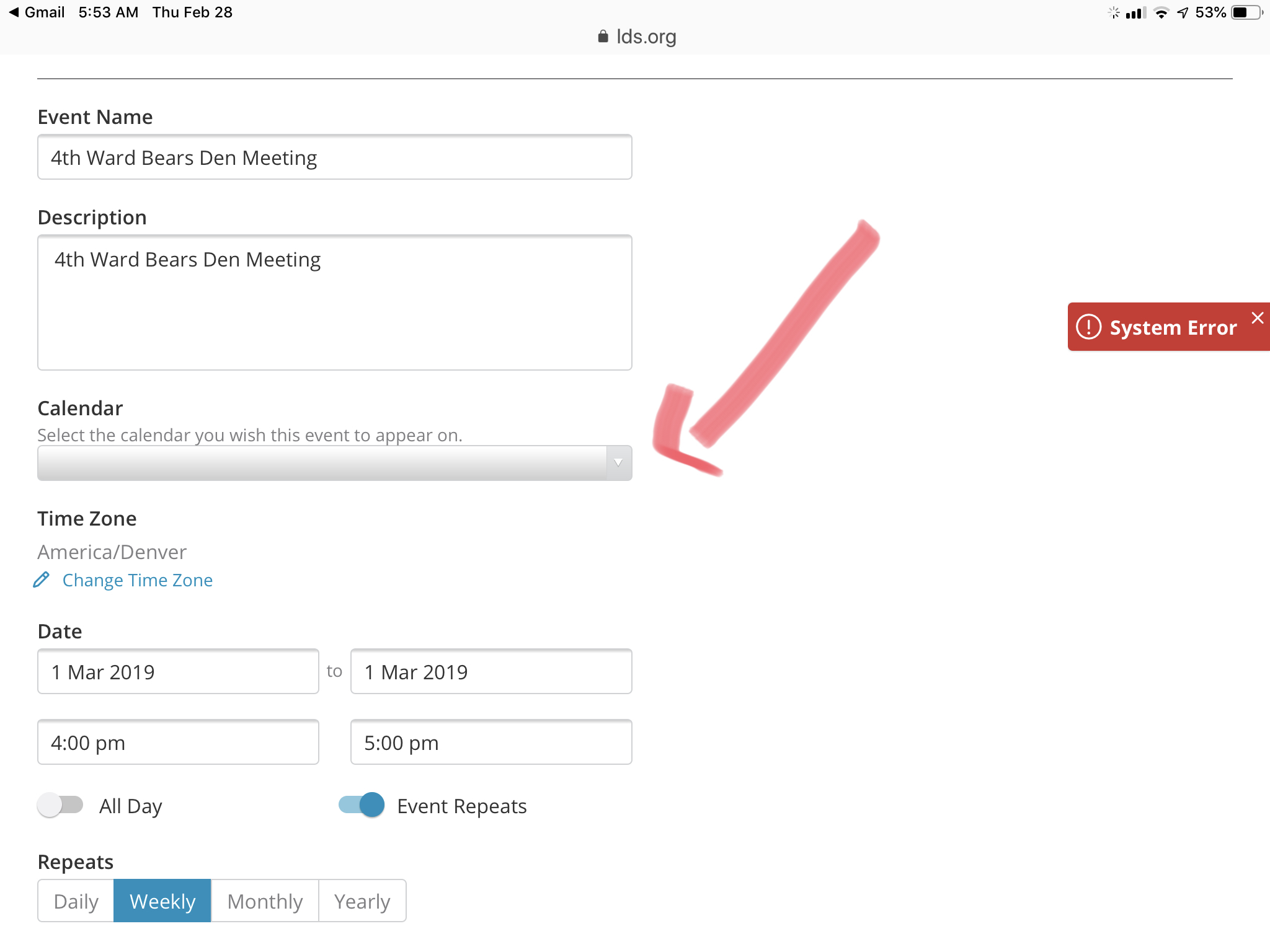
It just showed up today for me (was not there last night). I get System Error messages and if I view current items on the calendar, the calendar they live on is not showing. It is going to take a bit to learn the whole new look and feel. Is there where I should report issues if I see them (like the missing calendars)?
Community Moderators
#2

Re: Calendar 3.0 - new major version coming

The short URL "Calendar.LDS.org" redirects to "https://lds.org/church-calendar", which gives me an error ("server unexpectedly dropped the connection").
Samuel Bradshaw • If you desire to serve God, you are called to the work.
Church Employee
#3

Re: Calendar 3.0 - new major version coming

Yes, we are still in the process of rolling out the new calendar today. Still chasing some redirect issues. For issues, using the feedback link in the footer of lds.org will get to me if you use the word calendar. Also, I will be checking in here.
Member
#4
Having the time zone alone is making me a very happy scheduler. Interesting tidbit, it picked up my time zone as in Eastern Time (which I currently am) but my laptop is set to Mountain Time Zone and is the same as my buildings. Not a problem because I told it to ignore my current location but I did not know where it was getting it from.
Church Employee
#5

Re: Calendar 3.0 - new major version coming

You shouldn't have any missing calendars. But the way to now "subscribe" to them (list them on the left) is to use the "Choose Calendars" link.
Church Employee
#6

Re: Calendar 3.0 - new major version coming

The time zone function is not working yet. If you change it, it won't stick. It will be overridden by your browser timezone if you refresh the main calendar page. We'll get that fixed.
Member
#7

Re: Calendar 3.0 - new major version coming

CrockettDR wrote:You shouldn't have any missing calendars. But the way to now "subscribe" to them (list them on the left) is to use the "Choose Calendars" link.
If this was a response to my comment, I was talking about viewing a current calendar entry details. When I view the details of an item, the calendar name is not showing. I have entered the same data as a "feedback" item.
Member
#8

Re: Calendar 3.0 - new major version coming

CrockettDR wrote:The time zone function is not working yet. If you change it, it won't stick. It will be overridden by your browser timezone if you refresh the main calendar page. We'll get that fixed.
Well, I like that it is going to be an option. I asked for it about 5 years ago. Thanks!!
Member
#9

Re: Calendar 3.0 - new major version coming

At the top of the page (just to the right) of +Add Event is a calendar icon. Should clicking that bring up a calendar to allow for movement to a future date faster? If so, it does not currently work.
Community Administrator
#10

Re: Calendar 3.0 - new major version coming

RBeatse wrote:At the top of the page (just to the right) of +Add Event is a calendar icon. Should clicking that bring up a calendar to allow for movement to a future date faster? If so, it does not currently work.
The calendar icon takes you to the current month. But the arrows just to the right of that will allow you to move forward/back one month (assuming you are in "month" mode.)

Off hand, I don't see anything that would allow you to just faster than one month at a time.
Have you searched the Help Center? Try doing a Google search and adding "site:churchofjesuschrist.org/help" to the search criteria.

So we can better help you, please edit your Profile to include your general location.
Member
#11

Re: Calendar 3.0 - new major version coming

I saw the arrows. I usually stay in week mode because Month view is so busy. To have to switch to month in order to move multiple months ahead and go right to a date seems odd. Maybe it is just me but I move back and forth a lot as I add things for private events in the future.
Church Employee
#12

Re: Calendar 3.0 - new major version coming

The mini calendar below that lets you jump fast. If using on a mobile device you will need to slide open the left-hand pane using the > which is a bit hard to see.
Community Administrator
#13

Re: Calendar 3.0 - new major version coming

Note that there is a small calendar just under the "+ Add Events". You can use that to move quickly even if the main display is in "week" mode.
Have you searched the Help Center? Try doing a Google search and adding "site:churchofjesuschrist.org/help" to the search criteria.

So we can better help you, please edit your Profile to include your general location.
Member
#14

Re: Calendar 3.0 - new major version coming

CrockettDR wrote:The mini calendar below that lets you jump fast. If using on a mobile device you will need to slide open the left-hand pane using the > which is a bit hard to see.
Thanks. I would like to say that I was on a mobile device at the time but I was on a laptop and completely blanked seeing the calendar there. I was so used to seeing it in the upper part of the screen that I didn't see it. Thanks!
Member
#15
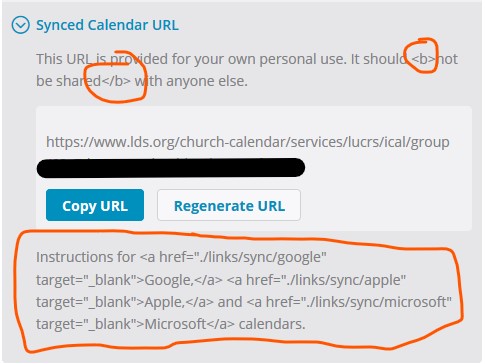
the synced calendar URL page is showing HTML formatting tags
html tags.jpg
html tags.jpg (42.26 KiB)
There are 11 types of people. Those who understand Gray Code and those that don't.
Church Employee
#16
Thanks. Yes, one of our last fixes did that. Also on the locations and rooms page. We will get that fixed quick.
Community Moderators
#17
Well sadly, my first impression is that the new Month view is practically worthless. The actual calendar portion of the display is squished to use the available screen space with no scrolling.

That might not be so bad if the calendar started before the middle of the page. But by the time the Church logo is displayed, along with the banner menu underneath it, and the top of the calendar margin, there is only slightly more than half of a display screen left. So when the monthly calendar is crammed into the remaining space, each day shows only one event and then a line that says "+n More".

Is there a setting to display more than two lines in the Monthly view? I never minded scrolling up and down to see the month. The main reason I use the calendar is to review everything and then select certain items to put on my personal calendar. I could easily do that before with only a couple of dates that overflowed their box. Now I would have to click on 30 little boxes to make sure I saw everything.

This is a step backward for me.
Community Administrator
#18
lajackson wrote:The main reason I use the calendar is to review everything and then select certain items to put on my personal calendar.
One of the nice changes to 3.0 is that now you can have a sync that's separate from what you see on lds.org. If the calendars are sliced up right that would go a long way to automatically selecting the activities. Plus with a sync, any changes will be automatically forwarded as well.
Have you searched the Help Center? Try doing a Google search and adding "site:churchofjesuschrist.org/help" to the search criteria.

So we can better help you, please edit your Profile to include your general location.
Member
#19

Re: Calendar 3.0 - new major version coming

RBeatse wrote:
CrockettDR wrote:You shouldn't have any missing calendars. But the way to now "subscribe" to them (list them on the left) is to use the "Choose Calendars" link.
If this was a response to my comment, I was talking about viewing a current calendar entry details. When I view the details of an item, the calendar name is not showing. I have entered the same data as a "feedback" item.
As an update...now, when I look at the details of a calendar entry for an item on one of the calendars that I have access to (whether I put it on or not), I can see the calendar name. If I view the details of an item on a calendar I do not have access to add to (another Ward's RS calendar, for example), I can see all of the details but the calendar name is blank.
Senior Member
#20
I haven't tried all of the features yet, but the one I did try, deleting an administrator, gave me a "system error" message. I know it's new and hopefully bugs like this will be fixed in time.
Community Moderators
#21
What does it mean when the calendar is loading and little red banners enter from the right side saying System Error? I often get two of them. There is no other message. I see a little circle ! but clicking on it does nothing. The fix seems to be to reload the calendar and hope they do not reappear.

Another one that shows up a lot is Timeout Error, which sometimes appears even when the calendar loads in three seconds. Is that considered too slow?

When these show up, the calendar data still appears to be fine, but should I be wary that items may be missing or incorrect?

Sometimes you can click them off with the little X on the right, but not always.

Does it have anything to do with the big black X that briefly flashes before the page loads?
Member
#22
Question about scheduling facilities - with the previous calendar, an admin could schedule a facility even if general scheduling had not yet been enabled. This doesn't seem to be the case anymore. Is this a bug that will be fixed, or is that the new intended behavior? That prevents us from putting high priority events on the calendar before opening things up to anyone...
Member
#23
I agree with lajackson post below.

I am a Stake Center Bldg Scheduler and use the month view to review all activities scheduled
in the building. But now can only see one event and + more and must review each week instead. Much more difficult. Hope there
is a fix for that soon. ALSO from what I could see restrictions show up for everyone to see now. I prefer the "conflict" popup if someone tried
to schedule on a restricted time. BUT thank you for NOT removing restrictions.

Julie


Re: Calendar 3.0 released
Unread postby lajackson » Tue Feb 26, 2019 1:22 pm

Well sadly, my first impression is that the new Month view is practically worthless. The actual calendar portion of the display is squished to use the available screen space with no scrolling.

That might not be so bad if the calendar started before the middle of the page. But by the time the Church logo is displayed, along with the banner menu underneath it, and the top of the calendar margin, there is only slightly more than half of a display screen left. So when the monthly calendar is crammed into the remaining space, each day shows only one event and then a line that says "+n More".

Is there a setting to display more than two lines in the Monthly view? I never minded scrolling up and down to see the month. The main reason I use the calendar is to review everything and then select certain items to put on my personal calendar. I could easily do that before with only a couple of dates that overflowed their box. Now I would have to click on 30 little boxes to make sure I saw everything.

This is a step backward for me.
Church Employee
#24
We have several bugs that we hope to have fixed by next week.
1. System errors seen by some. A timing race condition needs fixed. Refresh the page and things should be fine. But we will get rid of those.
2. Sync is only syncing 3 months ahead. We will change that to 12 months ahead
3. At times when you click "more" from the month view, the pulldown goes off the screen without a scroll bar. If you are on a desktop user, try zooming your browser out a little to work around it and see more events on a day.
4. Admins can't be deleted. Get a system error. If you have a pressing one that needs to be deleted, contact me
5. Stray html seen on a location page and on the sync url page
Others.

Coming later.
1. Slim lds.org header so the month calendar can use more of the space.
2. Improve the print format for the month view. It cuts off the number of events for each day, black/white control doesn't work.

Answering an above question about turning scheduling off. In the old system it was never intended to turn off scheduling if future events existed. That cause the calendar to be in a very buggy state. Scheduling can only be turned off if all future events have been moved or deleted from the location.
Member
#25
Answering an above question about turning scheduling off. In the old system it was never intended to turn off scheduling if future events existed. That cause the calendar to be in a very buggy state. Scheduling can only be turned off if all future events have been moved or deleted from the location.
I had it turned off before the upgrade and it is currently turned off. As I mentioned, before the upgrade, a building scheduler was still able to schedule events even with it off. One of our schedulers tried to add an event after the update and the location is not available in the facilities pull down. It sounds like if I turn it on, then I won’t be able to turn it off again unless the calendar is clear in the future? And while it is off no one, including schedulers can schedule events?

Rick
Church Employee
#26
We were going to turn on scheduling for all calendars that still have future events to get them out of this buggy state. So yes, you should turn it on. If you don't want the building to be scheduled, move off or delete the future events. In locations and rooms you can generate a list of those events.
Church Employee
#27
The development team reconsidered automatically turning scheduling on for locations that have future events scheduled so we wouldn't surprise anyone. Looks like for now, we will leave it as is. But those future events are stuck until scheduling is turned back on. I don't think a building scheduler can edit them and couldn't in 2.0 either, thus the buggy state. We know some stakes were trying to do this to prevent wards from scheduling themselves to try to get all scheduling flowing through the building scheduler, but the system was never designed for this model and the help files tell users otherwise, so it would generate many calls and feedback to church headquarters. In locations and rooms we now highlight strongly those locations that have scheduling turned off.
Member
#28
Yes, there were issues with changing those events when scheduling is disabled. They could always be deleted and they could be edited if they were recurring. Single events with a location were “stuck” as you note. However, for those of us who have been able to get by doing central scheduling in spite of those issue, the update has completely eliminated the option of using the church calendar while doing central scheduling. I guess it’s time for someone to do mobile app project... :P
Church Employee
#29
Yes that central scheduling trick really confused members, especially those moving into stakes trying to do that after they used the calendar as documented.
New Member
#30
This new version 3.0 calendar software is so dysfunctional, I almost want to go back to a PC based piece of software. I saw this software for the first time yesterday, 2/28/19, It's horrible! 3.0 should have retained all of the good functionality and printing it had with the upgrade to 3.0 adding even more enhancements. On a scale of 0 - 10, the prior version probably had us at a level 7 or 8, but 3.0 took us back to a 2 or 3. It doesn't look like nearly enough testing of the software in a beta mode was done. I am just sick over it. Please put the prior version back online until the version is REALLY ready to implement.
Community Moderators
#31
dana.jeffs wrote:This new version 3.0 calendar software is so dysfunctional, I almost want to go back to a PC based piece of software. I saw this software for the first time yesterday, 2/28/19, It's horrible! 3.0 should have retained all of the good functionality and printing it had with the upgrade to 3.0 adding even more enhancements. On a scale of 0 - 10, the prior version probably had us at a level 7 or 8, but 3.0 took us back to a 2 or 3. It doesn't look like nearly enough testing of the software in a beta mode was done. I am just sick over it. Please put the prior version back online until the version is REALLY ready to implement.
According to a post above, they are working on fixing a bug with printing from the month view. What other issues are you seeing?
Samuel Bradshaw • If you desire to serve God, you are called to the work.
New Member
#32
If we are talking about the new Calendar functionality on lds.org, I am also very upset about this. Printing for the old version would wrap entries nicely and nicely format the page. The new version just truncates the entries. Also the printed calendar is much harder to read as the fonts are not as crisp and dark. I tired to select Black & White see if it helps make it any easier to read the fonts, but it still prints color. The biggest problem for me, however, is the truncation of entries when printing. I hope they can provide access to the old printing engine. It worked really well.
Member
#33
CrockettDR wrote:
Coming later.
1. Slim lds.org header so the month calendar can use more of the space.
2. Improve the print format for the month view. It cuts off the number of events for each day, black/white control doesn't work.
@lewisnewton. The above post makes it clear they are working on the printing issues you mention.
Church Employee
#34
Yes, the print function needs work and will be worked on it. Issues have been open. Please have patience and work with us. The many beta stakes just didn't print much I guess. The print function does not get used as much these days but we know it is needed for things like ward bulletins and ward histories. No, we cannot go back to the old calendar,

A new bug was found today for those who have out-of-unit callings. If you have an out-of-unit calling in another stake and have edit rights to calendars in that unit, you may not see those calendars in the pull down for creating an event and see a system error.

Getting all fixes out may be stalled as general conference approaches, but we will get a new build out. We are very careful during weeks prior and after to conference about making changes to our systems. We don't want to impact general conference at all. But during that time, we will be busy doing fixes.
Member
#35
I have noticed a change in 3.0...events that have setup and cleanup times do not show those on the displayed calendar (at least in week view). For example, I just put an event on for next Saturday from 2-4pm with 30 min of setup and 30 min of cleanup. When I saved the event and was taken back to the main week view where it showed it on the calendar as 2-4pm. In the previous version, there was a dotted area that showed that the actual event and the setup/cleanup times.

Is this how 3.0 is supposed to work?
Member
#36
With regards to restrictions. Thank you for keeping!!!!!!! Just had problem come up and wondering solution?
Baptistry in another stake unavailable. No problem they have used ours in past. However, not quite sure of
times so I put in a restriction. Problem is no longer an option to choose restrict bldg for entire stake for event
period. So best I could do was restrict it so only MY ward could schedule, as no other option.

This block entire stake needs to return as sometimes a building has some type of repairs going on and
the bldg needs to be blocked. I realize you can't think of everything when making these changes.
You are just at our mercy to tell you what we are not so fond of that is missing :-) Thank you for all
you do but really I also prefer the old version.

In the help section of the calendar would appreciate screenshots for training purposes. Just a suggestion.

Reducing the size of the screen does help to see more events scheduled on one day. But having not a great
eyesight prefer the large size but will work with it.

Thank you.
Member
#37
When I used to add events, I would put the name and phone number of the person requesting in the “Description “ field. Now, on the 3.0 version, I see the Requestor Name, Phone, and E-mail fields. Do these fields give some extra benefit to make me change my ways????
Community Moderators
#38
RBeatse wrote:Do these fields give some extra benefit to make me change my ways????
Yes. They show up. The contact information is no longer the person who touched the event last as it was before. Someone still can edit the event, but now doing so does not "take over" the event. You can still leave another brother or sister as the contact point for those who have questions about the activity.
Member
#39
lajackson wrote:
RBeatse wrote:Do these fields give some extra benefit to make me change my ways????
Yes. They show up. The contact information is no longer the person who touched the event last as it was before. Someone still can edit the event, but now doing so does not "take over" the event. You can still leave another brother or sister as the contact point for those who have questions about the activity.
Thanks! That makes sense. I will start to spread the word.
Church Employee
#40
And another related bug that we will fix is if you look at an event and you have read-only rights for the event, (perhaps looking at the building calendar) the unit that owns the calendar is missing and so is the last updater. We'll work on that. Those are there if you have read/write rights in the details.
Church Employee
#41
We may add some images to the help but the last help version had way too many. Images become a maintenance problem as things change and with the calendar in 11 languages.

To block the entire stake, you can either create a real event that blocks everyone, or create a restriction that blocks everyone except stake calendar events. Your stake name should be listed in "restrict event scheduling to" pulldown. I see the order list is random and should be alpha.
Member
#42
In the Locations Details reports, is there an order to the way the events are shown? I can’t seem to find rhyme or reason to it.
Church Employee
#43
RBeatse wrote:In the Locations Details reports, is there an order to the way the events are shown? I can’t seem to find rhyme or reason to it.
Yes, they do look pretty random, probably in ID order, order of creation. I'll see if they can be sorted by date. The purpose of these reports are to help you find events to delete when you are getting deleting events when a ward moves out of a location, moving an event when you don't want to schedule a room anymore, etc. BTW, the number of events in that badge number doesn't count a repeating event as 1, each instance is in the count.
Church Employee
#44
Another way to quickly jump months is just swipe if you have a smart screen.
Church Employee
#45
RBeatse wrote:In the Locations Details reports, is there an order to the way the events are shown? I can’t seem to find rhyme or reason to it.
Also these lists only include future events.
Member
#46
CrockettDR wrote:
RBeatse wrote:In the Locations Details reports, is there an order to the way the events are shown? I can’t seem to find rhyme or reason to it.
Also these lists only include future events.
Hmmmmmmm :idea: :?: :idea:
Church Employee
#47
Yes, too many stakes created custom locations that are duplicates of the facilities building calendars and that causes great confusion when wards move, stake split, callings change, etc. because things don't happen automatically for those custom locations that are not tied to a building. Using those lists, one can pretty quickly migrate all their future events to the real building calendars and delete the custom location. The steps are all outlined in https://www.lds.org/help/support/calend ... s?lang=eng
Member
#48
Can you update locations of previous events (like back to the beginning of the year)? We keep track at the end of the year on how many “private/non-Church” events in each of our buildings. Or, do I need to count them before I make changes to my Custom building?
Member
#49

Turning calendar viewing on/off?

Am I missing the way to turn on/off viewing of calendars as there used to be? Often times I want to see just certain calendars in the main view and you could easily turn on/off stake or ward calendars all at once. Now it appears I have to do that one at a time which is extremely inconvenient.
Member
#50

Re: Turning calendar viewing on/off?

mprusse wrote:Am I missing the way to turn on/off viewing of calendars as there used to be?
If only thee was an eye next to the Ward or Stake name. :idea:
New Member
#51
CrockettDR wrote:We may add some images to the help but the last help version had way too many. Images become a maintenance problem as things change and with the calendar in 11 languages.

To block the entire stake, you can either create a real event that blocks everyone, or create a restriction that blocks everyone except stake calendar events. Your stake name should be listed in "restrict event scheduling to" pulldown. I see the order list is random and should be alpha.
That is a way to almost accomplish things, but it doesn't really fill the need. What is really needed is the ability to completely block scheduling of a resource for specific periods. Creating an event works, but it clutters up peoples' calendars. Even better would be adding 'Building Scheduler' as a choice in the drop down list. We have some resources, like the baptismal font, that we would like to make sure people understand the rules, and have proper approvals, before scheduling. It would make things easier if I didn't have to remove the restriction, add the event, and then put the restriction back. Especially as it seems the event 'copy' no longer works.

While wishing - it would also be nice to be able to restrict to multiple units.
Member
#52
Interesting idea about adding "building scheduler" as a choice on drop down list. Never thought of blanket restriction for font.
I restrict in October for upcoming year for COR baptisms so only Stake Primary can schedule on the calendar during
their assigned times. But other times it's open season. Just happy that restrictions still allowed with this new calendar.

I am Stake Bldg Scheduler and as such keep a close eye on the font scheduling. Continually need to educate members
that time must be allowed to fill font. Takes actually 1 1/2 hours to fill but that is not a choice on the times so must select
2 hours. People don't realize that when filling font noise may be disturbing to an activity in the Relief
Society Room AND that "serving area" (I now see renamed kitchen in beta version) must also be scheduled
during a baptism to avoid unwanted noise.
Member
#53
RBeatse wrote:
lajackson wrote:
RBeatse wrote:Do these fields give some extra benefit to make me change my ways????
Yes. They show up. The contact information is no longer the person who touched the event last as it was before. Someone still can edit the event, but now doing so does not "take over" the event. You can still leave another brother or sister as the contact point for those who have questions about the activity.
Thanks! That makes sense. I will start to spread the word.
Hmmm but this involves another step to see contact info. Whereas when put in description it comes right up. Used to be able to
see when hovering over event. So if NOT put in description now must click on "Event Details" and go way down the page to see
event organizer.
New Member
#54
I am having a difficult time entering calendar appointments. It’s like the website has a mind of its own. While in the agenda view, I click on a date in the small calendar in March and the agenda part shows up on the date I picked for about 2 or 3 seconds, and then the agenda goes to January. I click on the March date again, and now my view is in the month mode, which I didn’t want. Very frustrating and very difficult to get anything done when the program keeps jumping from month to month or from agenda view to month view. I hope the IT people can fix this soon. Best wishes.
Church Employee
#55
ricnel wrote:I am having a difficult time entering calendar appointments. It’s like the website has a mind of its own. While in the agenda view, I click on a date in the small calendar in March and the agenda part shows up on the date I picked for about 2 or 3 seconds, and then the agenda goes to January. I click on the March date again, and now my view is in the month mode, which I didn’t want. Very frustrating and very difficult to get anything done when the program keeps jumping from month to month or from agenda view to month view. I hope the IT people can fix this soon. Best wishes.
From what I could see clicking on a day in the small calendar would toggle between the month, week and day view.
Community Administrator
#56
It seems to me that what happens when you click on a date in the small calendar depends on where you are. If you're clicking on something already displayed, then it changes display mode. Otherwise, it will take you to that date. I was not able to duplicate the reported problem with clicking on a date while in agenda mode. But double-clicking will no doubt cause problems.
Have you searched the Help Center? Try doing a Google search and adding "site:churchofjesuschrist.org/help" to the search criteria.

So we can better help you, please edit your Profile to include your general location.
New Member
#57
Thanks for looking into this. Here is an exactly what is happening to me. I am in the agenda view on March 3rd. The small calendar is on March and the date March 3 is highlighted in green. I advance the small calendar to April. When the small calendar is in April, I click once on April 16. The agenda view advances to April 16, but after 1 or 2 seconds, the agenda view goes to March 5th. If I click on the small calendar again (once) for April 16, I now view the month view of April. If I click once on the small calendar again for April 16, I now see the week view for the week including April 16. If I click on the small calendar again for April 16, I am back in the agenda view showing April 16. Now I will click once on the small calendar for March. Once the small calendar is in March, I click once on March 3, my starting date. The screen now goes to March 3 in the agenda view for 1 or 2 seconds, and then jumps to January 31, 2019 in the agenda view. However, right above the agenda view, it says March 3, 2019. I can’t figure this out. It keeps jumping around, and won’t stay where I want it to stay. Thanks for any help.
New Member
#58
Recurring appointments do not post to the calendars if you try to repeat an even like on the 2nd and 4th Sunday it never shows on the calendar.
Community Administrator
#59
GowenRJ wrote:Recurring appointments do not post to the calendars if you try to repeat an even like on the 2nd and 4th Sunday it never shows on the calendar.
Are you trying to schedule an event for every other Sunday? That's likely to cause problems as there's months with 5 Sundays. I'd use two events (one for 2nd Sunday and one for 4th) and repeat once a month.
Have you searched the Help Center? Try doing a Google search and adding "site:churchofjesuschrist.org/help" to the search criteria.

So we can better help you, please edit your Profile to include your general location.
New Member
#60
In the example I gave, I wasn't trying to schedule an event. I was merely trying to review some events that I had already scheduled. I use the agenda view so I can clearly see the events on the schedule. I thought I could use the small calendar to go from month to month and check a specific date in the month that I had put on the calendar. However, this doesn't seem to work very well as I keep getting getting different views or get bounced from one month to another that I didn't want to view. I merely want to check a date in a month without having to scroll through the agenda view through every month. I thought I could use the small calendar to jump to a date in say October and view it in the agenda view, then go back to March. However, I keep getting different views or it jumps me to different months that I had no intention of viewing.
Community Administrator
#61
ricnel wrote:but after 1 or 2 seconds, the agenda view goes to March 5th.
I have something like that happen if there's nothing on that date. At first I couldn't replicate it because I had enough calendars turned on that there was something for that date.
Have you searched the Help Center? Try doing a Google search and adding "site:churchofjesuschrist.org/help" to the search criteria.

So we can better help you, please edit your Profile to include your general location.
Senior Member
#62
russellhltn wrote:
ricnel wrote:but after 1 or 2 seconds, the agenda view goes to March 5th.
I have something like that happen if there's nothing on that date. At first I couldn't replicate it because I had enough calendars turned on that there was something for that date.
I'm getting that to happen sometimes too. It seems like it may be more likely when there isn't something on the date but it doesn't always happen in that case for me. And once it starts happening it seems to happen on many different dates but not every one. I've even had it happen on the same date and then not happen when going back to that date after going to a different date.

Definitely a bug.
Church Employee
#63
Yes, we have a known problem with agenda view that I forgot to add to the list. I tend to see it happen mostly when trying to swipe or scroll backward. It retrieves more events and jumps back several months. The dynamic scrolling is tricky, but yes we know about this one.
#64
russellhltn wrote:
GowenRJ wrote:Recurring appointments do not post to the calendars if you try to repeat an even like on the 2nd and 4th Sunday it never shows on the calendar.
Are you trying to schedule an event for every other Sunday? That's likely to cause problems as there's months with 5 Sundays. I'd use two events (one for 2nd Sunday and one for 4th) and repeat once a month.
Can't you just use repeat monthly by day and select which weeks (1st, 2nd, 3rd, 4th and/or 5th)? I have used this for activity day girls and other things that repeat on specific weeks of the month and it doesn't matter if the repeat day has 4 or 5 weeks.
Community Administrator
#65
jhowell2000 wrote:Can't you just use repeat monthly by day and select which weeks (1st, 2nd, 3rd, 4th and/or 5th)?
That would work. I was thinking of older systems where you only specified how often something repeats.
Have you searched the Help Center? Try doing a Google search and adding "site:churchofjesuschrist.org/help" to the search criteria.

So we can better help you, please edit your Profile to include your general location.
Church Employee
#66
Repeating events should work the same if we hooked the new front-end up to it right. We didn't change its function.
Church Employee
#67
Fixes planned to release this Thursday
• Sync only syncing next 3 months. Will extend to 12 months
• Mobile users not noticing the arrow to open left side
• Solve a nasty problem when viewing a building in locations and room that has never been set up (don't try it until fixed).
• Resolve the html shown on a location page and sync URL page
• Make the time zone option in the “date options” work
• Already fixed a problem involving branches that became wards. They couldn’t edit their events.

Next priority problems
• More menu sometimes is missing the scroll bar
• Items missing when viewing event details in R/O view: last updater, unit, setup/cleanup times
• Can’t delete stake/ward administrators that were added
• Put 15 minutes in the pulldown for the end time
• Non-English calendar has English header
• Repeating events widget for Until date isn’t working sometimes

Other things will be worked on but won’t make it before general conference such as: agenda view weirdness, print month view (show all events, wrap titles, fix black/white), Use slim lds.org header giving lots more vertical space, sort events in the PDF lists in locations and rooms, and others.
New Member
#68
I printed a calendar using Calendar 3.0. When I deleted the calendar title and then generated the printout, the word "True" was substituted as the title in the printout. Looks like a stray boolean value got in there. Just an FYI.
New Member
#69
Wanted to suggest a calendar option to add to your wish list of nice features to have. How about modifying the header of the mini-calendar with two drop down lists. One to select a specific month and one for selecting a specific year. That way you can jump to a specific month and year with only a couple of clicks instead of having to continuously click the previous or next arrows to get where you want to be. It would be a very convenient and welcomed addition. Thanks for considering.
Member
#70
RBeatse wrote:I have noticed a change in 3.0...events that have setup and cleanup times do not show those on the displayed calendar (at least in week view). For example, I just put an event on for next Saturday from 2-4pm with 30 min of setup and 30 min of cleanup. When I saved the event and was taken back to the main week view where it showed it on the calendar as 2-4pm. In the previous version, there was a dotted area that showed that the actual event and the setup/cleanup times.

Is this how 3.0 is supposed to work?
Just putting this out there again since there was a lot that happened at this same time and it wasn’t listed anywhere in the future updates.
Church Employee
#71
For the next couple months we will concentrate on fixing things as we had intended to have them work but won't be working on any new significant enhancements until things are more stable. Our team is small and with all the changes church leadership is constantly making, demands for other projects are pretty intense. I hope you all understand.
New Member
#72
We have a unique calendar that also included the institute building where we reside with four wards, our stake and regional Family History library. With the new update our calendar is now flooded with institute classes, Family History prayer meetings, and other activities, that we used to be able to block because we wouldn't pick the icons to see them. Each of our Wards has an evening assigned and some of our wards are flooding into other wards nights. In short we had our calendar really easy to read for Stake activities in January and the first part of February, and now it is a cluttered mess. How do we resolve the problem?
New Member
#73
My calendar continues to tell me that I'm in the America Chicago time zone when making calendar changes, but I'm still residing in the America Denver area. How do you get the error message to go away?
Member
#74
MillerWR wrote:My calendar continues to tell me that I'm in the America Chicago time zone when making calendar changes, but I'm still residing in the America Denver area. How do you get the error message to go away?
What is interesting is that mine always says Eastern time (New York) and I know that they are working on it to have it "stick". In the interim...When you initially sign in, you should get a box on the right side that says your device is in a different time zone than your calendar. You can accept the change and that will fix it until you refresh your browser. If you don't see that box or you refresh and need to verify, you can go to the "gear" icon on the top right of the calendar and choose "Date Options". On that screen, you can set some date options but also change the time zone of the calendar (the list is not in time zone order, it is alphabetical). Choose the one you want (Denver based on your message) and save. The calendar will be set until the next time your browser is refreshed again (or it is fixed to have the time stick).
Church Employee
#75
We hope to release the timezone fix this week. See above for list of known problems.
Church Employee
#76
MillerWR wrote:We have a unique calendar that also included the institute building where we reside with four wards, our stake and regional Family History library. With the new update our calendar is now flooded with institute classes, Family History prayer meetings, and other activities, that we used to be able to block because we wouldn't pick the icons to see them. Each of our Wards has an evening assigned and some of our wards are flooding into other wards nights. In short we had our calendar really easy to read for Stake activities in January and the first part of February, and now it is a cluttered mess. How do we resolve the problem?
The update didn't do anything with that, but you can turn off showing the calendars that have all those events by clicking on their "eye balls" in the left pane. If you are using a mobile device or pad, slide out the left pane by touching the ">" icon on the left that is a bit faint (we will fix that).
Community Administrator
#77
MillerWR wrote:We have a unique calendar that also included the institute building where we reside with four wards, our stake and regional Family History library. With the new update our calendar is now flooded with institute classes, Family History prayer meetings, and other activities, that we used to be able to block because we wouldn't pick the icons to see them. Each of our Wards has an evening assigned and some of our wards are flooding into other wards nights. In short we had our calendar really easy to read for Stake activities in January and the first part of February, and now it is a cluttered mess. How do we resolve the problem?
As CrockettDR pointed out, you probably have too many calendars turned on for display. I'd suggest paying particular attention to the "See events by location" section. Activating one of those building calendars will quickly flood your display with all the activities going on in that building regardless of ward, stake, quorum or auxiliary.
Have you searched the Help Center? Try doing a Google search and adding "site:churchofjesuschrist.org/help" to the search criteria.

So we can better help you, please edit your Profile to include your general location.
Church Employee
#78
A fix release went out today. I'll call it 3.0.1

• Sync only syncing next 3 months. Extended to 12 months
• Fixed system errors showing when calendar is loaded.
• Mobile users not noticing the arrow to open left side (sorry about the flashing, a developer went too far. We will get that turned off eventually).
• Solve a nasty problem when viewing a building in locations and room that has never been set up (don't try it until fixed). - that will be fixed tomorrow.
• Resolved the html shown on a location page and sync URL page
• Make the time zone option in the “date options” work.

A new problem was discovered today. On month view, if you have multiple bars of multi-day events across a week, it can cause the +more link to disappear on certain days so you think an event that you just scheduled isn't there. Work arounds 1. zoom out your browser a bit, 2. unshow the calendars with the bars temporarily.
New Member
#79
I'm a Stake Building Scheduler for four buildings, I nothiced since the update on lds.org I don't see my own ward's calendars plus two of my Stake's calendars.

I was also wondering how do ward members subscribe to their different ward calendars now?
Community Administrator
#80
scrapsue wrote:I nothiced since the update on lds.org I don't see my own ward's calendars plus two of my Stake's calendars.

I was also wondering how do ward members subscribe to their different ward calendars now?
"The Choose Calendar link is used to select which calendars you want to have listed in the left panel in order to easily show or hide the events on your personalized calendar."

Once the calendars are listed on the left, click the "eyeball" to turn the display of the events on/off in the calendar page.
Have you searched the Help Center? Try doing a Google search and adding "site:churchofjesuschrist.org/help" to the search criteria.

So we can better help you, please edit your Profile to include your general location.
Member
#81
Another question or possible bug... I am listed as a building scheduler for all buildings and I have a ward with an event that selected a building for use. I need to remove that so that it will go on another calendar, but until the reservation is removed, there is a conflict. Whenever I set the facility to None and then try to save, I get a system timeout. My understanding is that building schedulers are supposed to be able to change facility selections in order to resolve conflicts. Is that not the case? Why am I getting the timeout instead of being able to remove the reservation?
Community Administrator
#82
rickk wrote:Another question or possible bug... I am listed as a building scheduler for all buildings and I have a ward with an event that selected a building for use. I need to remove that so that it will go on another calendar, but until the reservation is removed, there is a conflict. Whenever I set the facility to None and then try to save, I get a system timeout. My understanding is that building schedulers are supposed to be able to change facility selections in order to resolve conflicts. Is that not the case? Why am I getting the timeout instead of being able to remove the reservation?
Someone with access to both calendars should be able to move the event by editing it.

I'm not sure why you're not able to make the change, but I will note that once it no longer schedules a facility, you'll no longer be able to edit it.
Have you searched the Help Center? Try doing a Google search and adding "site:churchofjesuschrist.org/help" to the search criteria.

So we can better help you, please edit your Profile to include your general location.
Member
#83
The calendar access could be the problem. I don’t have access to edit one of the calendars (it is a ward calendar and I am in the stake) but I can access the other. However, if a building scheduler is not able to modify a reservation on any calendar, then it severely limits their ability to deal with conflicts or unauthorized reservations. I wouldn’t expect to be able to modify any of the other details or even remove the event, but I should be able to edit the location.
Member
#84
rickk wrote:The calendar access could be the problem. I don’t have access to edit one of the calendars (it is a ward calendar and I am in the stake) but I can access the other. However, if a building scheduler is not able to modify a reservation on any calendar, then it severely limits their ability to deal with conflicts or unauthorized reservations. I wouldn’t expect to be able to modify any of the other details or even remove the event, but I should be able to edit the location.
I am happy to be wrong, but I don’t believe it has ever worked that way. If you can edit, you can edit any fields, up to, and including, deleting it.
Church Employee
#85
If an event is scheduled in a building, the building scheduler should be able to edit it or delete it. I'll check to see if the case from building to none is working. Not sure it did in 2.0 but it seems like it should be allowed.
Member
#86
Trying to help another building scheduler that can create & edit other events with his issue.
Background: He created a ward leadership calendar in December 2018 for this year and is now unable to edit this particular calendar.
He is also the ward clerk. I advised checking to see that he calling has correct rights granted and it does. He has been bldg scheduler
for quite some time. Any suggestions?
Community Administrator
#87
casper684 wrote:He created a ward leadership calendar in December 2018 for this year and is now unable to edit this particular calendar.
My guess is that he created it as a private calendar but didn't add himself in as a editor. He should be able to see the calendar and who the editors are. He'll have to ask an existing editor to add him to the calendar.

Note that being a building scheduler doesn't create any access to anything but the building calendar. It's his calling as a ward clerk that's giving him calendar access.
Have you searched the Help Center? Try doing a Google search and adding "site:churchofjesuschrist.org/help" to the search criteria.

So we can better help you, please edit your Profile to include your general location.
Church Employee
#88
I should note one important change in 3.0. The LCR calling of Stake Building Specialist is no longer a default stake calendar admin. Many Facilities Managers are put in as an out-of-unit calling as as Stake Building Specialist so they can see building calendars for the stake to schedule building work. The problem is that as a stake calendar administrator they had way too many rights and could schedule events without stake permission, they only should have R/O rights. If you have a "stake building specialist" that you want to be a stake calendar admin, just add them in your administrator list.

Beware that as stake calendar administrator has a ton of rights including deleting calendars. In 2.0 a stake calendar admin added by name or calling didn't have the same rights as a default stake calendar admin. That was confusing, so now all stake calendar admins have the same rights. In many case instead of making someone a stake calendar admin you should instead make them an editor of each of your stake calendars.
Church Employee
#89
For private calendars in the new calendar, you cannot create one without having at least one editor by calling.
Member
#90
Good to know. Could you please take a moment and explain the acronyms associated with the calendar like LCR etc. I see these
often and not sure what they mean and if it applies to my calling as stake center bldg scheduler. THANK YOU for all your hard
work!
Community Administrator
#91
casper684 wrote:Could you please take a moment and explain the acronyms associated with the calendar like LCR etc.
LCR = Leader and Clerk Resources. It's something the clerks would use to record callings, but it's unlikely that you have any access to it. At least not as a Building Scheduler.

I would suggest reading the Help files that are part of the calendar. They should explain what you need to know.
Have you searched the Help Center? Try doing a Google search and adding "site:churchofjesuschrist.org/help" to the search criteria.

So we can better help you, please edit your Profile to include your general location.
Member
#92
Help files very helpful. Just that I see these acronyms sometimes and wonder what they mean.
Community Moderators
#93
You are always welcome to ask, and you should if you do not recognize any of them. It is easy to become familiar with some of the common ones and forget that those who do not usually work with them will not know what they mean.
New Member
#94
Please explain the acronym R/O used as “they should only have R/O rights”
Community Administrator
#95
scrapsue wrote:Please explain the acronym R/O used as “they should only have R/O rights”
That's more of a IT acronym. R/O = Read Only.

In "calendar speak" that would be "View" as opposed to "Edit" or "Admin" rights.
Have you searched the Help Center? Try doing a Google search and adding "site:churchofjesuschrist.org/help" to the search criteria.

So we can better help you, please edit your Profile to include your general location.
New Member
#96
Is there a reason Last Modified By can’t be seen by anyone but Building Schedulers. Before the update it showed everyone who created the event, that way if people had questions or conflicts they knew who to call. Now only Building Schedulers can see this info. I realize you added the Organizer’s Information to cover that but we have a lot of activities that were created before the update and now that information can’t be seen.

I’m sorry to sound like I am gripping, but I’m just hoping to find answers or make you aware, since the Organizer’s Information isn’t a required field I feel that most people won’t see it or realize the need to fill it out. Also conflicts: when you get a conflict in the calendar it doesn’t show you who created the other event or mention that you should contact your building Scheduler for help as it did before or was the building schedule part added by our Stake?
#97

Ward calendar editing

I am the ward Young Women's president, and I am wondering if I can get some help with editing my ward YW calendar. I have not had any problems scheduling events on the ward YW calendar, but when I went back in to remove an event there was no where to remove the event. Any help is appreciated. Thank you.
Community Administrator
#98

Re: Ward calendar editing

kendraleighbaxter wrote:I have not had any problems scheduling events on the ward YW calendar, but when I went back in to remove an event there was no where to remove the event.
If you click on the event, then "event details", you should see a red "remove" button down at the bottom of the page.
Have you searched the Help Center? Try doing a Google search and adding "site:churchofjesuschrist.org/help" to the search criteria.

So we can better help you, please edit your Profile to include your general location.
New Member
#99
I am the Ward Executive Secretary. Today I was asked by someone to cancel a wedding reception he had scheduled in our building for April 11th. I checked on my LDS Tools phone (android) app and couldn't find the reception as being booked. On this app, I have the calendar checked to display events scheduled in the "Jordan Heights Building Use." However, when I checked on my iPad, through LDS.org, I found the wedding reception was in fact booked for April 11. It was listed under the calendar "See Events By Location" and I have the calendar checked to display events booked at the "Jordan Heights Building." On both my phone and on my iPad I have the box checked for the specific building (Jordan Heights), but the event only shows up in my iPad, and not in my phone. On my phone app, I refreshed the calendar several times, and synced the LDS Tools app several times, but my phone won't show this event. Is this another glitch? Thanks for looking into this.
Community Administrator
#100
Currently, it's not possible to see events by location anyplace other than LDS.org.

It sounded like someone created a calendar with the name of the building that's causing confusion. The events on that calendar should be moved to the correct calendar and that calendar deleted.
Have you searched the Help Center? Try doing a Google search and adding "site:churchofjesuschrist.org/help" to the search criteria.

So we can better help you, please edit your Profile to include your general location.
Church Employee
#101
To me that sounds like someone created it as a reservation rather than an event.
Community Administrator
#102
jonesrk wrote:To me that sounds like someone created it as a reservation rather than an event.
Possible, but it's also possible it was created as an event on the building calendar (or some other calendar he isn't subscribed to). Either way, the building calendar will not show up in LDS Tools.

He could see the "item" once he went to lds.org on his iPad. I assume he was looking at the real building calendar at that point. In which case, regardless of how it was entered, he'd be able to see it. He should then be able to see what calendar it was scheduled on.
Have you searched the Help Center? Try doing a Google search and adding "site:churchofjesuschrist.org/help" to the search criteria.

So we can better help you, please edit your Profile to include your general location.
New Member
#103
Can anyone tell me how to edit a calendar. I've done it before, have access, but don't seem to be able to figure it out now. Where is the edit button?
New Member
#104
On my LDS Tools android app under Calendars, there is a section entitled "Calendars to display." When I hit that I get several options, including all 3 buildings in our stake. (So the LDS Tools app does give me the option to see uses for each building.) I click on the box for my building (Jordan Heights Building Use) and I can see things which are scheduled for that building, but not the April 11 wedding dinner. On the lds.org through my iPad, I click on the calendar section. I have the option on the left of seeing calendars for "See Events By Location" which lists the same 3 buildings in my stake. When I highlight the "Jordan Heights Building Use" calendar, the April 11 wedding dinner is listed. I would think regardless of the app I use (phone or iPad) any building use for this building would be listed. I don't understand why I can see it on one calendar (iPad), and not the other one (phone). They are both listed as building use calendars. Why allow someone to create a calendar which can't be seen on the LDS Tools phone app. Shouldn't the calendars sync across all of the various platforms - - android app, apple app, and website. I just don't understand.
New Member
#105
When you use your iPad you are logged into LDS.org when you use your phone you are using Tools a different program. LDS.org shows events that are scheduled to the Locator calendar but Tools doesn’t. Usually items that are scheduled to the locator calendar are personal items like weddings, funerals, reunions of that sort. I am a Stake Building Scheduler I schedule all of the personal items for out whole Stake among other things and I know some of the people have been disappointed their event wasn’t going to show up on Tools.
Community Administrator
#106
ricnel wrote:On my LDS Tools android app under Calendars, there is a section entitled "Calendars to display." When I hit that I get several options, including all 3 buildings in our stake.
When you go to lds.org, and click on "choose calendars", do you see the three buildings listed? If you're using your iPad, you may have to click on a small icon left side of the screen, about mid-point to pull out that menu.
Have you searched the Help Center? Try doing a Google search and adding "site:churchofjesuschrist.org/help" to the search criteria.

So we can better help you, please edit your Profile to include your general location.
Member
#107
I schedule the personal events and we just created a Private Events calendar that can only be viewed by the Stake Presidency and me. Everyone else sees something is there but not what. Doing it on the building calendar is interesting way to do it.
Community Administrator
#108
RBeatse wrote:I schedule the personal events and we just created a Private Events calendar that can only be viewed by the Stake Presidency and me. Everyone else sees something is there but not what. Doing it on the building calendar is interesting way to do it.
While it's possible, I'm not sure as it's the best way. You have more control over who has edit rights with the stake calendar.

Personally, I'd limit events on the building calendar to things like FM needing to do renovations.
Have you searched the Help Center? Try doing a Google search and adding "site:churchofjesuschrist.org/help" to the search criteria.

So we can better help you, please edit your Profile to include your general location.
Member
#109
ktizgrt1109 wrote:Can anyone tell me how to edit a calendar. I've done it before, have access, but don't seem to be able to figure it out now. Where is the edit button?
1. Click on the actual event on the calendar that you want to edit.
2. When it pops up click on event details
3. Make changes needed
4. Click on save at the bottom.

You're good to go. This is new calendar so don't forget to complete "event organizer information" near the bottom with
required info. This will remain the same but if someone else modifies the event their name will show as the modifier.
New Member
#110
RBeatse wrote:I schedule the personal events and we just created a Private Events calendar that can only be viewed by the Stake Presidency and me. Everyone else sees something is there but not what. Doing it on the building calendar is interesting way to do it.
Private Event Calendar - Our Stake created a Stake Private Event Calendar. All Building Schedulers have rights for this calendar.
Protocol is that member submits request to building scheduler along with agreement to abide by guidelines. Bldg scheduler
submits request to ALL bishops in the requested building and places a restriction on calendar with " event pending approval".
Once approved requester is notified and event placed on stake private event calendar. Members simply subscribe to the Stake Private Events
calendar. Has worked very well in our stake.
New Member
#111
In response to russellhtln, yes in my iPad I see under the "Choose Calendar" the 3 buildings in my stake. This is where I see the information that one of the building was reserved for April 11th. On my phone app, I likewise have the option to see the calendar of all 3 buildings in my stake. Scrapesue states the LDS.org and LDS Tools are different programs. I just don't see why the 2 different programs can't share or sync the same information and show what is happening in the buildings on each program. Thanks
Community Administrator
#112
ricnel wrote:yes in my iPad I see under the "Choose Calendar" the 3 buildings in my stake.
Ok, then someone has created a stake calendar with those names. Those are not the real building calendars and cannot be relied upon.

This has been a common enough problem that it's been addressed in the Calendar Help:
Never create a location calendar for a Church-owned building or you will end up with duplicate calendars. Many stakes have made this mistake, and instructions can be found below to solve this problem. Also, never use a stake or ward calendar as a building calendar.
I highly recommend that you work with the stake to fix that situation or it will cause more confusion.
Have you searched the Help Center? Try doing a Google search and adding "site:churchofjesuschrist.org/help" to the search criteria.

So we can better help you, please edit your Profile to include your general location.
Member
#113
I think they’re are as many ways to do private/personal events as there are Stakes. :)

We don’t have others subscribe to the Private Events calendar because those that have the event know when it is and the rest don’t need to. We were having issues with “wedding/reunion/funeral crashers”. LOL
New Member
#114
Well, you could solve the "crashes" by just showing the Event as a "Jones Family Event." In my Stake, I created a STAKE-LEVEL "Family Events" Calendar so those trying to check potential building availability with the (so far un-syncable) LDSTools, are able to see that the building is being used. I do train other Calendar Admins and Editors to BE SURE to list a Contact person for the Event at the bottom of the new "Create Event" screen. That way, if the Calendar Admin or Editor is not available in a time-sensitive "emergency," such as a funeral, one can at least try to contact the person having the Event.
Member
#115
I still encourage contact info in description as I am finding people don't like
to have to click another details button AND everyone used to doing it that way.
BUT also now encourage them to fill out the "event organizer info" but that one
taking some time to catch on to. In description makes it much quicker to see.
New Member
#116
kjens wrote:Well, you could solve the "crashes" by just showing the Event as a "Jones Family Event." In my Stake, I created a STAKE-LEVEL "Family Events" Calendar so those trying to check potential building availability with the (so far un-syncable) LDSTools, are able to see that the building is being used. I .
Your idea for the SAKE-LEVEL “Family Events" Calendar to help people using Tools to find potential building availability seems unusual to me. People can’t & shouldn’t try to use Tools to see if a building is available, They won’t get a complete picture of the events scheduled in the buildings since each Unit can only see Stake & the their Units calendars if another unit has scheduled an event in that building iit won’t show up on Tools for them.
Member
#117
scrapsue wrote:
kjens wrote:Well, you could solve the "crashes" by just showing the Event as a "Jones Family Event." In my Stake, I created a STAKE-LEVEL "Family Events" Calendar so those trying to check potential building availability with the (so far un-syncable) LDSTools, are able to see that the building is being used. I .
Your idea for the SAKE-LEVEL “Family Events" Calendar to help people using Tools to find potential building availability seems unusual to me. People can’t & shouldn’t try to use Tools to see if a building is available, They won’t get a complete picture of the events scheduled in the buildings since each Unit can only see Stake & the their Units calendars if another unit has scheduled an event in that building iit won’t show up on Tools for them.
While I agree, in principle, you don’t know if the @kjens lives in an area that only has one Ward in a building. In which case, LDS Tools would work fine. In our case, we have one person in the Stake (me) who schedules all of the buildings in the Stake for personal/private events, even funerals go through me so that we can manage it all effectively.
Community Administrator
#118
kjens wrote:In my Stake, I created a STAKE-LEVEL "Family Events" Calendar so those trying to check potential building availability with the (so far un-syncable) LDSTools, are able to see that the building is being used.
While creating the stake-level calendar is fine, suggesting that LDS Tools can be used to see if the building is in use is a bad idea. Even if you live in an area where only one ward uses the building, all it would take is for one event on a calendar that someone isn't subscribed (on the lds.org website) to create a problem.

The most reliable options:
  • Use the browser to check the location calendar on lds.org
  • If you want to use the building, schedule it. If you're able to schedule it, then you know you have it.
Anything else is likely to come back and bite you when someone does the check imperfectly.

Frankly, I'd think the whole idea of "if no one else is using it then I can" is a bit iffy. Leaders no longer have a sense of what the building is being used for and there's no record of who was the last to use something. It just doesn't feel fully above board, IMO.
Have you searched the Help Center? Try doing a Google search and adding "site:churchofjesuschrist.org/help" to the search criteria.

So we can better help you, please edit your Profile to include your general location.
Member
#119
I can definitely agree. Our Stake President tells Stake and Ward leaders, “If it’s not on the calendar, it’s like it’s not really happening.”
New Member
#120
RBeatse wrote:I can definitely agree. Our Stake President tells Stake and Ward leaders, “If it’s not on the calendar, it’s like it’s not really happening.”
I love that! I say the some thing like that but not quite as succinct as your Stake Pres. I’m going to borrow that.
New Member
#121
Oh, yes, we've said that many a time; "If it's not on the Calendar, it's not happening!" Then ... you have two groups show up intending to use the building at the same time. That leads to many hard and hurt feelings.
That's why I believe we need Ward Level and Stake level "Calendar Specialists." There is SO much training to constantly do because callings are changing all the time. I ALWAYS use the website to look at the Calendar ~ because I know what I'm doing. MOST people are unfamiliar with it. You can't believe how many questions I get about WHY a particular Event didn't show up on LDSTools. I don't know why that can't be an option for people to check if they want to see what's going on in the building.
It's fine to SAY that you need to schedule the Event to see if you can have the building, but again, reality takes over.
Even I get frustrated trying to put an Event on the Calendar and getting multiple "Sorry! No can do!" messages (conflicts noted). For folks who are quite unfamiliar with the Calendar workings, they tend to just give up and CALL someone like me!
**Again, the setup and cleanup times need to be visible somehow (a pop-up perhaps?) like they used to be on the Calendar. That way, someone can "scout" the Calendar for a possible opening and THEN go ahead and either put in a HOLD reservation or schedule the actual Event.
New Member
#122
scrapsue wrote:
kjens wrote:Well, you could solve the "crashes" by just showing the Event as a "Jones Family Event." In my Stake, I created a STAKE-LEVEL "Family Events" Calendar so those trying to check potential building availability with the (so far un-syncable) LDSTools, are able to see that the building is being used. I .
Your idea for the STAKE-LEVEL “Family Events" Calendar to help people using Tools to find potential building availability seems unusual to me. People can’t & shouldn’t try to use Tools to see if a building is available, They won’t get a complete picture of the events scheduled in the buildings since each Unit can only see Stake & the their Units calendars if another unit has scheduled an event in that building iit won’t show up on Tools for them.
kjens wrote: I DO NOT suggest they use LDSTools for this. This is useful ONLY on the lds.org Calendar website. P.S. We have 3 buildings and 2 additional properties in our Stake that all get scheduled on multiple Calendar Layers by, it seems, zillions of members.
Member
#123
I am sorry your calendars get so crazy. The way it works in my Stake is that each Ward has their calendars for their auxiliaries (we have 11 wards, 2 branches, and 4 buildings...one of which is next to a temple and so you can guess we get a lot of weddings). They are expected to reserve their events on the calendar:
*Stake puts their events on in November for the next year, then...
*Wards put their events on, in their own building, (after coordinating with the Agent Bishop of the building) though Jan 31. This includes repeating events (RS monthly, and YM/YW weekly) as well as Christmas parties, etc.
*Wards can put events on the calendar in other buildings in the Stake between Feb 1 and the end of February
*Calendar opens for Private events on March 1.
I schedule ALL private events (when a Bishop gets a funeral, they call me). This is for any event that is not for the Ward or Stake. Funerals take precedent so if one comes and they want Building A and there is an event in there already at that time, I work with the scheduled people and we get them moved (obviously, there are times where that gets hard to do...I have had this job for almost 6 years and have only had to move a wedding reception to another location 3 times, days before the event, but you get what you pay for and everyone knows the rules when they reserve the building). Having one scheduler for all of the buildings allows me to be able to manage all of the properties when things happen.
Are there conflicts at times, sure! But, I do some training for new Auxiliary leaders when they are called, especially for new Bishoprics, and through 2 Stake Presidencies, all has become quite smooth. If someone thinks they have it reserved and someone else is there, folks know to look at the calendar and check or to call me and I will be the final arbiter. Most times, they can work it out. BTW, last year was an average year with 242 Private events in our four buildings (does not include Ward and Stake events).
I REALLY want the setup and cleanup visualization back (that has to be a bug and not a design choice). I also wish there was a screen in the Admin area for "History". It wouldn't have to show every add to the calendar but every update and deletion would be great for when someone says they put it on but now it isn't there and someone else put their event on, but without that, we are still doing ok.
Member
#124
Many thanks to R. Beatse for comments. Our calendar is run pretty much the same way though our deadlines are a bit sooner. With regard to funerals taking precedent a problem I have had a few times, other stakes will have a funeral so need to move baptism to another stake center for a font. Difficulty is knowing whom to contact in another stake to accomplish this. I finally was able to get contact info for all nearby stake center building schedulers and share this info when necessary. It wasn't easy but well worth the effort.

I agree with the set up and cleanup needing to be displayed. But will work with Stake Webmaster to get the word out to all members that it does not display.
New Member
#125
Many thanks to R. Beatse, & Casper684 our Stake and calendar is handled much the same way except our deadlines like casper 684 are sooner. Another big exception is funerals do not take precedent, Bishops could ask but usually we work around planned Events. We are a smaller Stake than R. Beatse we only have 6 Wards, 1 Branch, and four buildings. I also schedule ALL private/personal events and funerals for our stake.

I also agree with R. Beatse, & Casper684, the set up and cleanup time needs to be displayed as part of the event time. I will try to get the word out to my Stake that the set up and cleanup time does not display.
Member
#126
I do not schedule ALL private/personal events for my stake. We have 11 wards and 4 buildings. Each building has either a ward website administrator or a building scheduler PER WARD. The building scheduler for each ward schedules private events for their particular ward on their building's private event calendar that they have rights to schedule on. This is of course after receiving approval from all bishops in the building for the activity. I am stake center bldg scheduler so keep a close eye on our stake center building calendar to keep it running smoothly. Constantly training about set up and clean up time.
Church Employee
#127
We detected excessive calls from the calendar to services causing performance problems in a shared environment with LDS Tools. The good news is that we plan today to release an emergency fix to greatly help this. You should see a noticeable performance improvement loading the calendar when we get this out.
New Member
#128
Thanks, CrockettDR! Is there any HOPE of getting the "setup" and "cleanup" times to again show on the Calendar? One idea I had is that you could add an icon on LDSTools that was "Building" so anyone could see that the building was in use or not. Right now, it ONLY shows a person's own Ward and the Stake Events. People need to be able to see when the building is available.
We are having a VERY hard time with folks who do not look at the Calendar on lds.org but only use the LDSTools. The "concept" of trying to schedule the building to see if there are any conflicts is an extremely hard one to get across ~ especially since we are to do away designated with Ward Schedulers ~ AND because they cannot use LDSTools to schedule.

The training issue is growing due to the apparent "vision" the Church has for the Calendar where every Editor and Administrator is able to schedule Events. It would be lovely to have some Training available online, maybe have some Calendar training included in the Church Leadership Manuals and even a place or person to call when something isn't working or when the online HELP articles do not address the issue one is having. This very much feels like an "orphan" calling in the Church.
Community Administrator
#129
kjens wrote:It would be lovely to have some Training available online,
The training is "hidden" under "help". That's true of all the web apps.
kjens wrote:The "concept" of trying to schedule the building to see if there are any conflicts is an extremely hard one to get across
Hopefully we're just talking about ad-hoc "friends" events and not scheduled church events. To me, the calendar's primary purpose is for the leaders to communicate to the members the ward/stake activities. The building scheduling is just an outgrowth to that to make sure the building use is in sync with the planned events.
Have you searched the Help Center? Try doing a Google search and adding "site:churchofjesuschrist.org/help" to the search criteria.

So we can better help you, please edit your Profile to include your general location.
Member
#130
I would say it is mostly private events but it is Ward/Stake events also as they schedule a Ward party or other event (RS extra meeting). If they can’t tell if a previous event has cleanup time then they get frustrated when they try to schedule since they do it so infrequently also.
Community Administrator
#131
The problem is, if they're not scheduling a major event, they could arrive to find someone else has scheduled the building. Failing to schedule any event that has a significant size or amount of pre-planning is an open invite to conflict and contention. I can understand that some find it challenging to work the calendar, but they need to work with someone to make sure it's done.
Have you searched the Help Center? Try doing a Google search and adding "site:churchofjesuschrist.org/help" to the search criteria.

So we can better help you, please edit your Profile to include your general location.
Church Employee
#132
Displaying setup and cleanup times on the week view is on our future feature list. Hopefully by next week they will again be seen on the read/only details view of an event. We plan to have a release with many fixes next week. We hope to have LDS Tools have an option to display building calendars in the future. Yes, to learn the calendar, please try reading through the new help articles, they seem to be helping.
Member
#133
“Hopefully by next week they will again be seen on the read/only details view of an event. ”

I hope I am misunderstanding this...does this mean I still have to click to see the pop up and then it will tell the setup/cleanup times?
Or (please, please, please), does this mean that when you look at the “Week” view, the time blocked by setup and cleanup will show?
Thanks for all of the updates!
Church Employee
#134
Yes, sorry, you will currently have to click on the details.

The release was delayed to hopefully next week. Developers are very busy on the priority work of changing lds.org to churchofjesuschrist.org and got pulled away. Also we currently have an outage of the message service that sends out reminders, due to a database upgrade. They should quickly get that fixed.
Member
#135
Oh well, that is disappointing. Is there any way we can hear from either the developers or the people who give requirements as to why this was changed? I am sure someone had to say, “Let’s take this functionality away and it is a good idea because...”. Maybe if we understood the reasoning, it would make more sense (hard to believe but maybe).

Thanks!!
Community Moderators
#136
RBeatse wrote:Is there any way we can hear from either the developers or the people who give requirements as to why this was changed? I am sure someone had to say, “Let’s take this functionality away and it is a good idea because...”
Based on my experience with prioritization of features, I'm guessing it was more of a "we don't have time to re-implement this feature that broke right now, with X and Z on our plate and Y coming down the pipe."
Samuel Bradshaw • If you desire to serve God, you are called to the work.
Member
#137
OK, I guess that answers it. If anyone asks you for input, this, to me, is a bug, not a feature that wasn’t implemented in the latest release. Looking at the calendar, you should be able to see the whole time a resource is scheduled and not just when the event itself is scheduled.

This is equivalent to me of deciding to just put a line on each day when an event starts instead of a block for the start to end. It would make the calendar easier to read with just a line but not as helpful. But, maybe I am in the minority.

Thanks for the response.
Church Employee
#138
Samuel Bradshaw's guess is correct. Calendar 3.0 implementation was a total rewrite of the front-end in a much more current front-end coding language. We didn't cut anything out of the code, we had to re-implement in new code and were asked to reduce and simply where we could. If we didn't make the right decisions on priorities of features, we can further re-implement items based on cost and our limited resources. And guess what, at some point we are going to need to rewrite the back-end too. The calendar is very complex. To do 3.0 I had to try to document every feature and business rule and it was more than 25 pages. There is a lot that goes on, especially with locations. It looks like our next fix release will be next week if all goes well. The list of fixes in long.
Member
#139
@crockettDR, thank you for the response. I can’t imagine trying to document all of the features and such. Is the best way to make sure this gets on the bug list to comment from the web page or some other way (or is it already on the list?)?

Thanks
New Member
#140
I don't see this reported after several searches so posting it as a bug report:

In Arizona (the only true and unwavering time zone):
I configure my time zone to "America/Phoenix" under "settings gear | date options"
When adding a new event to a shared/public calendar, the event initially shows properly in the "America/Phoenix" time zone.
However, when I choose which calendar the event is to be added to, the time zone changes to "America/Denver" and has to be manually corrected to "America/Phoenix" for each event.

It's as if there is a time zone field specified for each calendar that is set to Denver, but I am unable to find a place to update the calendar to phoenix.
I can see the logic in having differing time zones on each calendar - especially for stakes that span time zones.

i think the solution would be either to expose the time zone for each calendar or to update the calendar time zone to match the user time zone.
Member
#141
I’ll let someone confirm but I believe that each building has a time zone attached to it. Since wards are also assigned to a building, the calendars for that Ward/building can be the culprit.
Have your calendar administrator go to “Locations and Resources”, then choose the building and on the next page you will see the time zone for that building.
Community Administrator
#142
RBeatse wrote:I’ll let someone confirm but I believe that each building has a time zone attached to it.
That is correct.
RBeatse wrote:Have your calendar administrator go to “Locations and Resources”, then choose the building and on the next page you will see the time zone for that building.
It requires a stake admin.
Have you searched the Help Center? Try doing a Google search and adding "site:churchofjesuschrist.org/help" to the search criteria.

So we can better help you, please edit your Profile to include your general location.
New Member
#143
russellhltn wrote:
RBeatse wrote:I’ll let someone confirm but I believe that each building has a time zone attached to it.
That is correct.
RBeatse wrote:Have your calendar administrator go to “Locations and Resources”, then choose the building and on the next page you will see the time zone for that building.
It requires a stake admin.
I checked all buildings under "Locations and Rooms" in the Calendar app - all of them are in "America/Phoenix" time zone.

Some additional troubleshooting steps I just tried:
I thought maybe I would update the time zone on a building (change it to something wrong and then change it back to America/Phoenix ... but it gives a warning: "There are future events tied to this location that must be moved before the time zone may be changed. Coordinate with building schedulers to have these events moved." (Kudos to the developers that built that error check - nicely done!)

I tried to choose the building before choosing the calendar - but it warns that "You must select a calendar before you can select a facility."

I created a new test calendar to see if a new calendar would default to the "America/Phoenix" time zone, but new events on the test calendar also default to the "America/Denver" time zone.
Community Administrator
#144
Should have thought about this sooner: Under the gear icon, click on "Date Options".

Also, I'd check what your OS time zone settings are set at. The old calendar system pulled the time zone from the computer. I'm not sure what the current one uses for the default.
Have you searched the Help Center? Try doing a Google search and adding "site:churchofjesuschrist.org/help" to the search criteria.

So we can better help you, please edit your Profile to include your general location.
New Member
#145
russellhltn wrote:Should have thought about this sooner: Under the gear icon, click on "Date Options".

Also, I'd check what your OS time zone settings are set at. The old calendar system pulled the time zone from the computer. I'm not sure what the current one uses for the default.

Already checked Date options - that's been set to "America/Phoenix"

But I figured I'd check if it's pulling the time zone from computer:
Mac Chrome & Safari with auto time zone located in AZ: calendar chooses "America/Denver"
Mac Chome & Safari with manual time zone set to Phoenix: calendar chooses "America/Denver"
Win10 1903 Chrome & Edge with auto time zone located in AZ: calendar chooses "America/Denver"
Win10 1903 Chrome & Edge with time zone changed to Utah time (UTC-7 DST auto-adjust on: as soon as I refresh the calendar this gives me an error stating:
Your Device is in a Different Timezone
Your device's timezone: America/Denver
Calendar's timezone: America/Phoenix
Would you like to automatically update your calendar's timezone to match your device's timezone?
I adjusted time zones manually several times and each time I set the windows time zone to anything other than the only true and unchanging time zone (Arizona), Calendar 3.0 correctly recognizes that my computer time doesn't match the calendar time zone which is set to America/Phoenix.

Also - regardless of the local time zone of my computer, each time I try to create a new calendar entry and select which stake calendar to use, it always changes the time zone to "America/Denver". It's as if the time zone always defaults to Utah time when creating a new event.

If I go to "Date Options" and change my time zone to "America/New York" and then create a new event, the event time zone changes to "America/Denver" time zone as soon as I select a calendar for the event.
Church Employee
#146
Please create a feedback ticket for this and we will get you fixed up. Yes, somehow your calendars got created with the wrong time zone. It grabs the time zone for the unit so perhaps at one time Facilities had the wrong time zone set for the unit, but we can update your calendars for you.
Member
#147

Re: Turning calendar viewing on/off?

mprusse wrote:Am I missing the way to turn on/off viewing of calendars as there used to be?
Hello developers. What ever happened to this ability? I really need to be able to turn on/off viewing of all calendars for a ward or stake. I do a lot of calendar maintenance and this really helps to see things clearly in a quick way. Having to turn on/off calendars one at a time is extremely painstaking. Thank you so much!
Community Moderators
#148

Re: Turning calendar viewing on/off?

mprusse wrote:
mprusse wrote:Am I missing the way to turn on/off viewing of calendars as there used to be?
Hello developers. What ever happened to this ability? I really need to be able to turn on/off viewing of all calendars for a ward or stake. I do a lot of calendar maintenance and this really helps to see things clearly in a quick way. Having to turn on/off calendars one at a time is extremely painstaking. Thank you so much!
You can click the "eye" icon to the right of each calendar that appears in the left column, to show or hide that calendar.
Samuel Bradshaw • If you desire to serve God, you are called to the work.
Member
#149

Re: Turning calendar viewing on/off?

sbradshaw wrote:
mprusse wrote:
mprusse wrote:Am I missing the way to turn on/off viewing of calendars as there used to be?
Hello developers. What ever happened to this ability? I really need to be able to turn on/off viewing of all calendars for a ward or stake. I do a lot of calendar maintenance and this really helps to see things clearly in a quick way. Having to turn on/off calendars one at a time is extremely painstaking. Thank you so much!
You can click the "eye" icon to the right of each calendar that appears in the left column, to show or hide that calendar.
I believe what he was asking for was an "eye icon" next to the heading for particular Ward or Stake as a "View All" / "View None" type of thing. Having to click each calendar's eye, individually, is the issue.
New Member
#150
Is the month print bug fixed yet. Still can't print a monthly calendar.
New Member
#151
I have the same concern. In the previous version, Setup and Cleanup times were visually displayed in the Location calendar Week view so that it was easy to see when the building was being used. I can see no way to see at a glance how fully the building is being used and what times are open for other events. The new version seems to require that I make a guess, enter the event and cross my fingers to see if there are any conflicts. The system shows the conflict and then I make another guess. It is not very user-friendly in that regard. I liked being able to see the setup and cleanup times in just the location calendars.
Member
#152
I keep hoping this will be fixed/changed. It causes me much grief also.
New Member
#153
There used to be a Settings -> Import Event feature with which one could import events from a .ics file. Is that still available somewhere?
New Member
#154
I second the need to put back in the IMPORT events from a .ics file. This was very handy when trying to put in hundreds of events across multiple calendars for the entire year. (I am the Stake Clerk and have this responsibility each year). I could load them all in about 3 minutes, now I have to create each one manually. It is going to take hours and be prone to errors. Please bring it back if not immediately, at least for next year.
Community Administrator
#155
The problem with importing is that it won't block off the use of the building. That's a key part of the calendar system.

The development cycle is far too slow to do this in time for the coming year. I'd suggest allowing each group to enter their own events and make use of repeating events. That should dramatically cut your workload.
Have you searched the Help Center? Try doing a Google search and adding "site:churchofjesuschrist.org/help" to the search criteria.

So we can better help you, please edit your Profile to include your general location.
Member
#156
In my stake the Stake organizations input their stake level events during the month of October for the upcoming year. Current agent bishop completes upcoming year schedule for the entire building he is agent bishop for. This is submitted to stake webmaster who then, in the past has distributed to the building scheduler who puts in restrictions for known reoccurring assigned events such as Relief Society evening, Youth Activities (prev mutual), Activity Days, and Ward Nights. This year Stake webmaster was assigned to put in all restrictions for all 4 buildings. Will see how that goes. Around mid November the stake webmaster notifies the high councilman assigned to each ward that they may now input their ward events. This system works very well in our stake.
Member
#157
Ours works a lot the same...
Stake puts their items on through end of November.
Wards put their events on the calendar for events in their own buildings (either repeating stuff that is agreed upon through the agent Bishop for the building or parties/events). They have until the end of January to schedule them.
Wards put events in buildings that are not theirs. They have until the end of February to schedule them.
Starting March 1, private events can be scheduled through the Stake Building Scheduler for the rest of the year.

We don’t use the restriction process (I find it causes more problems than it is worth, but that is just us).
Member
#158
Worst nightmare with restrictions is when two wards use building for repeating event on same night i.e. mutual.
When using restrictions can only select one ward to do all input. No option to choose more than one ward.
Member
#159
That is one of the reasons we don’t use it. Also, it is hard to train people on how to make reservations without having to teach them about restrictions also. LOL
Member
#160
NOOOOOOOO, it looks like some time this afternoon the security model was changed and now I only have access to my Ward and Stake calendars (I am an administrator). Before this, for the past 9+ months, I have access to all of the calendars for all of the Wards in my Stake. This was a major help to assisting with calendaring in the Stake.

I wish this was back!
Member
#161
Oh for me I am happy for this because I am Stake Center building scheduler and ward webmaster. ALL ward calendars were listed as well as other Stakes. So when I wanted to put something on the calendar I had to scroll a lot past all these calendar selections that I had no rights to put things on. You will need to get someone to give you necessary access by virtue of your calling to the calendars you need. Sorry it doesn't work for your needs.
Member
#162
casper684 wrote:You will need to get someone to give you necessary access by virtue of your calling to the calendars you need.
I don’t think there is a setting/calling that gives access to all Ward’s calendars and the Stake ones. If there is, someone can let me know and I’ll get it added. We could never find the right combination until this opened up earlier this year (until today).
Community Administrator
#163
RBeatse wrote:I don’t think there is a setting/calling that gives access to all Ward’s calendars and the Stake ones. If there is, someone can let me know and I’ll get it added.
Try assistant stake clerk. Note that it can take up to 24 hours for changes to take effect.

I think pretty much anyone at the stake presidency level has that right. But unless you want to become the Stake Clerk or Stake Executive Secretary, you'll probably want to stick with Assistant Stake Clerk. :)
Have you searched the Help Center? Try doing a Google search and adding "site:churchofjesuschrist.org/help" to the search criteria.

So we can better help you, please edit your Profile to include your general location.
Community Administrator
#164
russellhltn wrote:Try assistant stake clerk.
Correction. I believe that will give you visibility into their calendars. But you can't add anything. And you can only edit what takes place in a location where you are the building scheduler.
Have you searched the Help Center? Try doing a Google search and adding "site:churchofjesuschrist.org/help" to the search criteria.

So we can better help you, please edit your Profile to include your general location.
Member
#165
I have the visibility now, I just can’t edit which usually isn’t an issue but I do users for assistance at times and it was easier when I did but, oh well, not anymore. Thanks for the clarification.
Member
#166
Our stake webmaster is also down as a building scheduler on each of the 4 buildings in our stake. Course no one calls him for building scheduling but it gives him input & editing rights access to all building calendars. He also has rights to all stake calendars. Just need to find the right person to give you access. Access can be granted by calling or name. I do not use name unless absolutely necessary cause callings change and you have to remember to go back in and remove person when done by name.
Member
#167
I just tried to go into the "Administrators" link in the "gear" and all I get is a red "System Error". I am not sure if that is the location where this can be changed or not but something I noticed. Also, I checked the building/Resource section and I am the Primary Building Scheduler for all of the buildings but I cannot schedule for a Ward on their own calendar (for example, I get a call from the RS president who is having some computer issue and would like to put something on her calendar so that her Sisters can see it). If that is a setting/calling/etc that can be done, then my Stake President would want me to have it but if not, that is fine also. We will work it as we always have. Thanks.
Community Administrator
#168
RBeatse wrote:I just tried to go into the "Administrators" link in the "gear" and all I get is a red "System Error".
A known new bug with the update. If anyone has been added by name, that will happen.
Have you searched the Help Center? Try doing a Google search and adding "site:churchofjesuschrist.org/help" to the search criteria.

So we can better help you, please edit your Profile to include your general location.
Member
#169
I had same problem with gear. I really dislike putting in by name. But necessary as a temporary measure sometimes due to
clerks not entering callings promptly :-)
Community Moderators
#170
casper684 wrote:But necessary as a temporary measure sometimes due to clerks not entering callings promptly :-)
Clerks are not the only ones who can edit callings. For some time now organization presidencies have been able to do that for their organization. And of course the bishopric members can edit callings.
JD Lessley
Have you tried finding your answer on the ChurchofJesusChrist.org Help Center or Tech Wiki?
Member
#171
Oh thank you so much I just had this problem this morning. A relief society secretary not being able to access as her calling had not been inputted
New Member
#172
russellhltn wrote:The problem with importing is that it won't block off the use of the building. That's a key part of the calendar system.

The development cycle is far too slow to do this in time for the coming year. I'd suggest allowing each group to enter their own events and make use of repeating events. That should dramatically cut your workload.
That is disappointing. Why would you remove a perfectly good feature when trying to make improvements.

Yes, we have to go back in and then update the events to reserve the building, but it cuts down on getting the wrong dates, times and text into the event and it does all of the events across multiple calendars.

I have to put in HC meetings, HC speaking assignments, Organization training, priesthood meetings, PPIs for all bishops, bishopric training, bishopric welfare, stake conference, all ward conference, all ward visits, etc. Many of these have text in the description that indicates who should attend, assignments, etc. These don't fall on reoccuring schedules necessarily. Some of them are close and I will use that and then manually edit were needed.

It would be nice if there was a DUPLICATE feature that would make a copy of the event and then I could just change the date and time. That will way better than having to start with a blank event each time.

I appreciate all of the work everyone does on these systems and they have come a long way in the past 5 years, but again, why remove perfectly good features during an UPGRADE. I would rather have the old calendar system back with its feature set than the new one that as far as I can tell only has changes in the looks and layout (which don't necessarily improve it).
Community Moderators
#173
bweight wrote:Why would you remove a perfectly good feature when trying to make improvements.
No one in this forum has had anything to do with this. This is a user-to-user mutual support forum with people just like you helping each other. Those who can answer your question most likely will never see it since they seldom, if ever, frequent these forums. If they have they have not exposed their identity to us. If you want your concerns to get to those who make decisions we recommend using the feedback link found at the bottom of the churchofjesuschrist.org home page - there is no link on the Calendar page.
JD Lessley
Have you tried finding your answer on the ChurchofJesusChrist.org Help Center or Tech Wiki?
Community Administrator
#174
bweight wrote:why remove perfectly good features during an UPGRADE.
I think it was a re-write. I doubt if they re-wrote it just for fun. Especially with their backlog of projects. I'm guessing there was something about the old code that required an expensive infrastructure. That's how we lost the Lesson Schedule and Bulletin features - not enough use to justify the re-write. As such, I don't think the import was removed as much as left out.

I think the original purpose of the import was to help units transition from calendar 1.x that was part of the Local Unit Website. That need has long past.
Have you searched the Help Center? Try doing a Google search and adding "site:churchofjesuschrist.org/help" to the search criteria.

So we can better help you, please edit your Profile to include your general location.
Community Moderators
#175
bweight wrote:It would be nice if there was a DUPLICATE feature that would make a copy of the event and then I could just change the date and time. That will way better than having to start with a blank event each time.
I don't have rights to edit the calendar currently, but it used to be that you could right-click on a calendar event (at least in the month view) and copy, then right-click on another day and paste. Is that still possible?
Samuel Bradshaw • If you desire to serve God, you are called to the work.
Member
#176
How to accomplish Stake President direction on calendar:
"The Stake calendar should reflect that every 4th Thursday of the month is reserved for Stake meetings. No meetings should be scheduled on that night which could conflict with a stake meeting."
Only way I can figure is if each of the 4 building schedulers do entry for their building as an event to block all scheduling. Stake organization then would notify stake webmaster of need for a particular date and he would communicate to all 4 buildings to edit entry?? Thank you this is a real puzzle.
Community Administrator
#177
casper684 wrote:How to accomplish Stake President direction on calendar:
"The Stake calendar should reflect that every 4th Thursday of the month is reserved for Stake meetings. No meetings should be scheduled on that night which could conflict with a stake meeting."
Have the building scheduler place a restriction on the building for the stake. Then, only the stake can schedule events for that building on that day.
Have you searched the Help Center? Try doing a Google search and adding "site:churchofjesuschrist.org/help" to the search criteria.

So we can better help you, please edit your Profile to include your general location.
Senior Member
#178
The stake president appears to want to restrict a time block regardless of location. But even if every location in the stake is either scheduled or restricted, anyone can still create an event with no meetinghouse location specified, and it would still conflict with stake meetings. The calendar only prevents you from over-scheduling physical locations, not blocks of time.
Dana Repouille, Plattsmouth, Nebraska
Senior Member
#179
casper684 wrote:"...No meetings should be scheduled on that night which could conflict with a stake meeting."
This is the key. It would appear the stake president wants everyone in the stake to pre-check if a stake meeting is scheduled and not schedule over it. This pre-check cannot be done with Member Tools - it must be done on the calendar online.

As previously noted, the technology will not prevent someone from scheduling a meeting without a resource and then go to the building to have that meeting. In addition, the technology will not force any member to follow the guidance of the stake president. In my opinion, there is a certain amount of personal obedience that will be required to comply with his directive that they check first and honor the scheduled stake meetings. Nothing any programmer can do will fix this.
Member
#180
russellhltn wrote:
casper684 wrote:How to accomplish Stake President direction on calendar:
"The Stake calendar should reflect that every 4th Thursday of the month is reserved for Stake meetings. No meetings should be scheduled on that night which could conflict with a stake meeting."
Have the building scheduler place a restriction on the building for the stake. Then, only the stake can schedule events for that building on that day.
I tried the restriction but I must choose who to restrict it to and no good choices unless I choose entire stake and that defeats purpose also what calendar to put it on? My best guess would be "Stake Events" calendar. OR schedule event which would read RESERVED for Stake meetings ONLY in EACH of the 4 buildings for time period 7-8:45 pm on 4th Thursdays of the month and notation to contact building scheduler to schedule.
Community Administrator
#181
casper684 wrote:I tried the restriction but I must choose who to restrict it to and no good choices unless I choose entire stake and that defeats purpose also what calendar to put it on?
I'll have to double check, but I think "stake" limits it to "stake calendar events" - not "any ward in the stake".
Have you searched the Help Center? Try doing a Google search and adding "site:churchofjesuschrist.org/help" to the search criteria.

So we can better help you, please edit your Profile to include your general location.
Member
#182
Could you put “Stake Meetings” on the calendar in each building and use the “Schedule entire building”? Then no one else can schedule the buildings during that time. As was said, that won’t stop someone from scheduling something with no location and do what they want anyway, but personal responsibility is there for a reason. Good luck!
Member
#183
RBeatse wrote:Could you put “Stake Meetings” on the calendar in each building and use the “Schedule entire building”? Then no one else can schedule the buildings during that time. As was said, that won’t stop someone from scheduling something with no location and do what they want anyway, but personal responsibility is there for a reason. Good luck!
Sounds like best option. Guess I would have to use Stake Events calendar and for event put
"Reserved for Stake Meetings" in the Event Name Section and in Descriptions just put
Per Stake President: Every 4th Thursday of the month is reserved for Stake meetings. No meetings should be scheduled on that night which could conflict with a stake meeting. To schedule contact
your building scheduler. This would need to be done for each building.

Anyone else have better suggestion. Just trying to accommodate Stake President's directive, IF it is possible. I only use the calendar as all scheduling must be done on it.
Member
#184
russellhltn wrote:
casper684 wrote:I tried the restriction but I must choose who to restrict it to and no good choices unless I choose entire stake and that defeats purpose also what calendar to put it on?
I'll have to double check, but I think "stake" limits it to "stake calendar events" - not "any ward in the stake".
OHHH now that is a different story. That would work. I thought that was an odd thing to have entire stake like that but figured it meant if another stake also utilizing building they would be blocked. Will anxiously await your "double check" :-) Thank you for your help with this matter.
Community Administrator
#185
russellhltn wrote:"stake" limits it to "stake calendar events" - not "any ward in the stake".
I've confirmed that's the intent.
Have you searched the Help Center? Try doing a Google search and adding "site:churchofjesuschrist.org/help" to the search criteria.

So we can better help you, please edit your Profile to include your general location.
New Member
#186
The time zone function is not working yet. If you change it, it won't stick. It will be overridden by your browser timezone if you refresh the main calendar page. We'll get that fixed.
New Member
#187
sbradshaw wrote:
bweight wrote:It would be nice if there was a DUPLICATE feature that would make a copy of the event and then I could just change the date and time. That will way better than having to start with a blank event each time.
I don't have rights to edit the calendar currently, but it used to be that you could right-click on a calendar event (at least in the month view) and copy, then right-click on another day and paste. Is that still possible?
Really missing this feature this time of year when we need to manually create EVERY event instead of editing copied events. Not sure why features like this would be removed.
Church Employee
#188
The entire front end of the calendar had to be rewritten, introduced nearly a year ago. The copy/paste feature wasn't re-implemented because of cost, complexity, and generally low use. Its usefulness is understood.
New Member
#189
Does the “copy to my calendar” button found in each calendar event not function? Will it ever?
Community Administrator
#190
gaskinsb wrote:Does the “copy to my calendar” button found in each calendar event not function? Will it ever?
I believe you're taking about Member Tools, not the calendar found on churchofjesuschrist.org

It works on my Android.
Have you searched the Help Center? Try doing a Google search and adding "site:churchofjesuschrist.org/help" to the search criteria.

So we can better help you, please edit your Profile to include your general location.