
Community Administrator
The forum software used on the LDSTech site has a Reputation feature that members can use to indicate their approval or disapproval of posts made by others. Forum users may find it helpful to learn how this Reputation feature works.
At the bottom of each post is a set of icons that look like this:
If you hover your mouse over the second one (that looks like the classic image of a set of balancing scales) you will see that it is designed to "Add to <username>'s Reputation".
Any user of the forum can click on that and either approve or disapprove of the post. They can also leave a brief, anonymous comment, either praising a post they consider particularly helpful, or criticizing a post they disapprove of.
The net result of all these approvals and disapprovals affects the color of the little colored square by every user's name, location, and post count. If you hover over the colored square, you may see any of the following:
Everyone on the forum can see the colored square and the little description that corresponds to each user's Reputation balance. This is simply a reflection of the aggregate community's opinion of a particular user: green for positive, blue for neutral, red for negative. However, the specific Reputation comments can only be seen by the user they apply to, and forum administrators (even moderators cannot see them). Each user can see the Reputation comments they have been given by clicking on the "User CP" (for "User Control Panel") link on the menu of each page. The comments will contain a link to the associated post.
All forum members are welcome to use the Reputation feature. Remember that your comments will be visible to the person whose post you commented on (but no one else except administrators). As with everything you do on the forum, Reputation comments should follow the Code of Conduct.
At the bottom of each post is a set of icons that look like this:

- Report2.png (1.97 KiB) Viewed 2137 times
If you hover your mouse over the second one (that looks like the classic image of a set of balancing scales) you will see that it is designed to "Add to <username>'s Reputation".
Any user of the forum can click on that and either approve or disapprove of the post. They can also leave a brief, anonymous comment, either praising a post they consider particularly helpful, or criticizing a post they disapprove of.
The net result of all these approvals and disapprovals affects the color of the little colored square by every user's name, location, and post count. If you hover over the colored square, you may see any of the following:
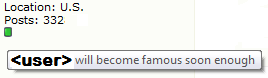
- Rep0.png (3.34 KiB) Viewed 2136 times
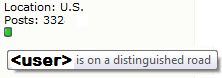
- Rep1.png (2.95 KiB) Viewed 2136 times
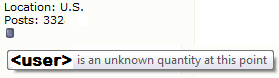
- Rep3.png (3.33 KiB) Viewed 2136 times
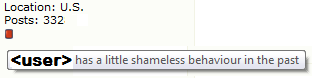
- Rep4.png (3.57 KiB) Viewed 2137 times
Everyone on the forum can see the colored square and the little description that corresponds to each user's Reputation balance. This is simply a reflection of the aggregate community's opinion of a particular user: green for positive, blue for neutral, red for negative. However, the specific Reputation comments can only be seen by the user they apply to, and forum administrators (even moderators cannot see them). Each user can see the Reputation comments they have been given by clicking on the "User CP" (for "User Control Panel") link on the menu of each page. The comments will contain a link to the associated post.
All forum members are welcome to use the Reputation feature. Remember that your comments will be visible to the person whose post you commented on (but no one else except administrators). As with everything you do on the forum, Reputation comments should follow the Code of Conduct.
Questions that can benefit the larger community should be asked in a public forum, not a private message.

