Changing bank accounts for donations.

7 postsstarted by WARDRICHARDLAWRENCE 3,031 viewsoriginal topic

#1
I would like to change from one bank to another bank and when I get to the part that says" Click on last line" the last line is "CANCEL" and it cancels everything I have put in.
Richard Ward Ph. 623-707-9587
Community Moderators
#2
Editing the banks and accounts for donations is done through the "Donations" application. Once there, select "Settings" on the left side of the page. Then scroll down to the "Donation Accounts" section to edit your accounts. Before deleting an account you should click the blue "Add Donation Account" button and complete the new account information. You can then add more accounts or delete accounts. Delete an account by clicking the trash can icon in the top right of the account name box.

If there is more than one account you can select an account to be the default account.
JD Lessley
Have you tried finding your answer on the ChurchofJesusChrist.org Help Center or Tech Wiki?
New Member
#3
I have tried to delete a donation account and it keeps telling me I can't because a donation is being processed . I don't have any being processed. All have been completed.
#4
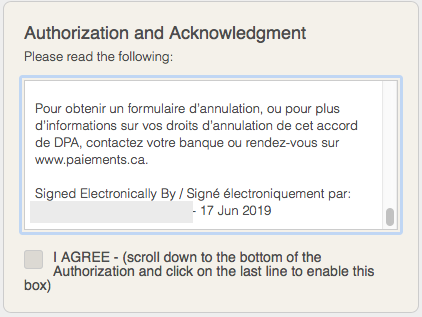
I am having the same issue. I can not change my back account because it says to "click the last line" to activate the check box but when I click the last line of the "fine print" nothing happens. Is there a solution to this? I may just have to return to paying by cheque until this gets resolved.
The pic below is the bottom but I can't click anything on that last line to enable the check box. Any ideas?

[img]
Screen Shot 2019-06-17 at 8.46.51 AM.png
Screen Shot 2019-06-17 at 8.46.51 AM.png (47.06 KiB) Viewed 2771 times
[/img]
Senior Member
#5
Sparky_mcsparky wrote:I am having the same issue. I can not change my back account because it says to "click the last line" to activate the check box but when I click the last line of the "fine print" nothing happens. Is there a solution to this? I may just have to return to paying by cheque until this gets resolved.
The pic below is the bottom but I can't click anything on that last line to enable the check box. Any ideas?

[img]Screen%20Shot%202019-06-17%20at%208.46.51%20AM.png[/img]
Have you tried it from another browser of device? Perhaps a browser extension/add-on is interfering. I use Privacy Badger in Firefox. Occasionally, I have had similar problems on some sites and disabling this extension for the site allows it to function correctly.
Community Administrator
#6
I'm seeing the same thing. I'd use the feedback link to report it.
Have you searched the Help Center? Try doing a Google search and adding "site:churchofjesuschrist.org/help" to the search criteria.

So we can better help you, please edit your Profile to include your general location.
#7
I have tried in safari, chrome, and firefox. All are the same. Clicking the last line does nothing to activate the checkbox.