How do bookmarks work now?

19 postsstarted by kingc12 10,386 viewsoriginal topic

New Member
#1
It seems that a recent update has messed up the bookmarks. When you add a bookmark, there is no way to find it later.
New Member
#2
Same here - no way to find your bookmarks in the new layout. There used to be a "Notes and Journal" link under "My Account and Ward", but now there is only "Notes" and it's nothing like the old format.

The old URL to get to the original "Notes and Journal" was:
https://www.lds.org/study-tools?lang=eng&_r=1

Is there a way to navigate to that now from the current layout, or is there a way to find my bookmarks (both old and new) in the current layout?
Community Moderators
#3
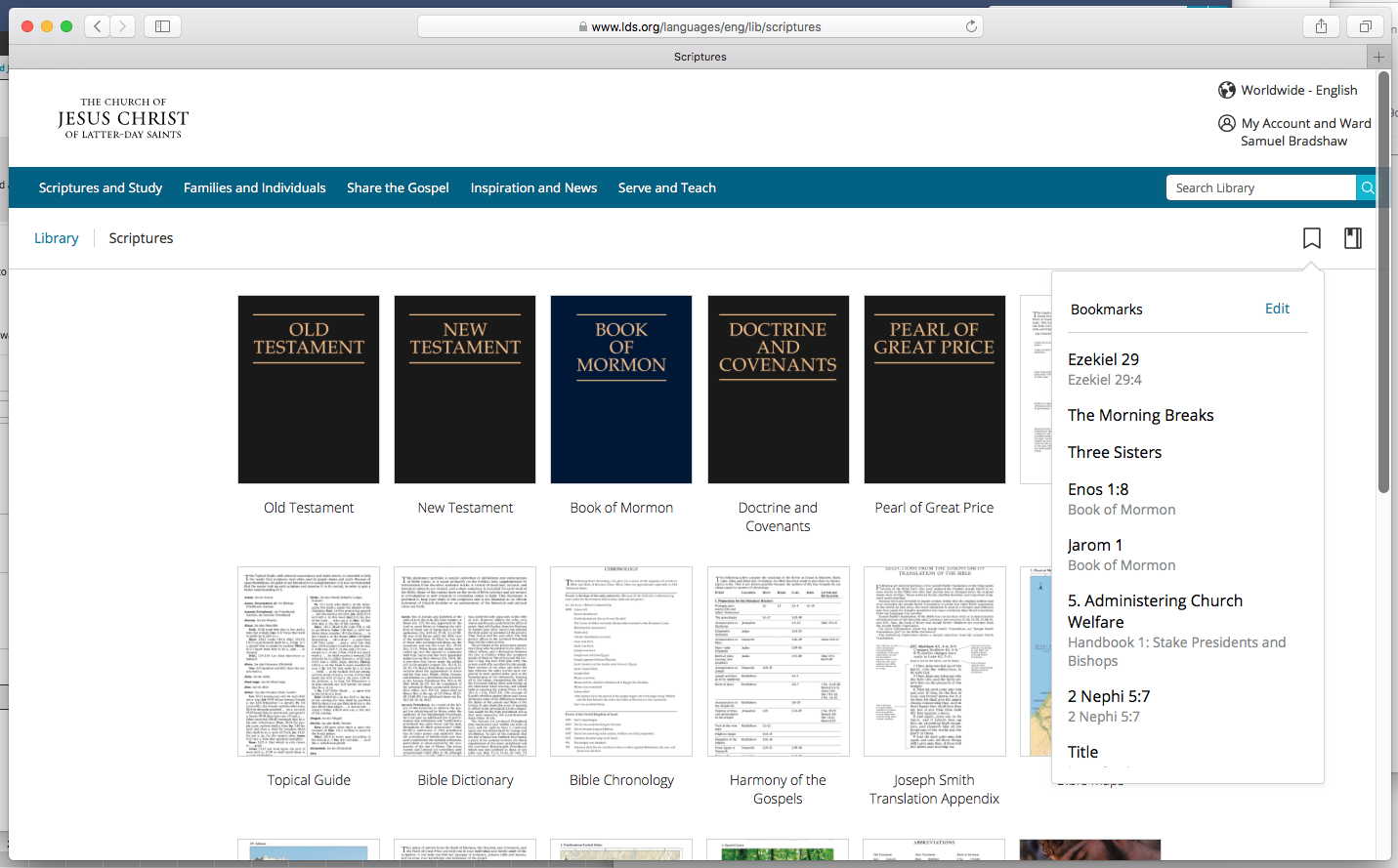
When you're on the "new experience" content pages (Gospel Library Online), and signed in with your LDS Account, you should see a bookmarks icon in the top right. Clicking the icon will show a list of your bookmarks. Attached is a screenshot.
Samuel Bradshaw • If you desire to serve God, you are called to the work.
New Member
#4
I can't find bookmarks either.
I see it on Bradshaw's post but I can't see how to get to that page on my PC.
Senior Member
#5
tyger wrote:I can't find bookmarks either.
I see it on Bradshaw's post but I can't see how to get to that page on my PC.
Are you signed in to your LDS Account?
New Member
#6
I don't see the new experience anymore.
Senior Member
#7
kingc12 wrote:I don't see the new experience anymore.
I see the same thing now also. The toggle for New Experience is currently missing. I wonder if they are preparing for updates to the site.
Community Administrator
#8
danpass wrote:I wonder if they are preparing for updates to the site.
Or putting a "stop work" on the current development. As I understand it, there's a "cease work" on everything in the week before General Conference just so there's no nasty surprises.
Have you searched the Help Center? Try doing a Google search and adding "site:churchofjesuschrist.org/help" to the search criteria.

So we can better help you, please edit your Profile to include your general location.
New Member
#9
russellhltn wrote:
danpass wrote:I wonder if they are preparing for updates to the site.
Or putting a "stop work" on the current development. As I understand it, there's a "cease work" on everything in the week before General Conference just so there's no nasty surprises.
Removing the ability to switch between old & new qualifies as a nasty surprise.
Community Administrator
#10
troutface wrote:Removing the ability to switch between old & new qualifies as a nasty surprise.
It's possible that they discovered a problem but because of the looming "hold", they didn't have time to fix it. It was the best they could do at the time.
Have you searched the Help Center? Try doing a Google search and adding "site:churchofjesuschrist.org/help" to the search criteria.

So we can better help you, please edit your Profile to include your general location.
Community Moderators
#11
The old and new experiences for accessing content are just different URLs. The toggle was a redirect. For example, here are the URLs for the old and new experience for 1 Nephi 1:
https://www.lds.org/scriptures/bofm/1-ne/1?lang=eng
https://www.lds.org/languages/eng/conte ... ofm/1-ne/1 (note that the format of the URL may change, since it's still in beta)

As long as you have the URL, you can get to either the old or new.
Samuel Bradshaw • If you desire to serve God, you are called to the work.
Senior Member
#12
sbradshaw wrote:The old and new experiences for accessing content are just different URLs. The toggle was a redirect. For example, here are the URLs for the old and new experience for 1 Nephi 1:
https://www.lds.org/scriptures/bofm/1-ne/1?lang=eng
https://www.lds.org/languages/eng/conte ... ofm/1-ne/1 (note that the format of the URL may change, since it's still in beta)

As long as you have the URL, you can get to either the old or new.
Thanks for the tip!

More generally, I see that you can (currently) go to the beta Library. Your bookmarks and notes are available there.
New Member
#13
Is there any news on when the new experience will return?
Senior Member
#14
gbonnell wrote:Is there any news on when the new experience will return?
I don't know if the new experience toggle will return, but you can get to the new experience directly by going to https://www.lds.org/languages/eng/lib.
New Member
#15
Any update to this? I can't find my bookmarks.
New Member
#16
I go back to the beta version and find my bookmark there. Click on the desired bookmark, when it's on the right page go to "new experience"
New Member
#17
In the scripture portion I used to be able to hit bookmarks so as I perused other areas of the library I could find where I left off. It says “bookmark failed...content is not formatted to allow bookmarking” how can I fix this? I have tried deleting gospel library and then adding it again but it didn’t fix it.
Community Moderators
#18
scpalmer1 wrote:In the scripture portion I used to be able to hit bookmarks so as I perused other areas of the library I could find where I left off. It says “bookmark failed...content is not formatted to allow bookmarking” how can I fix this? I have tried deleting gospel library and then adding it again but it didn’t fix it.
The error message isn't very good, but this error occurs when you try to add a second bookmark to a paragraph that already has a bookmark on it. If you need two bookmarks on the same chapter, the workaround is to put them on different verses/paragraphs by scrolling down slightly before creating the second bookmark.
Samuel Bradshaw • If you desire to serve God, you are called to the work.
New Member
#19
I am not able to find the bookmark icon to go back to the info I saved while preparing for a talk. I have to start over and try to remember what and where I found the references. I hope this gets fixed soon. Very frustrating.