Meetinghouse DNS Setting Changes

26 postsstarted by bartj 8,754 viewsoriginal topic

Church Employee
#1
Impacted service(s):
Meetinghouse devices statically assigned DNS settings.

Summary of work:
Church Networking Team will be changing the DNS settings on Church managed firewalls.

Expected start:
US/Canada - August 28, 2018 at 09:00 MST
International Areas – September 4, 2018 at 09:00MST

Expected completion:
US/Canada - August 31, 2018 at 16:00 MST
International Areas – September 7, 2018 at 09:00MST

Details of the work:
The Church Networking Team will change the DNS settings on all Church managed meetinghouse firewalls. Devices connected to these firewalls such as clerk computers*, printers and, IoT devices configured to obtain DNS settings dynamically will not be impacted. Devices configured with static DNS settings, however, may need to be manually configured as follows:

Primary DNS 208.67.222.222
Secondary DNS 208.67.220.220

Expected Impact:
Statically configured devices will no longer be able to access web pages on the Internet after the change takes place.

*An attempt will be made to centrally push updated DNS settings on all statically configured clerk computer’s, but it is likely not all will be update properly. Most clerk computers are dynamically configured and should not be impacted.
Senior Member
#2
Does this affect all the Zones, or just the User zone.
Church Employee
#3
All zones will be impacted as part of this change.
Community Moderators
#4
While the news is appreciated, there's probably only a small percentage of STS's that frequent this forum on a regular basis. Will there be an email going out?

I'm hoping there will be some overlap in using either the old or new DNS addresses. I, for one, can't remember all the static IP assignments I've made. They were well documented in the notes in TM until a TM update from the church wiped them all out (grrr...). There weren't that many, but it will take a bit of time to hunt them down.
So we can better help you, please edit your Profile to include your general location.
Senior Member
#5
I saw the notice about the DNS changes the last time I logged into TM. I am a ward clerk, and not a STS, so I don't know if an email was sent out. I don't think my stake has a STS at this time.
Dana Repouille, Plattsmouth, Nebraska
Community Moderators
#6
Mikerowaved wrote:I'm hoping there will be some overlap in using either the old or new DNS addresses.
I do not think so. As near as I can tell, the DNS addresses were changed on our routers yesterday morning. At least, that's the way I read the message that appeared when I signed in to Technology Manager a few days ago and now has changed. I am not sure how to check the addresses being used for myself. I'll bet I hear from the Family History Center soon.

And no, as STS I never received an email.

And for the life of me, how on earth did they expect to change the fixed IP computers and items that are turned off when not in use? For the record, one of my children asked me that question. I am so relieved that we think these things through before we actually.
Senior Member
#7
As I understand the original post, the only change is for DNS server addresses. I don't see any mention of static IP addresses of devices changing.

In our case, when I've set static IP's on devices, I've left DNS settings automatic.
Church Employee
#8
A few things.....

- A direct message to STSs is in the works. This type of communication is a little more difficult and time consuming to get out than messages on TM and this forum.
- The network IP address will not need to be changed, this is specific to the DNS addresses.
- A change will be sent out to the Clerk PCs from HQ. Devices that are not on will get the update when they turn on. That said it is still recommended that you check your PC settings.
- In most cases, things like printers don't use DNS so these devices really shouldn't be impacted.
Church Employee
#9
Mikerowaved wrote:I'm hoping there will be some overlap in using either the old or new DNS addresses.
Devices with the old settings should continue to work for at least another week or two. The old DNS services are still available and the firewall rules allowing traffic to these services have not been removed.
Community Moderators
#10
bartj wrote:Devices with the old settings should continue to work for at least another week or two.
Good to know. Thanks.
So we can better help you, please edit your Profile to include your general location.
Member
#11
I'm an STS in my stake. I just got the email about changing the DNS for static IP devices, a few minutes ago.
#12
I’m worried about it being a 3 day weekend and getting calls from Ward Clerks this Sunday if they are unable to get online as I will be out of town. :|
Member
#13
derrickfulkerson wrote:I’m worried about it being a 3 day weekend and getting calls from Ward Clerks this Sunday if they are unable to get online as I will be out of town. :|
Have you configured anything to have a static IP address? If not, then you likely have nothing to worry about. The only static IP in my stake is a family history printer. All the clerk computers are set to DHCP.
Community Moderators
#14
lajackson wrote:And no, as STS I never received an email.
It is official! At 3:55 pm Mountain Time today, just a few minutes ago, I received an email that the updates are expected to be completed by . . . wait for it . . . 4:00 pm, within five minutes, and that after this time devices that connect to the Internet should be tested to ensure that they still function as expected.
Community Administrator
#15
The updates can complete early, the question is how long we have before the old servers are shut down.

This is a good time to update any static devices to use the features of our new firewall. Leave the device on "automatic" and tell the firewall what IP you want it to use.
Have you searched the Help Center? Try doing a Google search and adding "site:churchofjesuschrist.org/help" to the search criteria.

So we can better help you, please edit your Profile to include your general location.
Community Moderators
#16
russellhltn wrote:This is a good time to update any static devices to use the features of our new firewall. Leave the device on "automatic" and tell the firewall what IP you want it to use.
Thanks for the reminder. I am thinking of doing this for the VidiU, so I don't have to look up the network address every time I turn it on, and then change my browser bookmark to find it again.
Church Employee
#17
Keep in mind that computers/devices with static IP addresses on the meetinghouse network should be fine. However, computers/devices with static DNS settings on the meetinghouse network may have issues. These will need to be updated to obtain DNS server settings automatically.
Community Administrator
#18
nmecantwin73 wrote:Keep in mind that computers/devices with static IP addresses on the meetinghouse network should be fine. However, computers/devices with static DNS settings on the meetinghouse network may have issues. These will need to be updated to obtain DNS server settings automatically.
Unless I'm missing something, once you configure Windows for a static IP, you're forced to use a static DNS IP as well.

Perhaps printers, copiers, and other devices are more flexible.

The older firewalls didn't let us set static IPs in the DNS. The new ones do. I think it's "best practice" to take advantage of that. If nothing else, it gives a centralized place to record those assignments. That would avoid any surprises by a rarely used static IP, like the webcaster system. I can just imagine someone setting up the webcaster for a conference and finding a printer has stolen the IP.
Have you searched the Help Center? Try doing a Google search and adding "site:churchofjesuschrist.org/help" to the search criteria.

So we can better help you, please edit your Profile to include your general location.
Member
#19
russellhltn wrote: Unless I'm missing something, once you configure Windows for a static IP, you're forced to use a static DNS IP as well.
Yes, if you don't set a static IP, you have to use DHCP.
If you don't use DHCP, you must set the IP address, Subnet mask, Default gateway, and DNS servers manually.
Senior Member
#20
russellhltn wrote: Unless I'm missing something, once you configure Windows for a static IP, you're forced to use a static DNS IP as well.

Perhaps printers, copiers, and other devices are more flexible.

The older firewalls didn't let us set static IPs in the DNS. The new ones do. I think it's "best practice" to take advantage of that. If nothing else, it gives a centralized place to record those assignments. That would avoid any surprises by a rarely used static IP, like the webcaster system. I can just imagine someone setting up the webcaster for a conference and finding a printer has stolen the IP.
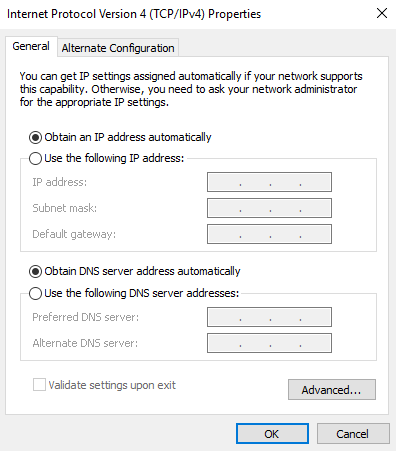
I agree with your statement on best practice of making static IP assignments at the firewall level and letting devices get that assignment automatically from the DHCP server. This is how we began doing it, once the capability was added in TM.

However, in the event that someone chooses to set a static IP address for a Windows computer locally on the device, this setting is independent of the DNS server(s) setting.
TCPIP v4 properties.PNG
TCPIP v4 properties.PNG (14.51 KiB) Viewed 2692 times
Community Administrator
#21
danpass wrote:However, in the event that someone chooses to set a static IP address for a Windows computer locally on the device, this setting is independent of the DNS server(s) setting.
Regarding your screen shot. While it looks like the settings are independent, on my machine, once I set a static IP the DNS switches to static and the setting is grayed out.

So, my choices are: Auto IP/Auto DNS, Auto IP/Manual DNS, Manual IP/Manual DNS. There's no way to do Manual IP/Auto DNS.

Edit: A quick read suggests there is no standard for Static IP/Auto DNS. The Auto DNS is part of the information the computer receives from the DHCP when it gets an IP assignment. There doesn't seem to be a way to get the DNS without that. If you set the Static IP locally, there's no contact with the DHCP to get that information.
Have you searched the Help Center? Try doing a Google search and adding "site:churchofjesuschrist.org/help" to the search criteria.

So we can better help you, please edit your Profile to include your general location.
Senior Member
#22
Hmmm, I still haven't received an email. At any rate, I noticed the following error in TM when I click on the Filter Type link:

Firewall's DNS are not valid. Filter may not be working correctly.

I assume that doesn't actually affect anything, and they just need to update something, but thought I'd mention it in case someone is monitoring this.
Craig
Saint George, UT
Senior Member
#23
russellhltn wrote:
danpass wrote:However, in the event that someone chooses to set a static IP address for a Windows computer locally on the device, this setting is independent of the DNS server(s) setting.
Regarding your screen shot. While it looks like the settings are independent, on my machine, once I set a static IP the DNS switches to static and the setting is grayed out.

So, my choices are: Auto IP/Auto DNS, Auto IP/Manual DNS, Manual IP/Manual DNS. There's no way to do Manual IP/Auto DNS.

Edit: A quick read suggests there is no standard for Static IP/Auto DNS. The Auto DNS is part of the information the computer receives from the DHCP when it gets an IP assignment. There doesn't seem to be a way to get the DNS without that. If you set the Static IP locally, there's no contact with the DHCP to get that information.
Thanks! I stand corrected.
Member
#24
For Manual IP/Auto DNS, a half-way solution would be to use the router's IP address as the DNS address of your static IP configured device. I know it works on consumer routers. I've never tried it on a Meraki MX64, behind a managed domain.
New Member
#25
We had an issue with the new DNS settings blocking photos.google.com. I actually found out from my daughter who is serving a mission in IIF. Last week should could get to google photos at her local FHC and this week she couldn't. I checked at our buildings at it was blocked as well. I emailed mht an OPENDNS block screenshot and they were not aware of it but checked and found the same result. Within a few minutes I had a return email that it should be fixed. I checked and it photos.google.com now works. I have used OPENDNS at home for years and love it. My kids have not been so fond of it. ;)
Member
#26
Has anyone else had issues with computers losing their DNS settings periodically? I went through all my buildings today and made sure the DNS was set for computers I had moved to static IP's. I tested each computer after I put in the DNS addresses. In at least 2 cases, the computers lost the changes and ended up with a blank DNS later in the day and had to be set again. In one case, it lost it multiple times.