LDS Tools Services are unavailable

41 postsstarted by wayneeckman 26,205 viewsoriginal topic

New Member
#1
When I try to sign into LDS Tools on my Android phone, it bring up the following: "LDS Tools Services are unavailable. Please try again later." Any suggestions?
New Member
#2
Same Problem here
New Member
#3
Me too!
New Member
#4
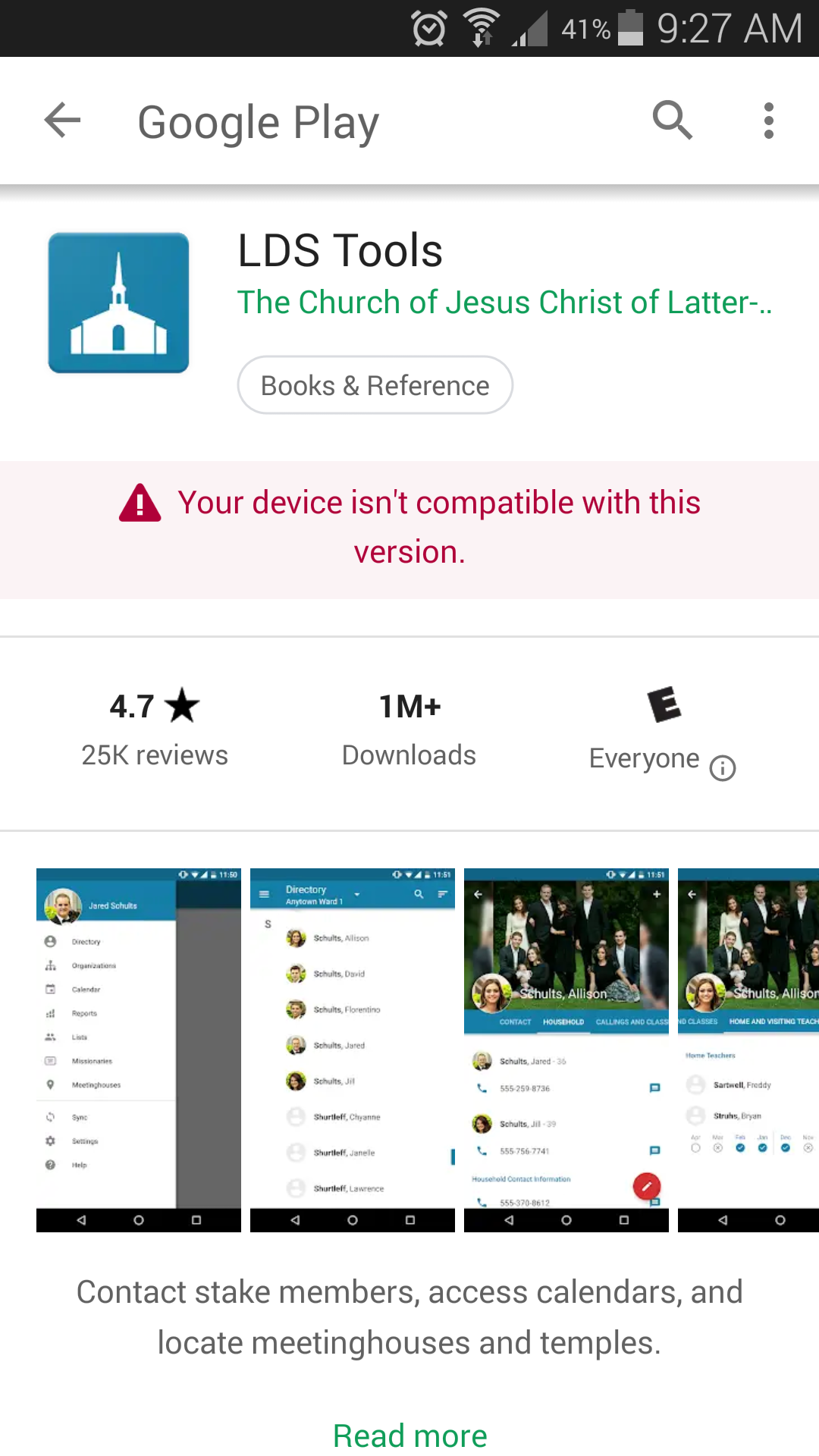
Same here. Samsung galaxy s5. LDS tools app says it no longer compatible with my device. Happened the end of Oct. Haven't been able to sync since. I'm a bit dependant on the information in my calling. Why is a android S5 no longer supported?
๐Ÿ“Ž Screenshot_2018-11-17-09-27-12.png (433.06 KiB)
Community Administrator
#5
jkarlphillips wrote:Same here. Samsung galaxy s5. LDS tools app says it no longer compatible with my device. Happened the end of Oct. Haven't been able to sync since. I'm a bit dependant on the information in my calling. Why is a android S5 no longer supported?
What version of Android are you on? LDS Tools isn't compatible with anything below Android 5. Those versions lack a secure communication protocol that is still current by today's standards.
Have you searched the Help Center? Try doing a Google search and adding "site:churchofjesuschrist.org/help" to the search criteria.

So we can better help you, please edit your Profile to include your general location.
New Member
#6
My wife and I have a Galaxy S8+, my phone and account works just fine, her account comes up with LDS Directory Services are unavailable. Please try again later.

Tried different times and days, something is wrong with her account. My account logs in just fine on her phone. We can log on to her account on lds.org with no issues. Something is BROKEN on the Church system.
New Member
#7
For everyone with Android devices when the church changed to ministering instead of ht/vt some software changes were made as well so only Android 5.0 and above is compatible so if you need lds tools you will have to upgrade your phone if you have an earlier version
New Member
#8
Why does my tablet with 3.5.2 work fine but my phone with 4.4.4 does not? This is crazy that we will have to upgrade our phones every couple of years just to have tools. Got to be a better answer than "too bad, out of luck."
Community Administrator
#9
roddyjoe wrote:Why does my tablet with 3.5.2 work fine but my phone with 4.4.4 does not?
3.5.2 is the current version of LDS Tools and requires Android 5.0 or better. I'm not seeing any listing for a Android 3.5.2. It went from 3.2.6 to 4.0 seven years ago.

Android 4.4.4 doesn't support a security protocol that is still considered secure. So, in this case, it was a security of information issue.

Android 5 was introduced 4 years ago.
Have you searched the Help Center? Try doing a Google search and adding "site:churchofjesuschrist.org/help" to the search criteria.

So we can better help you, please edit your Profile to include your general location.
Senior Member
#10
roddyjoe wrote:Why does my tablet with 3.5.2 work fine but my phone with 4.4.4 does not? This is crazy that we will have to upgrade our phones every couple of years just to have tools. Got to be a better answer than "too bad, out of luck."
Unfortunately, the answer, "too bad, out of luck" is given by Google, not the church. It is possible for Google to provide security updates for obsolete Android versions but they do not. The church chose data security of membership data over convenience of individual members. I, for one, am grateful for that choice even though I no longer have access to LDSTools either (I'm running Android 4.4).

Having a digital device is not required to fulfill any calling in the church that I am aware of. I function fine as ward clerk without a cell phone and with a wifi tablet that cannot access LDSTools. It is a bit inconvenient at times, but it is my choice to not upgrade at the moment. I don't blame the church for that.

Often the advice is to purchase an older device at lower cost. If you plan to keep your device long-term, you might consider the opposite as older devices are abandoned by the OS and hardware manufacturers sooner which can put one back in the same boat as now.
New Member
#11
It's now 2018. Android 7.1.1 gives the same error.

Another update?
New Member
#12
phillipwales wrote:For everyone with Android devices when the church changed to ministering instead of ht/vt some software changes were made as well so only Android 5.0 and above is compatible so if you need lds tools you will have to upgrade your phone if you have an earlier version
I just bought a new phone with Android 8.0.0 and have the same problem.
My older phone with Android 5.1.1 worked fine until today - same issue.
Kindle Fire that once worked now also not working.
LDS Tools version 3.5.2
Senior Member
#13
I have the IOS version of LDS Tools and have been failing to sync for the last hour. That is until about 5 minutes ago, when the syncing succeeded. I suspect, without proof, that there might be server issues, or maintenance being carried out.

Or I might be completely wrong in my assumption. :D
New Member
#14
Hello,

I have an lg v30 and it had android 8, but I still cannot update my lds tools. Recently got a new calling and I have to get this setup quickly.
Senior Member
#15
Hillbert wrote:Hello,

I have an lg v30 and it had android 8, but I still cannot update my lds tools. Recently got a new calling and I have to get this setup quickly.
This is a user-to-user support forum. Unless someone here has experience with your device and the problems you are having, no-one here will be able to help other than offering generalized advice. You should work with your clerk and/or stake technology specialist.
#16
Android Oreo 8.0.0 syncs 3/4 thru than I get LDS tools has stopped or services are unavailable. Feb 11-2019
New Member
#17
I am using a Samsung Galaxy 5A (2016) with an Android 7 operating system. I am trying to run LDS Tools 3.5.3. When I tried to sync on Saturday evening, 9 February ~21:00, the LDS Tools sync progress bar froze for a while, then the the phone displayed the message "LDS Tools has stopped." with two options. "Open app again" or "Send feedback."

I have tried:
* Sending Feedback
* Opening the app again
* Restarting mobile phone
* Deleting some MP4 files
* Uninstall and reinstall. At least 3 times (It doesn't really uninstall, because when I reinstall it, the installation is complete almost instantaneously. That is much more quickly than reasonable for a ~50MB download.)
* I have done an internet search
* I have tried this forum

All to no avail.

Please help.
New Member
#18
gshosford wrote: * Uninstall and reinstall. At least 3 times (It doesn't really uninstall, because when I reinstall it, the installation is complete almost instantaneously. That is much more quickly than reasonable for a ~50MB download.)
You are correct, Android keeps some of the app data after you uninstall LDS Tools. That's why it installs again so quickly.

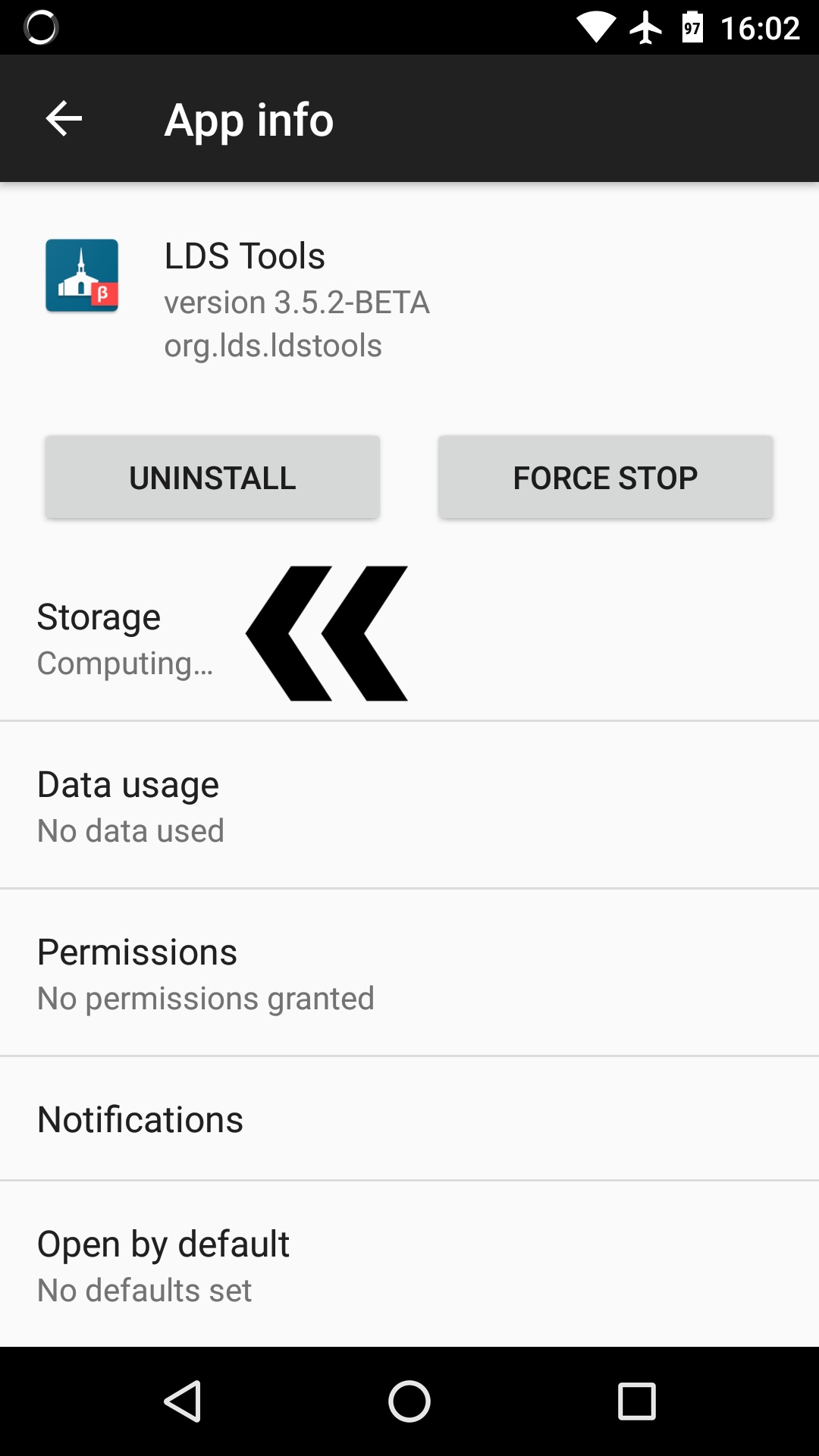
To completely uninstall the app, open your phone's Settings app.
Then go to Apps and tap on LDS Tools. You should see this:
LDS Tools 1-01.jpeg
(131.86 KiB) Not downloaded yet
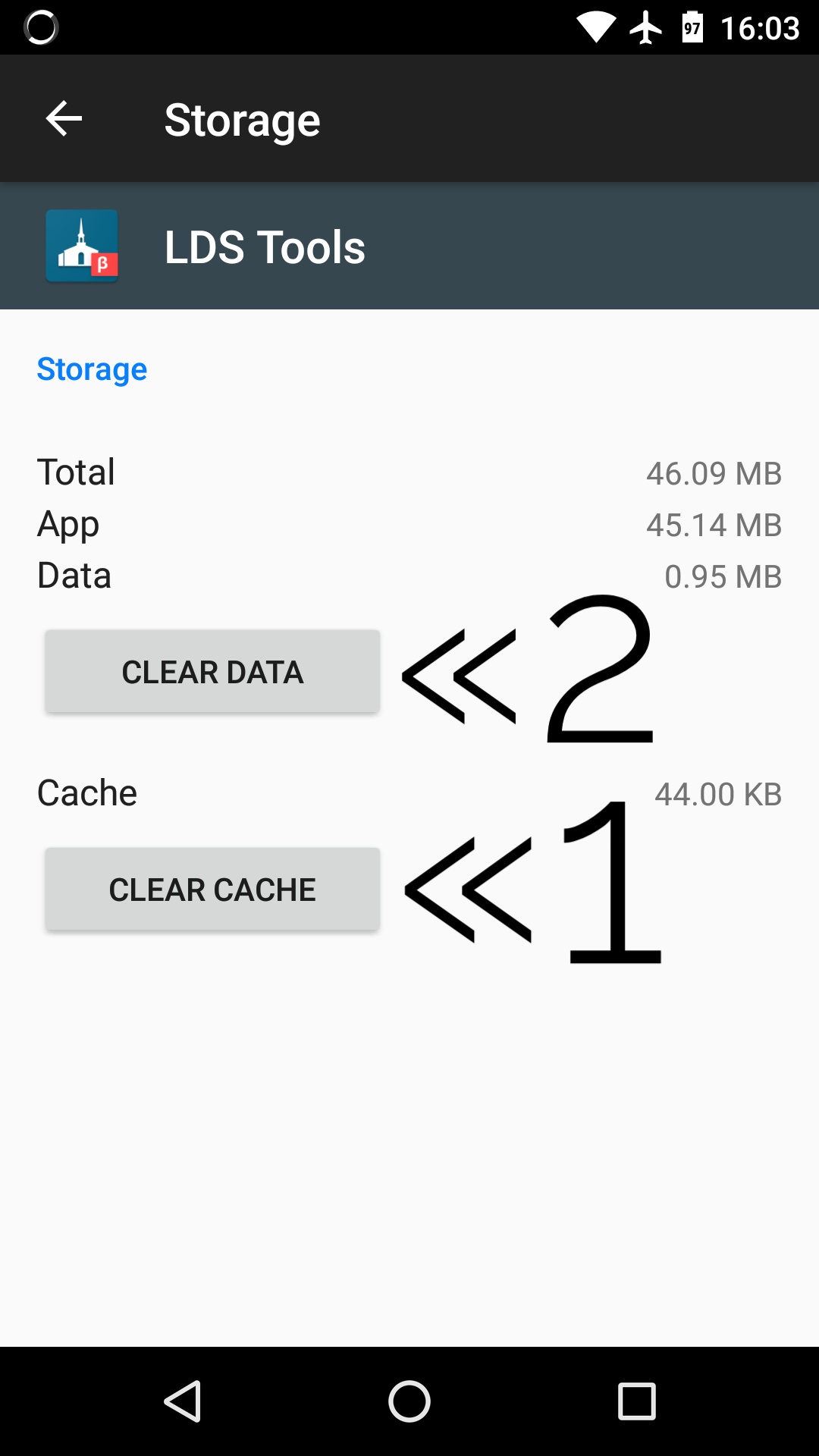
Tap on Storage, and then clear the cache and data.
LDS Tools 2-01.jpeg
(105.94 KiB) Not downloaded yet
Once you've done that you can uninstall and then reinstall it again and that will hopefully fix your problem. Normally you don't need to do all of that when uninstalling an app, but in this case it will probably help.
andrewpaultanner wrote:Android Oreo 8.0.0 syncs 3/4 thru than I get LDS tools has stopped or services are unavailable. Feb 11-2019
For the syncing problem, I would follow the steps above (since you have Android 8, it would be Settings > Apps & notifications > App info > LDS Tools) and just clear the cache. Then try syncing again. If that doesn't work, I'd uninstall and reinstall using the above steps.

Hope that helps!
New Member
#19
Thank you for the recommendations. However, it did not do the trick. Yes, it cleared the cache and the data. However, it left the application still on the phone. When I selected the "Uninstall" button, it just disables the app it does not remove it.

It reinstalled (reconnected) instantaneously. I closed again while trying to sync.

My wife can access LDS Tools without any problems. My calling is stake executive secretary. I have access to information and features to which she does not have access. I think the bug is in there. Our stake president has an iPhone. He is having problems with LDS Tools also.
New Member
#20
I'm sorry it didn't work! I believe the app is being removed from your phone. I tried what I told you to do, and when I downloaded LDS Tools again from the Play Store, the download size was 10 megabytes. (Usually the installer is a compressed file, so it's much smaller than the 50 megabytes the installed app takes on your phone. If you have a fast internet connection like I do, it only takes 1-2 seconds to download, and is just as quick to complete the installation. That is most likely why it installs so quickly, but I could be wrong. (I've been known to be wrong before.) :-)

I believe you are right, this probably just affects callings which have access to more information then most. (I do not have a calling that gives me access to more information, and I don't have the problem.) I'm seeing this problem reported in other threads on this forum as well; I'll ask what callings they have.

Unfortunately, I do not know of any way to directly contact the development team except to use the "Send Feedback" feature. I would send feedback again, mentioning your theory on what is causing the problem. Hopefully the project team can find the problem and get it fixed soon!
New Member
#21
Thank you. I will try sending feedback to them again. It will be the third time. Hopefully, they will not disregard my feedback.
Church Employee
#22
gshosford wrote:Thank you. I will try sending feedback to them again. It will be the third time. Hopefully, they will not disregard my feedback.
Feedback is reviewed, but there is no guarantee that you will get a response.

Sending repeated feedback on this issue isn't going to do anything except create more work for the person reviewing the feedback.
New Member
#23
Not sure if this helps everyone - but here are a couple of pieces that may help:

1. It appears that those in leadership positions (like Elders Quorum Presidency or Relief Society Presidency) who have expanded access to ministering are experiencing the syncing problems. The problem does not appear to be universal Android.
2. The feedback I received back from technical support was that the Android services are experiencing some difficulties and that I should use the BETA version until it is fixed.
3. The BETA version is working for syncing and worked on both my devices (phone and tablet).

Hope this information is helpful for others.
New Member
#24
As the executive secretary, I have to access member information in a lot of meetings and when preparing agendas and reports for the Bishop. Sure I can log on from my computer, but won't be carrying it around to every meeting. This error is on both my phone and my notepad. They were both working up until a week or so ago. I have uninstalled and reinstalled the app. (including cache clearing) and it still won't completely synch. I hope this gets cleared soon.
Community Moderators
#25
WJederberg wrote:They were both working up until a week or so ago.
And for the last week they have been trying to isolate and fix the problem. And for those who have succeeded by loading the beta, wonderful. But there are reports that some who have switched to the beta are still having the same sync problem.

I would not want to be the person who is fixing this challenge, because it may be related to other services besides the app itself.
New Member
#26
Same problem here. I have Android 8.1.0 and it is up to date. I have cleared the cache, cleared data, and finally reinstalled the app. Still no luck. It Starts to sync and then at the end it says that the app has stopped working or that lds services are unavailable. I have gotten both of these responses but the "app stoppped working" has been more common.
Senior Member
#27
jmackie6 wrote:Same problem here. I have Android 8.1.0 and it is up to date. I have cleared the cache, cleared data, and finally reinstalled the app. Still no luck. It Starts to sync and then at the end it says that the app has stopped working or that lds services are unavailable. I have gotten both of these responses but the "app stoppped working" has been more common.
In other posts, those who are closer to this issue than I am have indicated that they have determined what the problem is but fixing it is more of a challenge than anticipated. We will need to be patient - they are working on it as diligently as possible. For ward leaders, you can do everything on LDS.org that you can with LDSTools. Yes, it may be a bit inconvenient but it works.
New Member
#28
Same issue today and I am running android 7 on a LG stylus 2 I believe.
Community Administrator
#29
The app was updated in the Google Play Store today. That should fix the issue.
Have you searched the Help Center? Try doing a Google search and adding "site:churchofjesuschrist.org/help" to the search criteria.

So we can better help you, please edit your Profile to include your general location.
New Member
#30
Not working on my new pixel 4. Transferred the app from my old phone. got the tools services not available try again later message. Uninstall and reinstall the latest 4.4 release and had the same result. Advice?
New Member
#31
same problem and my android versionn is 9.
New Member
#32
Same. New Pixel 4. Android 10. All security protocols are updated. Get same message, i.e. "Tools services are unavailable. Try again later."

Tried deleting app and reinstalling. Several times. No luck. Suggestions???
Community Moderators
#33

Re: Member Tools Services are unavailable

drmoreland wrote:Uninstall and reinstall the latest 4.4 release and had the same result.
Member Tools is at version 3.6.1 according to my Android device.
New Member
#34
What I did, saved my staff and pressed reset, everything was reinstalled and It worked lost a few things not saved but No problem anymore besides LCR "sigh"
New Member
#35
For anyone still struggling with this, I just finally got sync working on my older Android 6.0 tablet. I had the same problem as described above, and I couldn't get it to sync at all.

However, I want manually into the app permissions for Member Tools and enabled everything. I believe the permission for Storage is probably the important one, but I turned them all on. For some reason Member Tools isn't triggering the pop-up that requests the permissions it needs. You can manually set permissions under Settings - Apps - Member Tools - Permissions. Please, every Android device is a little different though.
It worked for me, hopefully it can help someone else out.
New Member
#36
My Samsung version 7 is saying the same thing just recently.
New Member
#37
Same problem, I tried reinstalling and setting permissions manually. Still not working.
New Member
#38
Same. Android 11 and it's not working. Confirmed that I can login via the website.
New Member
#39
The issue I am finding is if your Play Store services are either not installed or out of date, this won't work. Why would our private membership data be reliant on Google's spy services?
New Member
#40
Google Play Services provides various "infrastructure" that apps use to do their work. It's somewhat kind of similar to saying you need to have a particular version or higher of Android to run an app because of what that version Android can do. (Same principle just on a "more specific" level).
New Member
#41
This was it! I have been pulling my hair out for a couple of weeks trying to figure out why I was getting this error setting up my son's phone. The specific app that needs updating is Google Play Services. I set up his phone without a Google account and thus it was never updated. Once I updated that app (using Aurora... an alternative Play Store app that doesn't require a Google account), Member Tools started working fine. Thanks for sharing this solution.

Unfortunately, the whole reason I gave him the device in the first place turns out to be invalid. Apparently (and inexplicably), Aaronic Priesthood quorum secretaries *DO NOT* have access to take attendance in their quorums through Member Tools :-[