Calendar 3.0 - new major version coming

19 postsstarted by CrockettDR 7,818 viewsoriginal topic

Church Employee
#1
We are nearing the completion of a very major new version of the calendar. We are hopeful to soon enter a beta with a few limited stakes that our team belongs to. Later we will open it up more, including some of you. This version has taken us a lot longer than we hoped but it is coming.

Some features that quickly come to mind
- Totally mobile responsive
- Modernized look and feel
- Solve so many issues around buildings moving between stakes, units moving between buildings, new buildings, buildings going away, units going away, stake splits, ward splits.
- Better help stake understand the FM building assignments better. Too many stakes have created duplicate building calendars. They will get warning to stop doing that. Will make it easier for them to fix that.
- Reports to easily find lists of events in a building by room, by unit.
- Redo of the Print so it works
- Time zone: Can set your time zone so event times don't move when you travel
- Solve many other problems. Stake turns off scheduling for a building but future events exist, then you can't edit those events. Building moves to new stake and scheduling gets automatically turned off. Ward moves into new stake but users aren't automatically subscribed to the new stake's calendars. Users have no idea how to subscribe to calendars by opening the lefthand pane wider.
- More control on which calendars to sync with 3rd-party calendars.
- Restrictions are still supported but making a few changes so they are less confusing.
- Stake can control which of its units can schedule which building. (Right now all units can schedule all buildings).
- Lots more.

Stay tuned.
Community Administrator
#2
Well, this is a welcome surprise. I would have thought it would be "all hands" working on the new ministering.

Any chance of seeing the new UI before it gets too set in stone?
CrockettDR wrote:- More control on which calendars to sync with 3rd-party calendars.
The big one for me is to separate iCal sync from the lds.org display and LDS Tools feed.

One thing that has come up is groups that seems to operate on a "if the building isn't scheduled, then I can use it" and then gets surprised when LDS Tools doesn't show the building calendar. However, I'm not sure as I'd want to "fix" that since it would only be a matter of time before you get conflicts between unscheduled activities.
Have you searched the Help Center? Try doing a Google search and adding "site:churchofjesuschrist.org/help" to the search criteria.

So we can better help you, please edit your Profile to include your general location.
Church Employee
#3
After the 3.0 release is out and stable we hope to start new work on the LDS Tools mobil app to add building calendars and perhaps allow event creation from the app.
📎 cal.jpg (270.6 KiB)
Church Employee
#4
The sync improvements mainly include the ability for you to create your own group of calendars to sync instead of just all subscribed calendars. -

Another helpful improvement is to add an event organizer and contact information to the event details instead of just the creator/updater of the event.
Community Moderators
#5
Thanks for the update! Excited to see it.
CrockettDR wrote:The sync improvements mainly include the ability for you to create your own group of calendars to sync instead of just all subscribed calendars.
I assume this means that all of the calendars you select will continue to sync as a single calendar, instead of syncing as individual calendars that you can turn on or off in the third-party calendar app... Is that correct?
Samuel Bradshaw • If you desire to serve God, you are called to the work.
Church Employee
#6
Yes, I believe so.
New Member
#7
Great to hear that the calendar is getting a "Fresh look and feel" with improvements of how the calendar runs. I was about to offer my design services to design the calendar interface but seems you already on track with that... Currently users can't edit, create events on the mobile app version, on the new update of the calendar will users have the ability to edit, create events on the mobile app ? Or is this more in the future? I can see that you're making the calendar responsive which is fantastic.

Thanks
Senior Member
#8
CrockettDR wrote:After the 3.0 release is out and stable we hope to start new work on the LDS Tools mobil app to add building calendars and perhaps allow event creation from the app.
The addition of the building calendars will be very much appreciated.
Craig
Saint George, UT
New Member
#9
Very excited for calendar updates! And mobile responsiveness. I would be more than happy to assist if any testing if needed for our bishopric.

Would love to see mobile app calendar alerts for alert subscribed calendars.
New Member
#10
Building Calendars would be welcomed as mentioned aboved as well as being able to use the LDS tools to schedule events. Thanks for all the hard work on this. Not sure if I missed this posted earlier or somewhere else, but any update on when this might be rolling out Church wide? Thanks!
New Member
#11
Any updates on the new calendar? I'm an Executive Secretary, and we're figuring out how to communicate changes in 2019. Can we expect to see these updates before the new year begins?
New Member
#12
In our Stake it's frustrating because they switch out building schedulers every year. So we get new unfamiliar schedulers called every year. The new building schedulers get miss information and do things different. It absolutely drives me nuts. I don't understand why they can't just get someone that's knows what they are doing to stay in the calling for years. I totally understand the restrictions concept and the scheduling concept. The problem we really have is the lack of education for organizations understanding how the calendar works. I've read through the documentations and they are well written and understandable. We have building schedulers that schedule for organizations, which would be okay, but there isn't a drop down for the building scheduler to schedule the building in behave of an organization. I was only the building scheduler for one year, but didn't mind being it for years on end until everyone understood how it worked, but I was released after the year and now it's a mess again. Do other stakes switch out their building schedulers every year? Do you have one consistent person doing it for years? How does your stake do it?
New Member
#13
Ward leaders, including auxiliaries, have permissions to schedule ward activities in both the ward and building calendars.

This should leave only personal activities, such as wedding receptions and funerals, to be scheduled by a building scheduler on behalf of members.

To your point, I’d suggest the ward councils be trained once a year to understand the effective way to schedule the building. This might include how to use LDS Tools for communicating with other wards as needed.
Community Administrator
#14
CrockettDR wrote:We are nearing the completion of a very major new version of the calendar. We are hopeful to soon enter a beta with a few limited stakes that our team belongs to. Later we will open it up more, including some of you. This version has taken us a lot longer than we hoped but it is coming.

Some features that quickly come to mind
- Totally mobile responsive
- Modernized look and feel
- Solve so many issues around buildings moving between stakes, units moving between buildings, new buildings, buildings going away, units going away, stake splits, ward splits.
- Better help stake understand the FM building assignments better. Too many stakes have created duplicate building calendars. They will get warning to stop doing that. Will make it easier for them to fix that.
- Reports to easily find lists of events in a building by room, by unit.
- Redo of the Print so it works
- Time zone: Can set your time zone so event times don't move when you travel
- Solve many other problems. Stake turns off scheduling for a building but future events exist, then you can't edit those events. Building moves to new stake and scheduling gets automatically turned off. Ward moves into new stake but users aren't automatically subscribed to the new stake's calendars. Users have no idea how to subscribe to calendars by opening the lefthand pane wider.
- More control on which calendars to sync with 3rd-party calendars.
- Restrictions are still supported but making a few changes so they are less confusing.
- Stake can control which of its units can schedule which building. (Right now all units can schedule all buildings).
- Lots more.

Stay tuned.
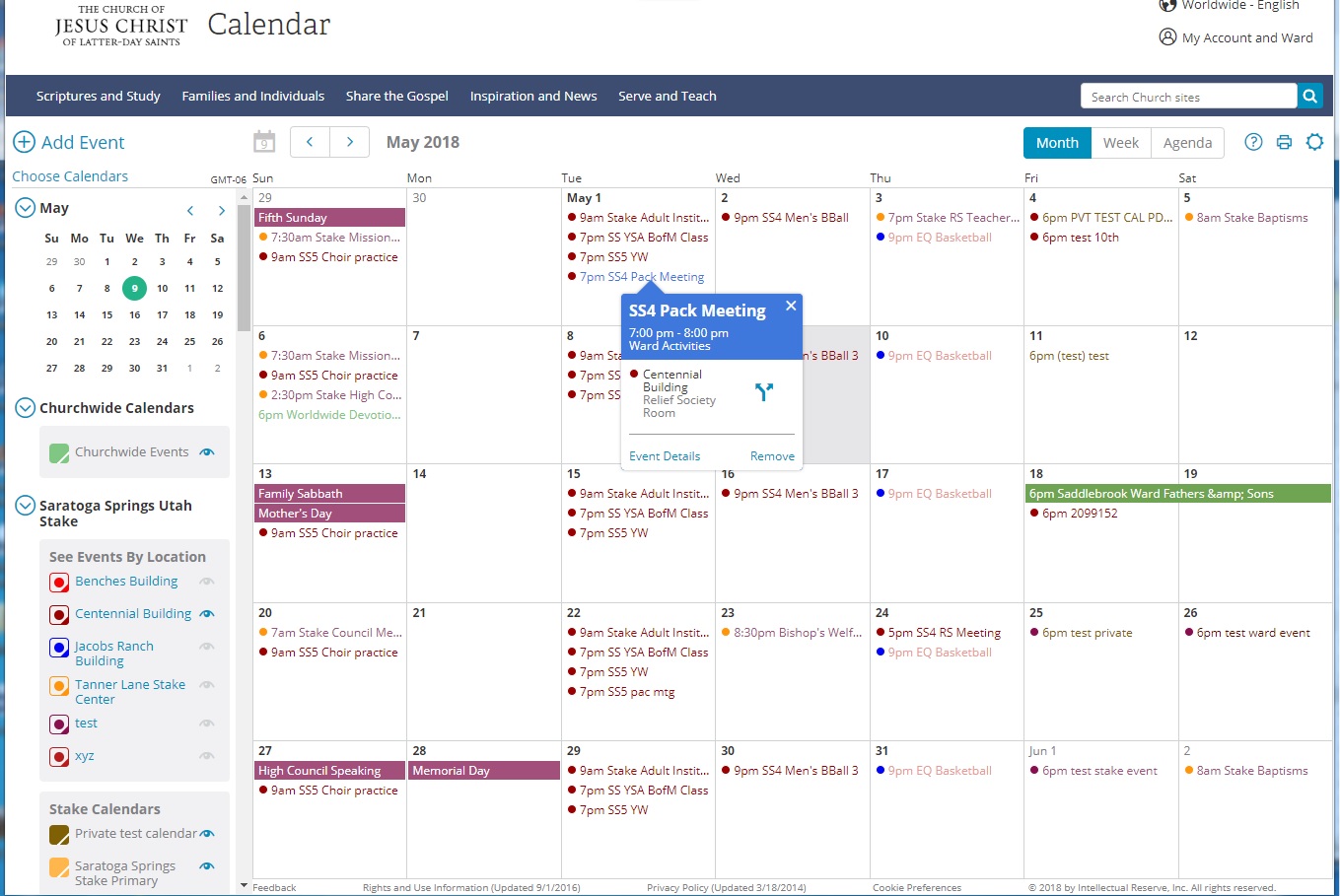
(Doing a Steve Martin impersonation) The new calendars are here! The new calendars are here!

Well, at least I see it.
Have you searched the Help Center? Try doing a Google search and adding "site:churchofjesuschrist.org/help" to the search criteria.

So we can better help you, please edit your Profile to include your general location.
Senior Member
#15
Must be a selective beta (or was quickly reverted). I'm still seeing the same as always and the version in the head elements says 2.11.
Community Administrator
#16
eblood66 wrote:Must be a selective beta (or was quickly reverted). I'm still seeing the same as always and the version in the head elements says 2.11.
Perhaps my stake was added to the beta. I'm still seeing the new one. The sync links say "beta".
Have you searched the Help Center? Try doing a Google search and adding "site:churchofjesuschrist.org/help" to the search criteria.

So we can better help you, please edit your Profile to include your general location.
Church Employee
#17
We rolled it out to all the stakes in Hawaii. So far so good. January is a peak month for using the calendar and we don't want to impact that, so we are hopeful to roll it out church-wide in February.
Member
#18
[quote="russellhltn"][quote="CrockettDR"]We are nearing the completion of a very major new version of the calendar. We are hopeful to soon enter a beta with a few limited stakes that our team belongs to. Later we will open it up more, including some of you. This version has taken us a lot longer than we hoped but it is coming.
Some features that quickly come to mind

- Stake can control which of its units can schedule which building. (Right now all units can schedule all buildings).


Wondering if you could please explain how Stake can "control" scheduling. I am a bldg scheduler and put in a restriction for
my building. Another bldg scheduler in same bldg is unable to remove my restriction. Is this due to setting stake webmaster
is missing for this person?

Same type of issue with another bldg. Bldg Scheduler doesn't seem to have access to the private events calendar. Assuming
again that the stake webmaster must give him such access. So I am guessing that each person rather than "particular calling" is
granted different access by stake webmaster? For private events in our stake, each bldg scheduler typically has rights
to enter events on "private event calendar". Events are only entered after approved by all bishops in the requested
building. System has worked very well except that for some reason this one building scheduler unable to access
private event calendar.
Community Administrator
#19
casper684 wrote:\Wondering if you could please explain how Stake can "control" scheduling.
Stake Calendar Admins can go into "Locations and Rooms" and select what units of the stake who do NOT meet at a building can schedule the building. But that seems to be separate from what you're describing.

casper684 wrote:I am a bldg scheduler and put in a restriction for my building. Another bldg scheduler in same bldg is unable to remove my restriction. Is this due to setting stake webmaster is missing for this person?
Most likely, the other person is not set up as a Building Scheduler for the same building. Note that the building scheduler has to be set within the calendar system and not just given the calling in LCR.
casper684 wrote:Same type of issue with another bldg. Bldg Scheduler doesn't seem to have access to the private events calendar.
Being a Building Scheduler only grants access to the building calendar. Access to any other calendar is a separate issue.
Have you searched the Help Center? Try doing a Google search and adding "site:churchofjesuschrist.org/help" to the search criteria.

So we can better help you, please edit your Profile to include your general location.