Ministering with private records

16 postsstarted by 1historian 7,630 viewsoriginal topic

New Member
#1
With the release of the changes and the new ministering information in LDS tools, I believe I may have stumbled across a potential issue. When a member has changed their record settings to "private - leadership only" these members cannot be seen by non-leaders, which means they will not show up either as a Ministering Assignment, nor as a Ministering Brother even if they have been assigned properly. This setting may need to be adjusted so that those who are assigned to minister and those they minister to can see them.
Senior Member
#2
This really has not changed from the way it was with home teaching. A couple months ago, I had a brother ask me why he could not see one of his HT families in LDS Tools or the Directory, while the HPGL and his assistants could see the family. I told him that due to the privacy setting for that family. The only way the home teacher (now ministering brother) could see the information for his assigned families was on the printed assignment list he received from his priesthood leaders.
Dana Repouille, Plattsmouth, Nebraska
New Member
#3

Re: Cannot see Ministering in lds tools on Android

I cannot see Ministering in LDS Tools. I was told to resync my account. I first made sure my settings were to Stake and not leaders only, then I synced my account. But I still cannot see ministering in LDS Tools on my android device.
Community Administrator
#4

Re: Cannot see Ministering in lds tools on Android

robschnell wrote:I cannot see Ministering in LDS Tools.
Where are you looking? Try finding your household in the directory. When you pull up the information you should see a heading called "Ministering". On Android, it takes a sideways swipe to get to that information.

Only certain callings can view that information for others, but you should be able to see your own information.

It's not unsual for leaders to think others have access to something only they have access to.
Have you searched the Help Center? Try doing a Google search and adding "site:churchofjesuschrist.org/help" to the search criteria.

So we can better help you, please edit your Profile to include your general location.
New Member
#5
I had the same problem on Android, even after updating the app. But then I figured out my problem. Forever ago I had installed the app via the Amazon app store. I uninstalled that version, installed from the Google Play store, synced my account and now I see it. I guess Church tech isn't using the app version in the Amazon app store.
New Member
#6

ministering

Where on my iPhone do I find my ministering partner & assignment?
Community Administrator
#7

Re: ministering

KittyKovach wrote:Where on my iPhone do I find my ministering partner & assignment?
On Android, you pull up your name from the ward directory, then scroll sideways.
Have you searched the Help Center? Try doing a Google search and adding "site:churchofjesuschrist.org/help" to the search criteria.

So we can better help you, please edit your Profile to include your general location.
New Member
#8

Re: ministering

russellhltn wrote:
KittyKovach wrote:Where on my iPhone do I find my ministering partner & assignment?
On Android, you pull up your name from the ward directory, then scroll sideways.
I'm running to most recent Android version of LDS tools (3.4) and don't have that option (Ministering tab). (Neither do several other Android users in my Elders quorum.) Is the currently an i-phone only feature? Can I see my ministering families from the website?
Community Administrator
#9

Re: ministering

mmcchesney wrote:I'm running to most recent Android version of LDS tools (3.4) and don't have that option (Ministering tab). (Neither do several other Android users in my Elders quorum.) Is the currently an i-phone only feature? Can I see my ministering families from the website?
Try updating to 3.4.1. I can see it there. Also, try doing a sync. Perhaps you have stale data that didn't have it.

Unless you have access to LCR, I dont' think you can seeit on the website.
Have you searched the Help Center? Try doing a Google search and adding "site:churchofjesuschrist.org/help" to the search criteria.

So we can better help you, please edit your Profile to include your general location.
New Member
#10
bez7 wrote:I had the same problem on Android, even after updating the app. But then I figured out my problem. Forever ago I had installed the app via the Amazon app store. I uninstalled that version, installed from the Google Play store, synced my account and now I see it. I guess Church tech isn't using the app version in the Amazon app store.
I had to uninstall the app from google play app store and reinstall it for the ministering option to be available for me.
New Member
#11
It appears no resolution has been found to allow ministering brothers (or sisters) to see assigned households with privacy settings enabled, which is understandable.

Follow up question, since I believe there are several in my ward who have this feature turned on unknowingly... is there anywhere I can get a list of all the members in my ward whose records are set to Leader Only? So that I know which assignments I have to manually print and distribute?
Senior Member
#12
Unless anyone else knows of an alternative way to achieve this, would be to go through the Directory and note the settings there.
Community Administrator
#13
Biggles wrote:Unless anyone else knows of an alternative way to achieve this, would be to go through the Directory and note the settings there.
But I think only a clerk or the bishop can see those settings.

Others would probably have to compare directory listings between someone in a leadership position and someone who is not.
Have you searched the Help Center? Try doing a Google search and adding "site:churchofjesuschrist.org/help" to the search criteria.

So we can better help you, please edit your Profile to include your general location.
Senior Member
#14
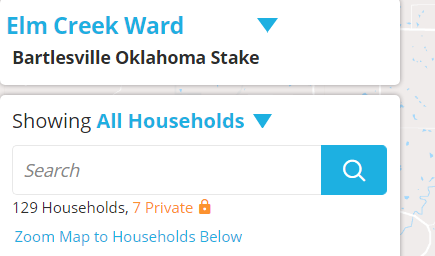
Members with their information set to "private, leadership only" show as orange text on the ward map and there is a lock next to their name. Ward council members can see this information (I assume stake council as well, but have not verified). It isn't as easy as a list, but it is pretty easy. I tried to find a way to generate a custom report for this list - didn't spend too much time on it, but could not find a way.

I have attached a snip from our ward map - it does not show the names, but the names are orange text and you can see in the snip that we have 7 in our ward.
Private Households.PNG
Private Households.PNG (18.27 KiB) Viewed 1962 times
Community Moderators
#15
On the LDS.org directory, leaders who have access to see "leadership only" households will see a lock icon next to the name in the directory.
Samuel Bradshaw • If you desire to serve God, you are called to the work.
Senior Member
#16
sbradshaw wrote:On the LDS.org directory, leaders who have access to see "leadership only" households will see a lock icon next to the name in the directory.
Thanks for the tip. I didn't remember that and noticed that the lock is greyed out and easy to miss.