PTZ camera control using IP

21 postsstarted by rmaughan 13,696 viewsoriginal topic

New Member
#1
Does anyone have an existing webcast set up that does PTZ camera control using a local LAN (IP control) -- we're looking for feedback and information about how well this works or doesn't work. We're trying to decide between IP camera control vs. direct (RS-485) control. Not sure if we care about VISCA vs. Pelco, but we definitely want a star (e.g. home run) topology for our PTZ camera control

Is there a multiple second lag between moving the joystick or controlling the camera through software vs. the actual camera movement? If so, how do you deal with that?

Does anyone do live panning (e.g. choir shot) with a PTZ camera that is IP controlled? How well does that work or not work?

The assumption is that for controlling the PTZ camera(a), the IP network (LAN) would be dedicated to the camera control and not be part of the existing building LAN.
Community Administrator
#2
If you're using a dedicated network, what would the advantage of IP be?
Have you searched the Help Center? Try doing a Google search and adding "site:churchofjesuschrist.org/help" to the search criteria.

So we can better help you, please edit your Profile to include your general location.
New Member
#3
Good question. That’s why I’m trying to reach out to the community here to find out their experience with using IP to control their PTZ cameras.

I know IP can be used for supplying power to the cameras (POE). It’s also possible to do H.264 video over IP but at this point we’re planning to get video over SDI instead.
New Member
#4
We have been using the Sony EVI-D70 camera with a serial control before switching to two Optics 20x SDI cameras. They are controlled via an internal AV network that also controls the webcast box, AV WAP, audio and video mixer. The two camera setup allows for camera movement before switching the live feed to the new camera position. We are using the standard Optics control software on a PC.

Generally we create a list of prepositioned scenes and save them by number and thus do not have to work too hard to setup a shot transition during the meeting. Live panning is done at a low rate for esthetic reasons. The responsiveness of the IP camera versus the serial control is the same to the human operator.

The internal AV LAN resides within the church firewall LAN. Before the new Meraki boxes, it was not possible to reserve addresses for specific devices but with our own router, the network can be setup so that all of the devices reside at specific IP addresses. The only LAN approach freed us from RS-485 wiring requirements. Network traffic volume and latency have not been an issue.

There are some subtle differences with the LAN cameras but it was a step up in overall performance. This brand of camera does not support POE.

Further details can be found on this website under https://tech.lds.org/forum/viewtopic.ph ... 50#p167550

Re: Need simple way to configure monitors on the stand posted on 15 Feb 2017
The attachment has the system block diagrams.

Incidentally, the two camera approach lets us do picture in picture with the chorister and congregation. Not as good as the conference center but at least we are commercial free.
Member
#5
We rotate our webcast between 4 different bldgs-which requires us to have a portable setup. Similar to you, we started out with multiple EVI-D70 cameras. We sent power, video, IR, & RS232 Visca over a single CAT5 to each camera and used a TeleMetrics PTZ Controller. Now we use two PtzOptics cameras with IP wireless PTZ control to each camera using the iOS /iPad app ($3) from PtzOptics. We setup one camera next to our control booth in the overflow area, while the 2nd camera is on the far side of the chapel and is completely wireless (wireless realtime HDMI as well as wireless PTZ control). For distribution within the bldg we convert the HDMI to Composite (for TVs) and to SDI (for pulpit monitors).

Attached is a system diagram.
Member
#6
Evidently the forum has reached a limit on attachments. I get this error message "Sorry, the board attachment quota has been reached."
Community Administrator
#7
CalS201 wrote:Evidently the forum has reached a limit on attachments.
So it does. We'll have to see what can be done to clear up some space.
Have you searched the Help Center? Try doing a Google search and adding "site:churchofjesuschrist.org/help" to the search criteria.

So we can better help you, please edit your Profile to include your general location.
Member
#8
Here is the missing attachment
📎 Wireless Camera Setup.pdf (763.86 KiB)
#9
You might want to also consider using straight IP cameras. We've been using two Dahua 12X PTZ cameras for the last couple of years with great results. We stream 1080P (using SundayStreams), receive with Roku boxes, and have never experienced a distribution dropout.

The cameras are both POE+ (we use an 8 port POE+ switch) and are controlled by a web interface in each camera. One browser window for each camera allows full control as well as presets for each camera view.
Senior Member
#10
AT my stake center, I use an EVI-D70 camera and I have my computer connect serially to it by the VISCA connection. I use and Ethernet cable to get the signal from the computer to the camera. I do have preset views and it works great.

May I point out one item that I feel that should be address here and that is the KISS principle, which is Keep is simple simon. Just my two cents worth.
New Member
#11
I didn't see this before, but we use 2x 20x ptz-oprics cameras and use ip control with them. We use wirecast pro for running the broadcast - it works well and is a simple setup but the IP cameras. We have the cameras set up with static IP addresses.

The most annoying thing for us is that the bandwidth of the broadcast is so ridiculously low - only 2 Mbps for an HD stream is tough. If they even upped it to let us stream at 4 Mbps it would help make the remote attendees have a better experience.
New Member
#12
Bump for my easy referencing.
*Currently in the design phase to upgrade our stake center system*
New Member
#13
CalS201 wrote:We rotate our webcast between 4 different bldgs-which requires us to have a portable setup. Similar to you, we started out with multiple EVI-D70 cameras. We sent power, video, IR, & RS232 Visca over a single CAT5 to each camera and used a TeleMetrics PTZ Controller. Now we use two PtzOptics cameras with IP wireless PTZ control to each camera using the iOS /iPad app ($3) from PtzOptics. We setup one camera next to our control booth in the overflow area, while the 2nd camera is on the far side of the chapel and is completely wireless (wireless realtime HDMI as well as wireless PTZ control). For distribution within the bldg we convert the HDMI to Composite (for TVs) and to SDI (for pulpit monitors).

Attached is a system diagram.
I know this is an old post, and maybe we are just behind the times. You mention that you sent power, video, ir, & RS232 VISCA over single CAT5. Do you have the wiring diagram for this and the power parts you used? I'm trying to get something similar setup in our building and would really like to reduce the wires to each of the cameras.
Member
#14
GETTING CAMERA VIDEO/POWER/CONTROL OVER CAT5/6 CABLES

If you are using HD cameras, like the PtzOptics20X, there is a very easy solution that uses 2 CAT5e/6 cables. One cable is used to to transfer the 1080P HDMI video signal, IR, and RS232 Visca using HdBaseT extenders (realtime no-lag, uncompressed 1080P60 video!!). We use the $115 OREI EX-500IR extender that can reach over 450ft. The 2nd CAT5e/6 cable is used for 12v power and LAN connection to the camera using off-the-shelf 48volt POE injectors or a POE LAN Switch. Having a LAN connection to the camera is very useful because PTZOptics provides several free and low cost VISCA over IP solutions for their cameras. Having a LAN connection also lets you stream "directly" from the camera to youtube or the church webcast system, or simply pull an rtsp stream into OBS or WireCast.

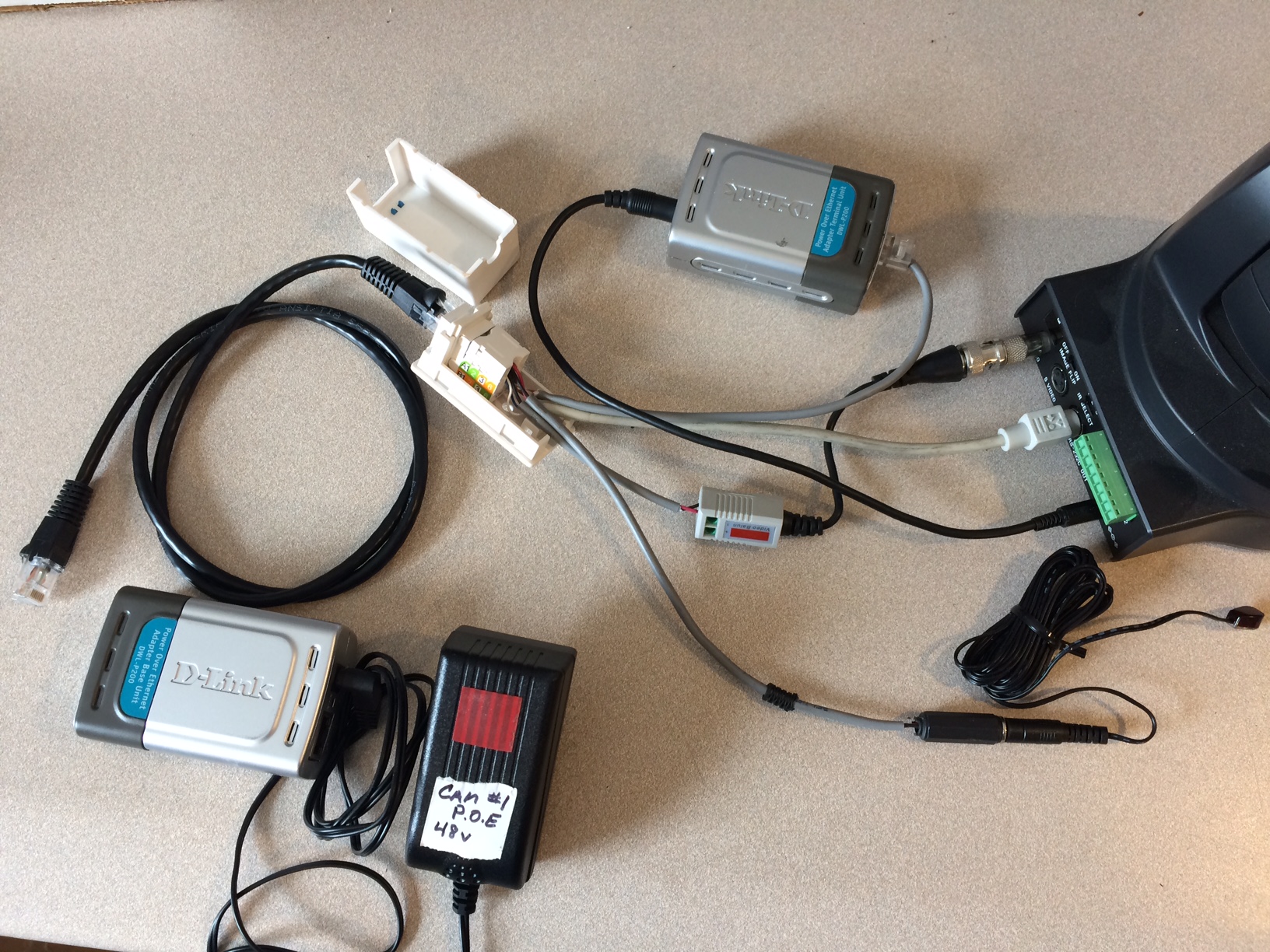
If you are using the old Sony EVI-D70 camera, getting power, video, ir, & RS232 VISCA to the old EVI-D70 camera over (1) CAT5/6 cable is possibly, but you cannot buy it - you must build it yourself. Attached is a picture of a custom RJ45 junction box at the camera with connectors for pwr, video, ir, and RS232 that we used for several years in our old portable 3 camera, 4 bldg setup. You need a similar (reverse) setup at the your video switcher and VISCA Controller. The wiring pinout for the CAT5/6 cable is: Pin 1=VideoGnd, 2=Video, 3=IR, 4=IR&RS232Gnd, 5=Rs232TX, 6=Rs232RX, 7=Poe48V, 8=PoeGnd. You should be aware that POE power injectors and splitters normally use pins 4,5,7,8 of the CAT, but in this application you must only use pins 7 & 8.
📎 IMG_0536.JPG (831.8 KiB)
New Member
#15
CalS201 wrote:GETTING CAMERA VIDEO/POWER/CONTROL OVER CAT5/6 CABLES

If you are using HD cameras, like the PtzOptics20X, there is a very easy solution that uses 2 CAT5e/6 cables. One cable is used to to transfer the 1080P HDMI video signal, IR, and RS232 Visca using HdBaseT extenders (realtime no-lag, uncompressed 1080P60 video!!). ... If you are using the old Sony EVI-D70 camera, getting power, video, ir, & RS232 VISCA to the old EVI-D70 camera over (1) CAT5/6 cable is possibly, but you cannot buy it - you must build it yourself. ...
CalS201, Thank you for the detailed reply and photo. I can easily replicate the cat 6 wiring from your information!

What cameras are everyone using or wish they used? With the recent announcement to use Zoom as our primary webcast service, this changes what I was going to install in our remote buildings. I tested a Sunba 3MP 20x (405-D20X V2), but struggled since it does not have an HDMI out. I was able to tap into the IP signal but do not want the complexity of teaching remote buildings/members how to do that. (Attached two photos of the Sunba. I enjoyed the colors that pop, but the sharpness is not the same as our Lumens A51S that was recently installed in the building.)
20210130121110976.jpg
(391.96 KiB) Not downloaded yet
20210130121128132.jpg
(434.66 KiB) Not downloaded yet
New Member
#16
Can someone direct me to where or how I can get the IP address for my PTZ Camera? I do not have access to the box the device came in, or any instructions that came in the box. Thank you!
Member
#17
tjbouslaugh wrote:Can someone direct me to where or how I can get the IP address for my PTZ Camera? I do not have access to the box the device came in, or any instructions that came in the box. Thank you!
If you know the manufacturer's name and model number of the camera then you can probably find your answer by searching for a users manual on the web!
Community Moderators
#18
tjbouslaugh wrote:Can someone direct me to where or how I can get the IP address for my PTZ Camera? I do not have access to the box the device came in, or any instructions that came in the box. Thank you!
Not all PTZ cameras have a LAN interface. For example, the Lumens model often installed by FM has no Ethernet port. PTZ is accomplished either by VISCA (RS-232), or an IR extender. (Ours has both options available.)

If it does have a LAN port wired to the building's network and it's powered up, it should show up in Technology Manager under Connected Devices. Hint: It's a lot easier to find during the week than on a Sunday.
So we can better help you, please edit your Profile to include your general location.
Community Administrator
#19
Mikerowaved wrote:If it does have a LAN port wired to the building's network and it's powered up, it should show up in Technology Manager under Connected Devices.

Only if it checks in with the DHCP server. If it's been been programmed with a static address, it won't show up.

But I'd certainly start there since it's easy to do.
Have you searched the Help Center? Try doing a Google search and adding "site:churchofjesuschrist.org/help" to the search criteria.

So we can better help you, please edit your Profile to include your general location.
New Member
#20
rmaughan wrote:Does anyone have an existing webcast set up that does PTZ camera control using a local LAN (IP control)
Yes, we use two PTZOptics 20x SDI cameras. We use POE for data + power, and RTMP for the video feed (1080p @ 60 fps). We can pan, tilt, and zoom them using either the PTZoptics camera application (which also has nice preset thumbnails), the web server on the camera, or vMix (but only if you pay for the 4K).
New Member
#21
Generally we create a listing of prepositioned scenes and store them by variety and as a result do no longer should paintings too hard to setup a shot transition throughout the assembly. Live panning is performed at a low charge for esthetic motives. The responsiveness of the IP camera versus the serial manipulate is the identical to the human operator.