When searching for Ward it shows places with an incorrect address

4 postsstarted by matthew.mcmullin 2,304 viewsoriginal topic

#1
It's my first post so hopefully I'm doing this correctly.

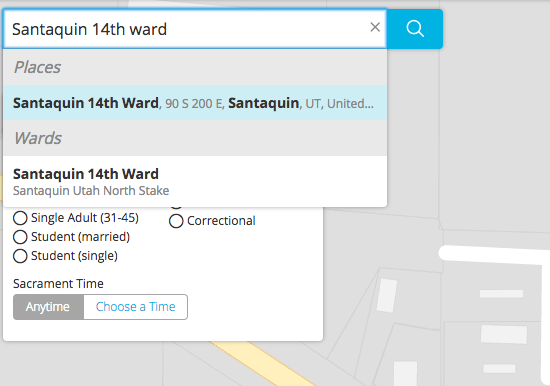
We have a ward in our Stake that when I search for it on Maps.lds.org it shows an incorrect address under places:
[img]
Screen Shot 2018-02-21 at 3.07.19 PM.png
Screen Shot 2018-02-21 at 3.07.19 PM.png (48.49 KiB) Viewed 2304 times
[/img]

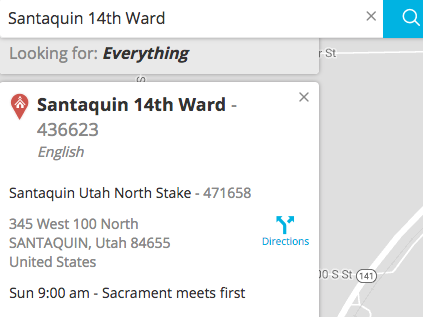
How do I fix the address in "places" to match what the actual location is?
[img]
Screen Shot 2018-02-21 at 3.20.45 PM.png
Screen Shot 2018-02-21 at 3.20.45 PM.png (44.7 KiB) Viewed 2304 times
[/img]

Thanks
Community Administrator
#2
Interesting. In the first picture, "Santaquin 14th Ward" is a place - just like any other business or building name. You'll notice that for anyone living in that location, they'd be attending the 12th ward.

The second screen shot is the location of the ward itself.

I'm not sure what "place name" index maps.lds.org is using. maps.google doesn't know that "place", so I don't think it's coming from Google.
Have you searched the Help Center? Try doing a Google search and adding "site:churchofjesuschrist.org/help" to the search criteria.

So we can better help you, please edit your Profile to include your general location.
Senior Member
#3
russellhltn wrote:I'm not sure what "place name" index maps.lds.org is using. maps.google doesn't know that "place", so I don't think it's coming from Google.
Bing finds it and gives that as the address so I'm guessing that's the source. I don't know how to suggest a correction to Microsoft for Bing but there is probably a way.
#4
Suggested updates from Yelp and Bing. Hopefully this addresses the problem.

Thanks