Gospel library requires internet access

24 postsstarted by natet 10,151 viewsoriginal topic

Member
#1
I've noticed an annoyance with the Gospel Library app on my Android tablet. Our building has terrible internet, so we have been turning off the wireless network each Sunday so that the clerks can perform their financial processes. Today I noticed that as I clicked around in the Gospel Library, a box appears at the bottom of the screen that says "This action requires an internet connection. Please connect to a mobile or Wi-Fi network and try again". This message remains on the screen for several minutes, blocking some of the content on the page. I've only observed this on my tablet. My phone doesn't seem to have the same issue.
Community Moderators
#2
Is your phone connected to the internet (over cellular data, if the Wi-Fi is off)?
What kind of tablet do you have (I'm assuming it doesn't have cellular data)?

That's a standard error message if you try to download audio or video or a book without an internet connection, but I wouldn't expect it to appear randomly, or to stay on the screen for several minutes (usually it's only there for a few seconds).

Did you kick off a "Download All" for audio or books, so the device is trying to queue up several things to download at once?
Samuel Bradshaw • If you desire to serve God, you are called to the work.
New Member
#3
I'm ... of late ... receiving the same message on my Android phone (Samsung Galaxy S7)... "Failed to Download ... Check your internet connection and try again". It was working just before the 1st of the year. I have plenty of available data on my phone for download and I still get the message when I'm connected via WiFi. Took to my provider (T-Mobile) and they said there was no issue with the phone. I even updated the Android system. Nothing works.
Member
#4
sbradshaw wrote:Is your phone connected to the internet (over cellular data, if the Wi-Fi is off)?
What kind of tablet do you have (I'm assuming it doesn't have cellular data)?

That's a standard error message if you try to download audio or video or a book without an internet connection, but I wouldn't expect it to appear randomly, or to stay on the screen for several minutes (usually it's only there for a few seconds).

Did you kick off a "Download All" for audio or books, so the device is trying to queue up several things to download at once?
I put my phone in airplane mode when I did my test, but I had the gospel library open earlier in the day, so it's likely that it was done with downloads. I don't know how often Gospel Library tries to download files, but I notice it downloading things at least the first time each day that I open it.

I never kicked off a download all, but I have noticed that sometimes when I use the app, it initiates a download for basically everything I have previously pulled. I haven't timed this download, but it's significant enough that at times during Gospel Doctorine or Priesthood they have already finished reading the scripture I was trying to look up before the download was complete. I personally would like more control over when the content updates get applied.
Community Moderators
#5
Another thing to check – are you on the latest content catalog version? If you go into Settings > Send Feedback, it will load some diagnostic info into a text file attached to an email. If you send that email to yourself you can open the text file and see what content catalog version the app is on. It should be on content catalog version 565 as of this afternoon.

If your content catalog is out of date, you can force it to check, download, and install the newest catalog by going to the main library screen and swiping downward (you will see a spinning arrow as it's checking, then download will queue up in the Android notifications area, if there is an update). For best/fastest response you'll probably want to be on a Wi-Fi connection when you do this.

If your app is stuck on an older content catalog, it may be pointing to older versions of books online that are no longer on the content server when trying to download.
Samuel Bradshaw • If you desire to serve God, you are called to the work.
Community Moderators
#6
deandbrown wrote:T-Mobile
If you're connected to the T-Mobile network and have T-Mobile Web Guard enabled, Web Guard blocks some of the Church content servers, which could cause unexpected behavior in the app. Usually the problem I've seen is when trying to download or stream audio or video. But you mention that it gives errors on Wi-Fi, too, so that may not be the problem.
Samuel Bradshaw • If you desire to serve God, you are called to the work.
Community Moderators
#7
sbradshaw wrote:It should be on content catalog version 565 as of this afternoon.
Does this mean there have been five updates since this afternoon? Or does the content team count by fives? Just wondering.

Catalog Version: 570
as I post this.
Community Moderators
#8
lajackson wrote:
sbradshaw wrote:It should be on content catalog version 565 as of this afternoon.
Does this mean there have been five updates since this afternoon? Or does the content team count by fives? Just wondering.

Catalog Version: 570
as I post this.
I was checking on my phone while I was on the bus, so it's possible my app wasn't fully up-to-date yet... It is possible that there was a catalog update today, though. The numbering goes up every time there's a change on the beta content lane, but not every beta content bundle gets pushed to production.
Samuel Bradshaw • If you desire to serve God, you are called to the work.
Community Moderators
#9
sbradshaw wrote:It is possible that there was a catalog update today, though. The numbering goes up every time there's a change on the beta content lane, but not every beta content bundle gets pushed to production.
It seems that the app is downloading actual items almost every other day. I know it has happened at least four times in the last week for me.

Unless there has been a problem with the download and it is taking place in multiple parts.
Community Administrator
#10
Which begs the question - why so many updates? Are they updating as they push out a format update for each chapter? Can someone talk to them and indicate what kinds of problems the frequent updates are causing?
Have you searched the Help Center? Try doing a Google search and adding "site:churchofjesuschrist.org/help" to the search criteria.

So we can better help you, please edit your Profile to include your general location.
Member
#11
russellhltn wrote:Which begs the question - why so many updates? Are they updating as they push out a format update for each chapter? Can someone talk to them and indicate what kinds of problems the frequent updates are causing?
One of the problems we have is with buildings that have substandard internet connections. We have one building that houses 4 units. A couple of wards have regular attendance of over 300 people, and a third is not far behind that. I've had to start turning off the wireless network in the building because everyone downloading the content updates during classes is causing the clerks to have extreme difficulty submitting their tithing and printing checks.
New Member
#12
I've noticed similar behavior on my Android (Samsung Galaxy M8). What I notice is, I sit down before Sacrament Meeting starts, open up Gospel Library on my phone, and all this content starts trying to download. Tons of content. I'm not really sure what it is. Building's WiFi is super slow (surely overloaded) so content doesn't seem to actually download. I close GL, disconnect from building's WiFi, reopen GL. Problem solved - GL doesn't try to download anything anymore.

I thought this was only happening at church (almost every Sunday), but I'll pay closer attention at home and see if it's more frequent and see if I can find a pattern.

FYI, my phone connects to the church's WiFi automatically.

(Side bar: I will turn off auto connect to the building's WiFi because it's so slow and data connection is faster anyway. It's just something I never think about until the next time church is about to start.)
New Member
#13
natet wrote:I've noticed an annoyance with the Gospel Library app on my Android tablet. Our building has terrible internet, so we have been turning off the wireless network each Sunday so that the clerks can perform their financial processes. Today I noticed that as I clicked around in the Gospel Library, a box appears at the bottom of the screen that says "This action requires an internet connection. Please connect to a mobile or Wi-Fi network and try again". This message remains on the screen for several minutes, blocking some of the content on the page. I've only observed this on my tablet. My phone doesn't seem to have the same issue.
This describes my problem precisely. [ My device details are at the bottom ]
If GL app decides it's time to download the latest content (ie: next month's Ensign, not video) and my phone doesn't have internet connectivity, I get the "This action requires..." notice bubble.
It was also an issue during previous app versions.

The notice remains on my screen until I go to a place with usable wifi (ie: go home) or Force Stop the app (reopening the app repeats the issue).
The notice does not go away when I minimize, back-button-close or swipe-window-close the app.
I tried force closing my app & then turning off my wifi. However, I get the same result when I relaunch the app.

My typical Sunday experience is like this.
2nd or 3rd hour lesson begins
Open GL app
Wait-wait-wait for Moroni progress/splash screen to time out
Briefly get to content
Get "This action requires..." notice blocking bottom ¼ of screen
Try to read around the notice for the rest of the class (and the next class).

You can imagine what camping trips are like.

Could we get an option to disable the notice?
Or could the notice get moved to the status bar?
Or could the notice time-out after a second or so?

Details:
I have GL ver 4.4.2.0 - Android 7.1.1 - LG G3 - Google Play Services 12.6.85 -
Device is WiFi only, no cellular data. The cellular radio is never on. The wifi radio is always on.

Our building wifi doesn't reach the chapel.
However, that doesn't matter because our Sunday internet usage far exceeds our ISP provisioning. Our pipe is choked & no one is updating anything on Sunday.
New Member
#14
Why does the App --REQUIRE-- downloading all the time ? , I don't think the scriptures have changed THAT much !!!!!
Community Moderators
#15
The scriptures don't, but a lot of other things do. There are new magazines each month, lesson manuals are being updated, New content is being added, especially with the Come, Follow Me curriculum. And yes, it is a royal pain.

One thing I have done to lessen the grief is to open GL on Saturday evening while I am on a solid WiFi site (home, for me). Usually, this saves the Sunday morning wait at Church while GL tries to get caught up on a very slow WiFi (meetinghouse).

But it does seem to me that the same things keep downloading and downloading over and over. Nothing unchanged should download. Only changes should be coming down the line. But there are a lot of them.

Another option is to go into airplane mode before starting GL. You will have to get the updates at some point, but on Sunday you can still get to the scriptures quickly if your device is not on any network and unable to download changes when you first start GL. It also works if you forgot to open GL and let it update on Saturday evening.
New Member
#16
This has been a very frustrating aspect of an otherwise amazing app and resource for the last few years, ever since the reworked Gospel Libray app version 4. For awhile I used version that 3, but then that stopped being updated with new content. I regularly send feedback through the app to detail all the problems everyone else has listed above, however I believe the real trouble is a fundamental design change. The app developers have decided to go to more of a streaming platform, so the intent is for you to not download all the content and keep it on your phone or tablet. Rather, you tap on what you want to see and it downloads.

I feel this obviously has a lot of drawbacks, namely poor internet access when you need it. I understand that there are constant updates to content, but the frustrating part is how easy a fix this would be. Every app I have, even the basic Android OS, allows me to choose if I want to auto-update content or not. LDS Tools allows me to sync when I want to, my finance apps only update my bank information when I ask, and Android will only update apps when I tell it to, or allow me to choose auto-update.

I so, so, so wish that the app developers would simply add an Update Content button so I can update when I want to. They can even put in an "Auto-update content" option for those that want it to work as is in the background. That would make this app fully functional at all times.

I'm running a self-reliance facilitator training right now and I was trying to show videos from the training guide in the Gospel Library app. 1 minute into the video GL decided to start 508 current downloads of general conference and ensigns since the 1980s. It does this redownloading 2 to 3 times a week. I had to switch over to the LDS Media Library app, which thankfully lets me just play videos!
New Member
#17
russellhltn wrote:Which begs the question - why so many updates? Are they updating as they push out a format update for each chapter? Can someone talk to them and indicate what kinds of problems the frequent updates are causing?
I second what he said. Please make it stop. The scriptures aren't changing, that's the only thing I have downloaded. There is NO reason for all the updates. It is ridiculous.
New Member
#18
My question: I have not updated/ sync'ed Gospel Library for some time and sadly have forgotten how to update. Can you kindly give me some direction?
Thank you,

Rod
Community Moderators
#19
grandparj2 wrote:My question: I have not updated/ sync'ed Gospel Library for some time and sadly have forgotten how to update. Can you kindly give me some direction?
Thank you,

Rod
What version of Gospel Library are you running, and on what kind of device?
Samuel Bradshaw • If you desire to serve God, you are called to the work.
#20
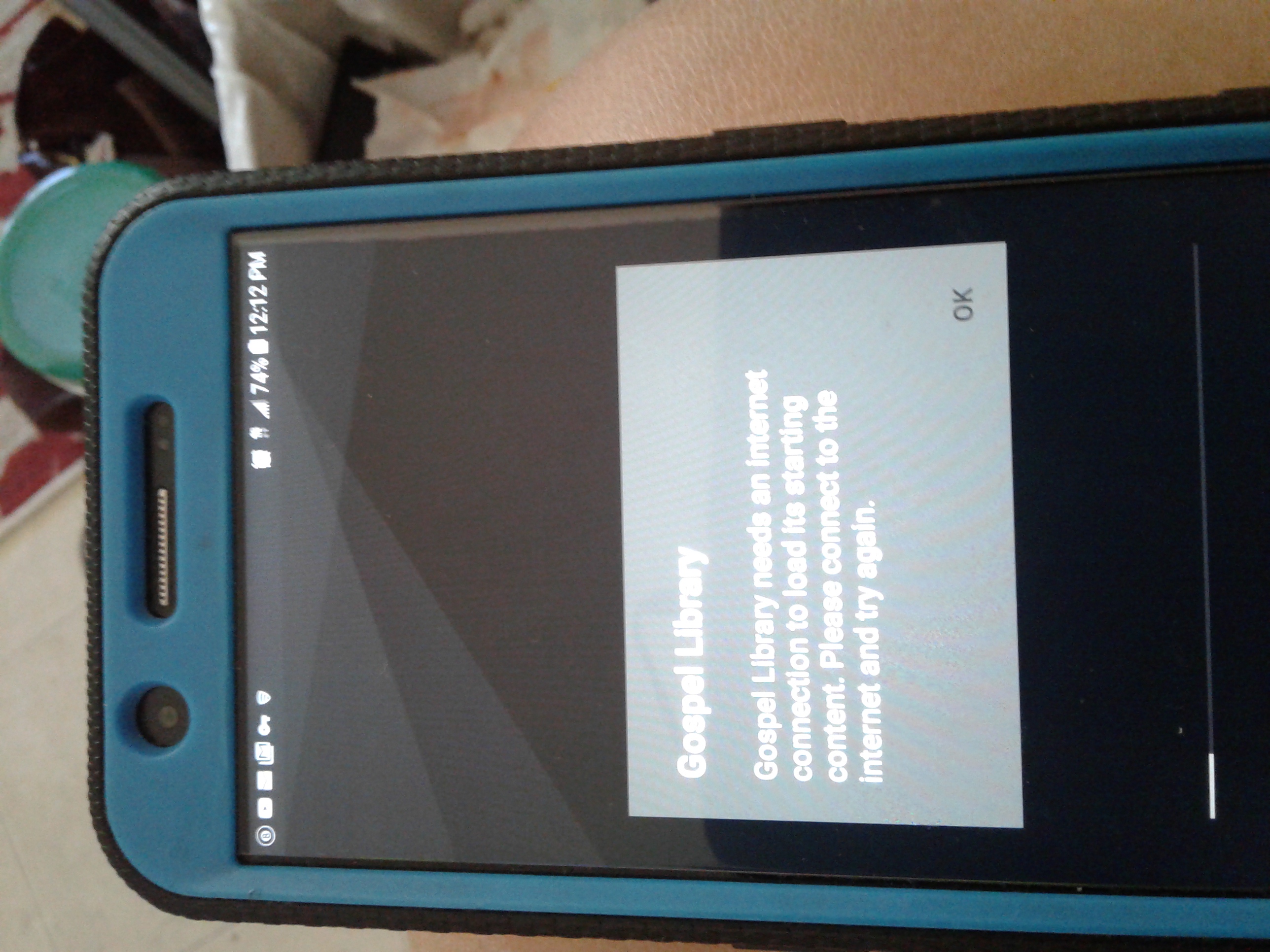
Ok so as of 7/26/2019 I've been having the same problem when trying to download an older or even newer General Conference. It pops up saying something like this action requires an internet connection. I'm on my cell phone with unlimited data, no connection problem since I was doing other updates for other apps at the same time. I even connected to my home wifi (100mbps) and it still doesn't recognize that it is connected to the internet. So I uninstalled it like I've had to in the past, now it pops up saying it requires an internet connection to initialize, so I click ok and it closes. Now it won't even open up at all. What is causing this problem with the gospel library? I've attached a picture of my phone with it saying it needs an internet connection to start up.
Community Moderators
#21
JeremieLeeBurhans wrote:Ok so as of 7/26/2019 I've been having the same problem when trying to download an older or even newer General Conference. It pops up saying something like this action requires an internet connection. I'm on my cell phone with unlimited data, no connection problem since I was doing other updates for other apps at the same time. I even connected to my home wifi (100mbps) and it still doesn't recognize that it is connected to the internet. So I uninstalled it like I've had to in the past, now it pops up saying it requires an internet connection to initialize, so I click ok and it closes. Now it won't even open up at all. What is causing this problem with the gospel library? I've attached a picture of my phone with it saying it needs an internet connection to start up.
If you're connected to internet, usually this means that there's something blocking the content servers. Do you have any web filters, content blockers, or VPNs enabled?
Samuel Bradshaw • If you desire to serve God, you are called to the work.
New Member
#22
I am having similar issues with GL on my android phone. A few weeks ago it suddenly said no internet connection when I had noticed that it had been over a week since the last sync. I verified my wifi was working properly and that it worked on other apps on my phone. I also checked at church without any success. The last few days it gives me the message about internet connection and will not even open at all. I have tried uninstalling and reinstalling, even rebooting the phone after an uninstall then reinstalling. I even tried LDS Tools just now and it is syncing fine. The app version is 5.2.3. What can I do to fix this?
Community Moderators
#23
GeorgeWilliam wrote:I am having similar issues with GL on my android phone. A few weeks ago it suddenly said no internet connection when I had noticed that it had been over a week since the last sync. I verified my wifi was working properly and that it worked on other apps on my phone. I also checked at church without any success. The last few days it gives me the message about internet connection and will not even open at all. I have tried uninstalling and reinstalling, even rebooting the phone after an uninstall then reinstalling. I even tried LDS Tools just now and it is syncing fine. The app version is 5.2.3. What can I do to fix this?
Do you have any web filters, content blockers, or VPNs enabled?
Samuel Bradshaw • If you desire to serve God, you are called to the work.
New Member
#24
Uninstall app then re-download. I couldn’t get new content (2020 Come Follow Me). Updating app didn’t help. Instead, it took away the content I previously had, then told me that I couldn’t download any content because I wasn’t connected to the internet, even though I was connected. Uninstalling took care of it.