Custom Reports

48 postsstarted by LLyman 14,247 viewsoriginal topic

New Member
#1
Can I create a report in LCR that would show all the widows in the ward? If so, How?
Community Administrator
#2
I don't think LCR has any custom reporting - yet. You'll have to do that in MLS.
Have you searched the Help Center? Try doing a Google search and adding "site:churchofjesuschrist.org/help" to the search criteria.

So we can better help you, please edit your Profile to include your general location.
New Member
#3
Why don't executive secretaries have access to custom reports in LCR?
Church Employee
#4
jmwarnick wrote:Why don't executive secretaries have access to custom reports in LCR?
I'm not sure why they did it, but at the ward level only the Bishop and Clerk have access.
Community Administrator
#5
jonesrk wrote:
jmwarnick wrote:Why don't executive secretaries have access to custom reports in LCR?
I'm not sure why they did it, but at the ward level only the Bishop and Clerk have access.
Only Bishops and Clerks have full access to the membership record. I'm guessing they didn't want to cripple the custom reports or try to add field restrictions based on current calling - at least not for this round.
Have you searched the Help Center? Try doing a Google search and adding "site:churchofjesuschrist.org/help" to the search criteria.

So we can better help you, please edit your Profile to include your general location.
Church Employee
#6
russellhltn wrote:
jonesrk wrote:
jmwarnick wrote:Why don't executive secretaries have access to custom reports in LCR?
I'm not sure why they did it, but at the ward level only the Bishop and Clerk have access.
Only Bishops and Clerks have full access to the membership record. I'm guessing they didn't want to cripple the custom reports or try to add field restrictions based on current calling - at least not for this round.
Yeah, but they didn't even give the custom reports to the assistant clerks who do have access to the membership record.
Community Administrator
#7
jonesrk wrote:Yeah, but they didn't even give the custom reports to the assistant clerks who do have access to the membership record.
Unless the custom report also gives access to annotations, that sounds like an oversight. (I don't remember if the membership clerk has access to see annotations.)
Have you searched the Help Center? Try doing a Google search and adding "site:churchofjesuschrist.org/help" to the search criteria.

So we can better help you, please edit your Profile to include your general location.
Senior Member
#8
russellhltn wrote:(I don't remember if the membership clerk has access to see annotations.)
No. Only the ward clerk and bishop. And I think only the bishop can see some specifics. But I don't imagine those were made available for custom reports.
Senior Member
#9
Am I missing something here? I am the ward clerk - still no custom reports in LCR...
Church Employee
#10
davesudweeks wrote:Am I missing something here? I am the ward clerk - still no custom reports in LCR...
It's in beta, so not everyone can see it yet, but it's coming.
Senior Member
#11
jonesrk wrote:
davesudweeks wrote:Am I missing something here? I am the ward clerk - still no custom reports in LCR...
It's in beta, so not everyone can see it yet, but it's coming.
Cool. Thanks. I thought I was quietly loosing my mind...
(well, perhaps I am but THAT is another matter entirely, LOL).
Community Moderators
#12
davesudweeks wrote:Cool. Thanks. I thought I was quietly loosing my mind...
(well, perhaps I am but THAT is another matter entirely, LOL).
Yes, we would have to cover the mind loss topic in another thread in keeping with the Forum Code of Conduct.

But hurray for the Custom Reports. And while it may be limited to leader and clerk in the beta, I hope they expand it to assistant clerks, as well. If this is just a limit for the beta test, that makes sense. Although I am certain the assistant clerks would give the feature a much better test drive.

What do they call it? Corner cases? Extreme limits testing? Real-use breakage? Coder's nightmare? [grin]
Church Employee
#13
russellhltn wrote:
jonesrk wrote:Yeah, but they didn't even give the custom reports to the assistant clerks who do have access to the membership record.
Unless the custom report also gives access to annotations, that sounds like an oversight. (I don't remember if the membership clerk has access to see annotations.)
Access is limited to the unit leader and the clerk. Assistant clerks do not have access. It is working correctly.
Senior Member
#14
I assume custom reports on LCR is currently in beta testing, since I have not seen it yet on LCR.
Dana Repouille, Plattsmouth, Nebraska
New Member
#15
How do I as the long, long time Stake Clerk see the custom reports in LCR?
Senior Member
#16
wcovey wrote:How do I as the long, long time Stake Clerk see the custom reports in LCR?
Unless you're stake is on the LCR beta program you have to wait until it's released to everyone. If your stake is on the beta program then it should just show up when you go to LCR.
New Member
#17
Thanks, guess my Stake is not on beta. Anxiously waiting!!
Senior Member
#18
I can see Custom Reports in LCR now.
https://www.lds.org/mls/mbr/report/custom-reports
Dana Repouille, Plattsmouth, Nebraska
Community Moderators
#19
drepouille wrote:I can see Custom Reports in LCR now.
Either you are now a part of the beta test, or they are rolling it out in phases. Access is still denied here.
Senior Member
#20
I have access to LCR custom reports as of today. Bartlesville, Oklahoma Stake. We were not on the beta.
Senior Member
#21
davesudweeks wrote:I have access to LCR custom reports as of today. Bartlesville, Oklahoma Stake. We were not on the beta.
Not happening in my house. When I use the url listed above, I get a note telling me I am not authorized to access LCR.
Church Employee
#22
Beta should be over. We deployed to production for everyone after the announcements this weekend.
Church Employee
#23
For those who have access but haven't been able to find it yet:
Reports > Create a Report
Senior Member
#24
scgallafent wrote:For those who have access but haven't been able to find it yet:
Reports > Create a Report
Still can't see it... I have the new Ministering report but not Create Report... Maybe I need to be patient....
Senior Member
#25
zaneclark wrote:
scgallafent wrote:For those who have access but haven't been able to find it yet:
Reports > Create a Report
Still can't see it... I have the new Ministering report but not Create Report... Maybe I need to be patient....
I did not look at every calling in the access table, but enough to believe that (at the ward/branch level) only the bishop/branch president and clerk have access to custom reports. If your calling is one of those, it sounds like a bug.
Senior Member
#26
Just checked and membership clerks do NOT have access to Create Reports. I will miss this. I used custom Reports extensively in MLS.
Community Administrator
#27
davesudweeks wrote:I did not look at every calling in the access table, but enough to believe that (at the ward/branch level) only the bishop/branch president and clerk have access to custom reports. If your calling is one of those, it sounds like a bug.
Which raises the question about what (if any) assistant clerks have access. One would hope the membership clerk would have access. I wouldn't expect the finance clerk to have access.
Have you searched the Help Center? Try doing a Google search and adding "site:churchofjesuschrist.org/help" to the search criteria.

So we can better help you, please edit your Profile to include your general location.
Church Employee
#28
zaneclark wrote:
scgallafent wrote:For those who have access but haven't been able to find it yet:
Reports > Create a Report
Still can't see it... I have the new Ministering report but not Create Report... Maybe I need to be patient....
You won't see it. It is only available to the bishop and ward clerk. Assistant clerks do not have access.
Community Moderators
#29
scgallafent wrote:It is only available to the bishop and ward clerk. Assistant clerks do not have access.
We had an assistant clerk who generated all of the custom reports. But, no longer.
Senior Member
#30
lajackson wrote:
scgallafent wrote:It is only available to the bishop and ward clerk. Assistant clerks do not have access.
We had an assistant clerk who generated all of the custom reports. But, no longer.
Unless I missed something, custom reports are still available in MLS so there is no change for the assistant clerk from how it was last week. I expect that functionality will go away at some point, but until then he should be able to carry on just exactly has he has been doing.
Senior Member
#31
davesudweeks wrote:
lajackson wrote:
scgallafent wrote:It is only available to the bishop and ward clerk. Assistant clerks do not have access.
We had an assistant clerk who generated all of the custom reports. But, no longer.
Unless I missed something, custom reports are still available in MLS so there is no change for the assistant clerk from how it was last week. I expect that functionality will go away at some point, but until then he should be able to carry on just exactly has he has been doing.
But that would mean I would have to actually use the computer in the clerk's office.... Not sure I even know where it is or have a key! :D
New Member
#32
Hopefully they are left in MLS. The Custom Reports in LCR are severely lacking in comparison to what we do in MLS. If this is being read by anybody in the know ( actually has direct access to the Development Team Leader) and would like to know exactly what I mean then please contact me on NambourWC@gmail.com and I'll get started on suggestions on how to improve LCR Custom Reports so they can actually do what MLS do.
Church Employee
#33
You're welcome to send me your suggestions and I'll get them to the appropriate person. Remember that you can make suggestions, but there is no guarantee when or if those features will make it into LCR.
Senior Member
#34
Let's start with this: LCR custom reports should be able to generate the same reports that MLS custom reports can generate (with the exception of MLS custom data that is not in LCR). One should be able to set up the same filters in LCR as one can in MLS and should be able to output the same columns in LCR as in MLS.

I'll provide specifics when I have a chance to try some of my most used MLS custom reports in LCR.
New Member
#35
Why can't the custom data in MLS be configured for and then input into LCR?
Church Employee
#36
So far all the custom reports I've done in MLS I've been able to do in LCR, and some that I couldn't do in MLS as well.
New Member
#37
BTW - THANKS FOR BRINGING CUSTOM REPORTS TO LCR! This is the last membership function I still USED in MLS, until now!

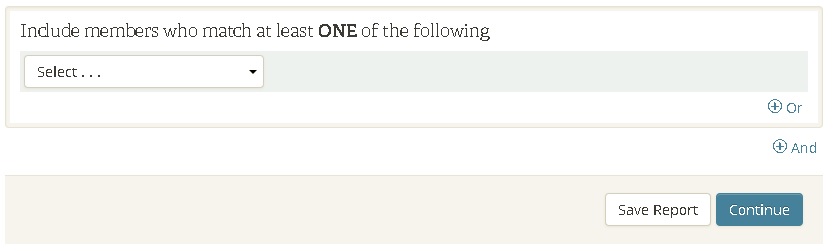
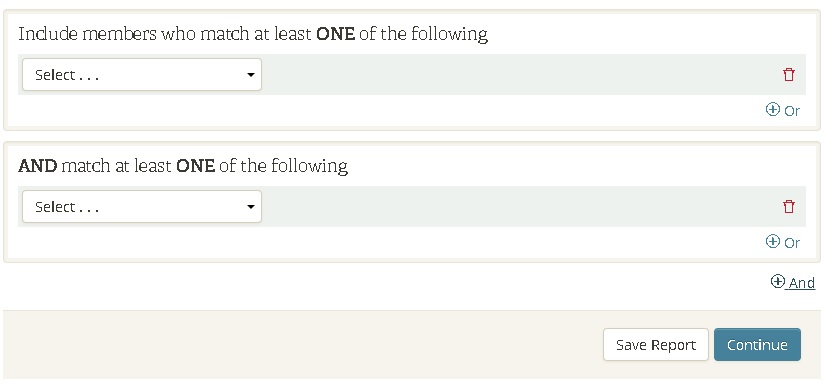
"And +" "Or +" is a little tricky at first (i didn't even see the "And+ " option at first) and was getting frustrated with "Or" not working! The "And +" lives outside of a box and i missed it completely.
CR default.jpg
(29.13 KiB) Not downloaded yet
My suggestion would be to have it default like this, without having to click "And +" first.
CR possible default.jpg
(46.68 KiB) Not downloaded yet
It would look a little less random sitting out there.

Thanks for all the hard work!

- Andrew
New Member
#38
I must say, That the new "Custom Reports" in LCR is awesome.....Thanks for the great work....We love them.
Senior Member
#39
Let's hope the same people who saw the advantage of adding presidencies to the Send a Message app also will see the light and let membership clerks create custom reports.
Member
#40
Please add the "Household Name" field to the list of columns in the Custom Reports tool. I want to create a report showing "Household Name", "Head of House" and "Head of House and Spouse" so that I can check for incorrect "Household Name" field contents.
New Member
#41
Brethren - I'm seeking custom reports, as a Ward Clerk, in LCR. Does anybody know when this will be enabled? shaun.ralston@gmail.com

Help!!!! Thank you.
Senior Member
#42
It is now available to Clerks, but not assistant clerks. In the Access Table, it is listed as Create Reports, so I'm assuming it will be under that same name in the Reports.
Senior Member
#43
LCR > Reports > Create a Report
Senior Member
#44

Set Apart filter in Custom Reports

A bishopric counselor asked me to create a custom report that shows him everyone that is NOT set apart for their calling. However, that filter does not exist.
Dana Repouille, Plattsmouth, Nebraska
Senior Member
#45

Re: Set Apart filter in Custom Reports

drepouille wrote:A bishopric counselor asked me to create a custom report that shows him everyone that is NOT set apart for their calling. However, that filter does not exist.
Possibly because that information is easily view-able without a custom report.
1. Member Tools: Reports| Members with Callings - everyone who has not been set apart will show red text that reads "Not set apart." On Android, if you scroll the titles at the top to the right, you can filter the members with callings list to show ONLY those who are not set apart.
2. LCR: Reports | Members with callings - there is a set apart check mark on the far right side of the list. You can click the "Set Apart" heading to sort and click it again to reverse-sort the list to put whichever group you want at the top.

Not quite as elegant as a custom report, but functional.
Community Moderators
#46
You can use the Members with Callings report in the Organizations tab and then sort by the Set Apart column. The first click of the column header will sort by 'not set apart' first. Then you can select the names that have not been set apart to print the report.
JD Lessley
Have you tried finding your answer on the ChurchofJesusChrist.org Help Center or Tech Wiki?
New Member
#47
Assistant clerks should have access to custom reports. It doesn't make any sense.
Community Administrator
#48
kkahara wrote:Assistant clerks should have access to custom reports. It doesn't make any sense.
It depends on what fields are a part of that. Certain things only the bishop and ward clerk have access to. Such as annotations. There might be others.
Have you searched the Help Center? Try doing a Google search and adding "site:churchofjesuschrist.org/help" to the search criteria.

So we can better help you, please edit your Profile to include your general location.