Unable to select a Destination Unit

12 postsstarted by simataas 2,854 viewsoriginal topic

New Member
#1
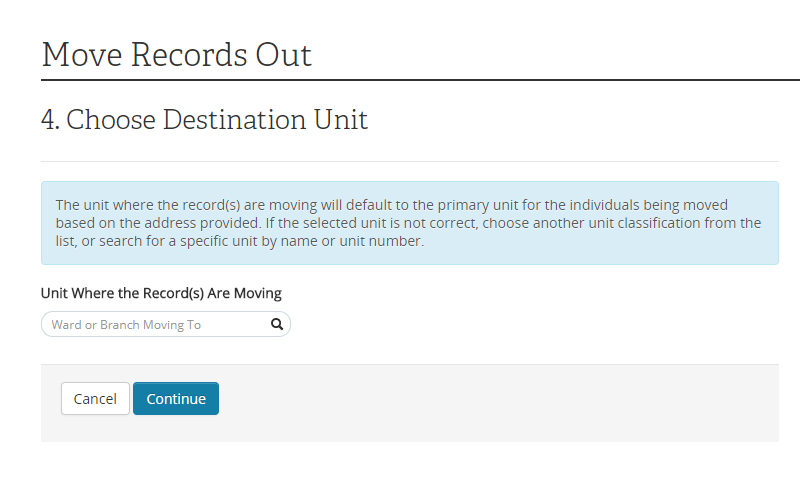
I am trying to move members out. I have the correct address, but a list of Destination Units is not generated in a drop-down list like I've seen before.
No_Drop_Down_List.png
(39.17 KiB) Not downloaded yet
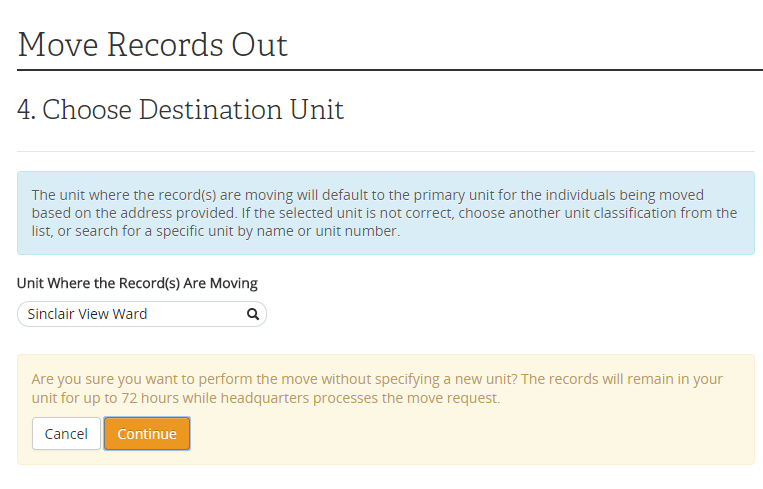
I know the proper Ward and when I search for and select it it shows up in the search bar. Clicking on Continue results in a warning message: "Are you sure you want to perform the move without specifying a new unit? The records will remain in your unit for up to 72 hours while headquarters processes the move request."
Warning.png
(52.18 KiB) Not downloaded yet
Does anyone know what I can do to properly move these records?
Community Administrator
#2
I tend to suspect that the address falls "between the cracks" in how the units were specified. I'd go ahead and move it.
Have you searched the Help Center? Try doing a Google search and adding "site:churchofjesuschrist.org/help" to the search criteria.

So we can better help you, please edit your Profile to include your general location.
Community Moderators
#3
Did the search bar have an auto-complete as you were typing? Sometimes with auto-complete you have to click the option from the list to select it, instead of typing the full name without clicking on the list item. I don't know specifically in this case, but I've seen that on other forms.
Samuel Bradshaw • If you desire to serve God, you are called to the work.
New Member
#4
Yes, I select the Unit as soon as it shows up (it shows up after typing just four letters in the searchbar). However, after clicking the whole Unit name just appears in the searchbar. It doesn't seem to be truly selected. Further clicking on the Unit or the search magnifying glass does nothing. Clicking Continue results in a warning that no Unit has been selected.
Community Administrator
#5
Just for kicks and giggles, what happens if you type that address into maps.lds.org? Is it able to select the unit? Is it able to place the location? It might be an added clue.
Have you searched the Help Center? Try doing a Google search and adding "site:churchofjesuschrist.org/help" to the search criteria.

So we can better help you, please edit your Profile to include your general location.
New Member
#6
I used the meeting house locator on LDS.org to verify the proper Unit. It had no trouble recognizing or placing the address or identifying the Unit.
Community Moderators
#7
I wonder if it would behave the same in a different browser.
Samuel Bradshaw • If you desire to serve God, you are called to the work.
New Member
#8
I have tried several devices (Ward PC, personal LapTop, Samsung Galaxy S8+, Samsung Galaxy J7) and every browser I have (Chrome for Windows, Chrome for Android, Firefox, IE, Dolphin Browser for Android). Nothing works. I have successfully moved previous records out on 3 of the 4 listed devices using IE, Chrome & Dolphin Browser, respectively.

The issue seems to be related to the fact that for this specific address the system does not return a pick list of Units to select and searching manually doesn't work (even though the right Unit can be found in the searchbar). Unknown is why maps.lds.org can find the address but the Move Members Out utility on Leader and Clerk Resources cannot. Also unknown is why manually searching for a Unit and selecting it does not work.
Community Moderators
#9
It might be good to send feedback to the Leader and Clerk Resources team reporting the issue. It sounds like a bug – either that the ward doesn't actually get selected in the process, or that it does get selected but the system gives you a warning that it wasn't.
Samuel Bradshaw • If you desire to serve God, you are called to the work.
New Member
#10
Is that done by clicking on "Do You Have Feedback on This Page?" or is there another contact option?
Community Moderators
#11
simataas wrote:Is that done by clicking on "Do You Have Feedback on This Page?"
Yes.
New Member
#12
Thanks, I'll do that. I'm the meantime, since the Destination Unit is in our Stake, I emailed their Membership Clerk and requested he just pull the records in.