Copy to my calendar

12 postsstarted by JasonWatts 5,301 viewsoriginal topic

New Member
#1
I'm looking for some instructional information on the "Copy to my calendar" feature in the LDS Tools app.

When I select the option and hit add nothing seems to happen. To what calendar is it supposed to add? A google calendar or an LDS calendar?
Community Administrator
#2
Which OS are you running LDS Tools on?
Have you searched the Help Center? Try doing a Google search and adding "site:churchofjesuschrist.org/help" to the search criteria.

So we can better help you, please edit your Profile to include your general location.
New Member
#3
IOS 10.3.3 on an IPad
Community Administrator
#4
Moved to the appropriate sub-section.
Have you searched the Help Center? Try doing a Google search and adding "site:churchofjesuschrist.org/help" to the search criteria.

So we can better help you, please edit your Profile to include your general location.
Community Moderators
#5
It should copy the event to the built-in iOS Calendar app, assigning it to whichever calendar is set as default. Do you have any calendars set up in the Calendar app?
Samuel Bradshaw • If you desire to serve God, you are called to the work.
New Member
#6
Is there anyway to make it interact with google calendar in stead of IOS Calendar?
Community Moderators
#7
No, but it's pretty easy to add your Google calendars to the iOS Calendar app:
https://www.lifewire.com/how-to-sync-go ... ar-1172187
Samuel Bradshaw • If you desire to serve God, you are called to the work.
Community Administrator
#8
It's pretty easy to add the church calendar as a layer in your Google calendar. It's all done from Google, no settings in your iPhone. I'm not sure if it's still the case, but it used to be that was how you got the calendar on a Android.

Help Center: Calendar Settings and Sync
Have you searched the Help Center? Try doing a Google search and adding "site:churchofjesuschrist.org/help" to the search criteria.

So we can better help you, please edit your Profile to include your general location.
New Member
#9
JasonWatts wrote:I'm looking for some instructional information on the "Copy to my calendar" feature in the LDS Tools app.

When I select the option and hit add nothing seems to happen. To what calendar is it supposed to add? A google calendar or an LDS calendar?
In iOS, if you are just copying one event to your calendar app, once you tap Copy to My Calendar, another 'bubble' will pop up, that also says, Copy to My Calendar. If you tap that, your default calendar app will open a new screen allowing you to edit the event and calendar details. Tapping Add will then add it to your calendar app.

I do suggest you use the instructions already provided to sync your LDS calendar with whatever calendar app you are using. I have been using the Google calendar, and all the updates are automatic. And it also keeps up with all the calendars I am subscribed to.
New Member
#10
falcon771 wrote:
JasonWatts wrote:I'm looking for some instructional information on the "Copy to my calendar" feature in the LDS Tools app.

When I select the option and hit add nothing seems to happen. To what calendar is it supposed to add? A google calendar or an LDS calendar?
In iOS, if you are just copying one event to your calendar app, once you tap Copy to My Calendar, another 'bubble' will pop up, that also says, Copy to My Calendar. If you tap that, your default calendar app will open a new screen allowing you to edit the event and calendar details. Tapping Add will then add it to your calendar app.

I do suggest you use the instructions already provided to sync your LDS calendar with whatever calendar app you are using. I have been using the Google calendar, and all the updates are automatic. And it also keeps up with all the calendars I am subscribed to.
That’s the problem for me - the bubble does not appear. Maybe I need to give iCal permission to access lds tools or visa versa but I don’t know how. I did subscribe to the lds tools calendar but that puts Everything on my calendar - too much.
Community Administrator
#11
swilde1 wrote:I did subscribe to the lds tools calendar but that puts Everything on my calendar - too much.
Calendar 2.x puts syncs everything you are subscribed to in the sync. "Subscribe" shouldn't be confused with the check boxes on the main page that's selected for view. Subscriptions are sliders. You can get to it via the Settings.

In Calendar 3.0, you can have a separate sync that is just of selected calendars. I believe that's going to be rolled out some time in Feb.
Have you searched the Help Center? Try doing a Google search and adding "site:churchofjesuschrist.org/help" to the search criteria.

So we can better help you, please edit your Profile to include your general location.
New Member
#12
swilde1 wrote:That’s the problem for me - the bubble does not appear. Maybe I need to give iCal permission to access lds tools or visa versa but I don’t know how. I did subscribe to the lds tools calendar but that puts Everything on my calendar - too much.
Okay. That means that at some point when you originally tapped the Copy to My Calendar link, you selected Don't Allow. This basically denies LDS Tools from accessing your calendar, forever-ish.
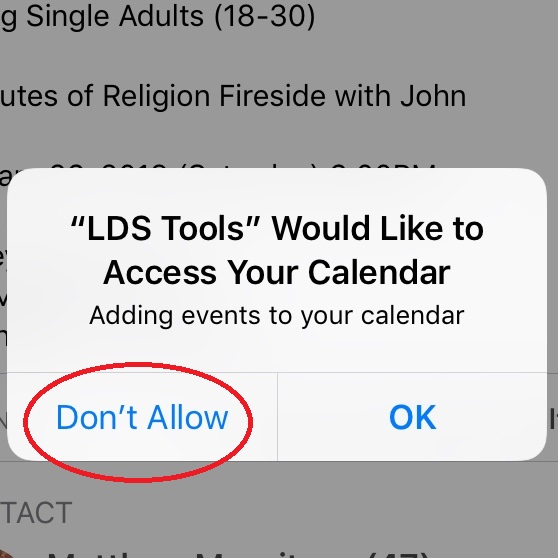
Allow LDS Tools.jpg
Allow LDS Tools.jpg (64 KiB) Viewed 1250 times
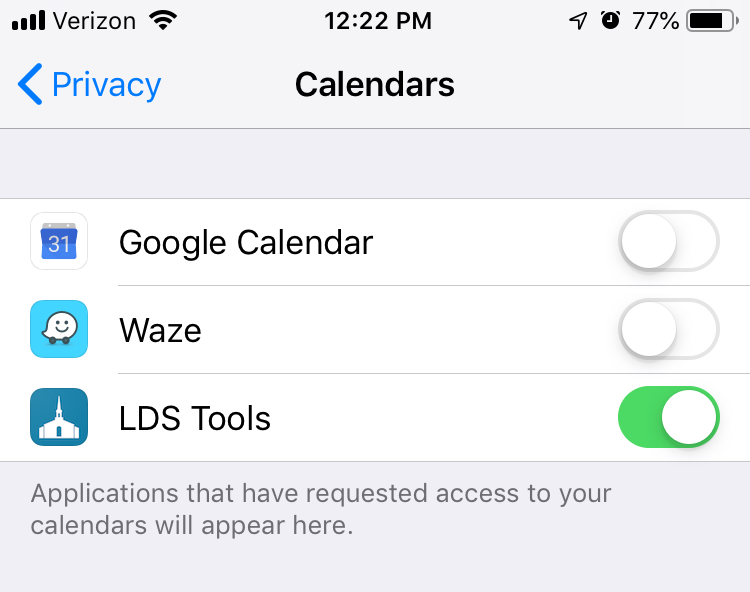
To reset this, go to Settings > Privacy > Calendar and slide the toggle button next to LDS Tools to enable (I am using iOS 12.1.3).
Privacy setting.jpg
(115.66 KiB) Not downloaded yet
You will have to log in to LDS Tools again. Then go to the calendar and tap Copy to My Calendar for the event you want to add, another 'bubble' will pop up, that also says, Copy to My Calendar. If you tap that, your default calendar app will open a new screen allowing you to edit the event and calendar details. Tapping Add will then add it to your iOS calendar app.

Additionally, I understand the "too much" comment. That is why I created a third Google Calendar just for the stake calendar (I have one for my work, personal, and church). I can turn it on and off in my view, but it is always synced with the calendar on lds.org. As a stake clerk, this has proved to be invaluable. I can see the stake calendar, ward calendars, and meetinghouse calendar without having to sign in to lds.org every time.