ward directory to iphone contacts

20 postsstarted by danielloveland 18,796 viewsoriginal topic

New Member
#1
I'm in the bishopric and have the habit of not picking up my phone when I don't recognize the number. Ideally I'd like to have the entire ward as contacts in my iPhone so that I DO recognize the numbers of members. I'd also like to have these contacts in a labeled group for easier searching, identifying, and eventually deleting.
I've read through a bit on this forum but haven't found anything really iphone friendly. I know that in LDS tools I can individually add members to my contacts but I want the whole ward in so adding them one by one isn't reasonable. Please let me know your thoughts.
Thanks in advance!
Community Administrator
#2
No idea if it works on iOS, but the Android version has a Caller ID lookup function. But the Apple OS may prevent that.

But keep in mind that even with all the numbers listed, a member may choose to call you from their work number or even from a blocked number.
Have you searched the Help Center? Try doing a Google search and adding "site:churchofjesuschrist.org/help" to the search criteria.

So we can better help you, please edit your Profile to include your general location.
Community Moderators
#3
iOS does support caller ID with third-party directories, since iOS 10, but it hasn't been integrated into LDS Tools. You can send feedback through the app and suggest it – I think it'd be a great feature.
Samuel Bradshaw • If you desire to serve God, you are called to the work.
Community Moderators
#4
danielloveland wrote:I'm in the bishopric and have the habit of not picking up my phone when I don't recognize the number. Ideally I'd like to have the entire ward as contacts in my iPhone so that I DO recognize the numbers of members. I'd also like to have these contacts in a labeled group for easier searching, identifying, and eventually deleting.
As sbradshaw said, send feedback. Android LDS Tools has a feature that will match the digits of an incoming call with the phone numbers in the LDS Tools directory. You tell it how many digits, 4, 7, etc., and if there is a match, the family name shows up. It is a little slow and does not always work in time.

It appears that iOS now has that capability. Hopefully, they will decide to program it into LDS Tools.

Neither Android nor iOS are able to bulk load contacts from LDS Tools. You have to do them one at a time. As an Android user, I have my contacts tied to gmail (intended as a sort of "cloud" backup). I don't know if there is a way to bulk load a list of contacts through the gmail website, but I would at least look if I were going to do it. Otherwise, it would be a couple of hours on a slow afternoon which, of course, does not exist for a bishop (or most anyone else).

As for keeping them all grouped together, I would use a one- or two-place code for all of them. For example, if you were the First Ward, I would enter a W1 either before or after each name, depending on how your contacts list sorts in iOS. The names then would all be together in the W section of your contacts list. Or you could use another letter, like Z, to put them all at the end, etc.

Those are all painful workarounds, but if you wish to do it, those are the best ways I know of, at least for now.
New Member
#5
Can you please send me the detail instructions to put my ward Directory in my apps onto my iPhone. Email: annewerner2017@icloud.com Thank You you! Anne
Community Moderators
#6
annewerner wrote:Can you please send me the detail instructions to put my ward Directory in my apps onto my iPhone.
You have to do them one at a time. There is not a way to take the LDS Tools app directory and transfer all of it into your phone at once, not even if you are using an Android. Sorry.
Senior Member
#7
Don't rely on the Android thing - it has never worked for an incoming call or text. It will very nicely give you a notification afterwards that it matched someone in the LDS Tools database but has never been useful to identify who is calling.

Also, it is the suggestion/update that is most frequently requested of that team and is a real no-brainer but the Church is in no hurry to change it or knows how to (remember folks, we are not the team's who design this stuff's clients. Only departments in the church are their clients). Each department is lined up to get 'their special stuff added' in some kind of priority list, likely the seniority of the GA at the head of the department.

It's a web service written a very long time ago that all online tools and apps utilize for directory data and my guess is the original writer is long gone from the church and nobody else claims ownership of it and due to other priorities nobody is getting the budget to go make it happen without another department adding it to the list.
“A long habit of not thinking a thing wrong, gives it a superficial appearance of being right, and raises at first a formidable outcry in defense of custom.”
― Thomas Paine, Common Sense
Senior Member
#8
annewerner wrote:Can you please send me the detail instructions to put my ward Directory in my apps onto my iPhone. Email: annewerner2017@icloud.com Thank You you! Anne
Install the app called LDS Tools, each individual member can be saved to your contacts, normally with a long-press on the name/phone, etc...
“A long habit of not thinking a thing wrong, gives it a superficial appearance of being right, and raises at first a formidable outcry in defense of custom.”
― Thomas Paine, Common Sense
New Member
#9
Go to settings -> Phone -> Call Blocking and identification -> Turn on LDS Tools
New Member
#10
LDS Tools isn't an option under Phone - Call Blocking and identification. Not sure why, there's another app there. I'm on v3.5.1 (6324) so the option should be there. I already tried restarting my phone, deleting and reinstalling LDS Tools.
Suggestions?
New Member
#11
To follow up on this, there I just selected it under Settings > Phone > Call Blocking & Notification > Turn on 'Tools'
That should work.
New Member
#12
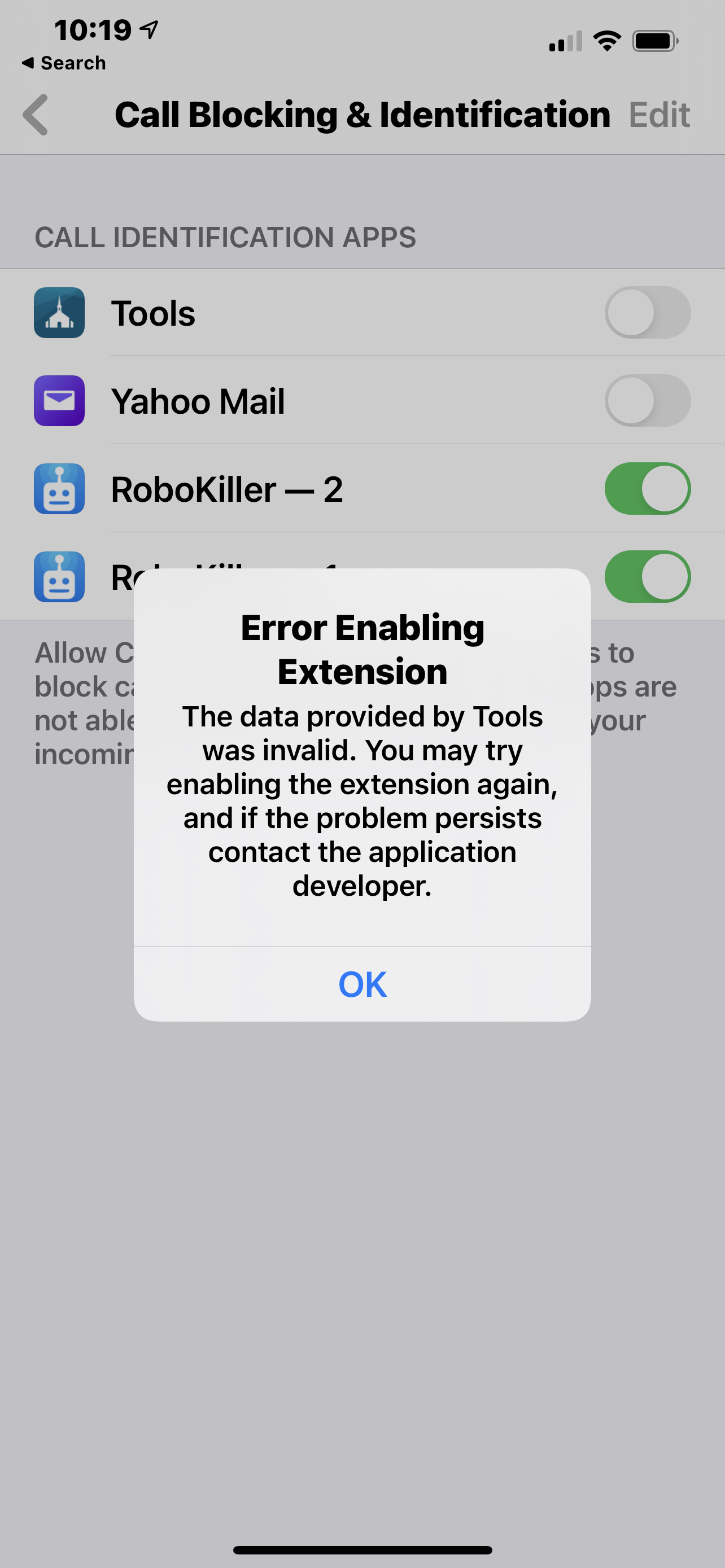
Attempted to do this today after activating app RoboKiller, an app that uses bots to answer calls from unknown callers. Sadly, my phone returns the error:

Error Enabling Extension : The data provided by Tools was invalid. You may try enabling the extension again, and if the problem persists contact the application developer.

Now I am sad. :'(
New Member
#13
Attached a screenshot if this helps.
📎 IMG_6059.PNG (1.36 MiB)
Senior Member
#14
For what it's worth, it doesn't work on Android either (Android 9, Member Tools 4.4.0 beta). I submitted feedback and they provided instructions but all the settings were correct per their instructions and it still has never worked for me unless I manually enter contacts in my contact list.
Community Administrator
#15
I wonder if success depends on the formatting of the phone number. Browsing my ward, I'm seeing xxxxxxxxxx, (xxx)xxx-xxxx, xxx-xxx-xxxx, xxx-xxxx and so on. Clearly, no standardization is being imposed on the display. I have no idea if any formatting is being imposed on what's passed to other apps, or of the apps care.
Have you searched the Help Center? Try doing a Google search and adding "site:churchofjesuschrist.org/help" to the search criteria.

So we can better help you, please edit your Profile to include your general location.
Senior Member
#16
russellhltn wrote:I wonder if success depends on the formatting of the phone number. Browsing my ward, I'm seeing xxxxxxxxxx, (xxx)xxx-xxxx, xxx-xxx-xxxx, xxx-xxxx and so on. Clearly, no standardization is being imposed on the display.
That's a very good point. When I was clerk, it was a "thing" with me to have them all formatted the same so I would update them when I found any that were different. Our current clerk is much more hands-off and only makes changes when specifically requested by someone.

I wonder how we can find out if the theory is a possible root cause?
New Member
#17
Makes very good sense.

In an attempt to resolve on my own, I removed the app, rebooted my phone, re-installed and tried again, but still no joy. I did open up a case CSLUS0379735 on the app.
#18
This post was made more than 3.5 years ago and I just now found it and enabled the setting on my iPhone.
Cease to be idle; cease to be unclean; cease to find fault one with another; cease to sleep longer than is needful; retire to thy bed early, that ye may not be weary; arise early, that your bodies and your minds may be invigorated
Doctrine & Covenants 88:124
New Member
#19
I need help!
Senior Member
#20
Don't rely on it, It has never worked well for me or my wife, we're on Android, it will maybe get the name by the time you're finished with the call and it doesn't work with text messaging, it's not a very important part of the app. - People will come on here and tell you it works for them every time and has for years, but I've never believed them :)
“A long habit of not thinking a thing wrong, gives it a superficial appearance of being right, and raises at first a formidable outcry in defense of custom.”
― Thomas Paine, Common Sense