Export LDS Tools contacts to Gmail?

19 postsstarted by toddjconklin 14,797 viewsoriginal topic

New Member
#1
Hey,

I'm getting sustained to a certain calling this Sunday ( :shock: ) in which I will be getting lots of calls from ward members. I need to know now to transfer the ward list into my phone so that I can recognise names and numbers when they call as I have a work phone and need to distinguish work from church.

I've had a look on here and am aware that caller ID is not allowed in iPhone (https://tech.lds.org/forum/viewtopic.ph ... ne#p129524) which is very annoying as this would be perfect.

Does anybody know is it possible to export from LDS Tools to Gmail contacts? Or alternatively would it work to go from LDS Tools to *.csv to Gmail? If anybody has tried is this successful and have any tips?

Cheers
Community Moderators
#2
Caller ID apps are supported on iPhone as of iOS 10, which was released at the end of 2016, but I haven't heard anything about it being adopted as a feature in LDS Tools. You can send in-app feedback requesting it. There's no way to export in bulk (most likely because of privacy laws/policies), but you can export people's contact information one by one from their individual profile pages.
Samuel Bradshaw • If you desire to serve God, you are called to the work.
Community Administrator
#3
Something to keep in mind when doing a export: how that will work when changes are made? Will you be able to mass-delete the last import from your phone and do a fresh one? Otherwise, you could have a real mess. Especially when you eventually get released and need to pair the phone list back down to just friends and family.

Android does have the caller ID feature, but I've never really found it useful. I'm not sure why but I only see the ID after the fact, not when the call is ringing.
Have you searched the Help Center? Try doing a Google search and adding "site:churchofjesuschrist.org/help" to the search criteria.

So we can better help you, please edit your Profile to include your general location.
Church Employee
#4
russellhltn wrote: Android does have the caller ID feature, but I've never really found it useful. I'm not sure why but I only see the ID after the fact, not when the call is ringing.
I see a little bubble with the name in the middle of my screen while it is ringing.
New Member
#5
Thanks for the replies.

If LDS Tools could support Caller ID in iPhone now that would be fantastic. Not sure how to request the feature but I'll look into it. Surely this would be a feature in fairy large demand if iOS 10 allowed it now...

Regarding the constant move-ins and move-outs, yes that will be problematic. I don't quite know how to deal with that. I think the best I could do would be to manually add and delete when people moved out or moved in. Whilst annoying, it would be far easier than entering everyone from scratch.

As to what to do when I get released, I've already thought of that - that's easy. I would open a separate gmail account for contacts only. When I'm done, just delete the account. But this is all irrelevant anyway if you can't do a bulk export. I was just assuming that would be possible. If you can export, surly you could export all at once and not just individual records?

Thanks again, if anybody can clarify further, please do!
Senior Member
#6
Wouldn't that be a nice feature :)
“A long habit of not thinking a thing wrong, gives it a superficial appearance of being right, and raises at first a formidable outcry in defense of custom.”
― Thomas Paine, Common Sense
New Member
#7
What you're really asking for isn't caller ID integration, but contact list integration. There have been requests in the past to make lds.org data available to phones as contact sources:

https://tech.lds.org/forum/viewtopic.php?t=8399

Doing this would seamlessly integrate with incoming calls on all platforms, regardless of what features (like caller ID hooks) might be exposed by the system. It would also remain synchronized with every change.

Lds.org as a contact repo would obviously be super helpful for people in many callings.
New Member
#8
toddjconklin wrote:this is all irrelevant anyway if you can't do a bulk export. I was just assuming that would be possible. If you can export, surly you could export all at once and not just individual records?
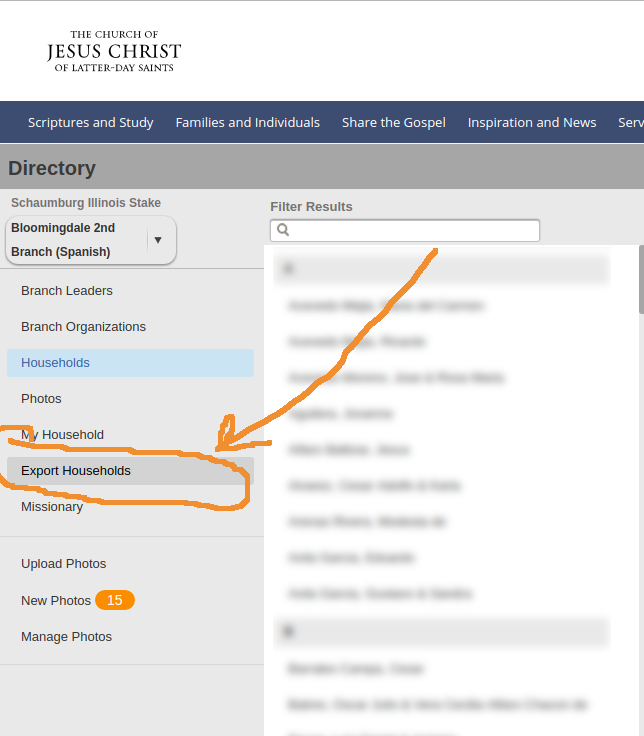
I hope this isn't too late to be helpful. Yes, it is possible to do a bulk export of membership information into a CSV spreadsheet, from which you can import into Google Contacts (i.e. Gmail) or other systems that will show up on your phone so you can know if it's a work call or a church call.

First, from the support page on exporting ward directory, as of 31 October 2016:
Export Household Information

A Ward Administrator can export Ward household data in the directory. The exported file will be in comma separated value (CSV) format, which will allow you to open the data in a spreadsheet application such as Microsoft Excel. The household data can be used only for Church use, and not for any commercial, business, or political purposes. If you are not a Ward Administrator you can contact one of the individuals in your Ward listed under Roles and Responsibilities in Help to make a request for an exported file.

If you are a Ward Administrator, you are prompted with the option to include or exclude private profiles in the export.

Stake leaders and clerks can also export data for any ward in their stake. Stake leaders can only export information for one ward at a time, not for the entire stake at once.
  1. In the left sidebar, click Export Households.
  2. Select whether you want to include private members. If you include them, the download will include all member information, including private profiles.
  3. Click Download.
  4. Save the CSV file to a location on your computer.
Second, as eblood66 pointed out on Wed May 24, 2017:
As of right now it still exists in the Directory (lds.org/directory) but I always expect it to disappear at any time since every other export has been removed. I'm pretty sure it's only available to bishopric members, clerks and the executive secretary.
If you aren't in one of those callings, I suggest that you kindly ask the clerk to assist you.

Third, see attached screenshot.

I tried it today as branch clerk, and I have a CSV file with names and phone numbers in it.
📎 export households.png (75.03 KiB)
New Member
#9
jcarroll wrote:I hope this isn't too late to be helpful. Yes, it is possible to do a bulk export of membership information into a CSV spreadsheet, from which you can import into Google Contacts (i.e. Gmail) or other systems that will show up on your phone so you can know if it's a work call or a church call.
Hi Josh,

Thanks so much, yes that helps a lot! I just did it. I'm SURE that option to export didn't exist before!!! But then again, when my wife asks me to fetch something around the house, it's never there when I look, but then magically appears right where she said it was when she comes to find it lol.

If only the ward list exported into individuals for each row instead of households! I'm now going to have to deconstruct the spreadsheet a little to get spouses to have their own row with their own mobile number. As it is, it will appear as the 'couple name' with either the "family phone", "head of house phone" or "spouse phone" as they all appear in the same row. If there are any other great ideas to solve this problem it would be great, but I'm much further along now then having to enter everything manually. Thanks!
Senior Member
#10
toddjconklin wrote:If only the ward list exported into individuals for each row instead of households! I'm now going to have to deconstruct the spreadsheet a little to get spouses to have their own row with their own mobile number. As it is, it will appear as the 'couple name' with either the "family phone", "head of house phone" or "spouse phone" as they all appear in the same row. If there are any other great ideas to solve this problem it would be great, but I'm much further along now then having to enter everything manually. Thanks!
You can do this by individual TODAY with good old-fashioned MLS:
1. I would set up a custom report to select everyone listed as "head of house" or "spouse"
2. Then I would select the information I wanted on the report (preferred name, individual number, individual e-mail, address, household number, etc).
3. Select the order I want the data to appear (columns in the report)
4. Export the report as a .csv file
5. Import the .csv into a spreadsheet and you will a report with each parent in the household on their own line (note: for member children of non-member parents, you will have to manually remove them as they may be listed as head of house)

The only downside is you have to go to an MLS computer to do it. I have an instruction for MLS custom reports I built some years ago to assist my father when he was called as ward clerk in his ward. I would be happy to email it to anyone who would like it - pm me me your e-mail address.
New Member
#11
So, just to confirm - It is not possible for LDS Tools contacts to be automatically associated to incoming calls in a way that also keeps caller contact info up to date and synced with LDS Tools? Exporting the ward directory & uploading them into Gmail or some other contact list works ok at a point in time, but you won’t get any future updates or changes to that info unless you run that export/import regularly or you manually maintain your contacts to keep them in sync with LDS Tools, right? I just switched from an Android to an iPhone and I was really surprised to find that feature didn’t work on iPhones. I miss it!
New Member
#12
Thanks! I'll give that a try on Sunday.

PS. Jcarrol, no idea why I called you Josh.
Community Administrator
#13
davesudweeks wrote:The only downside is you have to go to an MLS computer to do it.
Question: how would you remove families from your phone when they move out? New families can be fixed with another import. But keeping your "church contacts" separate from some of your rarely used personal/personal business contacts wouldn't be fun unless there's a way to track them.
Have you searched the Help Center? Try doing a Google search and adding "site:churchofjesuschrist.org/help" to the search criteria.

So we can better help you, please edit your Profile to include your general location.
Community Moderators
#14
russellhltn wrote:Question: how would you remove families from your phone when they move out?
Manually, one at a time, a painful process if you load them all. I add members to my contacts list as they call me or when I will be calling them. I keep many after they move, because I still enjoy being in contact with them.
Community Moderators
#15
russellhltn wrote:Question: how would you remove families from your phone when they move out? New families can be fixed with another import. But keeping your "church contacts" separate from some of your rarely used personal/personal business contacts wouldn't be fun unless there's a way to track them.
On Apple Contacts (iOS/Mac), you can organize your contacts into groups. I think Gmail lets you do something similar.
Samuel Bradshaw • If you desire to serve God, you are called to the work.
Community Administrator
#16
sbradshaw wrote:I think Gmail lets you do something similar.
It does, but I'm not sure how that would work with a mass import.
Have you searched the Help Center? Try doing a Google search and adding "site:churchofjesuschrist.org/help" to the search criteria.

So we can better help you, please edit your Profile to include your general location.
New Member
#17
russellhltn wrote:
sbradshaw wrote:I think Gmail lets you do something similar.
It does, but I'm not sure how that would work with a mass import.
I just set up a separate google account under "xyz"ward@gmail.com and then sync it to my iphone, so then I can just toggle that group on or off, or toggle all the others off and leave that one on if I want to see only ward contacts for a particular reason.
New Member
#18
lajackson wrote:
russellhltn wrote:Question: how would you remove families from your phone when they move out?
Manually, one at a time, a painful process if you load them all. I add members to my contacts list as they call me or when I will be calling them. I keep many after they move, because I still enjoy being in contact with them.
I don't think it's too big a deal. From the phone, yes it would be annoying. But I just go into google contacts on the computer and tick all the ones that I don't need any more and delete. It takes 30 seconds. If i want to keep them as personal contacts I would copy them over to my personal gmail account.
Community Administrator
#19
toddjconklin wrote:I just set up a separate google account under "xyz"ward@gmail.com and then sync it to my iphone, so then I can just toggle that group on or off
There you go! But I figured it's a plan you want in place before you do a mass import and comingle ward and personal contacts.
Have you searched the Help Center? Try doing a Google search and adding "site:churchofjesuschrist.org/help" to the search criteria.

So we can better help you, please edit your Profile to include your general location.