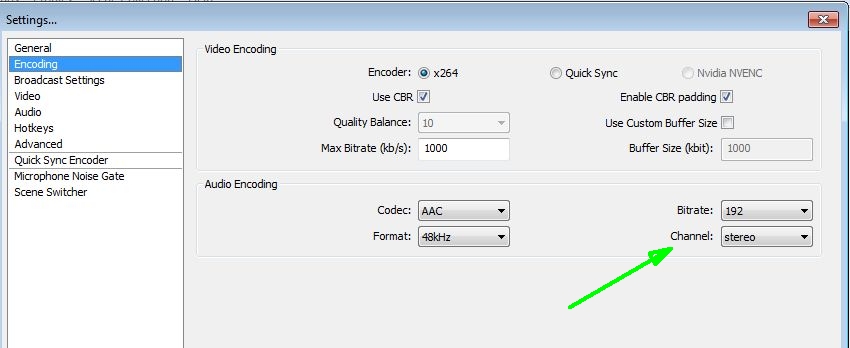
Used OBS version v0.659b, (not OBS Studio), for remote meetinghouses to test on the following dates, using headquarters (Microsoft) EastUS2-1 servers with no issues
..Tue 31Jan2017 7pm (EST) for 1 hour
.. Wed 18Jan2017 7pm (EST) for 1 hour
OBS Encoding settings:
..Audio Encoding
....Channel: Stereo
So, it appears that the Teradek VidiU and OBS both require Audio Encoding to be set to stereo
MHTech.LDS.org text (not the image) has been updated to show current audio settings for Teradek VidiU:
Configure VidiU Broadcast Settings
..
Configure Audio Input Settings
From the VidiU Web Interface, select "Settings" then click on the "Audio" icon. Configure your settings as instructed below:
1. Audio Source: "Analog" (unless audio will be embedded in the HDMI cable)
2. Channel: "Stereo"
. . .
https://www.lds.org/help/support/contro ... u?lang=eng
Wirecast users watch out
OBS Settings
Also, please review the posting:
Changes with the new rollout
Postby rannthal » 09 Nov 2016 11:43
There is a known issue with using the Mono Left or Mono Right settings for audio on the terradek. Using this setting causes the audio to become unusable. Using the Stereo setting on the terradek works fine. The Stereo setting is the default setting for audio on the terradek. We are working to correct this issue.
https://tech.lds.org/forum/viewtopic.ph ... 81#p161681