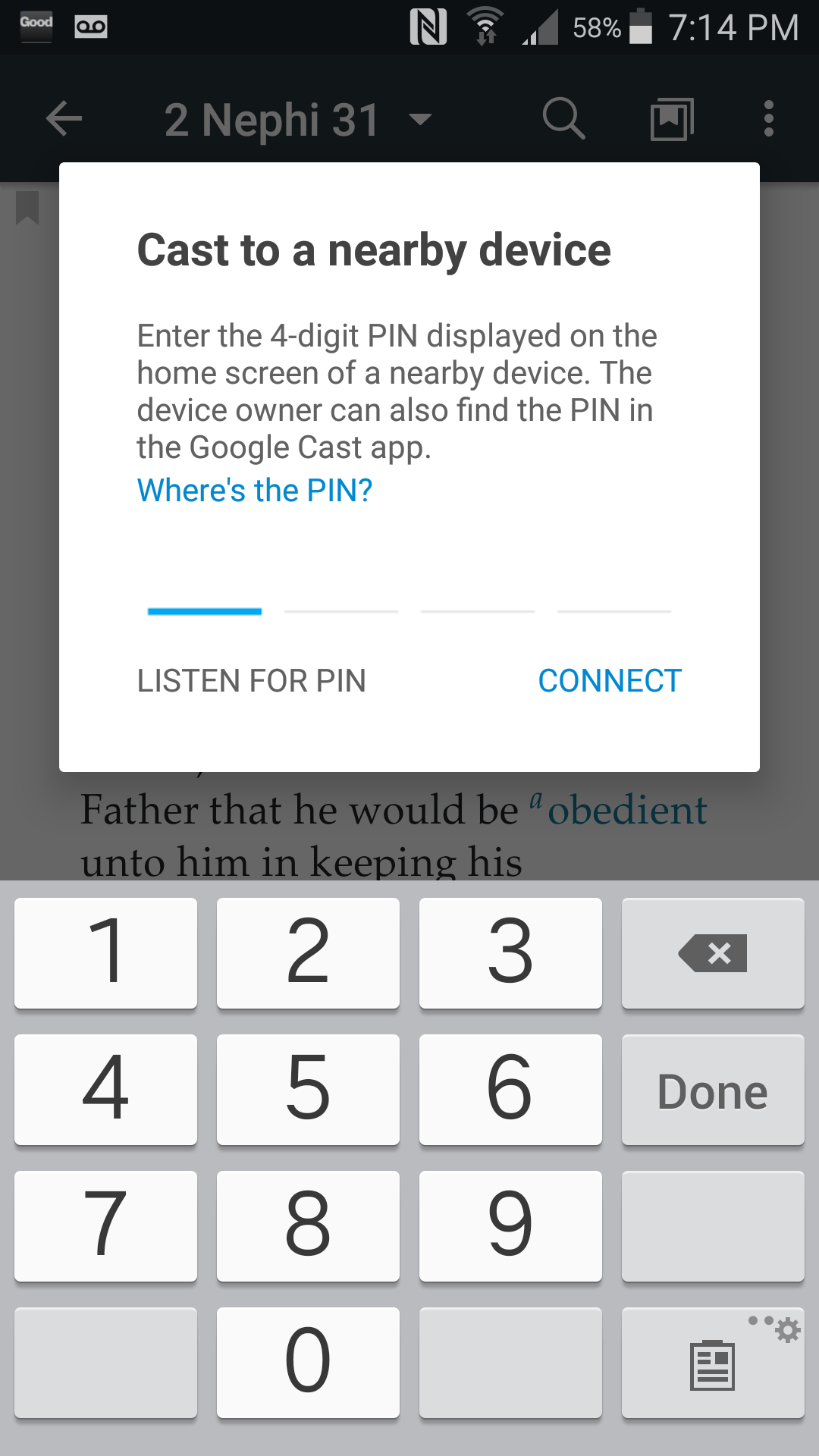
"Cast to a nearby device" issue

47 postsstarted by jared_glenn 27,626 viewsoriginal topic

New Member
#1
Over the last week or two the Gospel Library App on my phone has had some problematic issues, but yesterday they rendered the app unusable. Since then, every time I attempt to open a section of text the app requests that I "Cast to a nearby device" for some reason. In an attempt to overcome the issue, I uninstalled and reinstalled the app, and, when that didn't work, I tried re-installation a second time. I even tried to comply with the instructions and cast to my television, but that didn't work either.

At this point, I'm unsure what to do. I found a lot of instances of this happening in the app store reviews, but I can't seem to find a solution elsewhere online. While I certainly disliked the force closes, I could still soldier through that - but this problem essentially bars me from the app.

Please, if anyone knows of a way to overcome this issue, I'd be very grateful for your help.

Thank you!

Jared
New Member
#2
We're having the same issue on an Android phone as well. We haven't yet discovered a work around but it makes us unable to read at all and we can't cast to another device because no other device ID showing any kind of pin anyway. I just want to read before bed :cry: I really like the Gospel Library app besides this issue though.
#3
My wife and I have had the same issue on our phones. She was able to uninstall and then reinstall the app and it seemed to fix the issue for her. I have tried to do the same but the issue has not gone away. I too would like to know if anyone has been able to make the "cast to a nearby device" pop-up stop and how.
New Member
#4
I'm having the same issue on an LGV20. Please fix!
New Member
#5
Same issue here (Android).

I've found that if I put my phone in Airplane Mode, I'm able to use the app without the "Cast to a nearby device" popup. But then I can't download additional content, so I'm stuck with what I've downloaded previously.

Wish I could just download the old version of the app, since I'm not a fan of this version (I don't like how it opens multiple windows). But that's not likely, so Im looking forward to the bug fix!
New Member
#6
Super annoying. Doesn't feel like an upgrade.
New Member
#7
I have put the phone (Moto 4G) in "Airplane Mode" and that has stopped the pop-up messages.
I am sure this will cause other problems when the program has to download something.
Make sure to turn off "Airplane Mode" when you exit the program.
Good Luck - Hope this gets fixed soon.
New Member
#8
I have this same problem. How funny, studying the scriptures is thwarted by a technical glich. Maybe I need to go old school, never had this problem with a book...
Community Moderators
#9
This problem isn't limited to Gospel Library – it has popped up for other apps that support Chromecast as well, and has to do with the latest Google support libraries that are bundled in the app. I haven't seen the problem myself, but I've heard that disabling Bluetooth might stop the popup, while the developers are working on a fix. (Bluetooth is one of the things that gets disabled when you turn on airplane mode.)
Samuel Bradshaw • If you desire to serve God, you are called to the work.
Community Moderators
#10
infarctus wrote:Maybe I need to go old school, never had this problem with a book...
On the other hand, you never had night theme, tappable footnotes, audio, search, copy/paste, unlimited notebooks and bookmarks, history, and thousands of books, manuals, and magazines in your paper scriptures. :)
Samuel Bradshaw • If you desire to serve God, you are called to the work.
New Member
#11
My husband and I are also having this difficulty. We have Android phones. I don't have bluetooth enabled on my phone, so that isn't a fix for me. At the church building we were able to use the app on Sunday. But it doesn't work at home. We don't have any Chromecast devices, so a neighbor must. I'm going to have to go old school back a the books I hold. I like listening to my scriptures while I do housework.
New Member
#12
Heard back, looks like airplane mode does stop it, but this is a temporary fix as you can't download. Having Bluetooth off didn't work for us. I hope a fix is coming.
New Member
#13

Re: Chromecast

After the latest update my phone's gospel library automatically tries to get me to chromecast whenever I try to read scriptures. I have to reboot my phone every time to get it to stop. It's getting ridiculous, and I'm about to uninstall the app for good if a fix isn't impmemented. Carrying a stack of books to church and flipping through them for answers is less of a hassle than fighting the "cast" screen for 10 minutes every time I try to open the app.
New Member
#14
I also am having this issue (on a Moto G 1st Gen.). It just started doing it over the last couple of days. I really hope this gets fixed on the next release.
New Member
#15
kevinkjohn wrote:I'm having the same issue on an LGV20. Please fix!
Me too. Same phone, same problem!
Senior Member
#16
My wild guess is that you need to disable the wireless adapter on your mobile device. If your device detects a Chromecast or similar device on the local network, it may ask if you want to cast to that device. Turning off the wireless adapter on your mobile device should prevent that. It will also prevent you from streaming videos over the meetinghouse Wi-Fi.
Dana Repouille, Plattsmouth, Nebraska
New Member
#17
This problem just started this morning for me on my android phone. I saw in my notifications that there was a push from Google. I went to "Google Settings", clicked on "Google Cast", and disabled it. The problem seems to have gone away. :)
Senior Member
#18
Have you tried disabling the wireless adapter on your phone? That should prevent it from detecting any "cast" devices on the local network.
Dana Repouille, Plattsmouth, Nebraska
New Member
#19
Gasp I didn't know that was in there! I'm going to have my husband do it. I'll also have him email the app people so they know.
Answer is found! Go to Google Settings, click on Google Cast, disable.
New Member
#20
Having the same problem with my droid turbo 2. Opened other apps and its only in the gospel library is when this pops up.
New Member
#21
how do you get to google settings--google cast? I can not see that any where.
New Member
#22
Same trouble here. I've tried just about everything. Google play services delivers the popup, but this only happens in Gospel Library, so not sure who the culprit is. I'm leaning towards blaming it on the gospel library update, though. I didn't care for the update. Regardless, this popup makes the app useless, as I can't navigate anywhere in the library while the popup is there. I keep closing it, and up it comes two seconds later. I'll try going in airplane mode, like others suggest. Hopefully a fix will come soon!
New Member
#23
If you go to settings, scroll down, click on Google, then their should be an option in there for Google cast.

Fixed it on my Samsung galaxy a10 tab.
Community Administrator
#24
jcotys wrote:how do you get to google settings--google cast? I can not see that any where.
Go to you're phone's settings. It may be on your home screen, or you may have to go to the screen that shows every app on your phone.
Have you searched the Help Center? Try doing a Google search and adding "site:churchofjesuschrist.org/help" to the search criteria.

So we can better help you, please edit your Profile to include your general location.
Community Moderators
#25
This issue is fixed in Gospel Library Android 4.0.3, which should be available early next week. It's caused by the newest 25.1.1 Google support library for Chromecast. Google hasn't fixed it on their end yet, so for Gospel Library 4.0.3 the developers rolled the support library back to 25.0.1.
Samuel Bradshaw • If you desire to serve God, you are called to the work.
New Member
#26
Just had the 4.03.1 Beta come through and it's fixed the bug, have turned my cast back on with no issues. :)
New Member
#27
sbradshaw wrote:This problem isn't limited to Gospel Library – it has popped up for other apps that support Chromecast as well, and has to do with the latest Google support libraries that are bundled in the app. I haven't seen the problem myself, but I've heard that disabling Bluetooth might stop the popup, while the developers are working on a fix. (Bluetooth is one of the things that gets disabled when you turn on airplane mode.)

I just tested disabling bluetooth to not avail, it continues to prompt and prompt and prompt. So far this is the only app I have that has this problem and it only happens near my daughters bedroom, (I think the next door neighbors have a chromcast device)... makes reading scriptures at bed time a pain..

Also looking for some kind of hack/work around.
New Member
#28
Well, I thought that I had fixed the problem on my Android device by going to "Google Settings", clicked on "Google Cast", and disabling it. But the problem reappeared a day later even though Google Cast was disabled. It seems like it eventually stops trying to cast to a nearby device after several minutes. But that is not acceptable. We need a way to disable it up front. This very well may be a bug the developers need to fix. Sorry for raising any hopes. :-(
New Member
#29
Do you have a Chromecast? Have you disabled guest more on it?
New Member
#30
I am having the same issue on Galaxy S5. I reinstalled Gospel Library and thought it fixed it but no it started again. Just crashing like crazy. So I went the other route and uninstalled Google Home, formerly Chromecast. To my surprise it cast it again! Don't know how that happened! I have no other Apps that cast themselves without my initiation. Bery very frustrating. Thanks for the airplane mode tip.
New Member
#31
kevinkjohn wrote:I'm having the same issue on an LGV20. Please fix!
I'm having the same phone with the same issue as well. This makes the app unusable.
New Member
#32
ThomasLDS01 wrote:Just had the 4.03.1 Beta come through and it's fixed the bug, have turned my cast back on with no issues. :)
Makes sense this is a Google bug. Thanks for rolling the library back. I can confirm the BETA fixes this for me as well. To participate in the BETA for Gospel Library, go to https://play.google.com/apps/testing/org.lds.ldssa/join and opt in.
New Member
#33
Same problem as so many others... on a samsung android device s7 please fix very hard to teach with my notes, journals, annotations stored on my digital account...I'll keep doing old school if I have to but it's hard for some with disabilities who can't write or type a lot of notes each week for lesson prep...speaking into digital devices and recording notes and annotations is very helpful! thanks!
New Member
#34
I am having the same issue. I am on the samsung galaxy tab s2 running android 6.0.1. Updating to the beta version seemed to fix it.
New Member
#35
Anyone find a way to turn it off? (Besides just going into airplane mode?)
LG G3 & LG G4. It's driving us both nuts.
New Member
#36
I'm having the same issue on my android phone. Can't find a way to turn off casting in my phone's settings or the Gospel Library settings. It prevents the audio from playing and shows a pop up screen that I can't cancel out of.

Other than this glitch, I loooove this app! It makes reading and listening to scriptures, conference and lessons so wonderful! Thanks!! :)

-Heather
New Member
#37
I just uninstalled and reinstalled the app and everything is back to normal.
New Member
#38
My Bluetooth was never on and I am getting the cast to nearby device pop-up.

Any ETR?
New Member
#39
edfelt wrote:
ThomasLDS01 wrote:Just had the 4.03.1 Beta come through and it's fixed the bug, have turned my cast back on with no issues. :)
Makes sense this is a Google bug. Thanks for rolling the library back. I can confirm the BETA fixes this for me as well. To participate in the BETA for Gospel Library, go to https://play.google.com/apps/testing/org.lds.ldssa/join and opt in.
This is the only thing that worked for me. I had to follow that link and "opt in". I thought the update would come, but i had to go back into Google play and choose to update it. Today was the first time in over a week that I've had my scripture study on my phone :)
New Member
#40
Same problem
New Member
#41
My wife and I are also experiencing this. Please resolve... Back to paper scriptures...

We both have Nexus 5
Community Moderators
#42
LowrySC wrote:Please resolve...
No one here can resolve this issue for you, and the developers do not normally read this forum. Please provide feedback through the app to make them aware that you are also experiencing this issue.

This forum is mainly for user-to-user communication and ideas.
Community Moderators
#43
This issue is already resolved in beta, so it will soon be resolved generally.
Samuel Bradshaw • If you desire to serve God, you are called to the work.
New Member
#44
Same problem on LG Stylo2. How do I go backwards on an update?
Community Administrator
#45
sgmortensen wrote:Same problem on LG Stylo2. How do I go backwards on an update?
]
Don't go back -- go forward. Version 4.0.3 is now available on the Play Store, which fixes the problem.
Questions that can benefit the larger community should be asked in a public forum, not a private message.
New Member
#46
Possible solution!!

The solution I'm trying - If somebody determines this is, or is not it, before me post back!!

Go to Settings > Google > Services > Google Cast > turn off the "Show remote control Notifications".

The work arounds,

- Put phone on Airplane Mode
- Put in headphones.

I don't think this problem is unique to Gospel Library. It was where I encountered it first, but I've also gotten it on Youtube, Netflix, Google Maps in Navigation mode - basically it seem anything that plays sounds. But it's hit and miss as to whether it shows up. Further searching for this I found a whole site dedicated to finding the solution. and one guy posted the above. Please let all of us know whether you find success either through my method or some other means!

Below is a link to the original discussion on Android Forums.

http://forums.androidcentral.com/lg-v20 ... ost5676897
New Member
#47
kevinkjohn wrote:I'm having the same issue on an LGV20. Please fix!
This is a Google issue, not LDS issue. It cannot be fixed here, and Google does not seem interested in dealing with it.