Gospel Library 4.0.2 for Android

9 postsstarted by sbradshaw 2,515 viewsoriginal topic

Community Moderators
#1
Gospel Library Android 4.0.2 is now available.
• Related content scrolls with main content when the sidebar is pinned.
• Audio playback position is saved and will resume properly.
• Audio pauses when a phone notification or navigation voice comes on.
• Audio speed can be adjusted while listening (Android 6+ only).
• Audio player no longer overlaps the bottom of the chapter (Android 4.x).
• Content scrolls more easily on certain Android 4 devices.
• Fixed issue where some words and phrases couldn't be highlighted.
• Fixed issue that caused app to freeze sometimes on startup.
• Miscellaneous crash and bug fixes.
Samuel Bradshaw • If you desire to serve God, you are called to the work.
Community Administrator
#2
[Moderator note: I felt this was sufficiently importantly to justify it's own thread]
Have you searched the Help Center? Try doing a Google search and adding "site:churchofjesuschrist.org/help" to the search criteria.

So we can better help you, please edit your Profile to include your general location.
New Member
#3
Screen mirroring will no longer work with my note 3. It works fine as long as I don't have the gospel library open, but as soon as I open the gospel library, it shows the splash screen on the tv but then goes blank. It will not connect again, unless I close the app, then it works fine.
I have a Samsung un46h5203 tv and a samsung sn-m900v
Member
#4
sbradshaw wrote:Gospel Library Android 4.0.2 is now available.
• Related content scrolls with main content when the sidebar is pinned.
Hm. Not on mine.
GLA 4.0.2.2
Android 6.0
LG G4

Library>Scriptures>Old Testament>Genesis>1
Landscape orientation
Related Content, Pin Sidebar
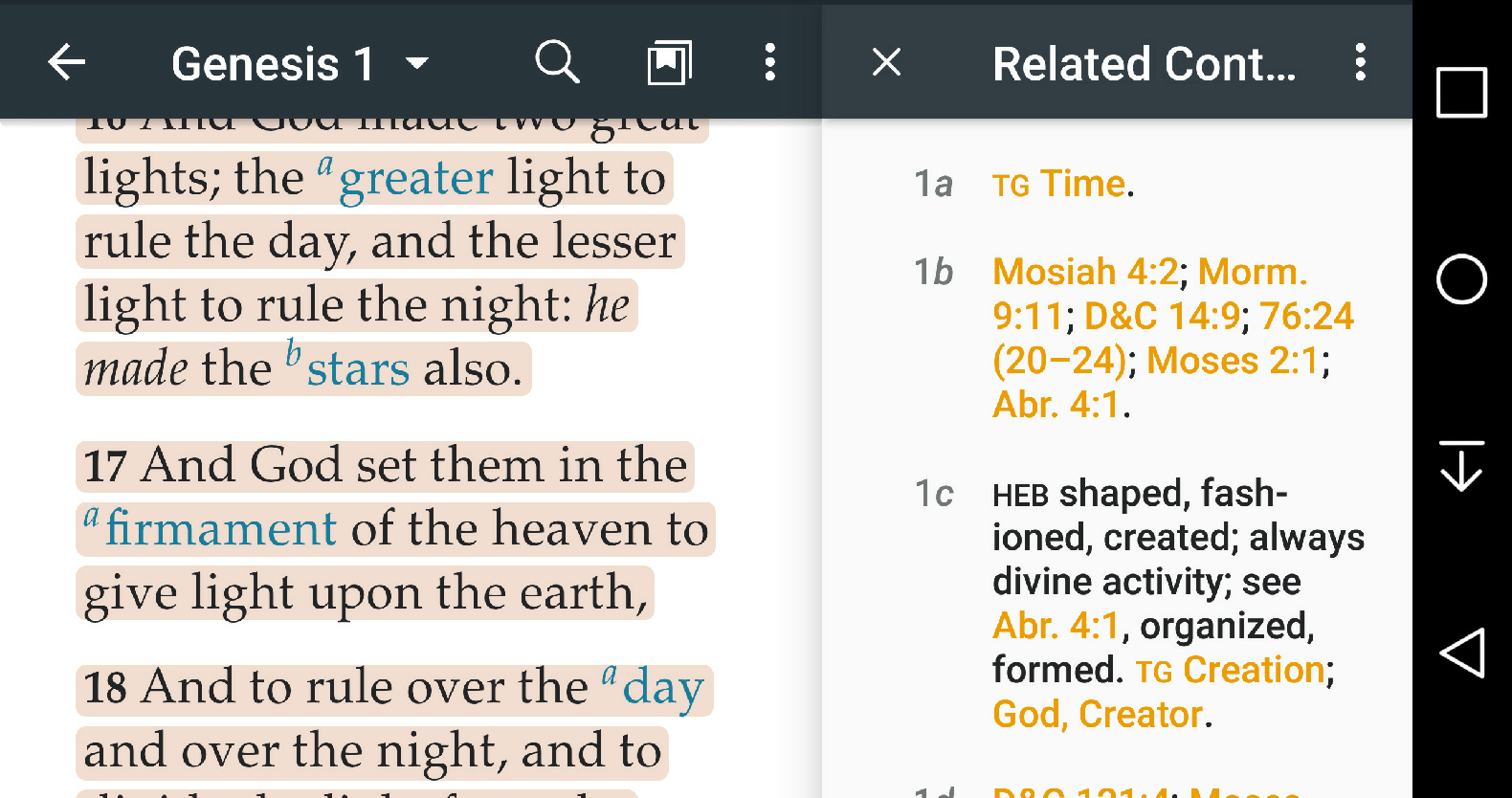
Completely independent scrolling on the two panes. Scrolling the scripture pane has no effect on the Related Content pane, and vice versa.

Is there a setting?
Thanks,
D.G.
Community Moderators
#5
andy1565 wrote:Screen mirroring will no longer work with my note 3. It works fine as long as I don't have the gospel library open, but as soon as I open the gospel library, it shows the splash screen on the tv but then goes blank. It will not connect again, unless I close the app, then it works fine.
I have a Samsung un46h5203 tv and a samsung sn-m900v
Did screen mirroring work on Gospel Library 4.0.0 or 4.0.1? Screen mirroring is a Samsung-specific feature – device to device – and what app you're using shouldn't make a difference...
Samuel Bradshaw • If you desire to serve God, you are called to the work.
Community Moderators
#6
GrasseDD wrote:
sbradshaw wrote:Gospel Library Android 4.0.2 is now available.
• Related content scrolls with main content when the sidebar is pinned.
Hm. Not on mine.
GLA 4.0.2.2 Android 6.0 LG G4
Library>Scriptures>Old Testament>Genesis>1
Landscape orientation
Related Content, Pin Sidebar
Completely independent scrolling on the two panes. Scrolling the scripture pane has no effect on the Related Content pane, and vice versa.
Is there a setting?
There isn't a setting – it should be automatic. I don't have an LG G4, but I tested on a G2 and didn't have any problems. The scrolling happens when you get to the next verse with footnotes – so, for example in Genesis 1, the related content won't move until verse 2 in the main content hits the top of the screen. Did you scroll down far enough?
Samuel Bradshaw • If you desire to serve God, you are called to the work.
Member
#7
sbradshaw wrote:The scrolling happens when you get to the next verse with footnotes – so, for example in Genesis 1, the related content won't move until verse 2 in the main content hits the top of the screen. Did you scroll down far enough?
I've scrolled to the end of the chapter and back to the top, then scrolled the related content pane to the end, and simultaneously scrolled them in opposite directions. Here's a screenshot:
scrolling screenshot.jpg
(566.98 KiB) Not downloaded yet
Thanks,
D.G.
New Member
#8
sbradshaw wrote:
andy1565 wrote:Screen mirroring will no longer work with my note 3. It works fine as long as I don't have the gospel library open, but as soon as I open the gospel library, it shows the splash screen on the tv but then goes blank. It will not connect again, unless I close the app, then it works fine.
I have a Samsung un46h5203 tv and a samsung sn-m900v
Did screen mirroring work on Gospel Library 4.0.0 or 4.0.1? Screen mirroring is a Samsung-specific feature – device to device – and what app you're using shouldn't make a difference...
I would agree with your statement, it shouldn't matter what app you are using. However I have further tested it and confirmed that it is something to do with the app itself. My wife has a note 4 and it does the same thing. As long as I do not use the gospel library app, screen mirroring works fine. It worked fine with 4.0. We do scripture study as a family using screen mirroring and it quit working after installing the update.

On a side note, is there a more appropriate place to report this?
Community Administrator
#9
andy1565 wrote:On a side note, is there a more appropriate place to report this?
Use the in-app reporting feature.
Have you searched the Help Center? Try doing a Google search and adding "site:churchofjesuschrist.org/help" to the search criteria.

So we can better help you, please edit your Profile to include your general location.