Meetinghouse Webcast

55 postsstarted by SheffieldTR 31,093 viewsoriginal topic

Community Moderators
#1
[font=&quot]Meetinghouse Webcast has now been released![/font]

[font=&quot]It is available through www.ldscatalog.com! [/font]

[font=&quot]Now what is Meetinghouse Webcast?[/font]
[font=&quot]This service sends a one-way audio and video Web broadcast from a central building to other buildings or remote locations.[/font]

[font=&quot]Benefits to the Church[/font]

[font=&quot]Eliminate multiple stake conference sessions[/font]
[font=&quot]Stake conference can be Webcast to several meetinghouses to accommodate overflow needs.[/font]

[font=&quot]Reduce travel costs[/font]
[font=&quot]Members and leaders can travel to closer buildings for stake conference and other meetings.[/font]

[font=&quot]Increase family time[/font]
[font=&quot]Less travel time means members and leaders can spend more time with their families.[/font]

[font=&quot]Increase stake conference attendance[/font]
[font=&quot]More members may participate in stake conference by viewing the Webcast at a closer location.[/font]

[font=&quot]Possible Uses[/font]
  • [font=&quot]Regional/Stake Conferences[/font]
  • [font=&quot]Area/Regional/Stake Training[/font]
  • [font=&quot]Regional/Stake Firesides[/font]
[font=&quot][/font]
[font=&quot]Requirements[/font]
[font=&quot]Before ordering Meetinghouse Webcast, stakes need to:[/font]
  • [font=&quot]Receive an official notice from the Office of the Presiding Bishopric authorizing Meetinghouse Webcast[/font]
  • [font=&quot]Have a qualified Stake Technology Specialist[/font]
  • [font=&quot]Have Meetinghouse Internet in each location that will send or receive a Webcast[/font]
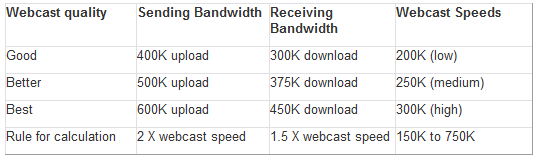
  • [font=&quot]Ensure Internet connection quality is acceptable:[/font]

Bandwidth Requirements
screenshot.png
screenshot.png (9 KiB) Viewed 5289 times

[font=&quot]Meetinghouse Webcast Components[/font]

[font=&quot]Several components are used in the creation and reception of a meetinghouse webcast event. Essential items include: [/font]
  • [font=&quot]Meetinghouse Webcast Communicator[/font]
  • [font=&quot]Meetinghouse Webcast Receiver or computer[/font]
  • [font=&quot]High-quality camera[/font]
  • [font=&quot]Adapters to connect to the building audio system, video system, projectors, tripod, network cable, etc. [/font][font=&quot](needs based on local building configuration)[/font]
[font=&quot][/font]
[font=&quot]How to order[/font]
  • [font=&quot]Available now at http://ldscatalog.com[/font]
  • [font=&quot]You MUST log in as a stake with the unit number and password or you will not see the equipment or be able to place an order[/font]
[INDENT][font=&quot]- Click on Unit Administration[/font]
[font=&quot]- Click on Communication Technologies[/font]
[font=&quot]- Click on Meetinghouse Webcast[/font]
[/INDENT]
  • [font=&quot]Order equipment[/font]
[font=&quot][/font]
[font=&quot]Items to consider[/font]
  • [font=&quot]Each location’s equipment should be tested before the first event as there may be significant variations in Internet connection quality[/font]
  • [font=&quot]Limited to one-way communication[/font]
[font=&quot][/font]
[font=&quot]FAQ's at:[/font]http://www.lds.org/ldsorg/v/index.jsp?v ... 6f620a____

#2

Format for stream

Hi there,

This is great news! Shame it's still only one-way, but it's definitely a step in the right direction. Can you tell me what format and resolution the stream is broadcast in? I've experimented with broadcasting using Windows Media Encoder and a high quality webcamera from one meetinghouse to another and, depending on the bandwidth, it seems to do quite well. Interesting to see how this new solution improves upon that.

Thanks,
Lionel
Member
#3

Format

lionelwalters wrote:Can you tell me what format and resolution the stream is broadcast in?
I don't know about the resolution, but my understanding is it is based on the Media Player 9 version.
Community Moderators
#4
We are using the Windows Media Encoder and you need the Windows Media Player 9 or newer to receive the signal. There are a few preset qualities and a custom setting so the reality is you cans send a stream anywhere from 200 kbs to 700 kbs. Our test has proven that you will want to at least double that size for your upload and down load speed. So it really becomes a factor of the size of broadband connection you have or can afford.
Troy
#5
tsheffield wrote:We are using the Windows Media Encoder
Would it be possible then to utilise the Church's WME server to broadcast directly from the WME software client on a PC on the Church's network, using the naming conventions, etc., outlined in the instruction booklet for the webcast hardware?
Senior Member
#6
Noting that you are posting from "down under," are you eying this as a possibility to reach those in remote locations, perhaps has an alternative to holding meetings via conference call?

I'm not sure if that was part of the original intent of the webcasting, but I could definitely see it being worthwhile to incorporate that type of functionality down the road. Unfortunately I have am not part of that descision making process, and thus am only voicing my perspective.
Senior Member
#7
lionelwalters wrote:Would it be possible then to utilise the Church's WME server to broadcast directly from the WME software client on a PC on the Church's network, using the naming conventions, etc., outlined in the instruction booklet for the webcast hardware?
Noting that you are posting from "down under," are you eyeing this as a possibility to reach those in remote locations, perhaps has an alternative to holding meetings via conference call?

I'm not sure if that was part of the original intent of the webcasting, but I could definitely see it being worthwhile to incorporate that type of functionality down the road. Unfortunately I am not part of that decision making process, and thus am only voicing my perspective.
Senior Member
#8
I'm starting to investigate doing this in our stake. I would like to see some documentation on the equipment that the church will supply so that I can learn what I need to "make it work." Basically what is the connections on the device and other stuff.

This way I can present nearly all my findings to my stake president for approval to move forward.

Thanks for letting me know.
Senior Member
#9
harddrive747 wrote:I'm starting to investigate doing this in our stake. I would like to see some documentation on the equipment that the church will supply so that I can learn what I need to "make it work." Basically what is the connections on the device and other stuff.

This way I can present nearly all my findings to my stake president for approval to move forward.

Thanks for letting me know.
There's a ton of information in the very first post of the thread.

But for some really detailed info, check out the two links in this post (especially the PDF link): http://tech.lds.org/forum/showthread.php?p=24410

Also, an LDS Tech Wiki page has gone up about the topic as well: https://tech.lds.org/wiki/index.php/Mee ... se_Webcast
New Member
#10

Webcast Cameras

Is there any particular camera that is recommended to use?
Community Administrator
#11
splassle wrote:Is there any particular camera that is recommended to use?
No, there is no particular model mentioned. However, the Meetinghouse Webcast Guide lists these requirements:
Meetinghouse Webcast requires a high quality video camera. An existing camera can be used or a new camera can be purchased in your area, if it meets the video camera requirements listed below. More information is available in the Meetinghouse Webcast Guide (available at http://clerk.lds.org).
■ 10X optical zoom lens
■ Auto focus
■ Low light sensitivity
■ Option to disable “auto shutoff ” when not recording (allowing video to be streamed without recording)
■ At least one composite video out (RCA) port or one S-video out port
■ Ability to not display timestamp or other camera display information in video output
The Meetinghouse Webcast FAQ adds this note:
Several cameras available in the market will meet these requirements. Provided it meets these requirements, an existing camera can be used or a new camera can be purchased in your local area.
Questions that can benefit the larger community should be asked in a public forum, not a private message.
Community Administrator
#12
■ Option to disable “auto shutoff ” when not recording (allowing video to be streamed without recording)
So far, I've found all the consumer cameras I've worked with will do that - just take the tape out. If you leave the tape in the unit, then it's in "pause" and will trigger a auto shutoff.
■ Ability to not display timestamp or other camera display information in video output
Remove the Canon XL1 from your list for that reason. So far, I have not found a consumer-level camera with that problem.
Have you searched the Help Center? Try doing a Google search and adding "site:churchofjesuschrist.org/help" to the search criteria.

So we can better help you, please edit your Profile to include your general location.
Senior Member
#13

Audio Bridge

I have been reading up on the web casting and it looks like my stake will move forward on it. I think if everything works correctly, I shouldn't have much problem with it, like totally dropping signal and so forth.

It does say that I should have an audio bridge as a backup in case everything goes down. I see where I call in and set it up, but my question is how do I get the audio from the stake center into the phone and then at each building get the audio from the phone to the sound equipment so that people can listen via the sound system in the chapel?

I don't see anywhere on the web site to give me instructions to do that. Please let me know how to get that to work.

Thanks
Terry
Community Moderators
#14
There is a device in your Media Center called a CRAB. It has connection cables attached to it and is in a zippered case. You hook that up to the audio system in the originating location and then to a phone, that is on the audio bridge. You then reverse this in the receiving locations. Only don't hook it up to the audio system just have it there and ready in case of failure. You will want to play around with this a little so that you are comfortable with it before an event.
Troy
Community Administrator
#15
tsheffield wrote:There is a device in your Media Center called a CRAB. It has connection cables attached to it and is in a zippered case.
To add to what tsheffield has said, this device is normally used to connect things like laptops, tape recorders, etc to the mic input on the sound system. There are two models. One in a gray case and one in a black one. The gray one has a telephone connection hidden on the left side. I don't think the black one has one.
Have you searched the Help Center? Try doing a Google search and adding "site:churchofjesuschrist.org/help" to the search criteria.

So we can better help you, please edit your Profile to include your general location.
Community Moderators
#16
For those who would like to see the Meetinghouse Webcast equipment in action you can now go to http://stream.lds.org/webcast It is a great tool for testing receiving location bandwidth capabilities.

This stream is running 24/7 Having said that there are a few times when server connections and other network issues here at CHQ cause it to stop. When I become aware of this I restart it. If it is not running and during business hours you can send an email to sheffieldtr@ldschurch.org and I will get it back up for you. It is running at the High quality selection or 300k stream setting in the Communicator. It is also using the EVI D70 camera.:) It does take in a little of State Street so there will always be some movement if no one is walking around.

Please take into account that it is on the 8th floor of a building looking out a window at the fountain behind the Church Office Building. They have not clean my window for a while so it might not have the greatest picture depending on the sun.:confused:

If there is something that you would like me to do a little different on this link please let me know.
Thanks,
Troy
Community Moderators
#17
I viewed the test webcast stream on my home computer and I am surprised that the resolution is so low. Since my download speed at the time I viewed the stream was 1300 kbps I was expecting better resolution. Since the upload speed also determines resolution I was wondering what the upload speed is.
JD Lessley
Have you tried finding your answer on the ChurchofJesusChrist.org Help Center or Tech Wiki?
Community Moderators
#18
The stream is 300k. Based on the ability of the upload here at the office I could send a picture much higher, but that would not be representative of what the normal location would experience. Remember that it is on the 8th floor, looking out a dirty window at a fountain that is at least 100 feet away from the building so we are zooming nearly 200 feet for this shot. You might have 25 feet from the back of the chapel to the front and not have direct sunlight. Not to mention your monitor will most likely at a much higher resolution than the projector at the chapel. Take all those factors into account and I think it is a pretty good picture.
Community Administrator
#19
tsheffield wrote:Not to mention your monitor will most likely at a much higher resolution than the projector at the chapel.
I think SD TV is close to 640x480. The newer projector we have is maybe 800x600. Most monitors today run at least 1024x768. Blowing it up to "full screen" on a typical monitor is going to get ugly fast.

The feed looked fine to me, but I let it stay at it's "natural" resolution on the monitor.
Have you searched the Help Center? Try doing a Google search and adding "site:churchofjesuschrist.org/help" to the search criteria.

So we can better help you, please edit your Profile to include your general location.
Community Moderators
#20
Looking at it at no more than 200% resolution it's not too bad. (IMO)

My problem was occasional stuttering. My Win Server 2K8 x64 PC might have needed a clean boot, but at the time it wasn't crunching on anything except that, so I don't think that was the problem. I don't know, I'll try it again later sometime.

BTW, without audio, the easiest way for me to detect stuttering was either to observe networking performance in Task Manager, or since there was a slight breeze, watch the reflection of the flag in the fountain. ;)
So we can better help you, please edit your Profile to include your general location.
Community Moderators
#21
My point of comparison is general conference streams versus the test webcast stream. I run my monitor at 1440x900. General conference is not perfect but significantly better than the test webcast stream. I dropped my monitor's resolution to 800x600 and still the webcast stream resolution was low. The items I noticed the greatest problems with were the people walking about. They look like moving pixels rather than people.
JD Lessley
Have you tried finding your answer on the ChurchofJesusChrist.org Help Center or Tech Wiki?
Community Moderators
#22
tsheffield wrote:For those who would like to see the Meetinghouse Webcast equipment in action you can now go to http://stream.lds.org/webcast It is a great tool for testing receiving location bandwidth capabilities.
...
Thanks,
Troy
That URL returns what appears to be a playlist. The second URL in the playlist has a numeric IP address in the 10.*.*.* block. If I understand correctly, that IP address won't likely be accessible outside the Church internal network.

Something else is odd. I can usually get at least close to viewing most multimedia stuff on my home Linux machines. However, when I attempt to download from the first URL in the playlist, the content is exactly the same as the playlist itself.
Community Administrator
#23
They all look fine to me. Right now is a bad test because it's dark. The water looks a bit funky, but I think it's a compression artifact. The cars flow normally.
Have you searched the Help Center? Try doing a Google search and adding "site:churchofjesuschrist.org/help" to the search criteria.

So we can better help you, please edit your Profile to include your general location.
#24
tsheffield wrote:For those who would like to see the Meetinghouse Webcast equipment in action you can now go to http://stream.lds.org/webcast It is a great tool for testing receiving location bandwidth capabilities.

Thanks for posting this. After reading so much about the Webcast kit, it's great to actually see it in action. Is it right that it's broadcasting at only 320x240? Quality is not bad though. I look forward to seeing the stream in daylight.
Member
#25
I hope the day it will be available in Brazil.
Community Moderators
#26
Now, it's working for me, too. On my home Linux machine, I saved the content of the posted URL, http://stream.lds.org/webcast to disk, then ran mplayer on the first URL from inside the saved file. That's the same thing I had tried earlier when it didn't work. Perhaps, my earlier attempts were during server maintenance. I'm glad the solution is inter-operable.

The image does appear to be 320x240. Here's a little of what mplayer says about the feed:

VIDEO: [WMV3] 320x240 24bpp 1000.000 fps 241.0 kbps (29.4 kbyte/s)
...
AUDIO: 32000 Hz, 2 ch, s16le, 32.0 kbit/3.12% (ratio: 4000->128000)
Selected audio codec: [ffwmav2] afm: ffmpeg (DivX audio v2 (FFmpeg))
...
VDec: vo config request - 320 x 240 (preferred colorspace: Planar YV12)
VDec: using Planar YV12 as output csp (no 0)

The 320x240 resolution isn't too bad. Even blown up to full-screen mode on a 1600x1200 monitor, it's not bad. That resolution would certainly be sufficient for a projector in a chapel.

Looking at the motion of the few people walking around and the occasional vehicles on the street, it looks pretty smooth to me. Of course, there's little enough activity that the bitrate is probably sufficient to transmit almost all the deltas with little loss. A more active scene would likely show more compression artifacts. However, a few minutes, ago, the fountain activated, and it looked okay as far as I could tell.

I remember the spider that got in front of the Nauvoo Temple camera. I hope no "bugs" get in the way of this demo. :-)

I'll definitely make sure my stake's STS knows about this.

(My mother lives in Salt Lake. One of the next times she is in the area, I expect a phone call so she can talk to us while she waves at the camera.)
Community Administrator
#27
Some interesting experiences this morning. It took several tries to come up. Many times it simply brought up WMP and then entered "stop" mode.

I did get it running and it looked fine, then for some reason (maybe my fooling around) it went to one frame every 5 seconds.

I killed it and restarted (took two tries) and it came back.
Have you searched the Help Center? Try doing a Google search and adding "site:churchofjesuschrist.org/help" to the search criteria.

So we can better help you, please edit your Profile to include your general location.
Community Administrator
#28
Same thing. Runs fine, then goes to one frame every 3-5 seconds. This is within 10 minutes of running time. It might be an ISP issue. I'm on minutes cable right now.
Have you searched the Help Center? Try doing a Google search and adding "site:churchofjesuschrist.org/help" to the search criteria.

So we can better help you, please edit your Profile to include your general location.
Community Moderators
#29
I wonder whether some of the difficulties, these recent ones and my earlier ones, might be a limit on the number of outbound streams from this demo URL.
Community Moderators
#30
Not to monopolize the thread too much but ...

It turns out my stake's STS already has the new equipment, both sender and receiver, and that's what was used for our stake conference this morning. Out stake didn't have a new camera, and the old camera has age-related issues. There may have also been some audio level issues (sounded like analog clipping) ahead of the digitizer. Other than that, it worked quite well.
Community Administrator
#31
rmrichesjr wrote:There may have also been some audio level issues (sounded like analog clipping) ahead of the digitizer.
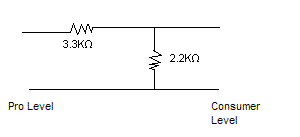
That may be due to the difference in line level between pro equipment and consumer equipment.

Pro stuff tends to run 0 to +4 dBu and consumer stuff runs about -10 dBV. So the Pro stuff is cranking out close to +9VU when compared to consumer stuff. It might not be noticeable in a casual test, but it will turn up when things get cranking. The input stage gets overloaded.

My solution has been to build an attenuator cable.

Image

Using 1/8W resistors, I built it into an RCA plug. All the parts can be obtained from a small electronics store like Radio Shack.

Hmmmm, for some reason the math isn't working out. I think when I went though it before, I thought the consumer stuff was referenced to 1V peak to peak. I do know the cable solved my problem of the satellite receiver distorting the audio in the VCRs.

But, if you use a 470Ώ instead of the 2.2K, then the Math looks better. But you might want to double-check those values.
Pro2Consumer.GIF
Pro2Consumer.GIF (1.89 KiB)
Have you searched the Help Center? Try doing a Google search and adding "site:churchofjesuschrist.org/help" to the search criteria.

So we can better help you, please edit your Profile to include your general location.
New Member
#32
My Stake Presidency seems a little confused on how the system may work. I spoke with my President a little about Webcast at church a little. We will be having a General Authority coming in October for our conference. Right now we are using Slingbox for our needs. They are under the impression I think, that we only borrow the equipment and then send it back to Church HQ. Is this the reality? Or do we own the Webcast Equipment forever?

Thank You

Adam Tipton
Adam J Tipton
Ontario OR Stake
Tech Spec
:cool:
WE8U
Senior Member
#33
WE8U wrote:They are under the impression I think, that we only borrow the equipment and then send it back to Church HQ. Is this the reality? Or do we own the Webcast Equipment forever?
Your stake buys it and keeps it. The best part about the solution is that the Church is promising to provide technical support.
New Member
#34
Great News!
OK, thanks for the answer so quickly.
We have several projects with other Stakes and since I am the new guy, I am wondering if we are going to use this technology. Pretty exciting stuff.

Thanks.
Adam J Tipton
Ontario OR Stake
Tech Spec
:cool:
WE8U
Community Moderators
#35
WE8U wrote:My Stake Presidency seems a little confused on how the system may work. I spoke with my President a little about Webcast at church a little. We will be having a General Authority coming in October for our conference. Right now we are using Slingbox for our needs. They are under the impression I think, that we only borrow the equipment and then send it back to Church HQ. Is this the reality? Or do we own the Webcast Equipment forever?

Thank You

Adam Tipton

We do have a small number of kits, you can count them on one hand, that are available to borrow to support the Brethren when they visit a stake for conference. It is not designed as a try before you buy program.
There have been times when stakes have been able to borrow a kit when it did not conflict with schedules of the Brethren.

Troy
New Member
#36
tsheffield wrote:We do have a small number of kits, you can count them on one hand, that are available to borrow to support the Brethren when they visit a stake for conference. It is not designed as a try before you buy program.
There have been times when stakes have been able to borrow a kit when it did not conflict with schedules of the Brethren.

Troy

This must be what my President was thinking about, as it pertained to a visit by a General Authority and we have yet to gain the equipment or to fully realize the scope of what it will take to upgrade everything in the Stake.
Adam J Tipton
Ontario OR Stake
Tech Spec
:cool:
WE8U
New Member
#37

Questions about Codecs

I just heard about this Webcast Communicator stuff 2 days ago, but we've been streaming our stake meetings for the past 2-3 years ourselves. We sometimes still have issues with pausing, etc., on the client end, and I think that lowering the stream bandwidth would help.

We've been using Windows Media Encoder 9. On the "Compression" tab, we set "Video" to "VHS quality video (CBR)", "Audio" to "Voice quality audio (CBR)", and only check "352 Kbps" (which is a 320x240 resolution).

If you don't mind me asking, what settings/codecs are you using in the Webcast Communicator for your three different quality settings?

I'm mainly looking to decrease our bandwidth usage without decreasing quality noticeably, so that we can greatly diminish or eliminate our pausing/buffering issues.

P.S. All of our client units have at least 512-Kbps-down connections, but they've been bandwidth tested and are getting at least 400 Kbps down consistently, but perhaps we're just cutting it too close (360 Kbps stream on a 400 Kbps connection). Anyway, I would love to find a way of decreasing bandwidth usage without decreasing quality.
Community Administrator
#38
KOlive43 wrote:P.S. All of our client units have at least 512-Kbps-down connections, but they've been bandwidth tested and are getting at least 400 Kbps down consistently,
What is your uplink speed? Is it fast enough to support all the clients?
Have you searched the Help Center? Try doing a Google search and adding "site:churchofjesuschrist.org/help" to the search criteria.

So we can better help you, please edit your Profile to include your general location.
New Member
#39

Upload Bandwidth(s)

RussellHltn wrote:What is your uplink speed? Is it fast enough to support all the clients?
To do it "on the cheap", we initially set up two different DSL connections in the stake center and connected them both to the same server (with two NICs). We then had two remote units come in on one external IP and two come in on the other. The upload speeds on both DSL connections were 768 Kbps (cost a pretty penny up here).

However, I later found out that a member of the stake was already renting a hosted web server in Houston, Texas with plenty of bandwidth, etc., on which we could stage the stream (just like Webcast Communicator does to Salt Lake), which made it so that all we needed was one DSL connection with enough upload bandwidth for one stream. We're still using the 768-Kbps-up connection, but we're now only sending one copy of the stream (360 Kbps) through it, so that should be plenty.

We don't get the pausing at all four remote units, which seems to suggest that the problem is client-side.

My main question is this: What codecs (video and audio) are being used for the three quality options that are hard-coded on the Webcast Communicator boxes? I would like to try emulating those settings with our current setup, to see if we can eliminate the pausing which some units experience.

We'll probably end up buying the box anyway, so that more than just one guy knows how to make the whole thing work. (Right now, my set-up task list is a page long and takes about 45 minutes to execute, let alone trying to train someone else to do it.)
Member
#40
lionelwalters wrote:Hi there,

This is great news! Shame it's still only one-way, but it's definitely a step in the right direction. Can you tell me what format and resolution the stream is broadcast in? I've experimented with broadcasting using Windows Media Encoder and a high quality webcamera from one meetinghouse to another and, depending on the bandwidth, it seems to do quite well. Interesting to see how this new solution improves upon that.

Thanks,
Lionel

I wouldn't get too excited yet, at least not in Australia where you are. I contacted ics about this back in early April this year. I asked (at the request of the stake president) for details about how to get the internet connected to all our chapels, and how to get streaming equipment for all buildings. After being bounced around from person to person for a while on the phone and everyone pretending that the area newsletter heralding the introduction of these technologies never existed, I finally got a three line reply from the head of the ics department saying that these features were not available and were mentioned in the newsletter to inform us of things that would be available in the future. This contradicted the text of the newsletter from the area presidency. It also seemed to be in violation of the letter from the presiding Bishopric last December saying that internet connections were to be made available at stake expense effective immediately, and to give local support offices 30 days to make the arrangements and order the hardware firewalls etc that are necessary. It seems that the men with the priesthood keys to direct both the area and the stake have been ignored or trumped by an area support manager.

I'm still waiting more than 4 months later for the follow up email he promised filling me in on the details "soon, when they were available", so maybe Australian units will have to go back to engraving their memos on gold plates and posting them as the preferred method of communication. It doesn't help that they've just moved our area presidency to New Zealand, they just pass it back and forward between the support centre (old offices) in Sydney and the Area Offices (new offices) in New Zealand, until somebody manages to give a nondescript answer that doesn't address the original question and terminate the communication. Kind of getting a little sick of waiting for stuff that Salt Lake assumes we already have.
Senior Member
#41
I know a year ago it was announced that units in the US and Canada got the go ahead to get broadband for their meeting houses (pending Stake President approval of course). I was not aware of a similar announcment in areas like Australia.
Member
#42
http://lds.org/Static%20Files/PDF/STS/Letters/English/08253_000_notice.pdf

That's the letter from the presiding Bishopric extending the program to areas outside the United States and Canada. The rest of the info I quoted was from a newsletter from the area presidency. In fairness, it said the webcast was something "coming soon", but it said specifically that the internet was available effective immediately. It seems 8 months is a bit different to the 4 week turnaround the presiding Bishopric said to allow for. And that letter was referring only to areas outside the US and Canada, so it doesn't make sense to say it's because we're further away. Everyone that letter applied to is further away. Postage from the US to here is pretty good for everyone else, arrives in a couple of weeks, 3-4 at the very most. Why not for ICS?
Community Moderators
#43
jltware wrote:That's the letter from the presiding Bishopric extending the program to areas outside the United States and Canada. . . .

Postage from the US to here is pretty good for everyone else, arrives in a couple of weeks, 3-4 at the very most. Why not for ICS?
It would appear that it is up to your area presidency, then. And since your stake president reports to the area presidency, and the FM Group reports to the area presidency . . . [hmmm]

I think I see a pattern here. [grin]

I also think that you may be working with some folks who are not sure exactly what to do or how to go about doing it. This is not unusual, especially in the Church, when something new is being put in place. I think if you work with them, ask questions, offer to help in a supporting way, you may see some progress. It may also help if they know your stake president is interested in seeing that it happens.
Senior Member
#44
I don't read the letter from the Presiding Bishopric the same way you do.

It appears you are under the impression that every single Church unit in the US and Canada was put on broadband internet within 1 month of the announcement 1 year ago (I believe it was August or September). It also appears you are expecting the roll out in areas outside of the US and Canada to go the same way.

What I believe you are misunderstanding is that each individual stake president in the US and Canada had the option to provide broadband internet access to it's local units at their own expense and implementations. My stake took 8-9 months before finally making it happen, after planning, debating, haggling with ISP vendors, etc. We just barely got it all going 2-3 months ago, and we are certainly not using any webcasting products from Church Headquarters.

Now that I hope I've cleared up any misconceptions you may have had, I'd like to address the actual letter you linked to and how I believe you are misreading it.
jltware wrote:...I finally got a three line reply from the head of the ics department saying that these features were not available and were mentioned in the newsletter to inform us of things that would be available in the future. This contradicted the text of the newsletter from the area presidency. It also seemed to be in violation of the letter from the presiding Bishopric last December saying that internet connections were to be made available at stake expense effective immediately, and to give local support offices 30 days to make the arrangements and order the hardware firewalls etc that are necessary.

(emphasis added)
jltware wrote:In fairness, it said the webcast was something "coming soon", but it said specifically that the internet was available effective immediately. It seems 8 months is a bit different to the 4 week turnaround the presiding Bishopric said to allow for.

(emphasis added)
There's really no way to "violate" this letter, as this is not a mandatory program. Let's look at the text of the letter and I will emphasize the key words that I think you may have glossed over:
Broadband Internet services may now be extended to areas outside United States and Canada. Area presidencies who wish to have Internet service installed in meetinghouses in their areas may do so by contacting the Meetinghouse Technologies Team (MHI@ldschurch.org). Requests should be made at least four weeks in advance.

(emphasis added)
The first thing I want to point out is that there are no absolutes are mandates in this text at all. This letter discusses nothing further than the opportunity Area Presidencies may act on if they wish to. As for the last line, the Presiding Bishopric was most certainly not saying "you have four weeks to implement broadband in your units." They were saying that if you opt-in to the broadband internet program, you need to expect 4 weeks before your request can be fulfilled and the necessary equipment sent to you. In other words, don't expect Church Headquarters to get you what you need in 5 days after you decide you want broadband internet.

Hopefully this clears up any misconceptions you may have had.
Member
#45
The newsletter from the area presidency (which is not available publicly on any church website and which I'm not sure is appropriate to publish publicly here since it was originally written for and distributed only to priesthood leaders in our local area) stated clearly that applications could be made now (back in March). I therefore conclude from this that the area presidency do wish to make this available in our area, and have authorised it at their end. Similarly, the stake presidency here are very keen to roll this out. I was not attempting in any way to ridicule any priesthood leader, or to say that I thought they should be running their stake / area to my timetable. Merely that I thought the local ics support office's timetable should more closely resemble the expected timetable handed down to us by our priesthood leaders (if indeed they have a timetable, as they haven't yet shared one with me).

The letter from the presiding Bishopric said that we should expect it to take 4 weeks to process such a request once it was authorised in our area, which it now has been by both our area presidency and our stake presidency for many months. I didn't expect it to magically appear on my doorstep the day after I spoke to them. But the quoted expected turnaround of 4 weeks is a far cry from still waiting for a reply (other than "we'll get back to you on that") in August to my phone calls and emails asking for an application form back in April. It is not our stake that is dragging the ball and chain in pushing this ahead. I am the person in the stake who was asked and authorised by the stake president to set it all up. I made this clear in my original communications with them. But we can't do it without the mandatory filtering hardware coming through ics. And they have simply said they can't do it yet and won't tell us when they will be able to do it.

It is also their policy here to not allow anybody (stake president included) a key to access any internet equipment. I queried them on this as well, and was told that it was their desire that nobody in any unit should have any need to access this equipment, and to direct any enquiries about the running of this equipent to them (ie, nobody's getting a key, so don't bother asking). While I'm happy enough for them to not trust me personally with a key if they feel so inclined, I would hope the people entrusted with priesthood keys can also be trusted with physical keys, especially as it going to be our stake budget funding this endeavour. Needless to say, I find the lack of communication somewhat frustrating, and the lack of trust in local leaders makes it somewhat difficult for me to fulfil my calling and comply with my priesthood leader's request.
Community Administrator
#46
jltware wrote:I am the person in the stake who was asked and authorised by the stake president to set it all up. I made this clear in my original communications with them.
As a suggestion, create a email to the stake president. Have him forward it with a CC to you. It does two things: it proves to them that you are actually authorized by the SP. It also means any "back talk" goes to the SP. You might be surprised at the difference that makes.
Have you searched the Help Center? Try doing a Google search and adding "site:churchofjesuschrist.org/help" to the search criteria.

So we can better help you, please edit your Profile to include your general location.
Community Moderators
#47
jltware wrote:It is also their policy here to not allow anybody (stake president included) a key to access any internet equipment. I queried them on this as well, and was told that it was their desire that nobody in any unit should have any need to access this equipment, and to direct any enquiries about the running of this equipent to them (ie, nobody's getting a key, so don't bother asking). While I'm happy enough for them to not trust me personally with a key if they feel so inclined, I would hope the people entrusted with priesthood keys can also be trusted with physical keys, especially as it going to be our stake budget funding this endeavour.
Once authorized and approved, the only device the Church ships to you is one Cisco ASA firewall/router for each building receiving the Internet. There is no charge for these. They initially arrive without password protection and clear instructions on how to finalize the configuration based on your particular internet connection (DSL, Cable, static or dynamic IP, etc.) Once configured, CHQ can access it remotely to "script" it for the level of filtering desired by the Stake President, as described in the WIKI. Once scripted, it is indeed "locked", to protect it from local tampering. The internal configuration is quite complicated, and once running, there is really nothing in there we as end-users need anyway.

The ASA firewall has 8 Ethernet ports available for the stake to do with as they wish. The stake will have to decide on a topology for each building's LAN, be it wired, wireless, or a combination of both. Once a topology is decided upon, any additional cables, patch panels, routers, switches, wireless access points, etc. will be the stake's financial responsibility. Rest assured, anything the stake purchases will be under complete control of the stake STS. He will set and maintain the passwords for configuring each device. For wireless access, he will set and maintain a wireless key for each building. The only device "locked" is the Cisco ASA box, and if the STS suspects a problem with it, it just takes a quick call to CHQ's 24/7 help desk and they can access it remotely to resolve any problems.

I can't help you with your timetable, as I am obviously not in the loop. I can only echo what mkmurray said. Because of the financial burden on the stake for each installation, ours could not start the project right away, even though they were given the green light. It took a while, but once funds were budgeted, it moved rather quickly.
So we can better help you, please edit your Profile to include your general location.
Community Moderators
#48
jltware wrote:I thought the local ics support office's timetable should more closely resemble the expected timetable handed down to us by our priesthood leaders (if indeed they have a timetable, as they haven't yet shared one with me).
There may be roadblocks the ICS support office has run into in getting all the hardware necessary for all the units wishing to proceed under this new authorization. They may not be communicating this down to lower levels for any number of reasons.
jltware wrote:The letter from the presiding Bishopric said that we should expect it to take 4 weeks to process such a request once it was authorised in our area, which it now has been by both our area presidency and our stake presidency for many months. I didn't expect it to magically appear on my doorstep the day after I spoke to them. But the quoted expected turnaround of 4 weeks is a far cry from still waiting for a reply (other than "we'll get back to you on that") in August to my phone calls and emails asking for an application form back in April.
I can see your frustration. I do, however, read those four weeks as being the lead time the people at Chruch headquarters would need to process the requests. There may be delays any number of places along the way. You really don't know when your stake's request was sent from the Area offices to Church HQ. There may be delays in getting the number of devices needed from the vendor. The possibilities go on. I do agree though that if there are issues that will delay, or are delaying, the orders from arriving at units requesting them that some communication should be made as to when they could be expected. Perhaps the Lord wants you to practice excercising patience. :rolleyes:
jltware wrote:It is also their policy here to not allow anybody (stake president included) a key to access any internet equipment. I queried them on this as well, and was told that it was their desire that nobody in any unit should have any need to access this equipment, and to direct any enquiries about the running of this equipent to them (ie, nobody's getting a key, so don't bother asking).
To have a policy such as this is their perogative. It does mean that some of the responsibilities normally in the perview of the STS are now in their hands. There are both benefits and drawbacks to this. In this postby a Church employee some of that was discussed. It does mean that they will have to respond to correct problems that arrise when access is needed. Perhaps after they find they cannot meet the needs of units with all the support requests that will flood in the policy may change. Having broadband access in meeting houses is new enough that not all the support issues can be handled as planned. Only time will tell. Perhaps they have studied this out and have a plan that will make Internet access transparent to the units and to their satisfaction. I only wish it were so in my stake.
JD Lessley
Have you tried finding your answer on the ChurchofJesusChrist.org Help Center or Tech Wiki?
Member
#49
Mikerowaved wrote:Once scripted, it is indeed "locked", to protect it from local tampering.

This sounds perfectly reasonable, as we have no desire to interfere with the filtering. However, in the one building in our stake that has the internet due to it having a family history centre, we do not have access to even be able to connect a computer to the internet without going through the support offices first. All configuration is done via odyssey client, and passwords to be able to install this need to come from the support offices. It seems having a simple wpa2 wireless key would make the inernet secure but still allow the stake presidency, bishoprics etc. to access it in their meetings if they so desired.
Mikerowaved wrote:The ASA firewall has 8 Ethernet ports available for the stake to do with as they wish. The stake will have to decide on a topology for each building's LAN, be it wired, wireless, or a combination of both. Once a topology is decided upon, any additional cables, patch panels, routers, switches, wireless access points, etc. will be the stake's financial responsibility. Rest assured, anything the stake purchases will be under complete control of the stake STS. He will set and maintain the passwords for configuring each device. For wireless access, he will set and maintain a wireless key for each building. The only device "locked" is the Cisco ASA box, and if the STS suspects a problem with it, it just takes a quick call to CHQ's 24/7 help desk and they can access it remotely to resolve any problems.

We would be quite happy with such a setup. Howver, this does not appear to be the case with the system already in existence. All equipment is locked and we have access to none of it. There is not a single ethernet port we can access without somebody having to make a 14 hour drive from Sydney to give us access, and you can guess how willing they will be to do that. All devices are connected wirelessly using odyssey client, and any new devices need to have odyssey installed to be able to access the internet there. My understanding is that odyssey vpns you to the church's network and automatically configures your wireless for access. As all of the stake presidency use wireless extensively elsewhere and most use other vpns for work, we would be reluctant to install a power hungry program like this that appears to hijack your windows settings as a part of its design. Even if we did, unless roaming access was authorised (which seems unlikely as it would give us access to every building in the country with the current configuration), stake presidency would still have to uninstall and reinstall at every building in the stake before they would be able to use it. This would be difficult, as the most likely time to be going from building to building is Sunday, when there is nobody in the offices to help us even if they were willing to do it.

We would also like very much to use the internet to stream conference broadcasts, as there is no satellite facility in our stake anywhere and we don't particularly like waiting for dvds while every other stake in the country watches the conference on time via satellite. But again, this is impossible unless we have at least some rudimentary access to the equipment.

While the scenario you describe sounds quite reasonable and our stake presidency would be happy to fund such a setup pretty much straight away, the current policies of our support offices are not the same as what you are describing.
Member
#50
RussellHltn wrote:As a suggestion, create a email to the stake president. Have him forward it with a CC to you. It does two things: it proves to them that you are actually authorized by the SP. It also means any "back talk" goes to the SP. You might be surprised at the difference that makes.

Thanks for the suggestion, I have seen such approaches make a real difference in the past. But in this case, the stake president was CCed on every letter from me and in the replies back to me. They were well aware the stake president was reading the "back talk" as they were writing it. It didn't stop them replying to my nice thousand word enquiry asking for multiple details of the current system and details on how to upgrade with a three line "we're not interested" response.
Member
#51
jdlessley wrote: I can see your frustration. I do, however, read those four weeks as being the lead time the people at Chruch headquarters would need to process the requests. There may be delays any number of places along the way. You really don't know when your stake's request was sent from the Area offices to Church HQ.

The point I am trying to make is that I do not believe our request has been sent on to Church HQ, at least not yet. All they said was that they would enlighten us as to the procedure we would be required to follow once it was available. We are still waiting on an application form or something to fill out to initiate the process. It seems to have taken a very long time to come up with a procedure, especially as there would have already been procedures in place in other areas that they could copy.
jdlessley wrote: To have a policy such as this is their perogative. It does mean that some of the responsibilities normally in the perview of the STS are now in their hands. There are both benefits and drawbacks to this.

While I respect your opinion, I do not believe this is true. It is the role of the men with priesthood keys to decide on policies and access issues. It is the role of the support offices to support these men in their responsibilities, not to dictate to them how things should be run, unless their priesthood leaders have instructed them in some way that contradicts or makes impossible the stake president's request. I do not believe that a area wide policy by the support offices to deny access to any internet equipment anywhere shows the respect to these men that they deserve, nor do I believe it is within the scope of their delegated authority. If a stake president requests a key, he should be given it, as it is his decision. This request should be followed without undue negotiation and without turning the whole thing into a political game to test jurisdictions. Priesthood keys govern the church, not support offices, and if somebody with priesthood keys requests a physical key within the scope of his calling, he should be given it. Full stop, end of story.
Community Administrator
#52
jltware wrote:They were well aware the stake president was reading the "back talk" as they were writing it. It didn't stop them replying to my nice thousand word enquiry asking for multiple details of the current system and details on how to upgrade with a three line "we're not interested" response.
I'm sure there must be ways for the stake president to escalate the situation. Unfortunately, I'm not sure of the details. If nothing else, I'd suggest bending the ear of the next GA that comes for a visit.
Have you searched the Help Center? Try doing a Google search and adding "site:churchofjesuschrist.org/help" to the search criteria.

So we can better help you, please edit your Profile to include your general location.
Community Administrator
#53
jltware wrote:All configuration is done via odyssey client, and passwords to be able to install this need to come from the support offices.
In the US we're able to make a call to the Global Services Desk and ask for that to be replaced by a more common WPA or WPA2 setup. Then you'd have a network under your control. I'm not sure how it works in your area, if you'd just end up with the same people or not.

I wish I could point you to a memo on this, but I don't know of any.
Have you searched the Help Center? Try doing a Google search and adding "site:churchofjesuschrist.org/help" to the search criteria.

So we can better help you, please edit your Profile to include your general location.
Community Moderators
#54
jltware wrote:Thanks for the suggestion, I have seen such approaches make a real difference in the past. But in this case, the stake president was CCed on every letter from me and in the replies back to me. They were well aware the stake president was reading the "back talk" as they were writing it. It didn't stop them replying to my nice thousand word enquiry asking for multiple details of the current system and details on how to upgrade with a three line "we're not interested" response.
Another thought: Has the stake president spoken directly with the area president about this problem?
#55
Watch this new video: Meetinghouse Webcast Overview.

http://stream.lds.org/ICS/Training/Meet ... erview.wmv