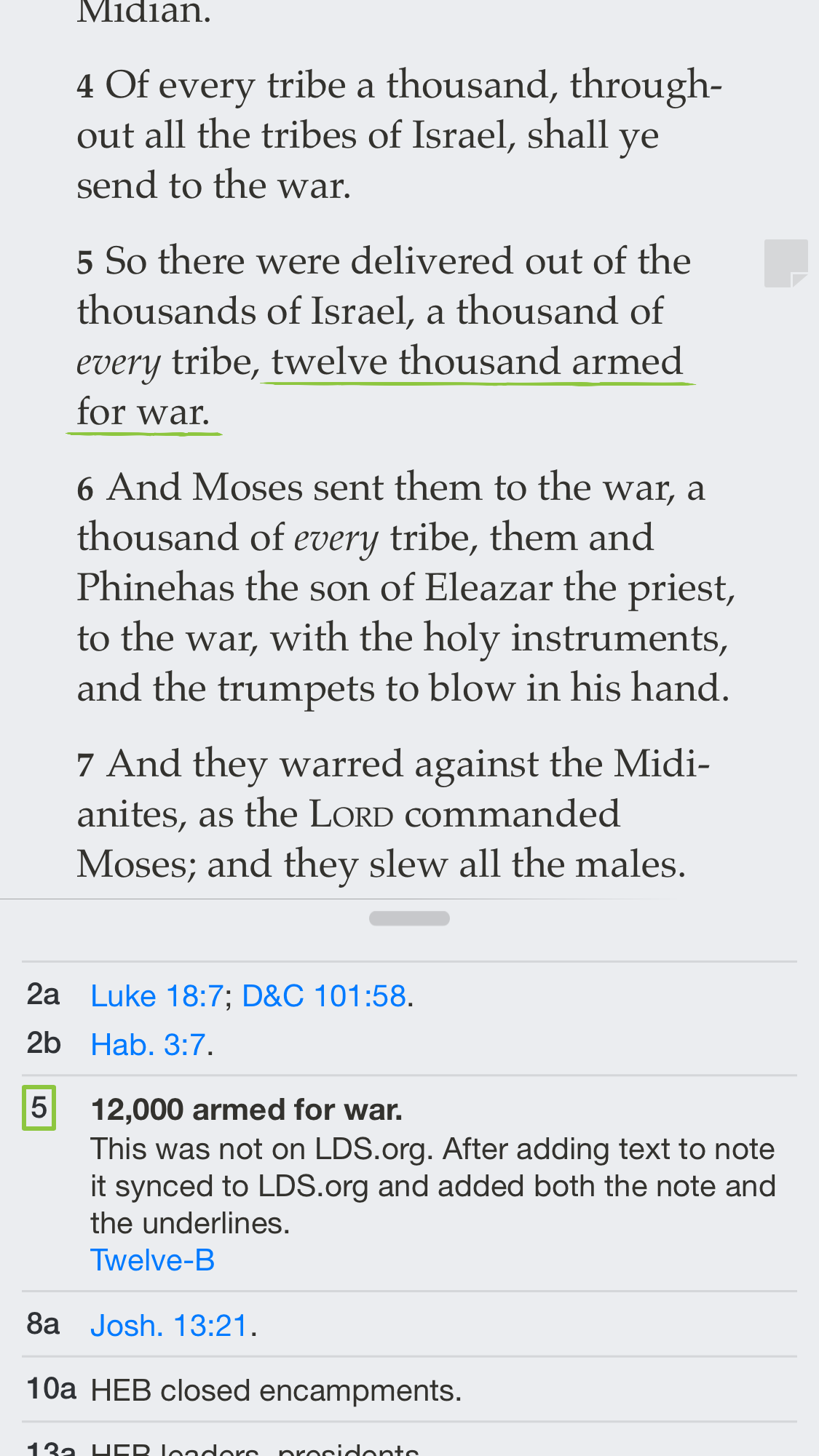
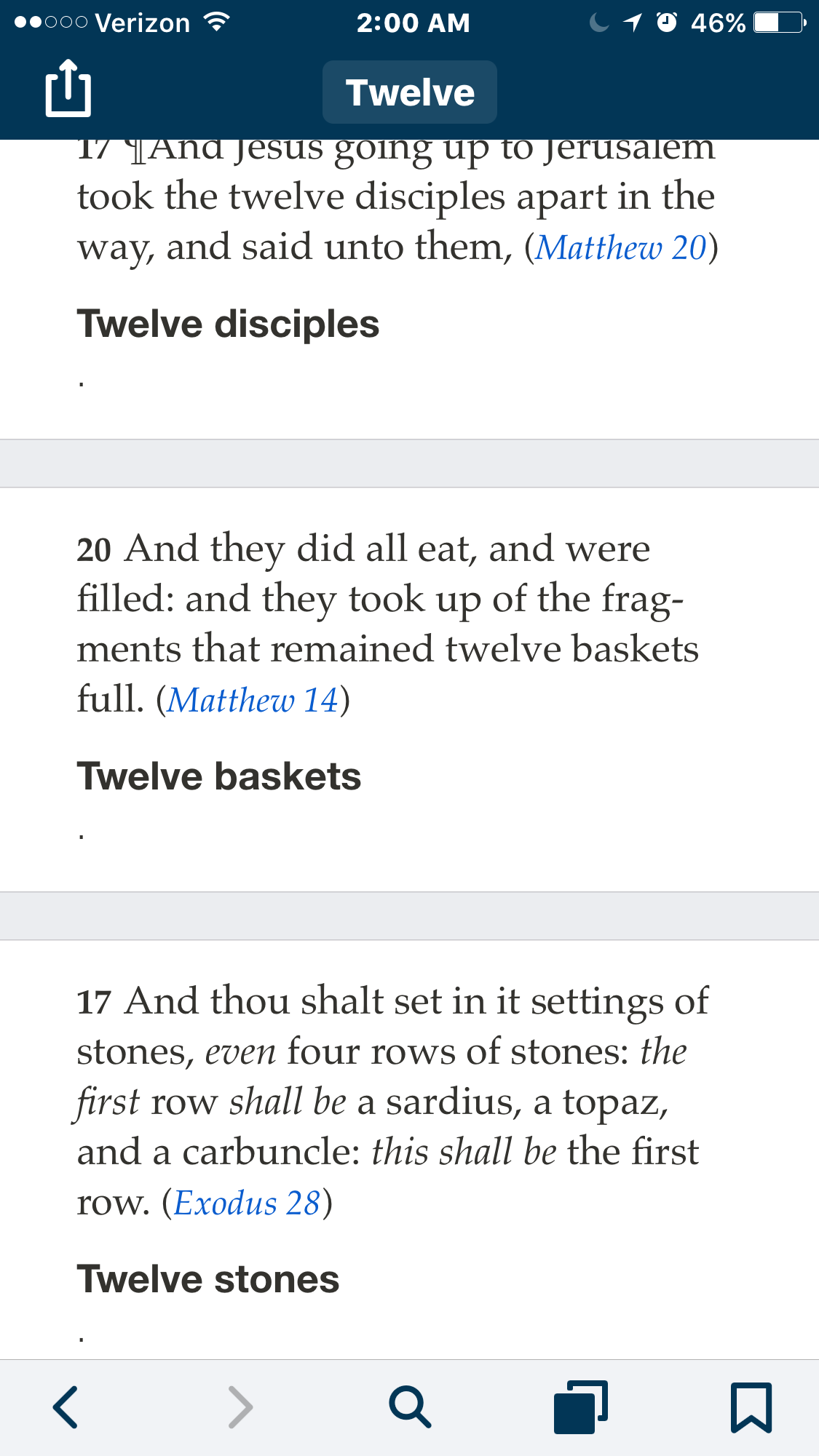
Notes go with which verse?

58 postsstarted by npk_techguy 13,066 viewsoriginal topic

New Member
#1
The update I have been waiting a year for. I love the rich next notes, particularly the outlines and underline/bold. I am so glad for split view that gives me the ability to have a document and GL open. I am glad we can finally highlight everything. This is a huge update.

However, what has been changed ruins the app experience for me and how I use GL every day.

1. In order to see any note, link, or tag I have to tap the note icon next to the scripture. Why?

2. If I have more than one note, link, or tag on the same line of the verse, I have no idea which will open when I tap the note. Why?

3. The note icons are not even listed in the same order as the highlights in the verse.

4. Once the note is open I have no reference as to what verse and highlight it is associated to. There is no longer a verse number that has the color or outline to which it is associated to. Is there a setting to turn this back on?

5. If I have a chapter that has 20 notes, links or tags associated to to it, I must tap 20 times to see the notes. I can no longer scroll through the chapter, read the verses and see all the notes at the same time. Is this really true? Surely I am missing something. Settings perhaps.

Please help me understand why there was such a drastic change. Is the scripture notes feature not getting used? Or they don't read the notes after they make them. What happened?

For one who makes lots of notes and highlights, and especially notes that reference other verses (and the associated notes) above or below in the same chapter, this makes it very unenjoyable.

Fortunately, I updated an older device before I updated my main iPad. As much as I want the other features for teaching the gospel doctrine class, these changes affect my daily personal study too much. Until the above is addressed I am not updating.
New Member
#2
I totally agree. This is what I posted on ldsliving.com:
Sadly the 4.0 version of the app seems to be a beta release that's not really ready and needs significant refinement.
I do like the ability to additionally mark chapter headings etc., but one still cannot highlight a footnote or footnote number if desired.
However, I am quite disappointed that tags and notes are no longer in the same column as footnotes. Now one must click on tags and notes that one has added to see them and then only one note or tag appears at a time. With several notes on a page, there is no way to determine which one you are opening - it's a hunt and guess system. For one who writes in a lot of notes, this is a terribly tedious process.
Further, and importantly, if one is teaching, not being able to see one's teaching notes on the same page as the scripture that one is teaching from is a significant impediment and lessens the functionality of the app. Now, one must continually switch back and forth, and hopefully, as mentioned above with the hunt and guess system, be lucky enough to touch on the appropriate note. This is not a very good system.
Additionally, this back and forth takes away from the experience of simply reading and scrolling once the notes have been entered.
Finally, I've also noticed on my iPad, as I try to move the cursor to correct spelling, that the magnifying glass does not move the cursor, and it does not magnify the letter where one is trying to move the cursor to. This too has sadly become total guess work.
Hopefully, 4.1 will be released soon to address these issues.
Until then I'm going back to 3.4
New Member
#3
Amen to npk_techguy and andyrosenberg. Why do people make notes in the margins of their physical scriptures? Because they want to see them again every time they open to that page. With all the advantages of the new features, not being able to see my own annotations alongside the scripture text completely overshadows any benefit. I am trying to figure out how to teach my lesson this Sunday. How do I go back to 3.4?
New Member
#4
marcolelarsen - If you've only updated the app on your phone and you haven't updated in itunes on your computer, then you can delete the app from your phone, and your itunes on your computer will still have the previous version which you can install.
#5
Formerly a highlight could contain one note, multiple tags, multiple links and could be entered into multiple journals. The visual connection between the highlight and the related content was maintained by highlight style.
Now the date of the link, tag, and note all appear to be relevant, they are not tied to the highlight in any meaningful way and because we may enter tags and links on different dates we get multiple marginal icons and no identity between the highlight and the icons.
Let me see it absolutely clearly: THIS IS A DESIGN ERROR THAT MUST BE FIXED!
The date we entered a tag or a link is not that useful and if we need it we can go to LDS.org and see it.
Our whole adoption of Gospel App 3.0 was based on this organizing paradigm. Changing it so drastically could not have been done by a designer who actually studied and marked scriptures in 3.0.
I have invested hundreds of hours in studying the scriptures using the tools available. I appreciate the enhancements and new features but so so sorry this doesn't work and there needs to be some urgent remediation or you need to offer the old app as an option until you get it fixed. Heaven knows you had long enough to get this right.
New Member
#6
Totally agree with corwinslack.
A huge and key oversight.
Sadly, this "update" was not ready for release for use by anyone who reads and marks their scriptures
New Member
#7
andyrosenberg wrote:marcolelarsen - If you've only updated the app on your phone and you haven't updated in itunes on your computer, then you can delete the app from your phone, and your itunes on your computer will still have the previous version which you can install.
THANK YOU!! You saved me as I was able to switch back to the old version with no loss to the way I had been using my notes. I'll wait to upgrade once all the bugs are resolved.
Member
#8
I also do not like not being able to look at the scripture other than the one highlighted in the lesson. It is often helpful to read before and after the lesson linked verses.
If the verse you have linked to in the lesson you want to highlight a person has to go to the actual book, you cannot mark the scripture in the highlighted lesson.
I guess I made the error of somehow updating my desktop computer because deleting the application and reinstalling just brings up the new version.

PLEASE LET ME REVERT BACK TO THE PRIOR VERSION.
Community Moderators
#9
clarkhall wrote:I also do not like not being able to look at the scripture other than the one highlighted in the lesson. It is often helpful to read before and after the lesson linked verses.
If you tap on the title or scripture reference above the quoted verses in the sidebar, it will take you to the full chapter.
Samuel Bradshaw • If you desire to serve God, you are called to the work.
#10
Multiple icons in the margins of a scripture verse are meaningless. we need one icon that indicates that there is either one or more annotations, links, tags, or journals associated with particular highlights in the verse. When we tap on the icon a window should open with highlight styles that show which annotations, tags or links are associated with highlight in the text of the verse. Highlights that extend across multiple verses should have one icon that is associated with the first verse of the multiple highlight.

I am sad to say that there was very little thought given to the effect of the current design on heavy users. All the features appear to be directed at casual users. This interface needs serious work and time. Please make the most recent version of Gospel Library available as a separate version while you fix this mess.
Member
#11
sbradshaw wrote:
clarkhall wrote:I also do not like not being able to look at the scripture other than the one highlighted in the lesson. It is often helpful to read before and after the lesson linked verses.
If you tap on the title or scripture reference above the quoted verses in the sidebar, it will take you to the full chapter.
Sbradshaw you are correct. There is nothing like making it more difficult. Before it was so easy, now not so much. I hope thy will restore the prior program.
New Member
#12
Ditto to all that has been said so far. It about makes me want to cry. Many hours of transferring my notes and now it's usability has just crashed to the ground. Just a very simple thing of in the prior version being able to see my notes and quotes in the "Related Content" column on the right has been taken away making it of no real help to put notes etc. into the app.

I would like to remind those who work on these apps that the Gospel Library app is starting to REPLACE our paper scriptures and the changes that were just made completely change how we see what we have "written in the margins" which make the scripture experience so rich to many of us - and up until now we have been able to for the most part reproduce, making this a good thing. Not so now.

I will immediately stop migrating my markings and entering anything new until this gets fixed. And if it doesn't, then I doubt I'll every use it again in such a way - I'll go back to my paper scriptures.
New Member
#13
I have an observation after using the app on my Nexus 5x on Android. In Android I can see my notes in the "Related Content". It's the IOS version where I can't. interesting.
New Member
#14
One thought is to use an android emulator on ipad and use android gospel library. Is it as good as iOS gospel library 3?
New Member
#15
I too would like to see the notes returned to the related content section, with the colors of the markings, etc. It's not helpful the way it currently is.
Community Moderators
#16
ebyers wrote:I have an observation after using the app on my Nexus 5x on Android. In Android I can see my notes in the "Related Content". It's the IOS version where I can't. interesting.
That is correct – user-created notes and annotations show in the full related content on Android, but not yet on iOS. This will be coming with a future update. Gospel Library for iOS is a little behind the curve on some things, but ahead on others. Major portions of the app needed to be rewritten from the ground up.
Samuel Bradshaw • If you desire to serve God, you are called to the work.
New Member
#17
I suppose to get what we had will be a pretty big feature change in v.4.0. I am assuming this change was made since so few people actually used the highlights and notes, so it makes sense. I was looking at people's devices in SS and PH yesterday and was surprised at how few people mark their scriptures on their devices. They are just happy to have all the content in one place. But it has really alienated those of us who use GL to its potential.

I started marking only single verses in v. 2 and making only small notes. It was difficult to manage since all the footnotes and notes were inline with the verses. 3.0 changed all of that. With notes, links and tags inline with all the footnotes in a separate side (or bottom) view I began to see the potential. I started marking single words and phrases and making notes, adding tags (I really wish we could search by multiple tags) and links. Some verses like Moroni 7:45 where the attributes of charity are listed I have 6 separate notes and several tags and links just to that verse. DC 4 is very similar. You can imagine the fiasco it is to find a note in V.4. In v. 3 I can see all the notes and tags for that one verse, simultaneously.

I notice that in V. 4 in the upper left is an icon that takes the user from a note back to the footnotes. If the user content (notes, tags and links) can't be shown inline with the footnotes, at least make it so we can see all the user content for a chapter simultaneously and use the icon to go back and forth between user content and footnotes. I would prefer that it was all inline like v. 3, but I open. I just know that the current implementation does not work.

This is an email I sent to the beta team on Oct 28th (I am sure these just went into Jira and were not looked at) when I realized what was happening that the v.4 release was imminent:
Oh, please, oh please, oh please, oh please don't make us have to tap the notes button next to a scripture every time we want to see saved notes, links and tags. Please, Please. I like having that information scroll with the verses. I don't mind that is isn't integrated with the footnotes, but each verse can't be its own world. I make notes to scriptures in context to scriptures (and associated notes) before and after the one I am reading. To have to open, then close, each note to read what I have typed will be very frustrating. It would be nice to have the notes, tags and links in a scrolling window like the footnotes, then be able to switch back and forth between the two, if the two aren't going to be integrated like the the current version.
another on Nov 23:
I hope that you are truly read[ing] these. I have not used paper scriptures since version 3 came out. I study, give talks and teach lessons from my iPad, and sometimes iPhone. I have a keyboard from Zagg that I absolutely love. In fact, I travel from my job and generally only carry my iPad.

With that, the ability for me to do things easily and quickly on the iPad is extremely important. I have been trying to use these 4.0 beta's as I have used 3.x. Somethings are so awesome and work so well. I love the enhancements to notes, and I especially love the split screen so I can have onenote and GL open side by side.

But the simplest task of just being able to sit on the couch and read a chapter in the standard works or a talk from general conference and simultaneously reading notes I have made without multiple, and I mean multiple, taps is impossible. Every single note, every link, every tag has to be tapped in order to be seen. I can no longer just scroll and see everything, I can't see all the notes within a scripture simultaneously or the notes for other scriptures around the one that relate to that scripture. Not only that, I have no idea what highlight the the note is associated to. I can assume by the line that the icon is on, but once the note is open there is no association back to the highlight, let alone the verse in the chapter.

I am extremely concerned about this update. Is it going to be a new app in the app store or will it replace version 3.x? As it is, please make it a new app in the store and not an upgrade. I am very uncomfortable with the way the highlights, notes, links, etc has been implemented and don't want to upgrade to the new version, even with the new notes and split screen. I have really tried to use this version. But having to tap on everyone single note, link, tag to see what I have put is not my style and makes using the app too much a part of studying. I believe the app should fall away into the background so one can focus on study, the content; for me, the app is too present and a distraction.
These were just two of several that had screen captures to illustrate the point sent to the beta team. I wish I had been on sooner. I would like to understand the thinking that went on behind this, I am sure there are valid points, I also want to know what the future holds. I have come to depend on this app.

I am glad I still have v. 3.4. I can't imagine the frustration for the folks that are stuck on 4 with no way to get back. I am sure it takes a few minutes to calm down enough to study each time you turn on your device.
New Member
#18

Back to V3.4 via itunes

SOLUTION Back to GOspel Library 3... I rarely use itunes, mostly to backup when getting a new device. I went to itunes and found a copy of version 3.4 I deleted the version 4 from my iphone and was able to copy 3.4 back onto my iPhone
New Member
#19
Sam, thanks for the reply. I find it curious that this change would be made since before this update, the IOS version did show my notes, etc. in the Related Content. Did they have to re-write a section of code which effectively removed that feature - and now is pending an additional revision?

Thanks-


sbradshaw wrote:
ebyers wrote:I have an observation after using the app on my Nexus 5x on Android. In Android I can see my notes in the "Related Content". It's the IOS version where I can't. interesting.
That is correct – user-created notes and annotations show in the full related content on Android, but not yet on iOS. This will be coming with a future update. Gospel Library for iOS is a little behind the curve on some things, but ahead on others. Major portions of the app needed to be rewritten from the ground up.
New Member
#20
We have another issue that when we mark in the app (iPhone/iPad) or on lds.org on our computer, the markings do not appear on the same word/s when we go from the app to lds.org or vice-versa. We've contacted "tech support" for months with no response. Anyone else run into this? Any solutions?
Community Moderators
#21
ebyers wrote:Sam, thanks for the reply. I find it curious that this change would be made since before this update, the IOS version did show my notes, etc. in the Related Content. Did they have to re-write a section of code which effectively removed that feature - and now is pending an additional revision?
Yes, user-created notes will be coming back to the related content sidebar on iOS. I don't have a timeline on how soon, though.
Samuel Bradshaw • If you desire to serve God, you are called to the work.
Community Moderators
#22
andyrosenberg wrote:We have another issue that when we mark in the app (iPhone/iPad) or on lds.org on our computer, the markings do not appear on the same word/s when we go from the app to lds.org or vice-versa. We've contacted "tech support" for months with no response. Anyone else run into this? Any solutions?
Do you have an example?
Samuel Bradshaw • If you desire to serve God, you are called to the work.
New Member
#23
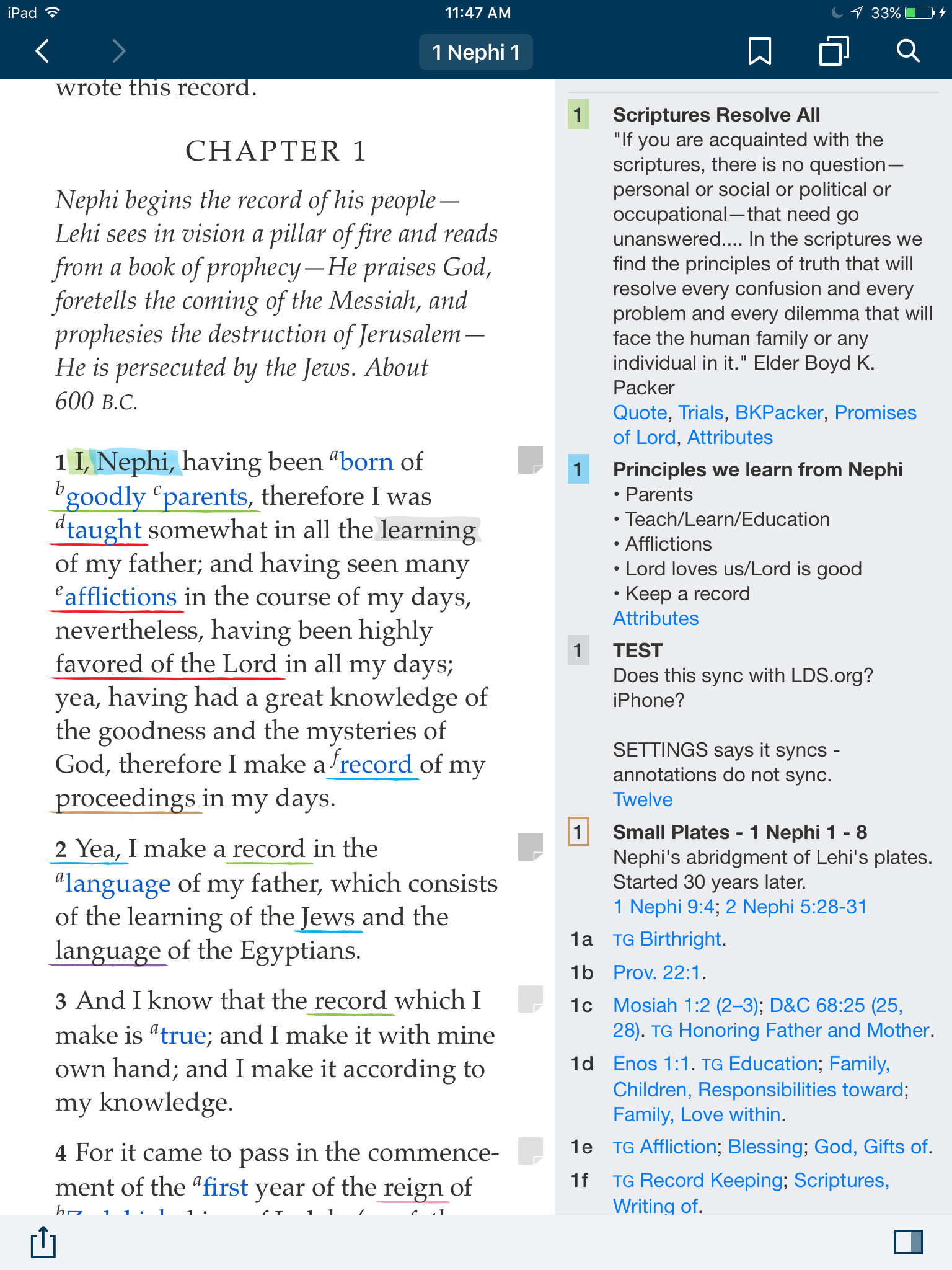
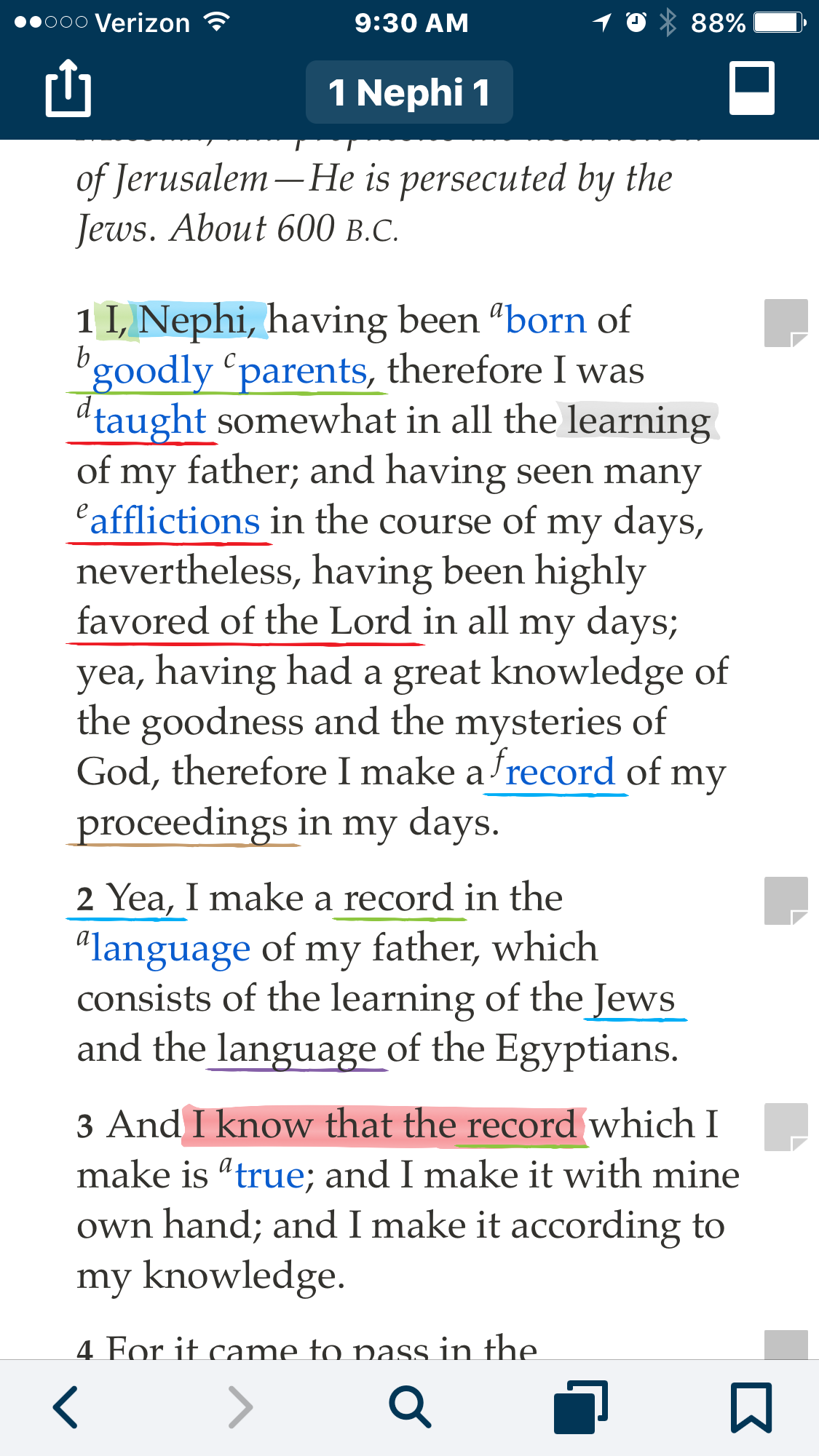
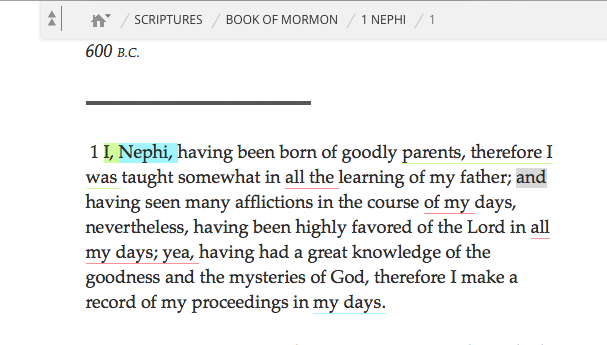
This morning we did a test. My wife highlighted the word "learning" in 1Ne1:1 on her iPad, and the highlight appeared on the word "and" 5 words later on lds.org.
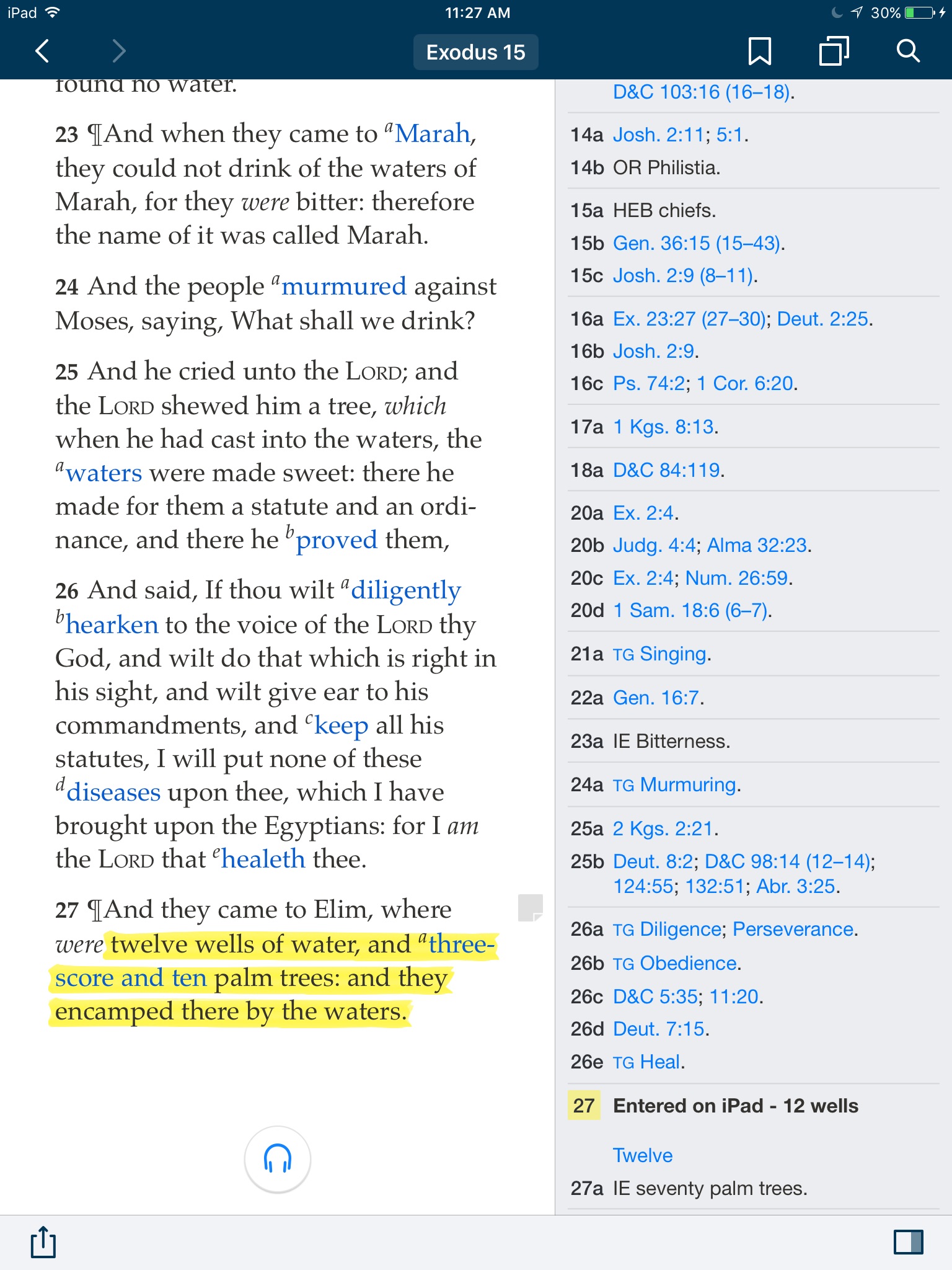
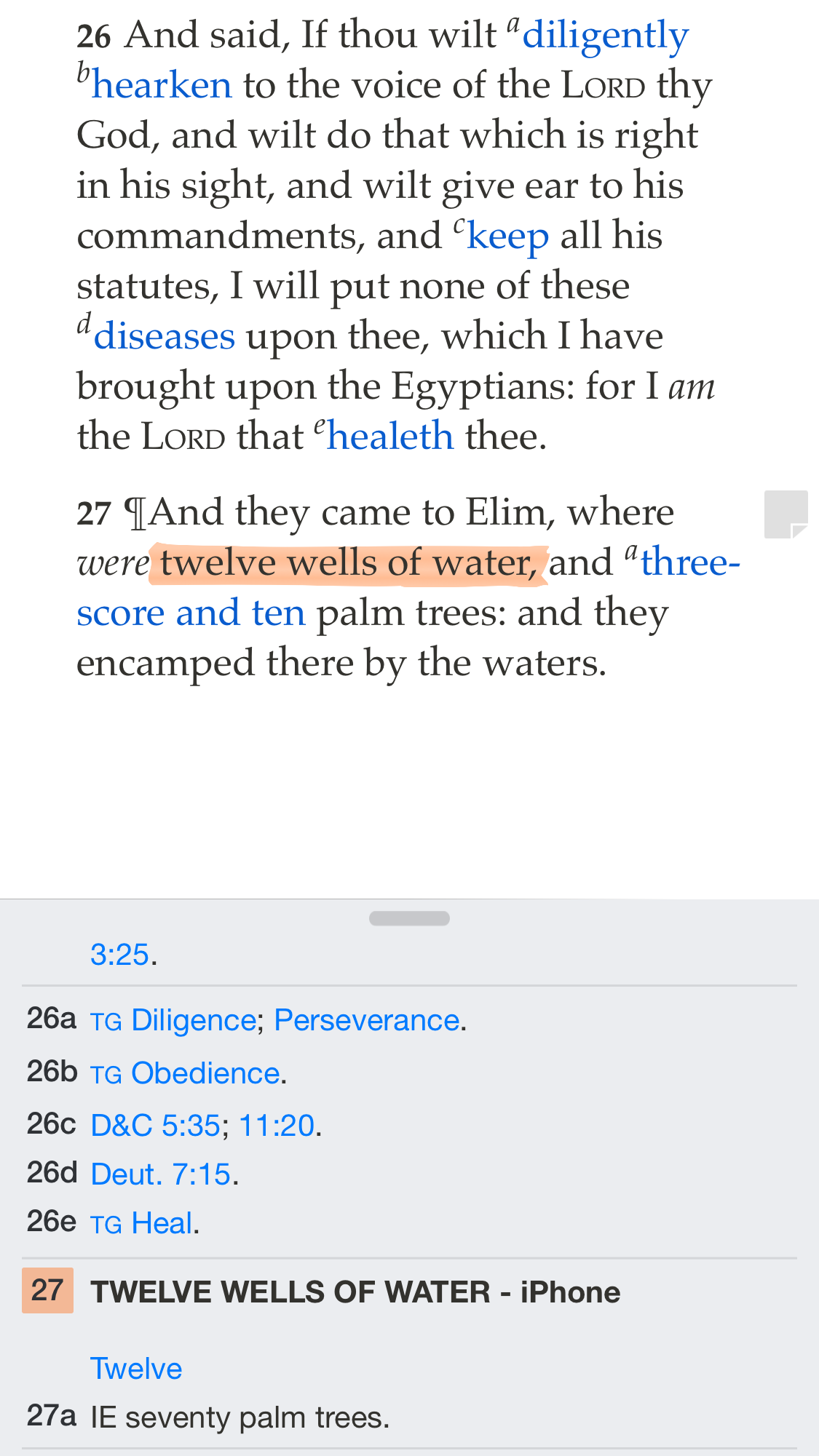
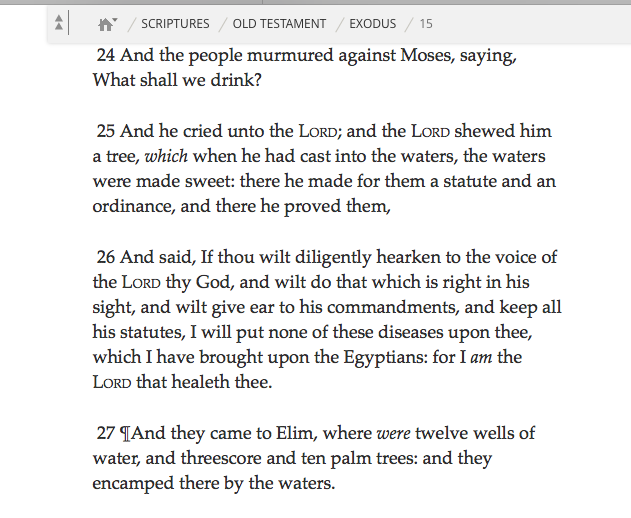
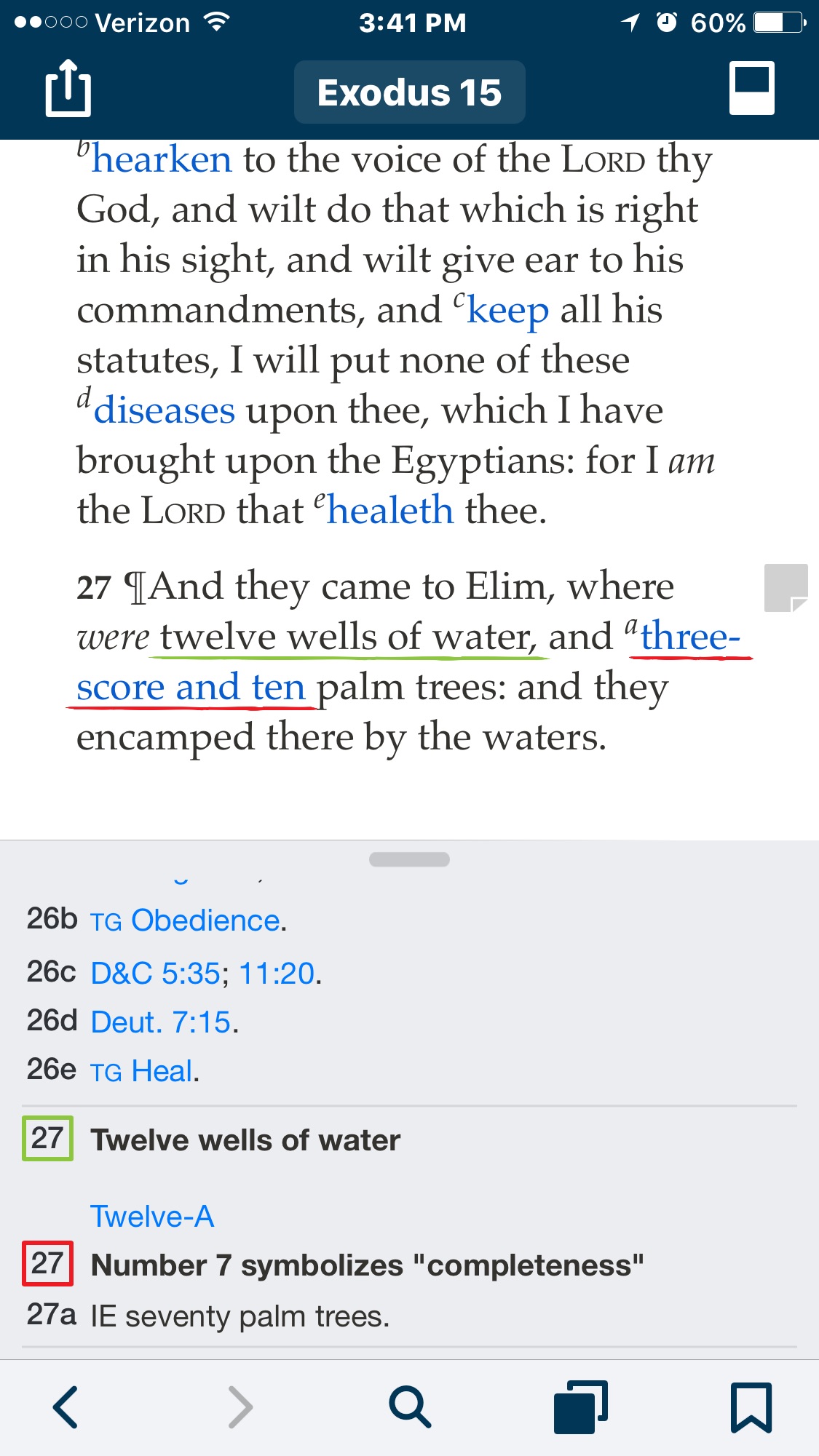
Then in Ex15:25 she highlighted the phrase "where were twelve wells of water, and threescore and ten palm trees: and they encamped there by the waters." It didn't show up on lds.org at all, and on her iPhone it only highlighted "where were twelve wells of water"
Community Moderators
#24
andyrosenberg wrote:This morning we did a test. My wife highlighted the word "learning" in 1Ne1:1 on her iPad, and the highlight appeared on the word "and" 5 words later on lds.org.
Then in Ex15:25 she highlighted the phrase "where were twelve wells of water, and threescore and ten palm trees: and they encamped there by the waters." It didn't show up on lds.org at all, and on her iPhone it only highlighted "where were twelve wells of water"
This seems to be a serious issue that I was able to reproduce. I'll follow up with a few people about it. Gospel Library for iOS and Android seem to play fine with each other, but it seems that LDS.org isn't playing according to the rules. I know an update to the LDS.org study tools is in the works, but I have no idea what their timeline is. I think highlights getting shifted should be an important enough issue for them to do a small patch release of some sort... Our worst nightmare is permanently messing up someone's annotations.
Samuel Bradshaw • If you desire to serve God, you are called to the work.
New Member
#25
Thanks! I sure hope this happens quickly. My wife is so discouraged that as she has entered so much info and then it appears in specious places, or modified. She has stopped reading a book that she wanted to take several quotes from and enter them in her scriptures, because she's not sure where they'll end up.
Please let me know if you if/when you become aware of a patch.
New Member
#26
sbradshaw wrote: Yes, user-created notes will be coming back to the related content sidebar on iOS. I don't have a timeline on how soon, though.
Any way you can step on some toes about this? I'd love to get this fix bumped to the top of the list. I too find it rather odd that my notes, which number in the hundreds, are separated from the other notes on each verse. Was user testing done on this feature (or any other)? If not, I'm glad to help on the next round. ;)
New Member
#27
sbradshaw wrote: Yes, user-created notes will be coming back to the related content sidebar on iOS. I don't have a timeline on how soon, though.
Can you explain that a little? What do you mean by user created notes? Are those notes in a notebook or or those the notes linked to a highlight in the scriptures? Or both?
Community Moderators
#28
npk_techguy wrote:
sbradshaw wrote: Yes, user-created notes will be coming back to the related content sidebar on iOS. I don't have a timeline on how soon, though.
Can you explain that a little? What do you mean by user created notes? Are those notes in a notebook or or those the notes linked to a highlight in the scriptures? Or both?
Notes, links, or tags associated with highlighted text in a chapter or article.
Samuel Bradshaw • If you desire to serve God, you are called to the work.
New Member
#29
Any suggestions for, what we discussed the other day, in the interim how best to handle notes not properly syncing between different devices and LDS.org?
Community Moderators
#30
andyrosenberg wrote:Any suggestions for, what we discussed the other day, in the interim how best to handle notes not properly syncing between different devices and LDS.org?
No progress – I reported it to the LDS.org team but haven't heard back.
I haven't been able to reproduce incorrect syncing between devices – at least not on Gospel Library 4. From what I can tell, only LDS.org has the problem of highlights being shifted.
Samuel Bradshaw • If you desire to serve God, you are called to the work.
New Member
#31
Thanks. Any suggestions on how to backup/protect info that is entered?
My wife's frustration level is enormous.
When she upgraded to 4.0 she found that several of her notes disappeared when she synced with LDS.org. She since has reverted to 3.4. Her notes stay intact on her phone, but they don't sync properly with LDS.org. Seems to be a Catch-22...
New Member
#32
I'll have her get on this blog chain to post (if possible) screenshots of her issues.
Community Moderators
#33
The only issue I'm aware of is highlights being off by a few words. If she's losing notes, that's another issue – could you expand on that?
Samuel Bradshaw • If you desire to serve God, you are called to the work.
New Member
#34
sbradshaw wrote:
npk_techguy wrote:
sbradshaw wrote: Yes, user-created notes will be coming back to the related content sidebar on iOS. I don't have a timeline on how soon, though.
Can you explain that a little? What do you mean by user created notes? Are those notes in a notebook or or those the notes linked to a highlight in the scriptures? Or both?
Notes, links, or tags associated with highlighted text in a chapter or article.
I am so relieved to hear that. Thanks for the clarification.
New Member
#35
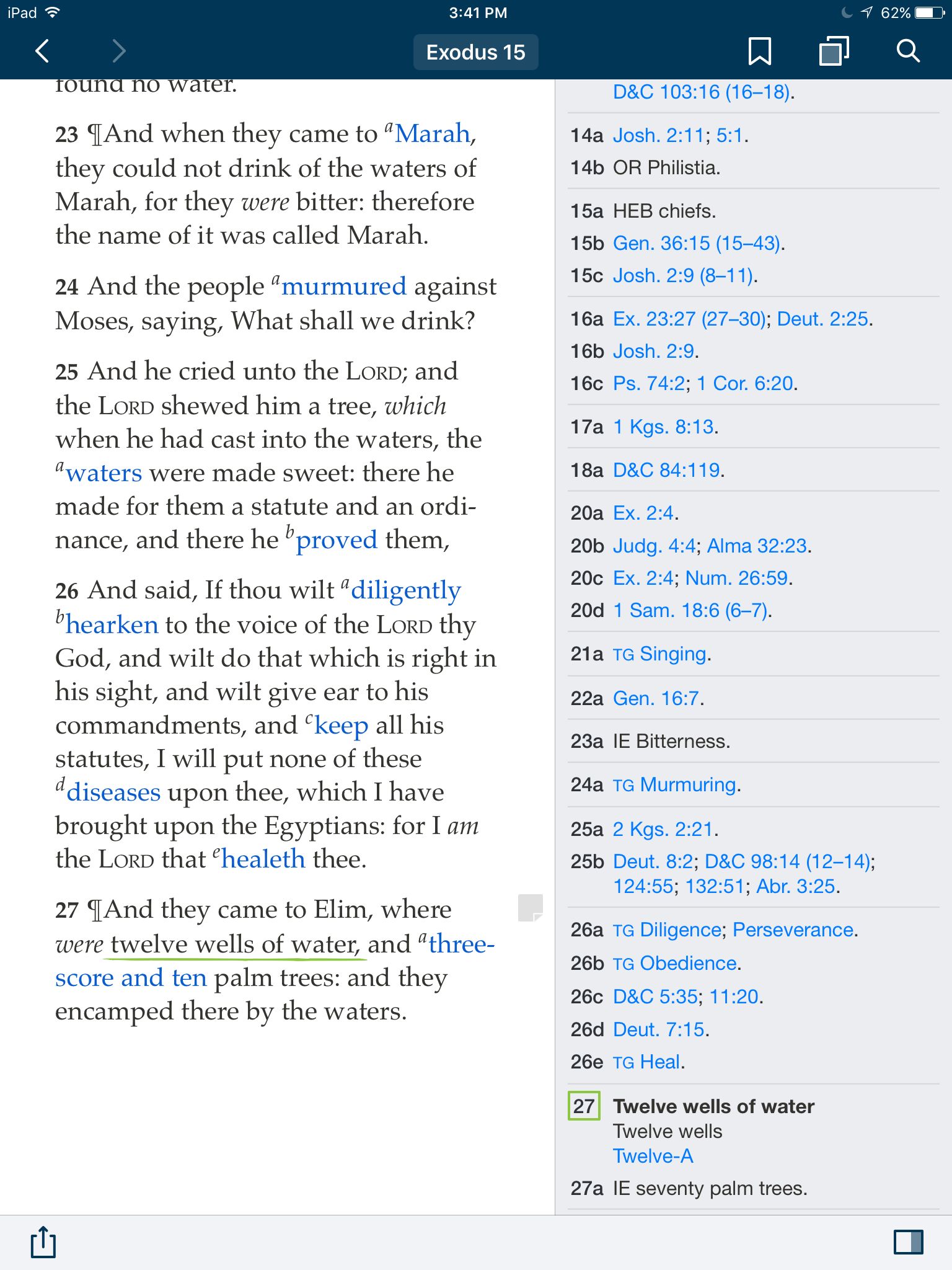
Here's an example of the issues my wife has encountered, EX 15:27:
First, her entry on her iPad 2
Exodus 15 - ipad.JPG
(573.63 KiB) Not downloaded yet
The phrase, "where were twelve wells of water, and threescore and ten palm trees: and they encamped there by the waters." is highlighted in yellow, and tagged Twelve.
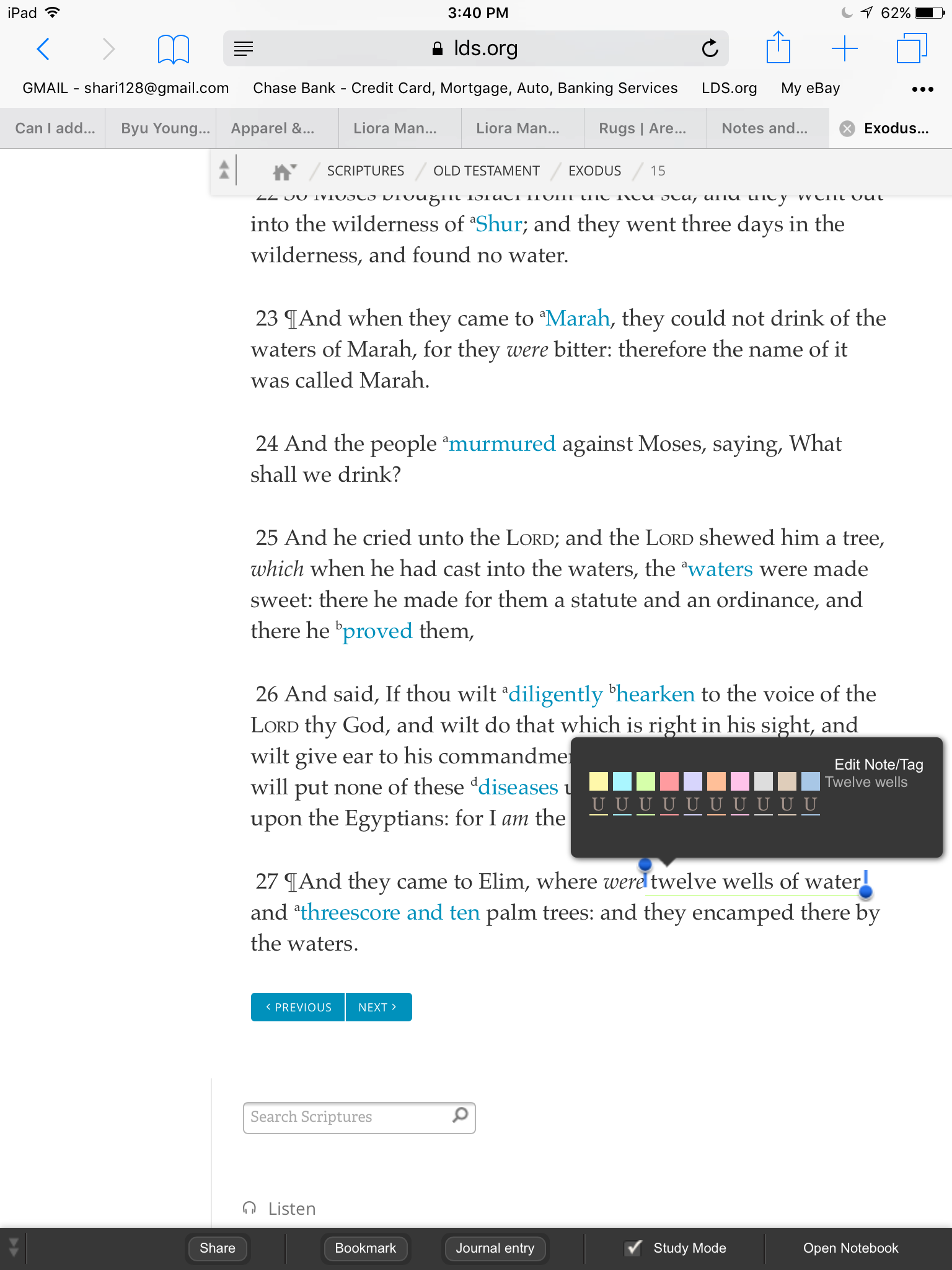
Next the same verse on her iPhone 6 Plus
Exodus 15 - iphone.PNG
(258.51 KiB) Not downloaded yet
Only the words, "where were twelve wells of water," are highlighted and not yellow, but rather orange. The tag Twelve appears.
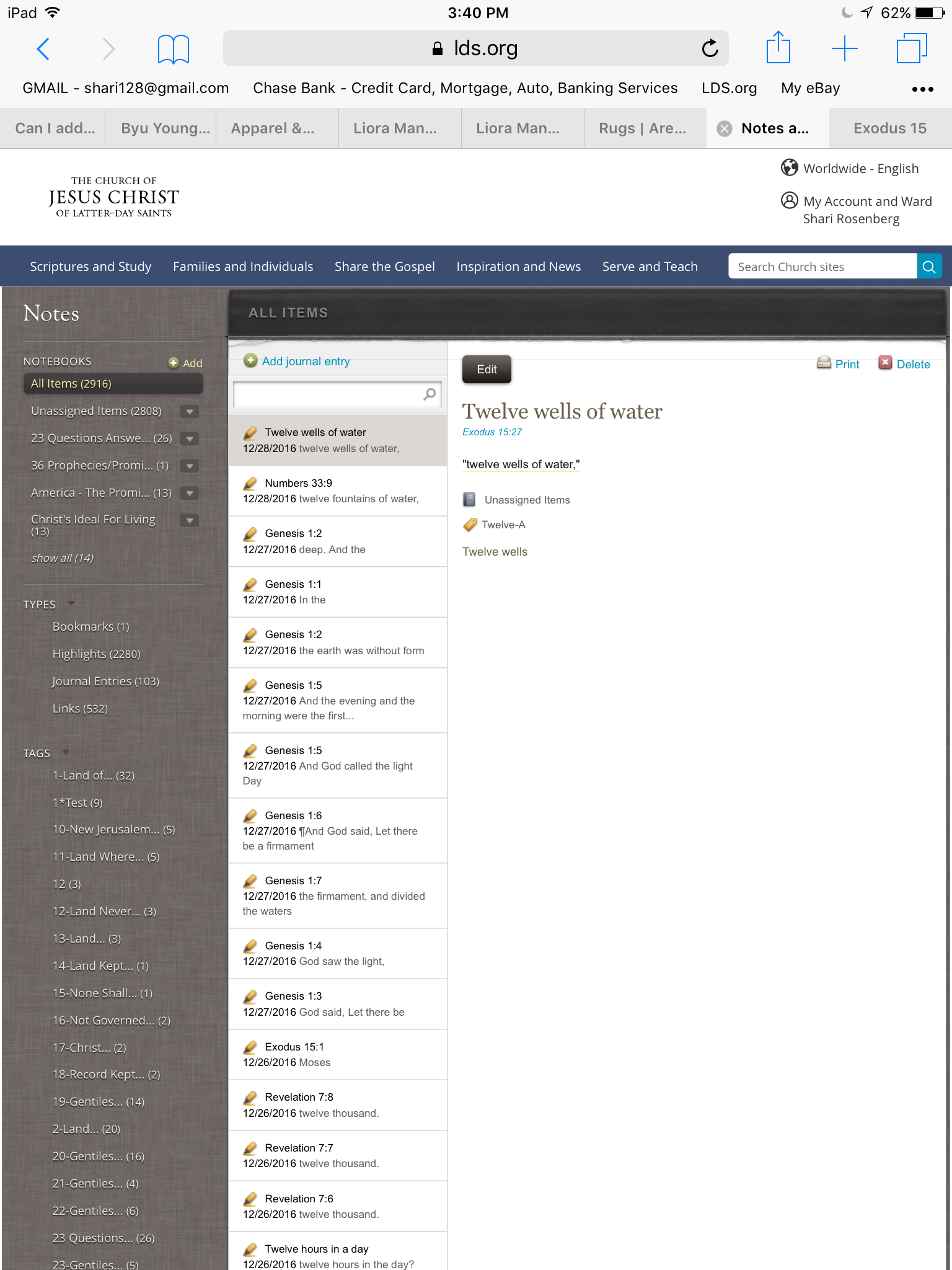
Finally, on LDS.org
Exodus 15 - LDSorg.png
(98.41 KiB) Not downloaded yet
Nothing is highlighted and there isn't any tag in the Notebook section of LDS.org (she has 23 Tags under Twelve so a screenshot can't capture them all)

Here's a test we did 1NE 1:1 - we highlighted the word "learning" in gray
First, her iPad
1 Nephi 1 - ipad.PNG
(532.22 KiB) Not downloaded yet
"learning" is highlighted in gray.
Second, her iPhone
1 Nephi 1 iPhone.PNG
(353.03 KiB) Not downloaded yet
"learning" is highlighted in gray.
Finally, LDS.org
1 Nephi - LDSorg.png
(56.56 KiB) Not downloaded yet
Rather than the word learning, "and" is highlighted in gray.
New Member
#36
I sent in the message an hour and 1/2 ago yet I see that the attachments are "Not downloaded yet"
What would prevent/slow this process?
Community Moderators
#37
It does look like they are out of sync. First:
  • Make sure Gospel Library on the iPhone, Gospel Library on the iPad, and LDS.org are signed in with her LDS Account.
  • Be sure that each is signed in with the same username (the same LDS Account, not different LDS Accounts).
  • Ensure that each is properly connected to the internet.
After making sure that each device is signed in with the correct LDS Account and connected to the internet, try these steps:
  1. Open Gospel Library on the iPhone.
  2. Force close the app (double-tap the home button, then swipe it upward out of the recent apps list).
  3. Reopen the app, and watch for a little spinner at the very top of the screen (next to the cell provider name or WiFi symbol). Force closing and reopening the app will force a sync, and the spinner means that the sync is in process.
  4. After the spinner is gone, go to the main library, then navigate back to the chapter. This will refresh the chapter and force the highlights and annotations to re-draw on the page. Depending on how many annotations you have on the page, it may take up to 5 seconds for everything to appear.
Next, repeat steps 1–4 on the iPad.

Finally, refresh the chapter on LDS.org.

Then report back! :)
Samuel Bradshaw • If you desire to serve God, you are called to the work.
New Member
#38
I am sad to say I agree with all that has been said about this. I study every day. This has made it very frustrating. I'm even having major issues trying to add new copied notes from another source to certain scripture passages. I use my iPad so have no way to revert back to the previous version. And the comment by corwinslack about "casual users", I think feel sorry for "casual users" who are not as computer savvy because I am sorry to say, the new changes are not easy to figure out and there are so many "buggie" issues. I do wonder if the team submitted this new version to beta testers first, because my impression is that they did not, simply by the amount of problems. I, too, wish that I could use the older version until this one has most of these issues fixed.
New Member
#39
So here is my report, and it has a seemingly bizarre quirk.

We had already done the steps that you recommend, but thought we'd follow the procedure again. After completing each of the steps as well as signing out and signing in on each device, the same errors appear in both 1 Nephi 1:1 and Exodus 15:27.

However, I then highlighted the word "Elim" in Exodus 15:27 in LDS.org and forced closed the app on her iPhone and iPad. When I opened the app on each device, the highlight correctly appeared on each device - though each device still displayed the 2 different highlights that I described in my previous note, and there still was no highlight in LDS.org where there were highlights, albeit different on the iPad and iPhone.

Then I thought I'd try it the other way. I highlighted the word "they" on her iPad and after force quitting the app on her iPhone, the word was correctly highlighted. I reloaded the page on LDS.org on her computer and it too correctly displayed the word "they" highlighted and in the correct color.

Next, I highlighted the word "And" on her iPhone and force quit the app on her iPad. When I reopened the app the word appeared with the correctly colored highlight. I reloaded the LDS.org page and it too had the correctly highlighted word.

Finally I reversed the process one word at a time, and each was correctly removed from the other devices.

However, through all that, the differently highlighted words and colors still remained on the iPhone and iPad without any corresponding highlight on LDS.org.

Of course that logically doesn't make make any sense, but those difference (errors) remain in EX 15:27 and 1 Ne 1:1.

Your thoughts???
Community Moderators
#40
OK, so it sounds like new annotations are syncing fine. What happens if you edit one of the unsynced highlights – for example, change the color – does the updated highlight sync to the other devices?

There was a bug in Gospel Library 3 (fixed in Gospel Library 4) that if you create a highlight on device A while offline, then sync device B, then device A comes online and syncs – that highlight from device A won't ever make it to device B. I wonder if that happened for those particular highlights? If so, just editing the highlight will change the modified timestamp and cause it to sync.

You say you signed out and signed in on each device – do you mean you just checked to see if you were signed in? Normally, if you sign out, it will remove all the annotations from your device, and then when you sign in again it will download them all from the sync service. So signing out and signing in should completely reset everything to what the sync service thinks you have. Anything that hadn't synced from your device would be lost.
Samuel Bradshaw • If you desire to serve God, you are called to the work.
Community Moderators
#41
andyrosenberg wrote:I sent in the message an hour and 1/2 ago yet I see that the attachments are "Not downloaded yet"
To answer your question and close the loop for others, attachments can be opened and viewed without being downloaded. And in that case, the download counter would not advance. As you have probably surmised by now, your attachments have, in fact, been viewed.
New Member
#42
To answer your question, I signed out and force quit the app on both devices, signed out on LDS.org, and then opened and signed in each of them.

Some of the notes do sync, and tests with entering and deleting new material seem to work.

However, despite the process of signing out, quitting, and signing back in , there are still some errors that seem imbedded.

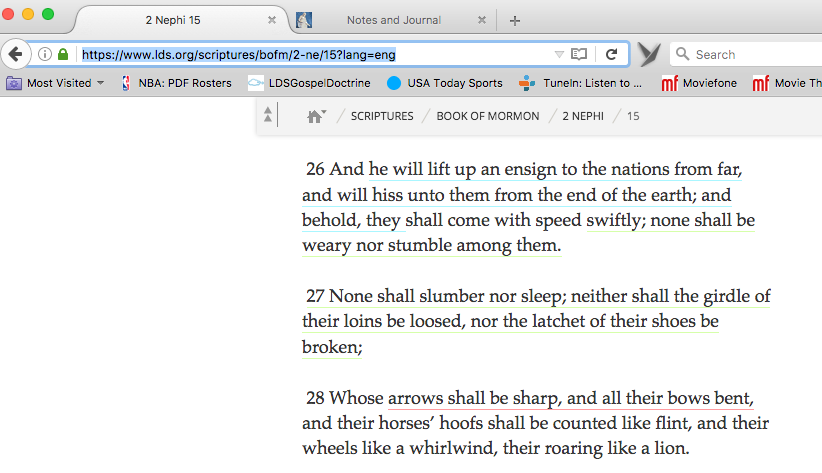
For example, in 2 Nephi 15, here is what is displayed in LDS.org
Screen Shot 2 Nephi 15.png
(107.02 KiB) Not downloaded yet
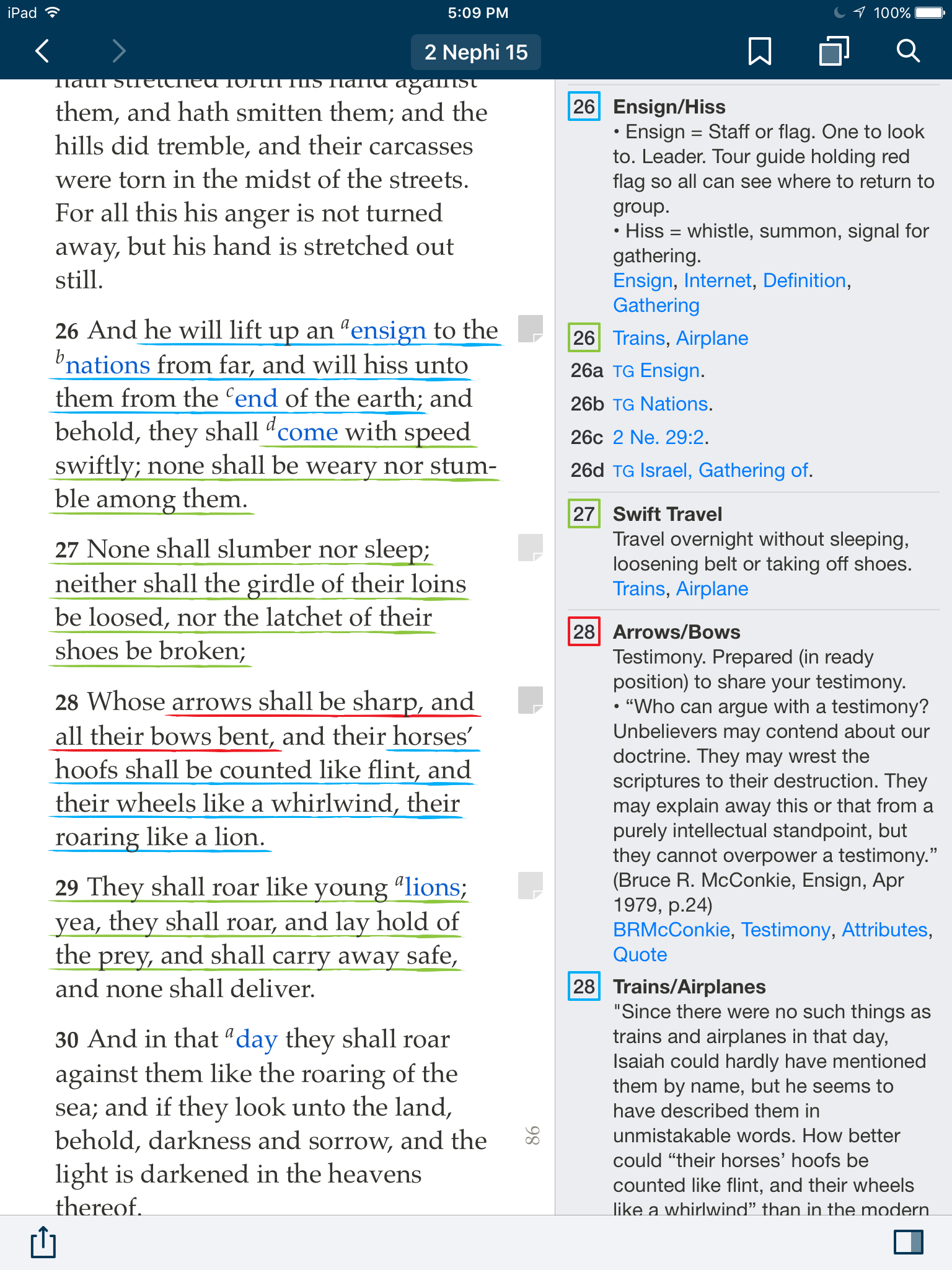
In verse 26 the highlight here is "he will lift up an ensign to the nations from far, and will hiss unto them from the end of the earth; and behold, they" whereas on her iPhone and iPad it's "he will lift up an ensign to the nations from far, and will hiss unto them from the end of the earth;"

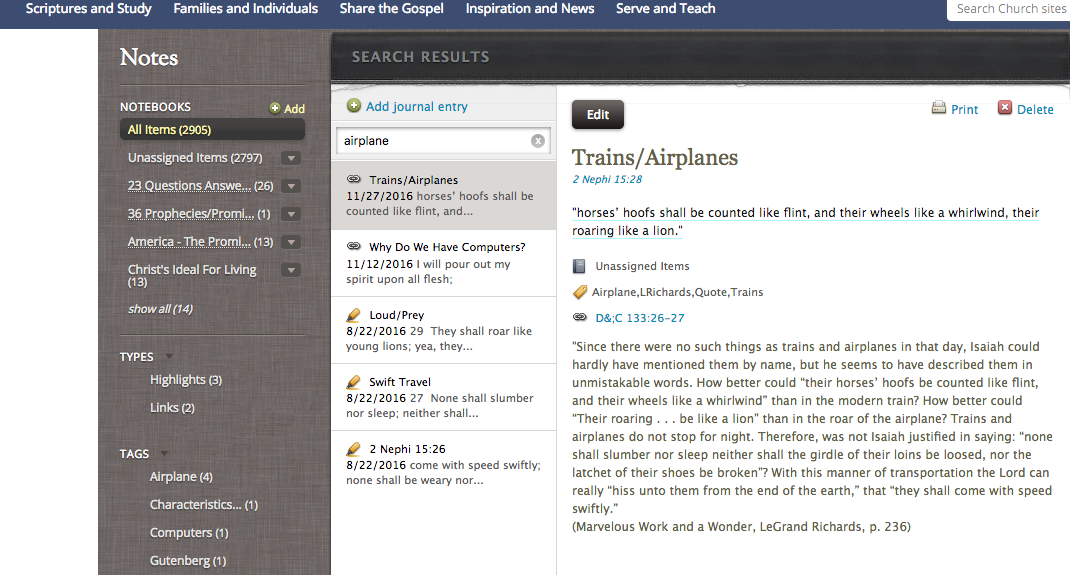
In verse 28 "horses’ hoofs shall be counted like flint, and their wheels like a whirlwind, their roaring like a lion." is underlined on here iPhone and iPad:
2 Nephi 15 iPad.png
(619.5 KiB) Not downloaded yet
but as you can see from the above attachment, it is not highlighted at all on LDS.org. However if I use the LDS.org Notebook search, the note and tag are there:
Screen Shot Notebook.png
(365.99 KiB) Not downloaded yet
So I'm open to any suggestions as to how to reconcile these quirks that avoid going highlight by highlight, note by note, and tag by tag as my wife has 2906 notes - yikes!

Thanks!

Merry Christmas!!!
New Member
#43
This last post was a response from andyrosenberg posted on Shari's account - it's her iPhone/iPad/LDS.org where we're seeing the issues...
New Member
#44
I have an issue I have noticed. When I add a note to a verse by clicking on the verse itself and clicking on the "Note" icon in the menu bar, two notes are added. They have different dates; there is an older date on one note and today's date on th othe note (I am assuming that the older date is when the verse was originally highlighted). The text of both notes are identical.

This does not occur when I edit a note after clicking on the note icon and then hit the three dots at the top of the note on the right hand side of the new pane and click "Edit note". It only happens when I click the note icon in the menu bar.
New Member
#45
I have done several tests today, and continue to be perplexed at the inconsistent results. Sometimes highlights are transferred with the exact same words underlined. However, sometimes the underlining is misplaced a few words. This occurs both going from the iPad to LDS.org online as well as from LDS.org to the iPad.

Here are the discrepancies:
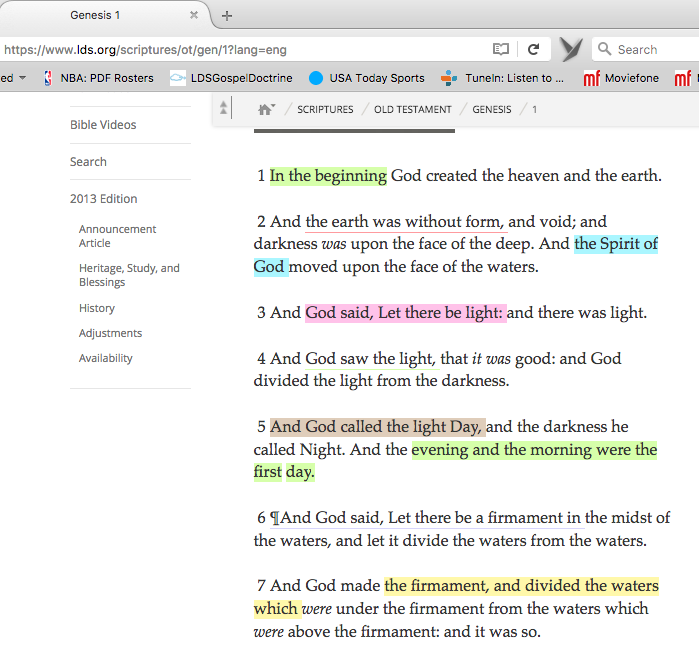
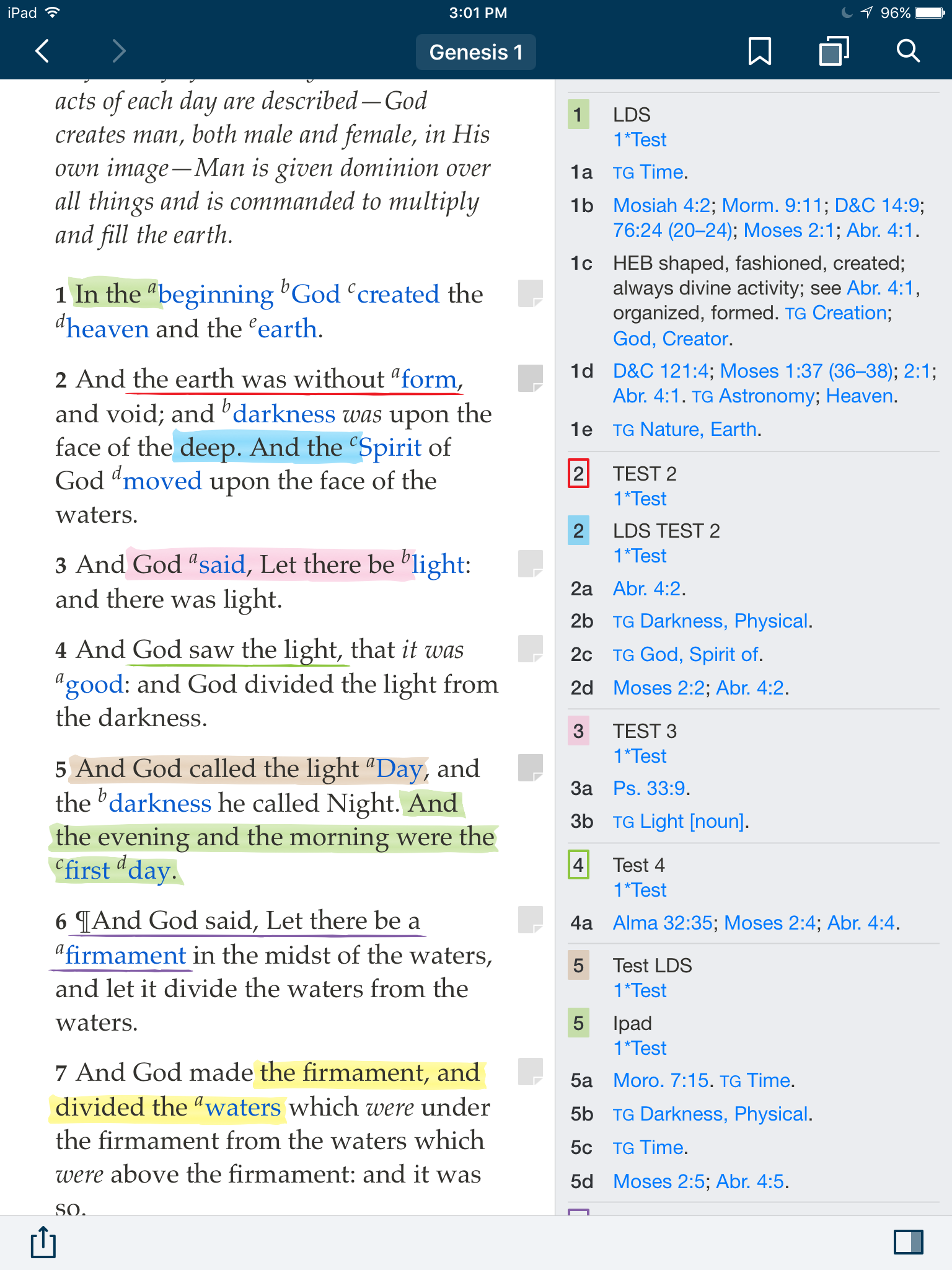
Genesis 1 verse 1 and 3 the words "In the beginning" and "the Spirit of God" were entered and highlighted on LDS.org - yet on the iPad "In the" and "deep. And the" are highlighted
Looking at verses 5 and 7 "And the evening and the morning were the first day." and "the firmament, and divided the waters" were entered and highlighted on the iPad - yet on LDS.org "evening and the morning were the first day." and "the firmament, and divided the waters which" are highlighted.

However, other highlights in these 7 verses are identical matches. All were entered in the last 1/2 hour as a test.

Here are the screenshots:
First from LDS.org
LDS.org.png
(143.29 KiB) Not downloaded yet
Next the iPad
iPad.png
(583.92 KiB) Not downloaded yet
There is seemingly no rhyme or reason as to when this occurs...
New Member
#46
Interestingly, I can replicate this issue on my devices with my LDS.org account, so I don't think it is a glitch in my wife's LDS account or devices.
I have an iPad mini 4 and iPhone 5s
My wife has an iPhone 6 Plus and an iPad 2
Community Moderators
#47
To clarify, you are no longer having issues with the Gospel Library app being out of sync between devices – is that correct? If that's the case, then no data is being lost – everything is synced – it's just a problem with how LDS.org is displaying the highlights. If so, then this bug will need to be reported to the LDS.org team. The best way to do that is by using the feedback link at the bottom of LDS.org. I've also sent feedback to LDS.org, but multiple cases from different users about the same issue will bring it to their attention more readily.
Samuel Bradshaw • If you desire to serve God, you are called to the work.
New Member
#48
I will report to LDS.org - though so far when I have reported to them they have never responded...

However, there are still issues between devices, either not syncing/losing info. On her iPhone we just changed in Isaiah 15:27 the "Title" in a 'Note" from the misspelled emboldened "Twelve wells if water" to the emboldened "Twelve wells of water" That properly was synced with her iPad and LDS.org.

We then deleted the the "Note" on her iPhone "Twelve wells" That phrase does not delete from either her iPad or LDS.org even after signing out and signing in to all 3 devices.

iPhone:
iPhone Isaiah 15 27 Dec 28.JPG
(341.46 KiB) Not downloaded yet
iPad:
iPad Isaiah 15 27 Dec 28.PNG
(441.34 KiB) Not downloaded yet
LDS.org:
LDS.org Isaiah 15 27 Dec 28org .PNG
(308.46 KiB) Not downloaded yet
LDS.org Notebook:
LDS.org Notebook Isaiah 15 27 Dec 28.PNG
(1 MiB) Not downloaded yet
LDS.org Notebook Isaiah 15 27 Dec 28.PNG
(1 MiB) Not downloaded yet
New Member
#49
I finally figured out why for the last 4 months some of my notes randomly synced between devices and some did not (lds.org, iPhone, and iPad).

I never knew when I did a full sync from lds.org if all the entries from my devices would sync over or be lost forever, which caused me to stop entering any notes at all.

After a lot of testing and experimentation, here’s what I figured out.

I always include a title for a note with a few words, to make it bold and easier at see at a glance:
IMG_6333.PNG
(227.09 KiB) Not downloaded yet
What I figured out is if a note has only a “title” it won't sync -- if a note has a “title” and “text” it will sync. And of course, a "text" only note will sync:
IMG_6334.PNG
(253.25 KiB) Not downloaded yet
Even if the text is only a “period” — it will work.
IMG_6332.PNG
(209.19 KiB) Not downloaded yet
I simply went back and added text to all my notes and everything synced! I hadn’t lost one!

I hope this helps someone from pulling all their hair out. Mine is almost gone. (Now growing back at magical speed.)

Please note that this does not correct the issue of underlines and highlights being displaced on lds.org from those entered on the iPhone on iPad. This only addresses notes syncing between all devices.
Community Moderators
#50
Ah, this is another Gospel Library 3 sync bug that was fixed in Gospel Library 4. I'm glad it's working!
Samuel Bradshaw • If you desire to serve God, you are called to the work.
New Member
#51
Me too, but I'm reluctant to update to 4.0 with the whole issue of notes. Hopefully 4.1 will be released soon and will restore a split screen so that notes may be seen while reading the scriptures. And underlining and highlighting will sync.
New Member
#52
Nice to know it's been fixed. What a long ordeal.

Any idea when the next update will come out with the return of side notes?
Community Moderators
#53
No, I'm not sure when the next update will be, other than a "patch release" with minor crash/bug fixes. There will probably be a patch release in the next couple of weeks, but I don't think anything visible will change. I do know that it won't be a whole year, like it was between 3.4 and 4.0! :)
Samuel Bradshaw • If you desire to serve God, you are called to the work.
Community Moderators
#54
We've made some progress on tracking down where highlights are sometimes shifted by a few words on LDS.org, compared to Gospel Library. It has to do with the Show Footnotes / Hide Footnotes toggle. @andyrosenberg, when you go to Exodus 15 on LDS.org, on the right there's an option to Show Footnotes or Hide Footnotes. When the footnotes are visible, the highlights seem to line up correctly. Is that the case for you?
Samuel Bradshaw • If you desire to serve God, you are called to the work.
New Member
#55
Thanks. Right now with some testing it seeems to work back and forth from the website to the device app. I will continue to experiment a little more thoroughly and report.
#56
There are a few virtues in the new window for member added notes, tags and links (NTL) in spite of the many problems. It would help for verses with NTL to only have one icon in the right margin. When the icon is tapped the window should open showing all the NTL for the verse organized by highlight style . Reciprocal links should be listed last. Highlights for multiple verses should be associated with the first verse in the range. The highlight could be indicated with the first and last words of the highlight separated by ellipses and styled exactly like the highlight in the verse.
#57
4.03 helps but I think that a single icon per verse that opened all the notes with the highlight "link" would be good. I like having things in the footnotes but the expanded link text is a distraction there.

Thanks for 4.03. I am looking forward to 4.1.
New Member
#58
4.03 is a great improvement. I played with the app yesterday on an iPad 3. So, yes, a little slow. However, I am still not going to update my phone and iPad. Waiting for 4.1 or at least seeing what 4.04 brings.

I like being able to see the highlights and notes in the footnotes section, I am glad that got started. I like the format of the content in 4.x, especially the SS lessons. Very nice, easy on the eyes and great information.
I really love the spit screen capability.

My concerns are still around the way I use the app for personal study.
  1. The highlights and associated notes with the borders use too much room in the side bar. Too much white space around.
  2. The highlight colors are too light. I can't distinguish between yellow and orange, especially a note for an underlined verse in the sidebar. I like the verse number in a box of the underline color rather than just underlined, like 3.4. that would help with visibility. Be sure and test the colors with Nighshift mode on and off.
  3. The whole linked scripture is shown in the sidebar. Needs to be a way to open and close (hide) or got back to the way it was done in 3.4. If I have 4-5 verses linked to a verse, then all of those verses are shown in the sidebar. Too distracting. Takes up too much space.
  4. The sidebar scrolls to the top footnote for the verse at the top of the screen, not to the top of the highlights and notes for the same verse. (I can live with this one because it is scrolling to the first shown footnote.)
For me, personally, I am comfortable with 3.4 for my scripture study. The changes in 4.03 are still too much of a distraction for me.

Keep up the good work and I look forward to future releases.