Gospel LIbrary for Windows 10 Beta Now Available

32 postsstarted by ToManyLetters 10,493 viewsoriginal topic

Senior Member
#1
A beta of the new version of Gospel Library for Windows is now available via the Windows Store. You can download it via the link below:

Download Gospel Library Beta: https://www.microsoft.com/en-us/store/a ... zdncrdfdcd

Note that we are currently focused on the app as it functions on desktops, laptops, 2-in-1s, and tablets. We are not taking any feedback concerning the application on Windows 10 Mobile at this time as the app, though available for phone users, is not ready for testing on phones.

A few new features worth highlighting:

- Support for tags - Windows now supports tags! You can add a tag by going to the Annotations ribbon, clicking the tag icon, and adding as many tags as you like! You can also add a tag to any note when editing your note, or when you first create your note.

- Download All and Download Section - Windows now allows you to download all of the books in your current language in Gospel Library with only a few clicks instead of a few thousand! To download a section, right click (or long press) on its cover on the home page, then click "Download Section." Download All works much the same way, though it is a bit less intuitive at present. To Download All, open the library pane, then right click (or long press) on "Library Contents" and choose "Download Section".

- Notebooks - Windows now also allows you to create notebooks, view content in your notebooks, and add annotations to existing notebooks via the new annotations pane!

- Breadcrumbs - The new omnibox in Gospel Library for Windows breadcrumbs your trail for you, allowing you to step back through any part of your library journey instantly. Further, you can use the arrows next to each part of the breadcrumbs to jump into a different part of the library quickly. You can also use the omnibox as a quick search to find whatever book or chapter you're looking for.

- Custom Themes - We now have a host of custom themes at your disposal in the settings menu. In addition to being able to match your system accent color, you can select a color from a list of fifty colors to customize the look of the application.

 - No more confusing radial menu - We listened to your complaints about the radial menu, the circle many people dreaded and too few people were able to figure out. In its place are the new ribbons and, soon, a shiny new context menu to allow you to get marking faster than ever before!

Thank you all for your patience as the volunteer team has worked toward this development milestone for the application. If, in your testing, you come across any bugs, be sure to swing by the known bugs list (linked below) to check that the bug you're seeing isn't something we already know about. If it's something new, let us know so we can work to fix it. To give submit bugs and to give general feedback, you can send an email via the link in the app (Settings > About > Send Feedback).

Known Issues in Gospel Library Beta: https://tech.lds.org/wiki/Gospel_Librar ... eta_Issues

Thank you all and happy gospel study!
Learn more about Gospel Library for Windows 10 Beta at the link below:
https://tech.lds.org/wiki/Gospel_Library_for_Windows_10
Senior Member
#2
A couple of other features worth mentioning that I failed to mention earlier:

- New Content Source - This new version of Gospel Library for Windows consumes a new source for its content, meaning it will always have the exact same content as the iOS and Android versions of Gospel Library (formerly, we shared content with just Android.) This also means that limitations caused by older content, like not being able to mark bulleted or numbered lists, content in tables, and other miscellaneous content, no longer exist. You can mark it all!

- Rich Note Formatting - Gospel Library for Windows now also includes a new note editor that provides the ability for you to use bold and italics formatting, as well as bulleted and numbered lists in your notes. Further, you can now include extra spaces between paragraphs to your heart's content. That same note editor offers the ability to add tags and include your notes in any notebook or notebooks of your choosing.

Coming Soon

Here's a list of what's currently being worked on in the app.

Journal Entries - Journal Entries will use the rich editor as notes. You'll be able to create a new journal entry from the Annotations ribbon. This feature is already completed and will be available in an upcoming update to the beta.

Tabs - We're working on bringing tabs back to Gospel Library for Windows as quickly as we can.

We're also looking to include as many features from the previous version of the app as we can. This new beta is definitely a beta--we've got a lot of work ahead of us, but we think you will all really love this new application more and more as we work toward full release.
Learn more about Gospel Library for Windows 10 Beta at the link below:
https://tech.lds.org/wiki/Gospel_Library_for_Windows_10
Community Moderators
#3
How do Journal entries compare to / interact with Notebooks? I know that Android used to have a Journal section, but that feature was specifically removed in Gospel Library 4 for Android, to alleviate confusion and align more closely with iOS (Gospel Library for iOS never had a Journal section). The Journal in Android was basically an "all notes" section – you could create notes directly in the Journal, and any notes you created in a Notebook also showed up in the Journal.
Samuel Bradshaw • If you desire to serve God, you are called to the work.
Senior Member
#4
I may not have this exactly correct, as I'm not the one implementing the feature, but it is my understanding that Journal Entries are basically notes without a specific location tied to them. This is, at least, how they work on LDS.org.
Learn more about Gospel Library for Windows 10 Beta at the link below:
https://tech.lds.org/wiki/Gospel_Library_for_Windows_10
New Member
#5
When I launch the V4 Beta the app starts to load then closes. No error code is displayed. Running Window 10 Enterprise 64-bit on a Surface Pro 3. I've removed the app then re-installed but same result.
Senior Member
#6
ellisonms,

Are you completely up-to-date on your version of Windows 10? It's likely you'll need to be running the Anniversary Update for the app to function, and I know Enterprise customers (businesses) tend to be pretty bad about keep their operating systems up to date. It's also possible that your antivirus is interfering with the app. Norton/Symantec, McAfee, and Avast have all been guilty of it in the past.
Learn more about Gospel Library for Windows 10 Beta at the link below:
https://tech.lds.org/wiki/Gospel_Library_for_Windows_10
Senior Member
#7
Some exiting news!

In the most recent version of the beta, version 3.0.26.0, the app now has another long-awaited feature:

Links - You can add a link in Gospel Library for Windows by selecting text you'd like to link, then clicking the Link button in the Annotations ribbon. Then, navigate to where you'd like to link, and select it. Chose the "Link to <PLACE>" option in the ribbon. Your link is now created!
Learn more about Gospel Library for Windows 10 Beta at the link below:
https://tech.lds.org/wiki/Gospel_Library_for_Windows_10
New Member
#8
I have been using Gospel Library for Windows 10 with few problems but the last few days I have had nothing but problems - crashes, downloading content, etc. etc. I have uninstalled and installed again but still many problems. it has become unusable for me. What has happened?
New Member
#9
The errors I get are Unknown Error. I see now I can copy the details. I get this error when I try to access the Aaronic PH lesson but I get this error all the time:

Arg_IndexOutOfRangeException
at GospelLibrary.Common.Helpers.UriHelper.GetQueryParams(String uri)
at GospelLibrary.Common.Helpers.UriHelper.GetQueryParamValue(String uri, String key)
at GospelLibrary.UI!<BaseAddress>+0x8c4ced
--- End of stack trace from previous location where exception was thrown ---
at System.Runtime.ExceptionServices.ExceptionDispatchInfo.Throw()
at SharedLibrary!<BaseAddress>+0x3c2c09
at SharedLibrary!<BaseAddress>+0x35369a
Senior Member
#10
EJLindsay wrote:I have been using Gospel Library for Windows 10 with few problems but the last few days I have had nothing but problems - crashes, downloading content, etc. etc. I have uninstalled and installed again but still many problems. it has become unusable for me. What has happened?
The first elements of the tabs feature have been implemented and seem to be causing a rather lot of chaos. The 2.0.28.0 update released this morning has helped reduce the issues, but we still have some to chase down. Beta is very beta right now. The more useful information we can get and better bug bashing we can do now, the better the app will be when we prepare for release.
The errors I get are Unknown Error. I see now I can copy the details. I get this error when I try to access the Aaronic PH lesson but I get this error all the time:

Arg_IndexOutOfRangeException
This is, with little doubt, caused by the stuff being done in the background in preparation for tabs. Please be patient with us as we clean up our mess.
Learn more about Gospel Library for Windows 10 Beta at the link below:
https://tech.lds.org/wiki/Gospel_Library_for_Windows_10
New Member
#11
The app for my 2-in-1 looks fantastic, however, all of my markings (highlights ) that I have previously studied have disappeared. Strangely, my annotations are hit and miss. Sometimes they'll be there and others they won't. No error messages are given. It all just goes away. Interestingly, however, I know it is being saved to my LDS profile because when I go to my mobile app (apple), everything I have done that has disappeared on the Windows app is there on the iphone app. Wierd.....
Senior Member
#12
Yes, this is a known issue listed on our known issues list as VSO 675 and possibly also VSO 673. We're investigating the issues so we can find a fix for them. You can see the full list of known issues at the link below:

https://tech.lds.org/wiki/Gospel_Librar ... eta_Issues
Learn more about Gospel Library for Windows 10 Beta at the link below:
https://tech.lds.org/wiki/Gospel_Library_for_Windows_10
Senior Member
#13
I've created a more dynamic version of this thread as a wiki article for easier updating and reading.

https://tech.lds.org/wiki/Gospel_Library_for_Windows_10
Learn more about Gospel Library for Windows 10 Beta at the link below:
https://tech.lds.org/wiki/Gospel_Library_for_Windows_10
Member
#14
I've been using the Windows 10 beta version since it first became available, and it's been something else watching it develop into what it is today, knowing that it has a ways to go before final release. Most of the bookmark issues have been resolved, and I especially like the format of the magazines section.

I've not experienced any of the crashing issues that some have reported.

Great job, all.
CIAO!

Ed Nielsen
Senior Member
#15
NOTICE: AN ERROR IN THE CONTENT HAS CAUSED THE BOOK OF MORMON TO DISAPPEAR FROM ALL CURRENT VERSIONS OF THE APP, INCLUDING OUR BETA. IT IS NOT AN APP BUG AND WILL BE FIXED BY THE CONTENT TEAM AS SOON AS POSSIBLE.
Learn more about Gospel Library for Windows 10 Beta at the link below:
https://tech.lds.org/wiki/Gospel_Library_for_Windows_10
Senior Member
#16
The new content catalog is very broken. Such that now, downloading it may cause the beta to be unable to start again.
Learn more about Gospel Library for Windows 10 Beta at the link below:
https://tech.lds.org/wiki/Gospel_Library_for_Windows_10
Community Moderators
#17
ToManyLetters wrote:NOTICE: AN ERROR IN THE CONTENT HAS CAUSED THE BOOK OF MORMON TO DISAPPEAR FROM ALL CURRENT VERSIONS OF THE APP, INCLUDING OUR BETA. IT IS NOT AN APP BUG AND WILL BE FIXED BY THE CONTENT TEAM AS SOON AS POSSIBLE.
ToManyLetters wrote:The new content catalog is very broken. Such that now, downloading it may cause the beta to be unable to start again.
Evidence that you can't get very far in gospel study without the keystone of our religion! :)

I believe the content issue has been fixed now, with the latest catalog update (at least on iOS and Android I tested).
Samuel Bradshaw • If you desire to serve God, you are called to the work.
Senior Member
#18
While the Book of Mormon has returned and the catalog is now sufficiently patched back together with whatever duct tape was lying around the office, there's still missing content, as can evidenced in this thread: https://tech.lds.org/forum/viewtopic.php?f=103&t=27885
Learn more about Gospel Library for Windows 10 Beta at the link below:
https://tech.lds.org/wiki/Gospel_Library_for_Windows_10
Senior Member
#19
A few features that have been added to the beta since my last update here:

Editing Highlights and Underlines - It's now possible and easy to edit the color, style, and size of your highlights and underlines. Select text with the highlight you'd like to edit, then press the hint bubble to bring up the context menu. If only one highlight is in the selection, you will see it appear with options in the context menu. If there are more than one, a Multiple Highlights option will appear to allow you to select the marking you want to edit.

Journal Entries - You can now create a new journal entry from Journals section of the Annotations pane and write your spiritual impressions as they come to you, no matter what you're studying.

Printing - Basic printing is now available in the application. You can print the content of a chapter or article by pressing the more (...) menu on the right side of the Home ribbon and clicking "Print". At this time, notes, highlights, and other annotations are not printed by the application.

Highlight Color Sets - You can now chose from one of six different sets of highlight colors so that your highlights and underlines appear in a way that is most helpful for you--whether brighter or softer.
Learn more about Gospel Library for Windows 10 Beta at the link below:
https://tech.lds.org/wiki/Gospel_Library_for_Windows_10
Senior Member
#20
A much-loved feature has made its return to Gospel Library for Windows as of the 3.1.0.0 update to the beta:

Tabs - Easily flip back and forth between different locations in Gospel Library. We also have some new and exciting things coming for tabs in the near future!
Learn more about Gospel Library for Windows 10 Beta at the link below:
https://tech.lds.org/wiki/Gospel_Library_for_Windows_10
Senior Member
#21
Another beta update, version 3.1.1.0, with more exciting updates!

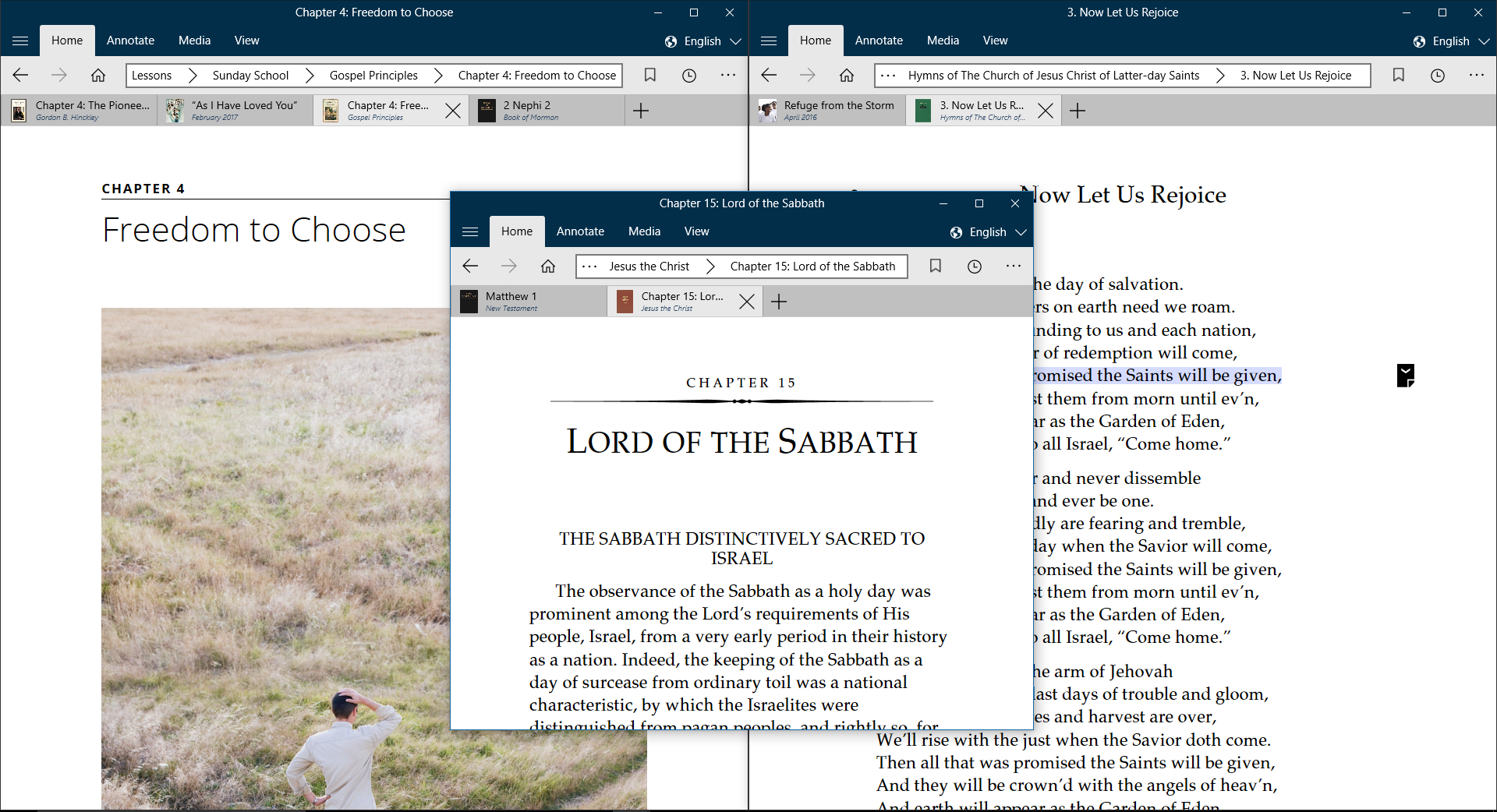
Tabs at the Top - The tabs feature has become distinctly more tab-like, allowing you to make use of browser-like tabs to quickly and easily flip between open pages of Gospel Content.

Multi-Window Support - You can now have as many Gospel Library windows open at a time as you need so that you can be more flexible in your studies.

Immersive Mode - With a double tap or double click, you can send the interface away, giving you extra reading space and allowing you to focus on what you're reading.

We are now entering into a new phase of beta development, focused in on locking down features, eliminating critical bugs, and preparing for our first public release. We hope you all will continue to test with us as the beta continues!
multiwindowtabs.jpg
(1.22 MiB) Not downloaded yet
Learn more about Gospel Library for Windows 10 Beta at the link below:
https://tech.lds.org/wiki/Gospel_Library_for_Windows_10
Senior Member
#22
Another update, now version 3.1.4.0:

Role-Based Content - Users of the app that need access to calling-specific content, like Handbook 1, are now able to see, open, and use relevant role-based content.

New, Detailed Help and Tips - A brand new help guide has been written for Gospel Library for Windows 10 that offers help on each of the features of the application and offers tips on how to best take advantage of the tools Gospel Library for Windows 10 offers.
Learn more about Gospel Library for Windows 10 Beta at the link below:
https://tech.lds.org/wiki/Gospel_Library_for_Windows_10
Member
#23
Is there any way to organize (or rearrange) bookmarks?
CIAO!

Ed Nielsen
Senior Member
#24
Ed,

No. We have some stuff planned for bookmarks in the future, but rearranging bookmarks isn't super high on our list of priorities at the moment.
Learn more about Gospel Library for Windows 10 Beta at the link below:
https://tech.lds.org/wiki/Gospel_Library_for_Windows_10
Senior Member
#25
Beta 3.1.6.0 has released! Two awesome new features come in tow.

Open Reference in New Tab or Window - In addition to the very tab-like tabs, you can now also open references to other materials in a new tab or window by right-clicking or pressing and holding on a reference, then choosing "open in new tab" or "open in new window".

Sheet Music - The Sheet Music feature has returned, now available in more languages than ever before. This feature is now also available for the first time on phones. [Note: We are still not yet testing on phones. This will change in the near future.]
Learn more about Gospel Library for Windows 10 Beta at the link below:
https://tech.lds.org/wiki/Gospel_Library_for_Windows_10
Member
#26
ToManyLetters wrote:Ed,

No. We have some stuff planned for bookmarks in the future, but rearranging bookmarks isn't super high on our list of priorities at the moment.
Thank you, Sir!
CIAO!

Ed Nielsen
Community Moderators
#27
Can't wait for the phone version to be ready for testing!
Samuel Bradshaw • If you desire to serve God, you are called to the work.
New Member
#28
Is there a way to change the way I am viewing the books? I'd like to change it to a list view instead of the tiles view.
https://drive.google.com/file/d/0B05pqC ... sp=sharing
Senior Member
#29
Shrinking the width of the app to small enough to force list view is currently the only way. While we plan to add an option to force list view all of the time, it is a very, very low priority.
Learn more about Gospel Library for Windows 10 Beta at the link below:
https://tech.lds.org/wiki/Gospel_Library_for_Windows_10
New Member
#30
In the previous version I was able to see a cross link scripture when I clicked on the hyperlinks, now it just shows the scripture. Is there any plan to have a pop-up of the scripture instead of just the hyperlink to the book?
https://drive.google.com/open?id=0B8ZRz ... FJWRzlreVE
Senior Member
#31
Tyler,

The next update to the app reintroduces the references pane and introduces the references snapdown. You'll be able to preview referenced scriptures using either of these features. The update should be available in a couple of days.
Learn more about Gospel Library for Windows 10 Beta at the link below:
https://tech.lds.org/wiki/Gospel_Library_for_Windows_10
Senior Member
#32
Beta 3.2.1 has now released, bringing with it an old friend.

References Pane - An old friend made new again, the references pane and a new lower snap mode for references allow users to skim through a chapter's references with ease. The new references pane also keeps scrolled in sync with you as you read.
Learn more about Gospel Library for Windows 10 Beta at the link below:
https://tech.lds.org/wiki/Gospel_Library_for_Windows_10