Journal/Notes Entries on My Account Suddenly All Gone

20 postsstarted by jhammond 7,473 viewsoriginal topic

New Member
#1
I've been saving talks to read for an upcoming speaking assignment in the Notes/Journal section of my lds.org account. I've just now logged into lds.org my account to review them. There are zero entries remaining! No bookmarks, etc. What has happened to them?

Could I have deleted these from my mobile device? Any way to recover them?

Thanks for any help!
~Jonathan

Community Administrator
#2
Generally, notes sync between on-line and the Gospel Library app. So it's possible that you've deleted them, but I think you'd have to be very aware of it. I don't think it's something that's easily done accidentally.

I'd double check that you are in fact logged in and that you didn't somehow make all your notes under a different account.
Have you searched the Help Center? Try doing a Google search and adding "site:churchofjesuschrist.org/help" to the search criteria.

So we can better help you, please edit your Profile to include your general location.
New Member
#3
Thanks for your prompt response. I don't have another account with lds.org.

Hoping it's a case of easily correctable user error or data recovery.
#4
Same problem. I was able to see all of my notes yesterday morning (Nov 7). Today nothing?
Community Administrator
#5
russellhltn wrote:Generally, notes sync between on-line and the Gospel Library app. So it's possible that you've deleted them, but I think you'd have to be very aware of it. I don't think it's something that's easily done accidentally.

I'd double check that you are in fact logged in and that you didn't somehow make all your notes under a different account.
There seems to be a system-wide problem -- it's not a problem with any particular account. I first noticed it yesterday afternoon (7 November). Notes are all gone on LDS.org and Gospel Library gives an error whenever you try to sync.
Questions that can benefit the larger community should be asked in a public forum, not a private message.
Community Administrator
#6
GOOD NEWS!

The system seems to be up now. Notes on LDS.org are now shown, and sync with the mobile Gospel Library app is working again.
Questions that can benefit the larger community should be asked in a public forum, not a private message.
New Member
#7
Excellent. Thanks.
New Member
#8
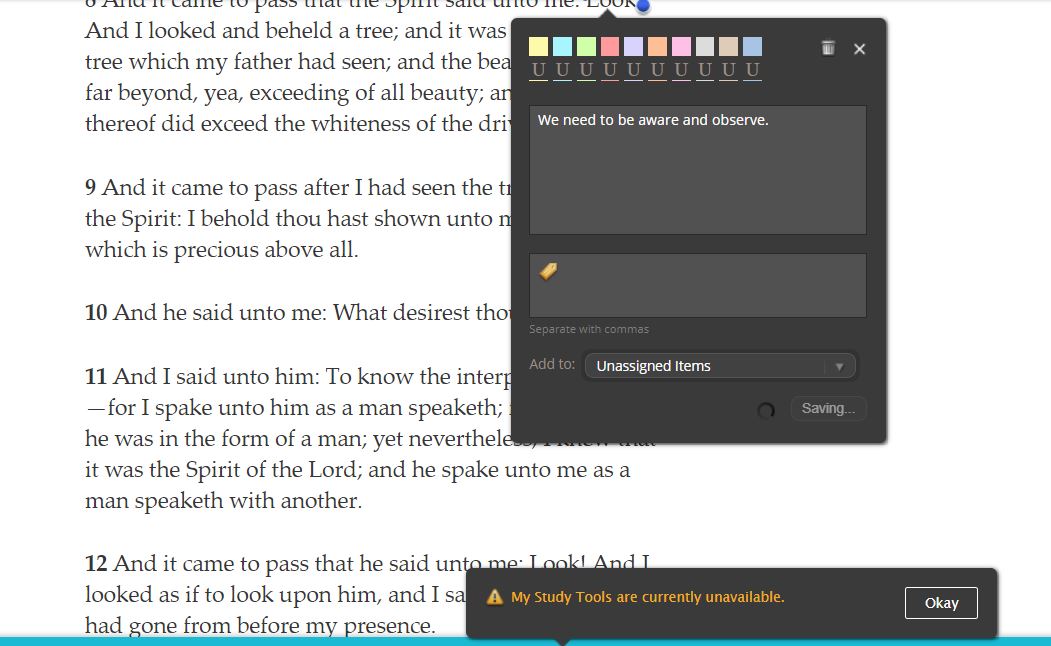
I am having this problem now. I use lds.org to read scriptures and make footnotes and journal entries, but the past several days, I get the message "My Study Tools are currently unavailable." What should I do?
New Member
#9
Same problem here. I am in lds.org on Safari on my MacBook Pro.
New Member
#10
Same problem here. I can see my highlights and notes on my computer, but can't add new notes. I'm logged in, and have tried rebooting, but if I try to edit or add, I get the popup, 'My Study Tools are currently unavailable". This has been the case for the past 3 days. Gospel Library seems to be working fine. It's just lds.org that's broken.
New Member
#11
It suddenly started working about 7 am today. I don't know why it wasn't working or why it now does, but I'm grateful.
New Member
#12
It worked properly for about 5 minutes this morning, then suddenly I started getting the not available message again. My sister two states away is getting the same message. PLEASE FIX IT!!!
New Member
#13
ldstools.JPG
(105.89 KiB) Not downloaded yet
Community Moderators
#14
These forums are user to user support. Nobody here can do anything about the issue nor do we have any special contact with people who can. Your best chance to report the issue is to use the feedback link at the bottom of the page.
JD Lessley
Have you tried finding your answer on the ChurchofJesusChrist.org Help Center or Tech Wiki?
New Member
#15
Thank you. That should have been obvious, but I guess I came here to see if others were having the same problem and forgot the purpose of the forum. I have submitted a request in the Help Center.
New Member
#16
I'm having the same issue. Every day I keep hoping it will be fixed, but nothing yet. Still just a blank area where my bookmarks usually are. I tried 3 different browsers, deleted my history/cookies. Didn't help.
New Member
#17
Both my sister and I have the same problem as mahubble, but without the popup. The notes bar at the bottom of a scripture page is gone, and going to the notes from the Account area reveals either nothing in the big right-hand box, or (0) in the counts of the different notebooks.
New Member
#18
I'm having the same problems. Nothing is visible. I haven't been able to save or change anything for weeks. My tags and notebooks are changing all on their own. I'm having problems with this online and in the app. It's really put a damper on my scripture study!!!!!
Senior Member
#19
I find it's random. Yesterday I was able to create some new highlights (with some failures in between).
New Member
#20
I have been having this issue for weeks. Precious journal entries and insights from my study is now gone. Please, how can I get these back? I use Windows 10 app, the web, and my mobile device.