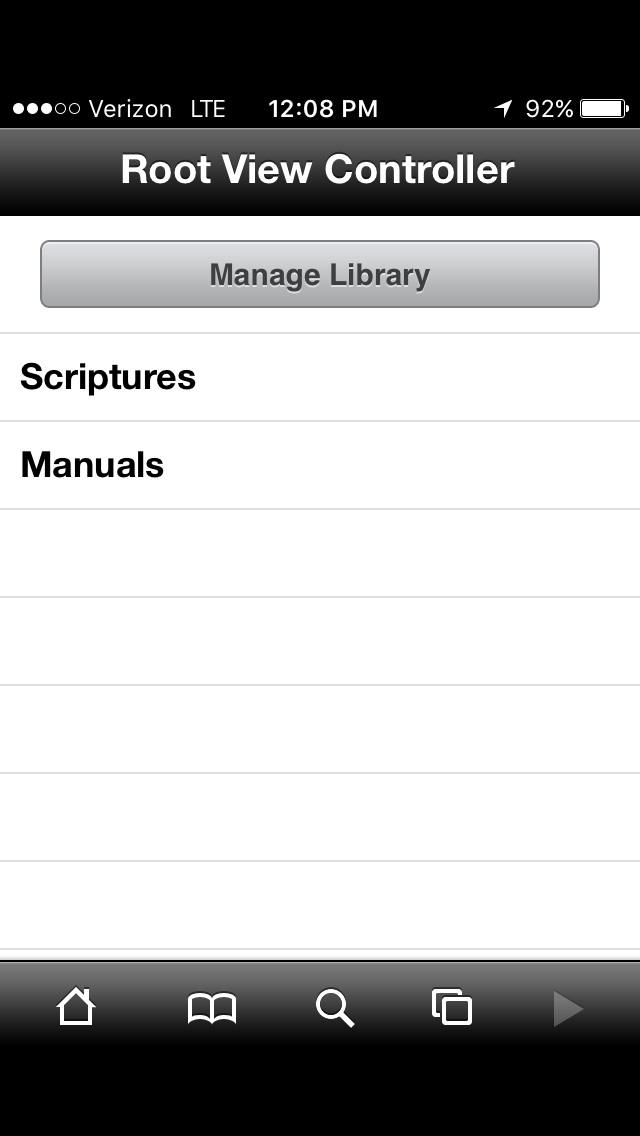
Root View Controller

11 postsstarted by nanetteh 3,274 viewsoriginal topic

New Member
#1
I updated my phone to IOS 10. Now the way Gospel Library app is stuck on 'Root View Controller.' I cannot seem to get back on the main menu for the standard works, etc.
How can I return to main menu so I can navigate easier?
Thanks for your help! I am super frustrated!

Nanette Crawford (Nanetteh58@gmail.com)
New Member
#2
Works for me. I would remove and reinstall app
New Member
#3
It installs with the new gospel app -- I guess that is the only choice now?
thank you!
New Member
#4
I am experiencing this exact problem after updating my iPhone to iOS10. I do not want to install the newer version of Gospel Library on my phone. Gospel Library 2.5 is much simpler to navigate on my phone. Does anyone know how to get out of "Root View Controller" and return to the main menu in Gospel Library 2.5?
Community Moderators
#5
Could one of you post a screenshot or photo of what you're seeing?
Samuel Bradshaw • If you desire to serve God, you are called to the work.
New Member
#6
IMG_7301.PNG
(39.16 KiB) Not downloaded yet
New Member
#7
I don't know how to attach the photo here. But it heads out like what was posted here -- Root View Controller - and then whatever page is there like the scripture verse.
At least with what is posted here it is on the scriptures menu already - mine is stuck from wherever it was I was in before ....
Help!!!
Community Moderators
#8
You may be out of luck with Gospel Library 2.5, since it's no longer being supported. I'd recommend downloading Gospel Library 3.
Samuel Bradshaw • If you desire to serve God, you are called to the work.
New Member
#9
So does this mean I have to give up 2.5? I will lose all my highlighted (marked) scriptures!
Community Moderators
#10
As long as you're signed in with your LDS Account, your markings will sync to LDS.org and to newer versions of Gospel Library.
Samuel Bradshaw • If you desire to serve God, you are called to the work.
New Member
#11
I just looked this up to help the other librarian fix this issue. We tried to find Gospel Library in the apps to update but could not find it so I looked it up in the App Store where it had it on iCloud. All we did was click on the cloud with the arrow and once it was downloaded again it was fixed.