Help Analyzing Webcast Data

15 postsstarted by RichPhillips 4,069 viewsoriginal topic

New Member
#1
I have recently been made responsible [read as novice] for the upcoming Stake conference webcasts. I have hooked up the built-in SD camera, vidiu and atlona converter and ran a webcast test about 10 days ago. The test did not go well. Similar to problems we have had in previous webcasts: low audio at the receive sites even when crab boxes and chapel audio are set at max with the volume controls; and some poor quality video with pixelations, buffering and drop-outs.

I am addressing the audio problems at the receive sites with a couple of different solutions to improve the headphone output before going into the crab box.

The video and overall broadcast quality is another matter. I had the broadcast site at the Stake center and six receiving meetinghouse sites [two failed to show up]. Using the event analysis from the portal site, the broadcast health was 54 and my best receiving meetinghouse site was 53. I also had a brother with a laptop, connected via the Stake center wifi, in the broadcast site, also log in, and his health is reported as 97? Not sure why his was so good and the others so bad.

I didn't find any real troubleshooting help on mhtech for webcasting.

Is there a primer somewhere that tells how to use the analysis from the portal?

I don't know what half the measures in the logs mean so I do not know the relative good and bad. And I don't know what they would be pointing me to change. Because of the low numbers, I suspect there may be something wrong in the settings of the camera, vidiu, atlona converter or firewall. As far as I know, I have set the system up according to the directions from the mhtech website.

I have posted the data in an excel workbook at:

https://docs.google.com/spreadsheets/d/ ... sp=sharing

If any of you experts can steer me in the right direction, I would very much appreciate it.

Thanks in advance for any help you can provide.
Community Moderators
#2
richphillips wrote:The test did not go well. . . .
I also had a brother with a laptop, connected via the Stake center wifi, in the broadcast site, also log in, and his health is reported as 97? Not sure why his was so good and the others so bad.
I am no expert, so you will want to get a second opinion, but it appears you barely have enough Internet service to consider streaming a broadcast.

And since the stake center WiFi was on during the test, your assistant with the laptop was able to snag most of the bandwidth and receive the broadcast, not really leaving you enough to send a good feed.

I would suggest you start by looking at your meetinghouse Internet speeds, then retest with WiFi turned off to one building until you find settings that will give you a good signal. Then add the others.

The receiving sites will continually try to bump up to 1.5Mbps, so if they do not have that much bandwidth available, you will want to set those receiving computers/laptops to stay at whatever level their ISP supports, i.e., 400k.

And if you do not have 2M at the sending site, you will have a very difficult situation. That's one of the reasons turning off WiFi is so important.
#3
We had the same Video Info event as you did for our broadcast dated: 2016-08-21 10:00 AM - 12:00 PM

EncoderType Teradek
AudioSampleFrequency 48000
AudioChannels 1
AudioCODEC mp4a.40.2
VideoFPS 0.3
VideoResolution 736x414
VideoCODEC avc1.77.31
Thanks,
:cool:Your Fellow Member,
Pete Arnett
Sunny South Florida, USA
Senior Member
#4
I can't look at your document from my current location. However, I agree with lajackson. You need to determine your bandwidth availability at the stake center. That is where I would start. Then you need to make the stream of the teradek less than what the amount of bandwidth you have available to you. It will be the upload speed that you will want to focus on, because some places only give you like 1 megabits/sec up and 10 megabits/sec down. Then turn off all WIFI in all buildings and give the test again.

Finally the audio coming in should be good and strong. In our stake center, I have it coming directly off the chapel amplifier. So I will look at the document either tonight or tomorrow night and see what you are seeing.
#5
our webcast
Audio Info Data Rate: 96.0 Kbps, your webcast shows Audio Data Rate: 48 Kbps

Also, our upload speed was 7 Mbps

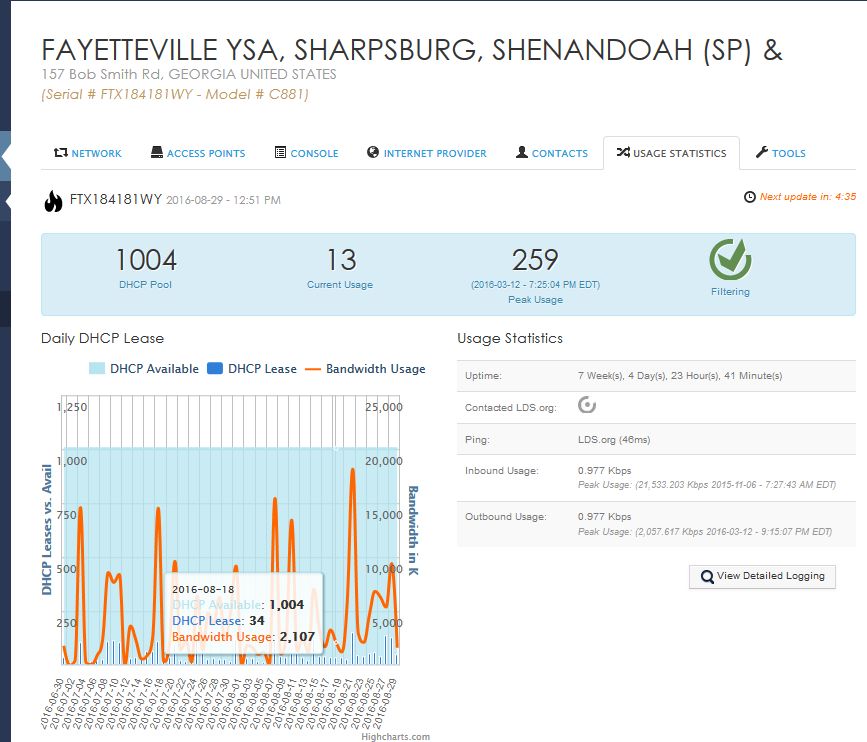
See attached firewall usage information
Thanks,
:cool:Your Fellow Member,
Pete Arnett
Sunny South Florida, USA
Senior Member
#6
Pete, not to get this thread side tracked, but I don't see where you are getting a 7 megabits/sec upload on your image. I see the maximum upload at one point was 2 megabits/sec on 12 Mar 2016. Now you may have a connection that allows up to 7 megabits/sec, but based on what you have shown, you have never come close to that number.
#7
Oops
Was trying to provide information from another webcast (our webcast) from another stake
That as it has been pointed out, that you need proper upload speed, our webcast upload speed was 7 Mbps
That we had most of the same event parameters and we had no issues
Thanks,
:cool:Your Fellow Member,
Pete Arnett
Sunny South Florida, USA
New Member
#8
Brethren:

Thanks for the speedy replies. When we did the test, it was at night and I and my companion were the only ones in the building. I don't think the wifi was an issue during the test. We plan to turn the wifi off during our actual webcast.

I think you are getting me on the right track. I did several OOKLA speed tests just now. I am the only one in the building and there is no wifi load. The download speed ranged from 1.78Mbps to 1.99 Mbps depending on the server it hit. I did not check the line speed before the test I talked about previously, but the vidiu suggested set it at "medium" quality based upon the line speed it checked. Does the vidiu suggestion usually follow what happens in realtime? Or is it overly optimistic?

The Church literature is confusing to me. In the overview it states that 2 Mbps should be good for medium quality (500k). In the vidiu setup it says 1.5 Mbps should be good for medium quality 700k.

I guess regardless of what is says, it appears that 1.8 will not send reliable medium quality video.

Should I set the vidiu to "low" for broadcast quality, or go back to the FM group to get the upload speed on the line increased? If an increase, what would be the best speed to request? We have standard definition camera.

Looking forward to your responses.........thanks
Community Administrator
#9
It's not just the speed, but the consistency. That's probably why you're seeing different recommendations.
Have you searched the Help Center? Try doing a Google search and adding "site:churchofjesuschrist.org/help" to the search criteria.

So we can better help you, please edit your Profile to include your general location.
#10
Suggest you ask your friendly Facilities Management Group (FMG) to see what they can do for your stake
Thanks,
:cool:Your Fellow Member,
Pete Arnett
Sunny South Florida, USA
Community Moderators
#11
richphillips wrote:The download speed ranged from 1.78Mbps to 1.99 Mbps depending on the server it hit. . . .

Should I set the vidiu to "low" for broadcast quality, or go back to the FM group to get the upload speed on the line increased? If an increase, what would be the best speed to request?
I would do both. Low quality setting (for now) and ask the FM group for a faster service, at least at the originating location.

According to the Internet Bandwidth Guide, you should have at the very minimum an Upload speed of 1.5 Mbps for a Medium Vidiu setting. Unless you have at least 2 Mbps up, I would test with and use the low setting.

Your service has two speeds, down and up. At the stake center (or originating location of the conference) the upload speed counts. Since you have a measured speed of approximately 1.8 Mbps down, I am guessing that you have an upload speed of less than that, possibly 750 kbps or even less. But find out what the upload speed is for sure, and set the broadcast quality based on that, probably low.

The receiving locations should have at least a download speed of 1.0 Mbps, but the system will use 1.5 Mbps if it is available.

I don't know when your stake conference is scheduled, but I would ask for increased speed from the FM group if they are able to provide it. I would ask for as much as they can afford to give you. You will have to work hard to make it work with a minimum of 4 Mbps down and 2 Mbps up at the stake center, and 2 Mbps down and 1 Mbps up at the receiving locations.

I have been able to run barely acceptable broadcasts with 1.5 Mbps up at the stake center and 750k down at the receiving sites. But they were barely passible to poor and the lack of consistency and system attempts to self-correct were very distracting to the spirit of the conference broadcast.
Community Administrator
#12
Sometimes it's just a matter of FM ordering a higher level of service (which FM may or may not be willing to cover - they are constrained by budgetary considerations). Other times, it's simply not possible to get better services to a building - even if it's in a developed area.
Have you searched the Help Center? Try doing a Google search and adding "site:churchofjesuschrist.org/help" to the search criteria.

So we can better help you, please edit your Profile to include your general location.
Community Moderators
#13
richphillips wrote:The Church literature is confusing to me. In the overview it states that 2 Mbps should be good for medium quality (500k). In the vidiu setup it says 1.5 Mbps should be good for medium quality 700k.
The rule of thumb is to have your building's measured upload speed be 2x more than the video streaming rate. For example, a 700kb/s video rate would need at least a 1.4Mb/s upload speed available at the originating site. As was mentioned, this upload speed needs to be consistent. Some DSL providers have a hard time with the consistency part.

It's also recommended to have at least a 1.5x margin at each of the download sites, if they wish to receive it at the full rate. So to view a 700k video stream, they would need at least a 1M consistent download speed at each of their sites.
So we can better help you, please edit your Profile to include your general location.
Senior Member
#14
richphillips, I would suggest you talk to your FM group to see if you can get the Internet speed at the stake center upgraded. That may not be possible depending on where you are located.

Now remember from the stake center you are uploading (sending) the video out. With a download speed of just under 2 megabits/sec, I would suspect your upload speed wouldn't be much more then 0.5 megabits/sec. So I would agree that you set the vidiu to low and give it a test. The thing is that you don't want to use the full bandwidth on your link to do a broadcast. The reason is that once you get to a certain point the line gets saturated and then you get the low quality. Most links don't like having over 90% of the link utilized because there is no "breathing" room for the traffic.

So I would start with the Internet connection at your building.
Church Employee
#15
I have posted several posts here in the forum to help answer questions. Look through the posts and see if any of them help. Also feel free to email me with any specific questions.