Help with troubleshooting new website www.abrandnewyear.org

19 postsstarted by lblack-p40 9,425 viewsoriginal topic

New Member
#1
Hello everyone,
Tonight the Church launched a new website for the youth at http://www.abrandnewyear.org. We are asking for feedback from all users out there to test the speed of the site. Specifically the video area. Please click around on the site and report back in this forum your experience with the speed of the site. Does the video play "normally"? Does it perform as you would expect?
Please respond with your subjective results of your speed test along with your location and internet connection type.

Thank you,

Lance
Community Administrator
#2
I wasn't impressed with the speed. There's no feedback when the video is buffering with the built-in viewer, so when I click on things nothing seems to happen for a long time. Like 30 seconds to a full minute.

In some cases the video couldn't keep up with the download.

The site seems to be designed with the idea that it could take up my full 1280 x 1024 desktop real estate rather then be happy with the smaller window it opened in.
Have you searched the Help Center? Try doing a Google search and adding "site:churchofjesuschrist.org/help" to the search criteria.

So we can better help you, please edit your Profile to include your general location.
Community Moderators
#3
I am running FireFox 3 on a DSL line. The site is slow, and it is annoying to have to scroll back and forth to see everything that is on each page.

As for the videos, after about three minutes, my browser says they have loaded, but I still cannot play them. And I know they have not loaded, looking at the size of some of them. There is no way I will get 91 meg or over 100 meg, or even 45 meg (those are just the first three I clicked on) down my DSL line before the new year hits where I am located.

Sorry.
New Member
#4
I'm getting mixed results, the first time I loaded the main page, the bottom side scrolling bar didn't load for a long time (1-2 minutes on a fast connection). At first I didn't realize that there was supposed to be something else there so I clicked all over try to find a link- a "loading" message would be helpful there.

The video takes a long time to load, again with no loading message. They would load much more quickly from a Flash Media Server.

On a positive note, the site looks great and it looks like there are some great ways to involve youth.
Disability Services Manager, LDS Church
Community Moderators
#5
Videos take from 9 to 17 seconds to begin play. For the first minute and a half there are stalls that occur for 1.5 to 4 seconds in both the audio and video. Spacing between stalls is from 20 seconds to 33 seconds. Beyond two and a half or three minutes into a video there are no further problems.

I am in Columbus Ohio on a 1.5 Mbps DSL line (actual speed varies from 900 to 1300 Kbps)
JD Lessley
Have you tried finding your answer on the ChurchofJesusChrist.org Help Center or Tech Wiki?
Member
#6

Feedback

In Omaha, NE, using a cable modem, I experienced similar problems with the video clips as expressed by earlier posts. However, the rest of the links worked great. I think the overall layout is fine and seems to be in a form that will be attractive to the youth.
JLR
Community Administrator
#7
RussellHltn wrote:The site seems to be designed with the idea that it could take up my full 1280 x 1024 desktop real estate rather then be happy with the smaller window it opened in.
I'll change that to say it was designed for 1280x1024. On my 1024 x 768 laptop it requires up/down scrolling to get to the navigation ribbon at the bottom.
Have you searched the Help Center? Try doing a Google search and adding "site:churchofjesuschrist.org/help" to the search criteria.

So we can better help you, please edit your Profile to include your general location.
#8

Youth Website has been Announced‏

Several members of various groups have provided the following updated information:

The church's home page at lds.org has announced the new web page and provides a link, which means that it has been announced to everyone http://www.lds.org/pa/display/0,17884,8212-1,00.html

The new site is located at http://abrandnewyear.lds.org

Also, the "A Brand New Year Introduction" web page states that leaders were sent a copy of a DVD that was to arrive in Dec2008 with a letter asking them to let everyone know about the URL

Thanks,
Your Fellow Servant
Porter (Pete) Lee Arnett Jr.
:cool: Your Fellow Servant,
Porter (Pete) Lee Arnett Jr.
USA
#9

Youth Website - not ready for prime time

Testing by several members in our area shows that the new website is not ready for prime time, because videos, music and images are still very slow in loading and may stall during playing (etc.)

We are using ATT DSL links in Palm Beach County Florida

http://www.whatismyip.com/speedtest/index.asp website to Atlanta server show that the speed today is
Download Speed: 1899 kbps (237.4 KB/sec transfer rate)
Upload Speed: 124 kbps (15.5 KB/sec transfer rate)

Using Firefox version 3.0.5 with Flash version 10.0.12.36

Also, it would have been great if headquarters could have told us in early Dec2008 that the site was ready for testing
:cool: Your Fellow Servant,
Porter (Pete) Lee Arnett Jr.
USA
Community Moderators
#10
RussellHltn wrote:I'll change that to say it was designed for 1280x1024. On my 1024 x 768 laptop it requires up/down scrolling to get to the navigation ribbon at the bottom.
I am using a 19" wide screen flat panel monitor with maximum resolution available at 1140x900 and also find that having to scroll down to view the navigation buttons displeasureable. Would it be possible to have the page auto scale to fit the browser page?
JD Lessley
Have you tried finding your answer on the ChurchofJesusChrist.org Help Center or Tech Wiki?
Senior Member
#11
I'm probably not a good test case because of my connection speed, but other than the initial buffering time, the videos played fine for me. I was annoyed, however, that there seemed to be no way to play them in full screen mode.

I am in Oregon, with a 5/2 Mbps connection.
Member
#12
The site (with the video and audio features) are speed to me. It's a cool program!!! I will be happy if the Church "can" export it to international areas...
New Member
#13

More help?

Thanks for the feedback. This is very helpful. One of the issues we have been hearing is that our servers which provide the videos are slow. Some people claim to have very fast connections (1-3 Mbps) and can download from other servers very quickly, but get less than 100 Kbps from our servers.

Can anyone validate this? We know the videos are large, and we're trying to address that (the size was cut in half a couple of days ago), but we're concerned that there may be an issue with our network or servers.

Thanks for any help you may provide.

Best regards,
Tom Kofford
Community Administrator
#14
At a quick glance, I don't see any easy way to see the actual download speed without resorting to sniffing packets. Is there something I should be looking at?
Have you searched the Help Center? Try doing a Google search and adding "site:churchofjesuschrist.org/help" to the search criteria.

So we can better help you, please edit your Profile to include your general location.
New Member
#15
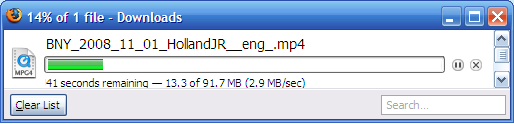
If I download the QT (mp4) movie files (the same one that is "streamed") using the default firefox download manager, at the end of the details line in parentheses it shows the current speed. In the attached screenshot the speed is 2.9 MB/sec. There are other download managers that allow you to specify/use multiple download threads, etc., and show you the speed. These numbers aren't exact, but should provide enough info to draw some conclusions.

For comparison, you might want to download something from servers somewhere else that show you that your connection is capable of faster speeds.

I'm not sure how to test the streaming, but for me it takes the same amount of time to buffer the entire video as it does to download the mp4, so I'm guessing they're the same. That's a big assumption.

EDIT - I just realized that the streaming mp4 files are now smaller than the downloadable files in an effort to speed up streaming. Anyone know how to calculate the download speed for a streaming QT file from a flash application? For now, just try downloading the QT file and we'll see what info we can get from that.

Thanks for any help!

Tom
downloadscr.PNG
downloadscr.PNG (12.1 KiB)
Community Moderators
#16
I watched 8 or 9 of the videos and saw the DL speed vary from about 0.8Mb/s to 1.5Mb/s over the couple of hours I was viewing. I estimate the overall average to be 1.2Mb/s. It only stuttered once near the beginning of one video where the DL speed was averaging ~0.8Mb/s, but soon after that the speed picked up and it was able to spool ahead.

Mike
Comcast 8Mb/s DL link
Windows Vista Ult.
Firefox 3.0.5
Similar results with IE7 (7.0.6001.18000).
So we can better help you, please edit your Profile to include your general location.
New Member
#17

Download Video?

I am in the Netherlands and my wife is in the YW presidency here. We had planned to show one or two of the "Brand New Year" videos for an activity tomorrow night, but the buffering interruptions make it very difficult to enjoy. Is there any way to download the videos as MP4, WMV, MPEG, etc?
Community Moderators
#18
dbriscoe wrote:I am in the Netherlands and my wife is in the YW presidency here. We had planned to show one or two of the "Brand New Year" videos for an activity tomorrow night, but the buffering interruptions make it very difficult to enjoy. Is there any way to download the videos as MP4, WMV, MPEG, etc?
Go to the "Watch the Videos" page and find the video(s) you would like to download. For each video you will see two small icons just below the thumbnail picture of the video. One is labeled "WMV" and the other is labeled "QT". Clicking the WMV icon will start the download process for the WMV (Windows Media Video) format file. Clicking the QT icon will start the download process for the QT (Quick Time) format file.

Note: Clicking either format icon to download the video will open a popup window. For Internet Explorer you must have popups enabled. If nothing happens when you click one of the file format icons you probably do not have popups enabled. You can temporarily turn on popups several ways. The quickest way is to click the second from the left empty box at the bottom of the IE browser window and then select "Turn Off Pop-up Blocker". When you are done downloading you can click the same box and select "Turn On Pop-up Blocker" to return to the original setting.
JD Lessley
Have you tried finding your answer on the ChurchofJesusChrist.org Help Center or Tech Wiki?
New Member
#19

My Test data

If needed, here is additional test data.

My Speed
Image

My Test Download
Image

I usually download anywhere from 1.5 to 5 Mb/sec from other video sites.