No calendar options besides main stake calendar

13 postsstarted by nathanwalch 2,155 viewsoriginal topic

New Member
#1
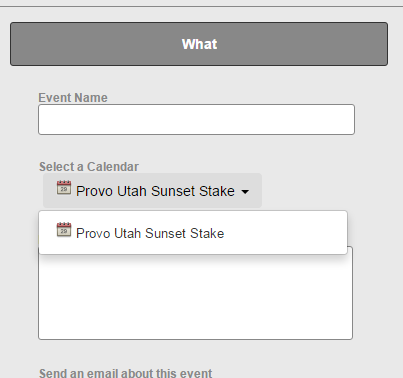
I'm new to a stake calling involving the calendar. Our stake calendar is filled with ward items that shouldn't be there. When I go to try to create a new item, I only have one option:
Creating a calendar event.PNG
Creating a calendar event.PNG (10.7 KiB) Viewed 1564 times
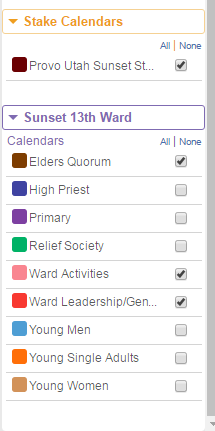
However, at a ward level, individual calendars appear to exist, I just can't access them:
Ward calendar.PNG
Ward calendar.PNG (12.79 KiB) Viewed 1564 times
I'd love to be able to clean this up without having to contact each person who originally created the events. Is there any way our stake to gain access to ward calendars so we can clean up the stake calendar?
Community Administrator
#2
nathanwalch wrote:Is there any way our stake to gain access to ward calendars so we can clean up the stake calendar?
Not really. You'd need someone who has rights to the ward calendar. You can give anyone in the stake rights to the stake calendar, but only someone in the ward can be given rights to see the ward calendar.

In your shoes, I'd look to see who has been adding these events to the stake calendar. You need to put a stop to that. It's possible that ward is trying to schedule events with a "building scheduler" rather than adding events on their own calendar.
Have you searched the Help Center? Try doing a Google search and adding "site:churchofjesuschrist.org/help" to the search criteria.

So we can better help you, please edit your Profile to include your general location.
New Member
#3
Ok, so it looks like this will be a larger project. One more question, am I right in guessing that my new stake calling has eliminated my ability to add items to my own ward calendar?
Community Administrator
#4
nathanwalch wrote:am I right in guessing that my new stake calling has eliminated my ability to add items to my own ward calendar?
Not directly. More likely it was the release from your ward calling that caused it.
Have you searched the Help Center? Try doing a Google search and adding "site:churchofjesuschrist.org/help" to the search criteria.

So we can better help you, please edit your Profile to include your general location.
New Member
#5
Thanks ... and I guess I have one more question ... or two. :) Do you know how I would get that functionality back? I looked and it appears our building schedulers have callings in the system on both the ward and the stake level. I wonder if they are having the same visibility issues as I have (that they can only see the stake calendar). Since they schedule for multiple wards but for a specific building, would the best solution be to create stake calendars for each building? I just don't want to fix this only to discover I set things up in the wrong way.
Senior Member
#6
"Building Scheduler" privileges are not granted by calling. A stake administrator grants schedulers editing privileges by name for each location (meetinghouse, pavilion, etc.).

IMHO, building schedulers should not be creating events for wards or stakes. Members of ward council and stake council should be creating their own events on the appropriate ward or stake calendars. You may have noticed that the last person to "touch" an event is listed as the Point of Contact for that event, which is really not appropriate for building schedulers.

Also, please don't confuse building schedulers with website administrators.
Dana Repouille, Plattsmouth, Nebraska
Community Moderators
#7
Your best bet is to look at a few of the events and see who is listed as the "Contact Name" – chances are it's the same person each time, and you can talk to him and give appropriate training.
Samuel Bradshaw • If you desire to serve God, you are called to the work.
Community Administrator
#8
nathanwalch wrote:I looked and it appears our building schedulers have callings in the system on both the ward and the stake level.
Which raises a number of other questions. Please keep in mind that the old system of one person managing a building with multiple units doesn't work in this system. Each unit (if not each quorum and auxiliary) is expected to manage their own events.

Under the new system, the Building Scheduler is seen more as a referee or someone who schedules non-church use of the building.

It's quite likely the underlying problem is Building Schedulers who can't schedule events for wards they are not a part of. They don't have rights to those calendars, so they plunk it into the stake calendar.

At first, such distributed management seems scary, but it works quite well. Generally, the only ones with rights to add/edit the calendar are ward leaders. You'd hope that ward leaders would have the ability to act responsibly.
Have you searched the Help Center? Try doing a Google search and adding "site:churchofjesuschrist.org/help" to the search criteria.

So we can better help you, please edit your Profile to include your general location.
New Member
#9
Russell,

This is really helpful to know the evolution. I think our stake is stuck in the dinosaur age. I think I'm up to speed and will work to get our stake there too.

Much appreciated.
New Member
#10
I am also a New Stake Technology Specialist. One of my responsibilities is the Stake calendar. I have been approached by a Ward who needs to add calendar administrator rights for their Ward for a couple of individuals helping out with Scouts. They are not members of the Ward, however, are members of the Stake. Am I correct in understanding I cannot add do this as it will need to be completed by someone with Ward Administrator rights. I only have Stake Calendar rights.

Thank you!
Community Administrator
#11
gunnars67 wrote:I have been approached by a Ward who needs to add calendar administrator rights for their Ward for a couple of individuals helping out with Scouts. They are not members of the Ward, however, are members of the Stake. Am I correct in understanding I cannot add do this as it will need to be completed by someone with Ward Administrator rights. I only have Stake Calendar rights.
You are correct in that you have no rights to their calendar system. But there are other issues as well:
  • The persons only need edit rights to the calendars - not admin rights to the ward.
  • There's no way to add someone to the calendar who is not a part of the ward.
I think what they'd have to do is add the person to the ward as a out-of-unit person and then given them a calling in the Scouts. Then I think they can be added as editors to the desired calendar(s).
Have you searched the Help Center? Try doing a Google search and adding "site:churchofjesuschrist.org/help" to the search criteria.

So we can better help you, please edit your Profile to include your general location.
New Member
#12
Will they still show up on the roster of their own Ward? They need to be maintained there as well with their families for HT/VT etc. Can they be on both rosters? Someone in the Stake Office has suggested I just add them as Stake Administrators. I think you answered that question as that will still not give them rights to the Ward Calendar.

Thank you for the help!
Community Administrator
#13
gunnars67 wrote:Will they still show up on the roster of their own Ward? They need to be maintained there as well with their families for HT/VT etc. Can they be on both rosters?
Adding them as a out-of-unit member will not remove them in any way from the home unit.
gunnars67 wrote:Someone in the Stake Office has suggested I just add them as Stake Administrators. I think you answered that question as that will still not give them rights to the Ward Calendar.
You're a stake admin and it's not allowing you to edit their calendar, right? I think what's confusing them is certain stake admins can see all the ward calendars. But they can't edit them. Besides, even if it did work, I think that would be a bad idea.

But if they're helping out with scouts, then they should be recognized by being given an appropriate calling in the ward.
Have you searched the Help Center? Try doing a Google search and adding "site:churchofjesuschrist.org/help" to the search criteria.

So we can better help you, please edit your Profile to include your general location.