A plea for a dedicated streaming receiver

54 postsstarted by randysteck 20,542 viewsoriginal topic

#1
We have been very grateful to see the improvements in the web portal for our stake conference webcasts. Our webcast yesterday went very well and it was the first time we've not seen some form of disruption in the feed.

However, I also share the sentiment that we feel like we're running an experiment every time we do a webcast. Even though we met a standard yesterday, it feels like we just barely cleared the bar and we want a lot more margin. We've finally gotten to the point where the broadcast side feels pretty much under control, and the weak link now is the laptop or any general purpose computer on the receive side.

We would really, really like to have a Roku or Apple TV, or any one of a number of different dedicated streaming receivers on the receive end of our broadcast.

Don't get me wrong, laptops and computers are great for doing lots of things. I've designed lots of microprocessors for Intel and don't want folks to stop buying them. Lots of focus goes into graphics performance, throughput, etc. But, that's not the problem we need solved at the receive end. What we need is direct focus on converting a media stream into a video and audio presentation for a congregation. Updates to the operating system, virus scans, etc. have disrupted us all. And the problem actually gets worse if you dedicate a system to this function since one only turns the system on when a broadcast is coming up, only to wait sometimes an extended period of time until all the system updates are installed and working again. Personal laptops have fewer update issues, but also run into IT department restrictions and requirements. The result is often a "cross-your-fingers-and-hope-we-can-get-it-working-with-another-laptop-in-the-bag-for-backup" mentality. Plus, these things are expensive.

Why isn't this easy enough for any member who can plug in a few cables and run a remote control to set up? In this case simplicity gives reliability also because these system are designed for only one purpose.

Roku and Apple TV are great systems. They rarely fail and do a fantastic job of rendering images that laptops often choke on. With such high reliability the need for constant monitoring diminishes dramatically. Our webcast system should support these directly. Getting a dedicated channel for a Roku is an inexpensive and simple thing. Many, many streaming services do this already, often for Sunday broadcasts from a variety of churches. They have the same 2Mb limitation and still get a great picture with literally no hassle.

Okay, so these systems only allow monitoring connections and download speeds to each receiver. The simple question is whether you really need more. I would gladly trade off high reliability on the receive end for any alert/warning we've received on the broadcast end. Most of these are false positives anyway. They are much more suited to a corporate webcast system where the controllers can actually do something about a disruption or limitation. Let's face it, the only thing we do when we see an alert is worry. The real action happens when we get a text from the remote site that something has failed. And, since the portal has been updated, our most frequent failures have been on laptops on the receive end.

So, my plea is for simplicity, reliability and less hair loss from stress...

For those from church HQ monitoring this, please consider this a strong user request. Frankly, I can go to any of a number of streaming services and for $50 get access to their streaming service for a month at a time with full support for Roku and without even having to schedule the webcast. We're behind the curve for sure on this.
Church Employee
#2
Remember that this is a world-wide church. The system services members world wide.

When the system was being designed, many different types of systems were considered. The reason laptops were chosen as the general receive system is because members world wide can obtain access to them.

Currently their is no plans to move or incorporate systems like Roku or Apple TV. This does not mean that sometime in the future these will be considered.

However, that does not mean a different receiver can't be used. Any system that is able to use a browser and support a rmtp stream with their receiver can be used. The only drawback is that no support can be offered if the stakes choose to go with this path.

Remember, that stakes are not required to use the webcasting system. The system is provided as a service for stakes to use to broadcast their conferences to members who can not get to the stake centers very easily. The stakes are free to use any system that the stake president deems appropriate for their conferences.
#3
Good to know that this is only a recommended service, not required.

Still, even worldwide, Roku, Apple TV, FIreTV, Chromecast (yes I know this already works) and the many that work throughout Europe and Asia, are all much cheaper and better video receivers than laptops. These are all pretty much straight RTMP clients. Could we not open up the system to allow connection to either a player or a streaming box? That would seem to be the best of both worlds. The browser in the middle can be either an advantage or a disadvantage depending on the circumstances.

Thanks much for the response.
Church Employee
#4
Its definitely a great idea. I'll bring it up to the "decision makers" had try to get this on the list of new features to improve the system.

Thanks for bringing it up. Its always great to get new ideas and recommendations that work to make the system better for all.
Senior Member
#5
I would like to 2nd this request. I thought everyone had laptops, but you would be surprised how hard it is to find someone sometimes, and add a network and video port to that, especially a VGA, along with ability to do it, and it can be difficult. For one building I emailed 36 people before I found someone. Sometimes I think stake laptops would be better than a dedicated receiver though, because they could be used to show presentations (which happens a lot more often than webcasting). Although they will become obsolete eventually, as long as you kept them clean I think they would work for quite a while and I don't think would have to be overly powerful. I will have to be released this fall when my daughter takes my laptop to college as I can't afford to buy another one.
Craig
Saint George, UT
New Member
#6
I third the request. Laptop wrangling is stressful. Stake ownership of laptops is painful as well.
Member
#7
I am wondering instead of a Roku or Apple TV, we might consider something like the following device, that when not in use could also work as a digital media device. It runs Windows 10 home on it. It called a kangaroo-mobile-desktop-pro You can use a tablet or phone as your screen to view along with a projector or larger TV.

http://www.kangaroo.cc/kangaroo-mobile-desktop-pro/

I like that it could be a streamer and a digital media device (between conference times) as well. I have not tried it yet, but it is interesting.
Church Employee
#8
Whatever you choose to use, its up to you, as long as it can connect to the media server with a URL and the player can receive RTMP streams.

However, if its not a laptop, then you won't get any stats and no support if something goes wrong.

If those things do not matter to you then go off on your own and use what you'd like... if you feel that is what you need to do for your stake.
Community Administrator
#9
rannthal wrote:However, if its not a laptop, then you won't get any stats and no support if something goes wrong.
What's required to get stats? The last item mentioned runs Windows 10, so it would seem to me that it should provide stats like a laptop. (Assuming it's a real Windows 10 that runs on a intel-like CPU, and not something like Windows RT.)
Have you searched the Help Center? Try doing a Google search and adding "site:churchofjesuschrist.org/help" to the search criteria.

So we can better help you, please edit your Profile to include your general location.
Member
#10
FYI: The kangaroo-mobile-desktop-pro runs Windows 10 (No Windows 8.x RT version here) It is running on an Intel Atom chip. From my initial test of another Kangaroo device at a local Microsoft store it ran pretty good. I am still researching other like products that can also be a media player/caster when not being used for Stake Conference.
Community Administrator
#11
However, one concern still has to be addressed - untimely updates. If you pull out a unit that hasn't been used in 6 months, there will be updates pending. And from what I've heard, Win 10 is pretty pushy about that.

Unfortunately, the alternative is something that rarely gets updates (like cheap Android boxes) - and likely has some vulnerabilities as a result. As they say, pick your poison. However, if the WiFi was turned off, limiting the number of people on the local LAN, the risk might be acceptable.
Have you searched the Help Center? Try doing a Google search and adding "site:churchofjesuschrist.org/help" to the search criteria.

So we can better help you, please edit your Profile to include your general location.
Member
#12
On Windows 10 you can now set it to update/restart at a different time like at 3 am or what is a more convenient time to apply updates.
#13
Although an older thread, this request is still active. Over the course of the last 2 years, we've systematically eliminated the weak spots in our system, including those enumerated by other posters. This is what we've done:

1. Found inexpensive, high quality, reliable HD cameras (2) for the stake center. Security cameras with large enough zoom; about $350 instead of over $2000 for PTZ. Plus POE capable.
2. Used vMix on a PC for video switching and streaming. This has been simple and bulletproof.
3. Created kits for each remote location including ethernet cable, HDMI cable, ground loop isolators, audio impedance matching to XLR inputs.
4. Eliminated large presentation screens (bought on ebay; difficult to set up) in favor of drop down screens at all remote locations.
5. Updated projectors at remote locations to HD capable and at least 3000 lumens. Also used for other functions and were inexpensive at about $400.

The weak link is the PC on the receiving end. We've tested commercial streaming services and are about to use one because they support Roku, AppleTV, Fire, laptops (PC and Mac). Plus they have no scheduling issues as they call upon a pool of available servers while paying for only those in use. The $50 cost twice a year is well worth the peace of mind given the many reported outages from the Church system. We'll use the Church system as backup, in particular when we have a general authority in attendance.

The setup is now simple (less than 30 minutes) at both the stake center and remote locations. Quality has noticeably improved to the point that members are now asking for such things as closed captioning (which we we will clearly never do). We have redundancy at most of the points along the signal path.

Our goal has been to provide remote locations with the highest possible sense that they are present in person while eliminating any disruptions which detracted massively from the conference in the past.

It would be great to have an RTMP feed from the church distribution system that we could use with a Roku. In fact, creating a Roku app is nearly trivial if that capability existed.
Senior Member
#14
I've tested using a simple Kodi STP puchased from Amazon for $30 or so... quick and easy. The problem is how difficult it is to maneuver in the case of a failure or hiccup in the stream. It's rock solid for hours in my testing, but what happens in the scenario if it fails. The wireless mouse and wireless keyboards are bulky to maneuver, etc... A simple app would be great that if a hiccup happens, you can then click a button 'restart' to get back to the stream rather than having to close the web browser and then open it up again.

I'd be interested, I didn't test Roku, but isn't there a web browser, does it work with the html5 palyer?
“A long habit of not thinking a thing wrong, gives it a superficial appearance of being right, and raises at first a formidable outcry in defense of custom.”
― Thomas Paine, Common Sense
Church Employee
#15
Isn't it great that the church provides a way for members to be able to attend stake conference from a convenient place at no cost to them.

Isn't it great for those in the Middle East, Africa, many places in South America, Asia, and even here in rural areas of the US to be able to use a system so they don't have to travel many, many miles to hear the word.

Isn't it great to have a system in place where shut-ins can use to be able to feel like they are part of the ward and stake.

How nice it is to have options to use to get the word out to members of your stake.
There are many out there who are very grateful to have a single SD camera and a VidiU, with low grade laptop using a low quality projectors on projecting to a 5 foot pull down screen and have less then 500k bandwidth.....with no other options out there for them.
You are lucky your stake has options....please take advantage of them to server the members of your stake well. I'm sure they will be and are very grateful for what you have done and will do for them. Well done, STS!!!

I find a few interesting things in what was said a couple of posts back:
1. I find it interesting that one feels that the weak link is the PC on the receiving end. In all my time here working with the system and being a STS myself for a rural stake, the PC has never been a problem.....ever. The Internet has been a problem several times, but never the PC. If taken care of and properly managed, they are rock solid, even from using members laptops. I'd like to hear more on why this is thought.
2. It was mentioned that other services have no scheduling issues.....is that implying that the church system does? If it was, I would like to hear about them, because I haven't seen or heard about any recently.
3. It was mentioned that there are "many reported outages from the Church system". What outages are being talked about? Maybe I just don't remember them or I wasn't told about them, but we are very aware of problems that happen with the system. I am aware of a couple since the system has been in effect, but many...I'd sure like to know about them.
4. If the church system is so bad and awful to work with, I find it curious that it would be used as a backup...especially when general authorities are in attendance. One would think it wouldn't be used at all....which is really curious because over a given weekend, there are well over 100+ successful events and over 550+ successful events a month with only a few failures...most of which are low bandwidth areas, training issues or equipment/hardware failures in the meetinghouses.

There are many things in this world that would be great to have, one of them, which we fight issues with on a daily basis that of low internet bandwidth.
It would be awesome for the world to have good bandwidth everywhere. It would be great where if as a STS I could have an easy button and have everything work without problems.
It would be great if I could have assistants in my stake that wouldn't move so I have to retrain new people every conference and a stake presidency that understood technology better.
But alas, this is not how it is. We are given weaknesses in order for us to grow.

Remember, these boards are here to help others out and to ask questions, not to be used for a ranting area.

Keep up the good fight, STS. You are not alone. May you be successful in getting the word out to your stake members in whatever way the Lord gives you to do so.
Senior Member
#16
Terrific post Rannthal. I have used the new system only once and it was rock solid for me and for my other buildings. I did have PVC in the background ready to go if the first system failed, but otherwise it worked great. I don't understand why people aren't using the system and having to jump through hoops to get things to work.
Community Moderators
#17
harddrive wrote:I don't understand why people aren't using the system and having to jump through hoops to get things to work.
Easy. Because in the past we have had to jump through hoops to get the system to work. It is better today than it used to be, and our last stake conference broadcast is the best we have ever had. But our last conference is also the first one where we were able to set up and complete the broadcast without assistance from the Global Service Center and where we weren't unceremoniously dumped by the servers with little time to recover.

If we are able to complete our next conference broadcast without assistance from the GSC, our confidence will increase. But I can assure you it is absolutely terrifying to rely so completely and helplessly on things that are so totally out of my control if something goes wrong.
Community Moderators
#18
rannthal wrote:1. I find it interesting that one feels that the weak link is the PC on the receiving end. In all my time here working with the system and being a STS myself for a rural stake, the PC has never been a problem.....ever. The Internet has been a problem several times, but never the PC. If taken care of and properly managed, they are rock solid, even from using members laptops. I'd like to hear more on why this is thought.
Granted, Internet speed and quality is an important issue. Thank you for the button that allows the stake to originate SD only to a receiving location. This has already made the difference for us.

As for that pesky laptop, I suppose the key here is "If taken care of and properly managed" when it comes to the laptop used to receive the broadcast. And I am not sure how I would do that myself.

I occasionally stream television shows. Sometimes they work, sometimes they don't. In each case, I have done nothing different than I did the previous time I streamed a show. It is the same way with the webcasting system and other Church videos.

I sometimes open my laptop and Windows 10 decides it is time to upgrade. I have no control over that. Those updates come when they come. I have gained a sense over the last year of when they will hit. But when they do, they do. At home, I can disconnect from the Internet. But you can't run a broadcast that way.

When I stream Church videos, sometimes they show up in Windows Media Player. Sometimes they show up in VLC. Sometimes they show up in whatever new-fangled video player Windows 10 uses. And sometimes they even come over YouTube with commercials. I do not know how to control that, and quite honestly I am grateful to be receiving the broadcast stream at all.

Every player has its own quirks, personalities, and settings to present a reliable broadcast picture and sound. Just recently I was unable to hide the task bar on my laptop during a broadcast because something had changed. After an evening Internet search I found that it was a bug in the latest update, and I have used the workaround several times since. At least the workaround has proven to be quick and reliable. Most are not.

As important as is stake conference, our small stake with no budget has not felt it worth the investment to purchase and maintain laptops for several buildings for only two events a year. So we rely on member laptops, usually one belonging to the technology specialist trying to receive the broadcast at the meetinghouse. They have the same challenges I have.

One poor and faithful bishop sat at his laptop during an entire conference to move the mouse every few minutes to keep the screensaver from kicking in because the webcast did not keep his laptop active as other streaming events did.

Now maybe I could figure out what is wrong and what the variables are on my laptop that cause these variances to occur. But I still work for a living, have other Church callings besides stake STS, and can only be in one place at a time. So I rely on our other STSs to do the best they can and we test a lot. But each time I reboot my laptop, I have a new adventure.

Oh, and be sure you take the laptop that can plug directly into the Ethernet port. You know, the one that hasn't been updated since you used it for the last broadcast. [grin]

Please understand that I have had one successful stake conference webcast and am looking forward to having another one next month. I love that the technology is available. But it takes a lot of work to make it happen and it is not simple. I do not have the experience, skills, or blood pressure to deal with more than small, minor surprises.

Nothing is the same two times in a row. And it starts with the IP address the VidiU picks up on the meetinghouse network. If that is the only variable, you are having a wonderful webcast on your wonderful Sabbath day.
#19
I went back to my previous post to see what I might have said to merit such a strong response. I think perhaps some folks misunderstood my intent, and the frustration is palpable with responses to claims I never made.

My point is simple: on the receive end dedicated video devices are more reliable than using a PC. We've been doing webcasts for about the last 8 years, even before any church system server was available. In that time we've seen it all: problems with too little bandwidth, bad cameras, encoder and streaming problems, cabling issues, sound issues, projection issues, receiver issues, and so on. We've fought through each of these because the alternative to no webcast was worse than even lower quality or some disruption on the webcast. We've also done it on the cheap, and I'd hoped that sharing the solutions would be of benefit.

Why do I keep advocating boxes like Roku? Because I've designed many microprocessors for Intel and others over the last 30 years, and I have a very good idea of what they are good for. We did everything we could to make them work for realtime tasks, such as video stream decoding. But microprocessors are much less efficient and reliable than a dedicated video decoder block on the same chip. This is why all current low power systems have a dedicated block to do just video decoding (like in cell phones). Unfortunately, HTML5 and other browser players do not use this capability (except in a few cases) so everything is still done in software. This makes them subject to all the other vagaries of the OS, which are almost the antithesis of what's required for realtime operation. Just ask yourself, which system plays videos more reliably: your cell phone or your laptop? The cell phone is using dedicated decode hardware.

The point of this is that what we might consider a problem with the transport system is frequently a problem with the PC on the receiving end. A list of problems and drops, many recent, can be found in this very forum. They sound awfully familiar, and the laptop on the receiving end has been implicated in over 2/3 of our problems. The laptop in the loop is a liability from a broadcast perspective. But, it's necessary if one insists on collecting link information. There is a clear tradeoff here between the reliability of the broadcast and the ability to collect data on it.

I am simply asking for each stake to be able to make this choice themselves.

More direct responses:
1. A PC on the receiving end is much less tolerant of internet and transmission problems than a Roku. Where a PC locks up a Roku re-establishes the link. I've seen this happen in side by side tests. Even when the Roku eventually gives up, restarting takes seconds instead of minutes as with a laptop.
2. Commercial services do not require a reservation to start a transmission. They can bring additional resources online to support streams with less than a minute warning. In a private conversation i was told that commercial webcast services follow the "80/20" rule where 20% of customers get unreliable service. Any one of these providers that I've worked with in a professional capacity would be outraged at the suggestion that they don't care about 20% of their market. Their methods are kept proprietary but all of them use pooled cloud servers with very high volumes.

It is agreed that the church system works across a broad range of bandwidths and geographies. I'm asking to make it better. Even commercial systems have more problems when received on a laptop. You've all seen this; your cell phone or tablet is much better at playing videos than your laptop or PC. This is due to dedicated video processing hardware being properly used (and much cheaper also).

I had hopes from the end of this conversation a year ago that we'd have this option. The highest reliability of a webcast system is when we put a Roku (or other dedicated video device) on the receive end. This is where the data leads us.

This is even MORE true with low bandwidth on the receive end. I can reliably run a Roku or Apple TV on a simple 5Mb link.

As I learned the hard way a long time ago: Feedback is a gift. Take this for what it's worth and if you choose to ignore it then it's your decision. I'll keep looking for the time when we can use the church system this way. I'm not holding my breath because the dynamics of this seem to dictate that the need to collect statistics is very high priority.
#20
I feel your pain. It's all too familiar.
Church Employee
#21
Thank you for your suggestion. It has been noted, discussed, and prioritized......again.....many times since the project started over two years ago. It is definitely not a new idea or is it the first time it has been brought up.
Using the Roku and/or similar technology may be a good solution and work for many, but at this current time it is not a priority to implement. There are other issues, statewide and worldwide that are more important than this one that need to be addressed.

If one only knew the system and what is all involved, one would not criticize. If one only knew the problems that others are facing, one would not complain and would be grateful for what they have.

I've said it once and I'll say it again. As an STS you have been called and set apart to serve your stake working with technology. You have been given the rights and responsibility as the STS to know what to do for your stake, what solutions to implement and what to do if things go wrong. Use the Holy Ghost as your guide. Will he not inform you on what to do for your stake? I believe many of us do not use this power to its fullest and think we have carry the STS burden and solves all the stakes technical problems by ourselves. We are wrong if we think this and are in need of repentance.

We are working in an imperfect world with imperfect people using imperfect hardware and software trying to find and create a perfect solution that works for everyone.

If you have found the perfect hardware and infrastructure.....USE IT.
If you have found the perfect encoding device......USE IT.
If you have found the perfect receiving device....USE IT.
If you have the perfect solution for your stake...PLEASE USE IT.
How many times have I not written here in this forum, that the purpose of webcasting is to allow the members of the stakes to hear the inspired words of their leaders without having to be there in person. This is the one and only purpose.

May our loving Father in Heaven grant you success in all of your events.
New Member
#22
Edited 1 time, last by aebrown on . Reason: Remove password
Our Stake has purchased Lenova Chromeboxes. These run the Chrome operating system and chrome browser.

We have had very good luck with them. Having a standard receive platform makes training easier and simplifies hook-up. The price for the Lenova chromeboxes at the time we purchased them last summer varied from $120 to $170. They came with keyboard and mouse. The Lenova chromeboxes have HDMI output and do not have VGA output, so we had to get a few HDMI to VGA converters for use with the older projectors. The Lenova chromebox has a wired enet connection which is needed to ensure best connection to the internet.

So much easier to have the equipment and instructions onsite when needed; and not having to find someone who is going to bring a laptop in. Personal laptops bring surprises: which operating system; which browser; enough speed and memory; only has WIFI; unwanted updating; inexperienced operators........

We are expecting them to have at least a five year life span. They can also be used for streaming at other times, and have WIFI capability.

The setup instructions are the same for every location (with modification because of projector capabilities and connection to the audio system). We even use the LDSAccess password to login to Chrome.

I would swear that when I was checking these chromebox systems out, there was no problem getting event statistics; but on my last webcast, I found I got no statistics for the remote sites!!! I wonder if this got lost in the recent server updates? I can live without it. But it seems if it was there before, should be able to get it back. I think it is helpful and I would like to see it back.

I support having a dedicated receiving system in the field. I am not familiar with ROKU or Apple or Chromecast.
Church Employee
#23
Nice find on using the Chromeboxes!!! :D

As for the stats on the remote sites or non-configured sies, yes these were temporarily taken out with recent updates to the portal while we battle logging issues and some network policy issues that will be enforced soon. With the system being used the way it is, the portal was bogging and we need to update the way the system handles logging so it the portal will not run slow.

This should only be a temporary thing. I apologize for any inconvenience that it may have cause or be causing, but it is necessary at this time.
#24
Good report on the Chromeboxes. We tried these out a couple years ago when deploying them in Family History Libraries but found them underpowered at the time (the processors didn't have dedicated H.264 decoders then). Sounds like we should take another look as they are much less prone to disruption than a Win10 box. have you tried them with a higher resolution projector with an HDMI input? If so, what kind of resolution can you get?

Which model did you get? I'm most familiar with the ASUS chromeboxes and haven't seen the Lenovo offerings.
New Member
#25
I have not delved into the resolution possibilities. We do connect them up to projectors that have HDMI input. Since we have a 720p camera and setup a "medium" stream with the encoder, I cannot say how the Lenova handles higher resolutions. They work fine for receiving our Stake conference webcasts. The model is the Lenova model 10H5. Here is the link to the spec sheet that Newegg has: https://www.newegg.com/Product/Product. ... 6883798391

Unfortunately, it looks like Lenova has gotten out of the Chromebox business. They no longer show them in their product line up. Most of the retailers are showing out of stock. You might find a few out there on the shelf, but probably not a lot. You will have to consider Acer, Asus or HP. I would stay away from HP....it's personal. Also, someone else suggested the Kangaroo. It looks like it has all the right stuff, but there were a lot of overheating comments about it when I was researching the chromebox; and it runs Win 10 OS.
#26
Thanks much. I've got some experience with the ASUS units and with the 2955U processor it could be an excellent solution. I agree with the HP assessment. 720P is just fine for us, although we'll gladly go 1080P when possible since we're projecting these to 10 foot screens. Hopefully we'll never have to do 4K.

As a side note, I tested the Raspberry Pi, but could not get drivers for the browser to work with the video decoder so it didn't work very well. Most Linux installs don't have the drivers, but the android-based OS in the Chromebox does.
New Member
#27
Have you had cause to use the Chromeboxes to receive church broadcasts?
New Member
#28
We have used the chromebox for Church broadcasts and it has worked well. I have one location that does not have satellite and they use the internet/chromebox for all web streaming of Church broadcasts. I have another that has such poor satellite service they prefer using the internet/chromebox as prime and the sat as a back-up.
Senior Member
#29
The topic of the thread (whether you like the idea of someone posting it or not) is valid and extremely useful. The best bang for the buck in a system like this is consistency and standardization. When stakes undertake to figure things out on their own we end up with hundreds of 'configurations' that there is NO WAY for the Church GSC to support, yet alone the next STS called that might not be as skilled with audio/video/internet related technologies.

The current System with a single camera mounted in the chapel is EXTREMELY easy to setup and use. Where it gets complicated is at the receiving site. I've experienced a rural environment webcasting to 8 different meetinghouses from our stake center that are hours away and I've experienced this at sites where the 3 other meetinghouses in my current stake are minutes away. There's no accounting for the person at the receiving station making sure they are on Wired vs Wireless, whether they updated their computer the week before even the day before even getting up the morning of and updating it. Corporate policies on people's computers that kick off anti-virus or screen savers as has been stated above. I can hold training meetings, assign checklists, but frankly, the assistants are just not as invested most times (particularly when it's a last minute addition). The Assistants on the receiving sites are ALWAYS the x-factor (excepting the internet, but quick prep leading up to the webcast takes care of knowns... it's the unknowns day of you just can't account for - EVER).

Let me also add that in the best of circumstances, a device 'purchased' for this purpose should be a multi-use device. In my opinion, when spending budget dollars that were originally tithing contributions we have the duty to see that it's spent wisely. I can't see a chromebook or dedicated laptop being as useful as something like a ROKU device for being multi-use. A Roku device can be paired with a Flash Drive and hooked up easily to TV's in the Meetinghouse Library, and can serve as a streaming device from phones, tablets, etc... Very early on there was a Roku channel developed that never got going because, IIRC, of the issues with streaming Windows Media files, but now that we're using standard streaming protocols why not develop an app or two that are dedicated streaming apps? Ease of use, Ease of training, guarantee standard setup, etc... easily added into the new tech stacks in meetinghouses, etc... {Edited} For golly-gee-hosephat sakes... BYUTV has already done a ton of the work, as has the Mormon Channel.{/Edit}

I completely agree with the above that a laptop is just NOT purpose built for this kind of streaming at the receiving site, and I don't think it inappropriate at all to ask the church to develop a Set-Top-Box style solution to receive a webcast, that might also receive STake Conferences broadcast, Face2Face events, Maybe even provide a platform for hosting audio/video/image content in the local meetinghouse when not in use as a streaming device for stake conferences etc... There's all sorts of good, strategic things it could be used for... I'm afraid, however, that it's a resource problem that we're masking. It's ok to say, Good Idea, we don't have the people to do that... it's not a good thing to say, why are you such a total-entitled church person always asking, asking, asking, and never saying thanks.

We're just tired like everyone else, we have a ton to do at church with multiple callings, prioritizing our families, etc.. it seems like a STB-type box would save time/money in the process leaving us time to concentrate on the little things and its the little things that get overlooked that cause the larger problems. I think the underlying problem is we spend so much time on the other things that we often fail in these others.
“A long habit of not thinking a thing wrong, gives it a superficial appearance of being right, and raises at first a formidable outcry in defense of custom.”
― Thomas Paine, Common Sense
Community Moderators
#30
This thread has been interesting from the standpoint of seeing where different points of failure happen to different stakes. In my stake, the receiving end has been nearly foolproof with a simple hardwired notebook PC. Video goes to the projector (HDMI if possible, if not then VGA) and audio through the crab box to the chapel audio system. There's really not much going on.

Our problems typically lie with either the video encoding PC or the service/server we are streaming to.
So we can better help you, please edit your Profile to include your general location.
#31
@johnshaw and @Mikerowaved: excellent insights. I don't know how much different our stake setup is from other stakes, but we also used to see all the problems with the encoder, webcaster, building bandwidth and server. After successively knocking these down, we've now recognized the instability of the PC on the receiving end. Some analysis led us to understand that some of what we had thought were purely distribution/broadcast issues were also partially or fully the fault of the PC. Thus the original request.

As time has gone on, we've successively deployed less expensive and more reliable solutions. At this point in time we have a single PC running vMix. The PC is not very special, an i5 processor and we're only using Intel integrated graphics, 8MB RAM (CPU load is only 20%). Of course, this is a dedicated machine for only this purpose. We used to use HDMI-connected cameras but have gone this year to IP PTZ cameras costing about $300 because the software can sync the delayed video to the audio stream. Setup is very simple now.

The broadcast servers used to be a problem (both at the Church and commercial), but aren't any more. However, with the requirement of the PC on the receive end for the church system we've had to make the call to use a commercial provider for best reliability.

The trend over the last few years has been from expensive, hard to deploy systems to simple, reliable ones for sure. I think in 1-2 years, it'll be entirely reasonable to get a full 1080P stake webcast system with 2 cameras serving 2 remote sites (with projectors and boxes) for under $1500.

Sorry, got caught up in some wandering thoughts, but overall it seems that many are seeing the same things we are.
Community Administrator
#32
randysteck wrote:We used to use HDMI-connected cameras but have gone this year to IP PTZ cameras costing about $300 because the software can sync the delayed video to the audio stream.
That's all well and fine until someone wants to set up screens in the overflow. Even if you're not doing it now, I'm sure the request will come.
Have you searched the Help Center? Try doing a Google search and adding "site:churchofjesuschrist.org/help" to the search criteria.

So we can better help you, please edit your Profile to include your general location.
#33
Since we have not had any issues with our webcast system, I've not been back on this forum in quite a while. However, let me just touch this topic again and report the results of our experiment over the last couple of years.

Since the church system does not support any dedicated video box (Roku, AppleTV, etc.) or even an RTMP feed to avoid a browser-type interface to the stream, we made the decision to use an external provider for all our webcasts. We selected Sunday Streams and the cost is one month of connection fees ($50) for every conference. Other stakes in our area have been using Youtube Live, but we have not gone there due to one transmission issue when we first looked at it. However, we're not at all opposed to it as it is even cheaper than Sunday Streams.

Thus are we able to use Rokus at each of the remote locations with 1080P (2Mb bandwidth) streaming video. Setup at those locations is literally 5 minutes: drop the screen, plug in the cat5, HDMI to the projector, audio out of projector to chapel, and power cords. We feed HDMI to the projector and use the projector's remote to adjust volume out. This has proven to be superb quality.

We have had ZERO transmission problems over the last 5 conferences. No dropouts, no delays, no buffering issues, etc. Latency from camera to remote screen is about 40 seconds compared to the church's delay (2 years ago) of about 4 minutes. Rokus have been rock solid.

I think part of this is the fact that we are using a commercial vendor, but part of it is absolutely the fact that we're using a dedicate receive box. When members use a computer to receive the webcast from Sunday Streams they report minor glitches and occasional frame drops which we have never seen on the receive Rokus.

I would like to renew my request for the Church to support dedicated video boxes. In addition, using cloud-allocated systems as most webcast providers are doing would likely prove cheaper with much less overhead than the current server reservation system, which I believe requires virtual machines on Azure from Microsoft.

I would strongly suggest that if you are having webcast transmission problems that you look at what Bruce Anderson (bcourtenaya) and we have published.

This has vastly improved the quality at our remote locations and dramatically decreased the stress felt by our Stake Presidency.
New Member
#34
I agree with Randy. I've been the STS for 3 years now, and each conference we had webcast issues. We never had upload issues, but several sites would either become choppy or drop out. It was so frustrating! Each time we did full testing for several weeks prior, but problems never occurred then. So last month we switched to Youtube. Bingo- no problems. It just worked. Additionally, we now have an archive of the meeting, for the stake to review and share (and easier to share with homebound). The only downside is we have to bypass the firewall, since Youtube live streams are blocked. We're also considering use of Roku instead of laptops, which are expensive, and we distribute/return them to the stake center each time, requiring driving great distances (if the visiting high councilor forgets, like last month). Rokus or Chromecasts would be a much better solution. The Church's current solution might have been a wise decision at the time, but streaming technology has advanced rapidly, and a rethink might be in order, going forward.
Senior Member
#35
You might be interested that the latest church release (beta) does have the ability to adjust the 'what you label as' Latency to a smaller number (adjustable) I can't guarantee it will be in the full production release but it was in the beta.

I did help out with evaluating the new beta and finished our latest webcast of Stake Conference Last weekend. It continues to be the ONLY real issue I have during the broadcast is the uneven experience with the receiving locations.

Because our stake is so large, we've been asked to not only setup receiving stations in the Chapel and Cultural Halls, but also the RS and Primary Rooms, so that's 9 official receiving stations being used. There is NO control of the type of equipment we use. It is varried between MAC's and PC's some use firefox, edge, and Chrome, some safarri, one person might not know how to separate the audio from the video when using HDMI so their audio goes to the projector and then to the sound system. Some people will plug their audio into the overhead sound system by using an EJ-8 while others will be going out to a TV, others choose to use a Projector.

No amount of training, no amount of 'here's what you need to do' nothing will EVER make the receiving stations consistent. We've been saying it on this thread, who knows that AV is running and what it's doing, malware might be on there, there could be Host-based intrusion prevention solutions running on a business laptop. And yet, in every instance, EVERY TIME, that we do a webcast the receiving stations ATS are asking to change things, the audio is bad here, so can you do X it's bad differently over here I need Y, it's bad a third way over here, so I need W - I'm like, guys, I'm sending the same feed to everyone.

I am not interested in any way in using another system and will NEVER do it as I feel the right thing is to support what CHQ is providing for us. But I am dumbfounded to understand why a dedicate receiving solution has NEVER been on the table. I was outright DISMAYED by previous comments from church employees in this thread about just sitting down and shutting up. The great thing about this solution is that even a High Councilman can get in, setup the feed and turn it on. As long as wireless is off you're bound to be successful with the upload. But good-golly if there isn't a dozen things that can be wrong at the receiving end.
“A long habit of not thinking a thing wrong, gives it a superficial appearance of being right, and raises at first a formidable outcry in defense of custom.”
― Thomas Paine, Common Sense
Community Moderators
#36
randysteck wrote:I would like to renew my request for the Church to support dedicated video boxes.
I was very recently in a meeting of stake technology specialists where representatives from Headquarters said they are working to implement a dedicated receive box similar to a Roku that will eliminate the need for PCs or laptops at receiving sites.

It is an existing device they are working to interface with the webcasting system. I believe they said it was in testing. I may have been happily dreaming at that point, but it was very clear from the discussion that they realize the need to replace laptops and other similar devices with a simple plug and play device at the receiving locations of webcasts.
Community Administrator
#37
dcburnett wrote:Additionally, we now have an archive of the meeting, for the stake to review and share (and easier to share with homebound).
Make sure that's cleared with the presiding authority - which may not be the stake president. Having a recording is a whole different kettle of fish.

Handbook 2: 21.2.10 prohibits recording. The exception for stake conference may only apply to streaming and not to recording. Webcast Policies and Guidelines found in the Help Center indicates "stake technology specialists should ensure that events originating in the chapel are not recorded. An event that includes the participation of a General Authority should also never be recorded."
Have you searched the Help Center? Try doing a Google search and adding "site:churchofjesuschrist.org/help" to the search criteria.

So we can better help you, please edit your Profile to include your general location.
New Member
#38
In our stake we purchased Lenovo Chromeboxes for each receiving site about two years ago. We paid between $100 and $120 each. This allowed us to standardize the training and the connections. It eliminated a lot of problems at the receive sites. We do have some locations that have audio differences which we address. Some work great with an EJ-10; some using a direct-in box; or similar device. This is probably because of aging audio components in the system and in the crab boxes, or improper levels set in the system. The operating system on the chromebox has been rock solid and the OS gets updated automatically. Since these boxes are dedicated to webcast receiving, they are not cluttered up with other software.

We don't have 1080p in our sending location, but we can send 720p out to the webcasting server. The only major problem we experienced in the past two years was when the webcast servers did not come online until 50 minutes after the opening of our Stake conference in March 2017. After that I tried Youtube and another free service as either primary or a backup, and the firewall eventually blocked them both.

As a backup now, I put lower resolution video plus sound into Google Hangouts, which is free and has worked very well, and has not been blocked. Drawback to Hangouts is it is limited to 10 users, which isn't a problem for our small Stake (six receive sites).

Another drawback to Chromeboxes and the Chrome OS is that data analysis available through the portal for other OS, is not available for Chrome. Seems this would be an easy software fix for our portal software.
#39
richphillips wrote:In our stake we purchased Lenovo Chromeboxes for each receiving site about two years ago. We paid between $100 and $120 each. This allowed us to standardize the training and the connections. .
Chromeboxes are indeed credible systems for the receive end and much better than a laptop. They do enable decode hardware for standard video streams and have a very low load when receiving the stream. A few stakes around us use them also. Our decision to go with Roku was based on the lower cost of the Rokus (<$60), and the ability to get 1080P instead of 720P supported by the church system. We did not understand the major difference in experience on a 10 foot screen until we observed it and received glowing comments from those at remote buildings.

I'm fully aware that these conditions may change and that technology moves on. I look forward to the day when we actually do have full HD streaming on-demand (not through Azure VM servers) with a dedicated, supported receive box. I also heard rumors in meetings at church HQ 2 years ago about trials of a dedicated box. But, the requirement of collecting link data persists due to performance reporting requirements from the management chain. That is unfortunate as that metric is an artifact of using a laptop at the receive end with the assumption that it was a link problem.

I'm hoping that we're due for a revision of the streaming system that allows simple RTMP with cloud servers on demand. Even though they are pretty tight-lipped, I believe that Sunday Streams uses AWS and adds capacity as required at the time of stream initiation.
#40
johnshaw wrote:You might be interested that the latest church release (beta) does have the ability to adjust the 'what you label as' Latency to a smaller number (adjustable) I can't guarantee it will be in the full production release but it was in the beta.

Because our stake is so large, we've been asked to not only setup receiving stations in the Chapel and Cultural Halls, but also the RS and Primary Rooms, so that's 9 official receiving stations being used.
We also had to sort out the difference between video reinforcement and webcast. The cultural hall is a candidate for video reinforcement because they are hearing the audio feed from chapel speakers. You need immediate video for this with no more than about 50ms delay. If it's longer than that the A/V sync gets on people's nerves. Yes, you can stretch it, but the comments increase. This requires a straight HDMI or SDI camera pointed at the speaker that does not compress the video, so IP cameras are out for this. However, we found that we could do away with this reinforcement and members did not have a problem with it. If we needed to do it we'd run it as an entirely separate system using a camcorder feeding two projectors/monitors. A very cheap solution as we can easily find camcorders and the scene does not have to change for choir shots, etc.

The webcast is a different matter where the delay from an IP camera does not matter and where movement is required to give remote locations a better feel for what is happening (choir shots, chorister, congregation, speaker names, song names, etc.). This camera feed is processed with delayed audio and combined into one a stream that we use directly to the YW and RS rooms as well as to feed the webcast to remote locations. We use an HDMI over Coax unit (discussed in other threads) to get the HD video and audio to these other rooms. The key is that we use the audio from the webcast stream, not from the building sound system for these rooms and the delay of 400msec is not noticeable. Of course, the delay through the streaming servers is longer but we don't use that in the originating building, just the remote buildings. In other words, no receive box is required in the originating building.
johnshaw wrote:There is NO control of the type of equipment we use. It is varried between MAC's and PC's some use firefox, edge, and Chrome, some safarri, one person might not know how to separate the audio from the video when using HDMI so their audio goes to the projector and then to the sound system. Some people will plug their audio into the overhead sound system by using an EJ-8 while others will be going out to a TV, others choose to use a Projector.
Why don't you have control of the remote building equipment? We send to three other buildings and simply got the same receive box paid for by the stake for all three buildings. Seems that this is something that is actually under your control. Feeding a projector with the combined signal and pulling audio from the projector (or monitor) to the chapel system using an inline transformer (cheap and does the same thing as the crab box) make volume adjustment straightforward. One building required a ground loop isolator, but it's also cheap and reliable. The only level issues we've had to deal with are for shut-ins who typically have to increase their volume a bit more than normal to get good levels, but that's been fairly minor.

Mostly curious on why this is the situation in your stake. Perhaps we don't have the same set of problems or situations to deal with.

Postscript: In thinking through this, is the lack of control of remote locations due to having each location decide for themselves how to operate? If so, we finally fixed that problem by calling a STS for each building that worked with everyone else to come up with a single stake-wide solution. Of course, it helped that at the time I was serving in the Stake Presidency, but your presidency can probably be approached for the same thing. Doing this allowed a single solution for everyone, which in turn increased reliablity to the point that it is rare to see even one dropped frame during an entire webcast.

We've also been in contact with other stakes in our region to share equipment and costs. But, that is mostly turning into an education effort since it turns out we can enable a two camera, two remote location system for about $1500 total. Frankly, I cannot imagine why we'd spend even that amount on a single camera at this point.
Senior Member
#41
randysteck wrote: We use an HDMI over Coax unit (discussed in other threads) to get the HD video and audio to these other rooms. The key is that we use the audio from the webcast stream, not from the building sound system for these rooms and the delay of 400msec is not noticeable. Of course, the delay through the streaming servers is longer but we don't use that in the originating building, just the remote buildings. In other words, no receive box is required in the originating building.
I'd love to do this but so far our Stake Presidency, through our High Councilor over Facilities (who is the real STS in our stake, which is a great frustration in my mind) has so far NOT chosen to spend the money to do this. I've put together multiple suggestions, and I believe that given the opportunity to actually speak to the Stake Presidency it wouldn't be that hard to justify the expense, but so far, I'm not someone they care to hear from, nor do they care to read anything I send them, I've attempted multiple angles to get information into their hands, but they have chosen not to care about it.
johnshaw wrote:There is NO control of the type of equipment we use. It is varried between MAC's and PC's some use firefox, edge, and Chrome, some safarri, one person might not know how to separate the audio from the video when using HDMI so their audio goes to the projector and then to the sound system. Some people will plug their audio into the overhead sound system by using an EJ-8 while others will be going out to a TV, others choose to use a Projector.
randysteck wrote:Why don't you have control of the remote building equipment? We send to three other buildings and simply got the same receive box paid for by the stake for all three buildings. Seems that this is something that is actually under your control
See the above answer on why we use volunteers computers. IF I felt that it was my responsiblity to 'lead' the webcast things would be extremely different, if we had a team called and set apart it would be different, I've made the decision to just ride out what my leaders want to do. They can choose to engage me or they can choose to continue as we have been doing.
“A long habit of not thinking a thing wrong, gives it a superficial appearance of being right, and raises at first a formidable outcry in defense of custom.”
― Thomas Paine, Common Sense
Member
#42
My solution streams 4k video, auto boots to full screen mode, all my remote support people don't need to worry about setup. It's been a life saver.

I built the software so I can remote control each device, update the agenda remotely, etc... The software is just a website and works with any device, so if a person needs to use their own computer, laptop, phone, tablet, they can do that.

Specifications:
ODROID-N2 with 4GByte RAM $70.00
ODROID-N2 Case Black $ 4.00
High Speed 4K HDMI 2.0 Cable $ 2.70
32GB eMMC Module N2 $26.90
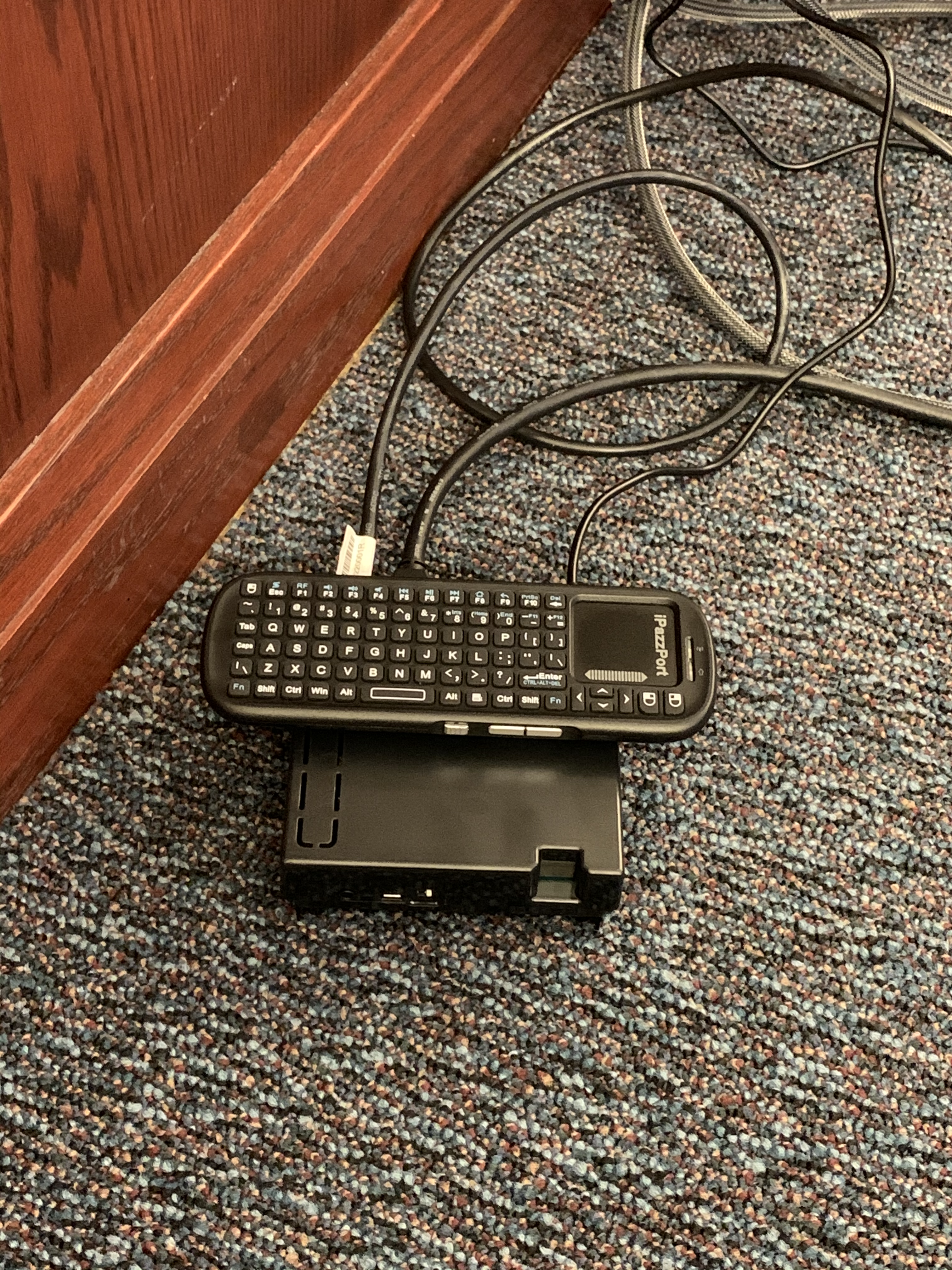
iPazzPort Wireless Mini Handheld Keyboard with Touchpad Mouse: $13.00
12V 2A Power Supply AC Adapter 2amp $4.99

Grand total for each receiver: $121.59

Photos

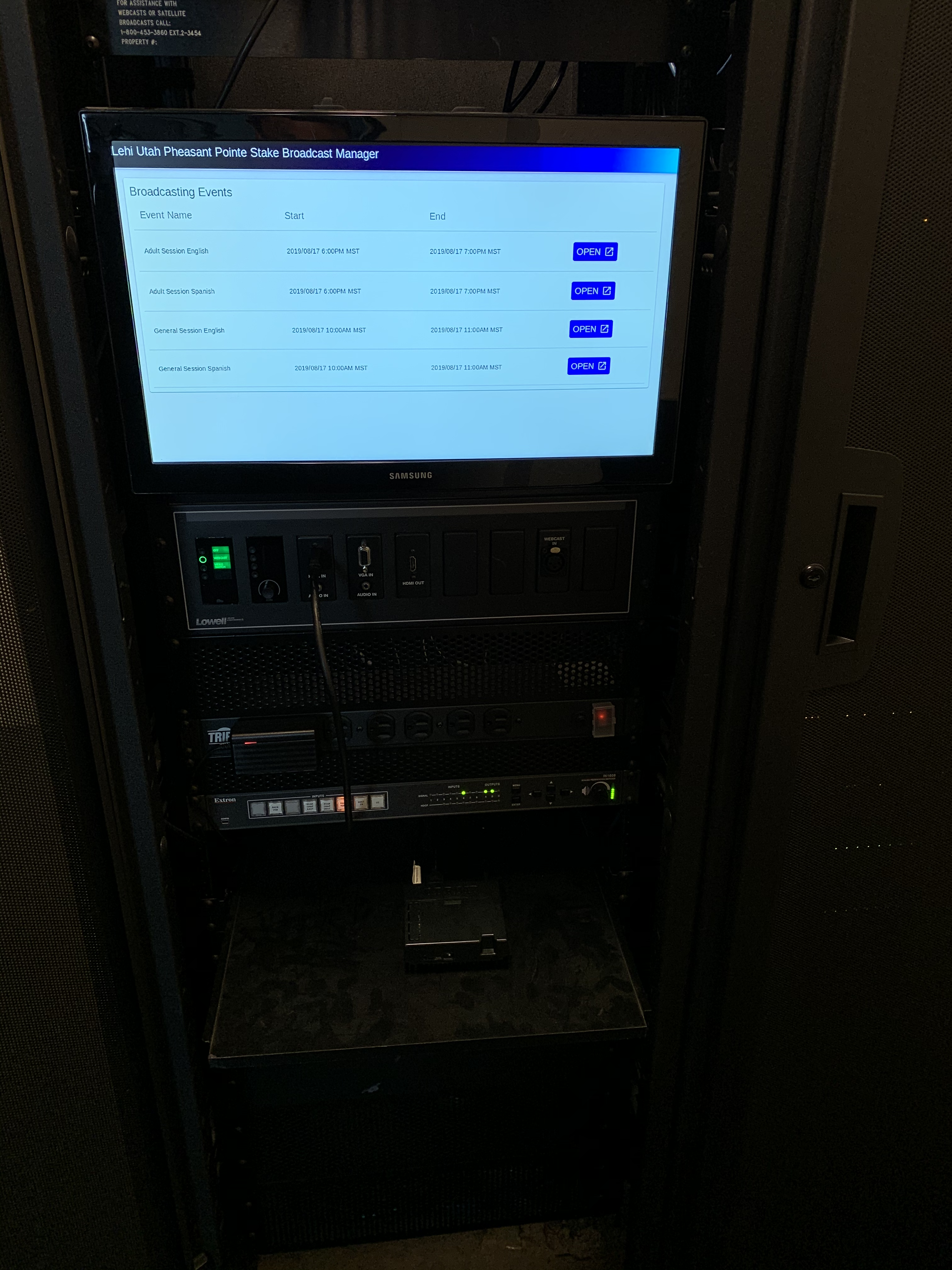
Here is the device I built and use for each receiver.
https://photos.app.goo.gl/6hRupXPfemUV4kiE7
IMG_6452.png
Closeup
(19.09 MiB) Not downloaded yet
It boots up to the following:
https://photos.app.goo.gl/SkCvbt56qwdSHbk38
IMG_6431.png
Booted
(12.07 MiB) Not downloaded yet
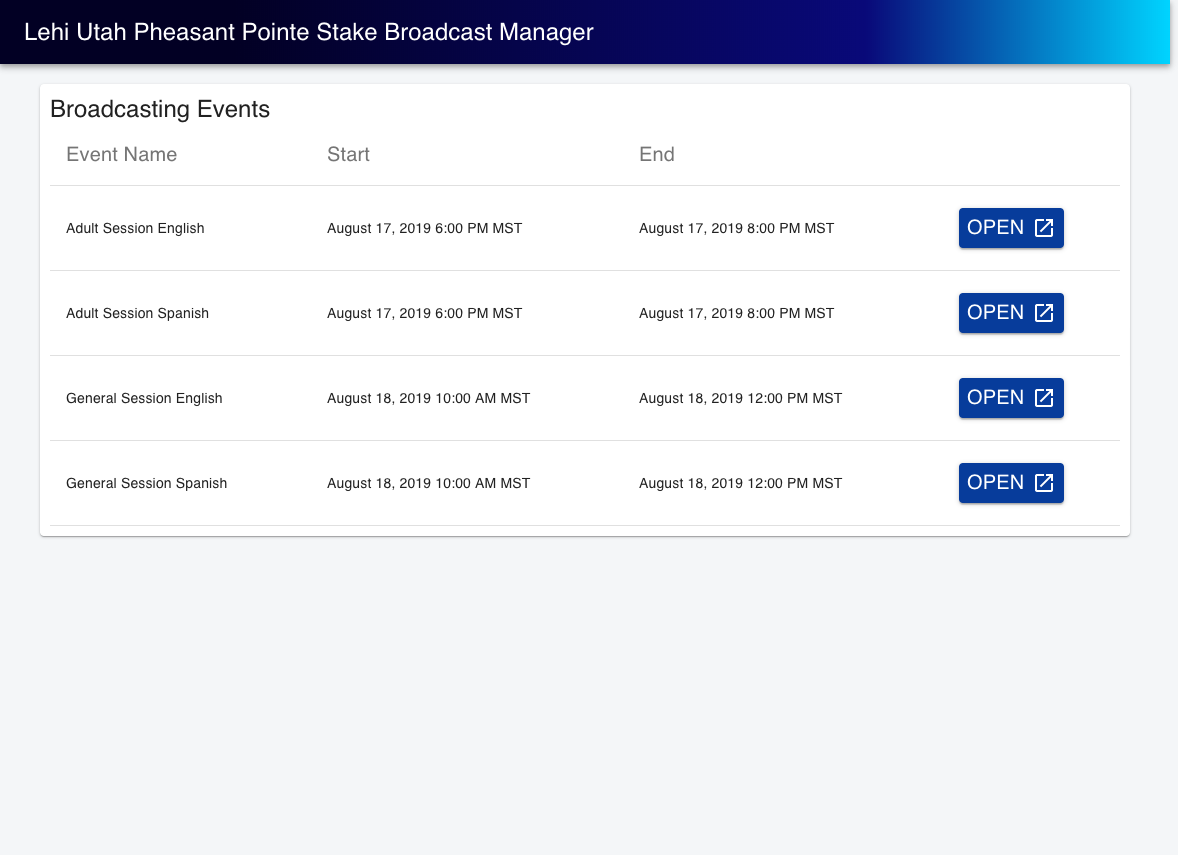
High resolution screen shot:
https://photos.app.goo.gl/h7eb8g8J435BrNVS9
screencapture-app-bretep-me-2019-08-08-22_15_44.png
Screenshot
(93.15 KiB) Not downloaded yet
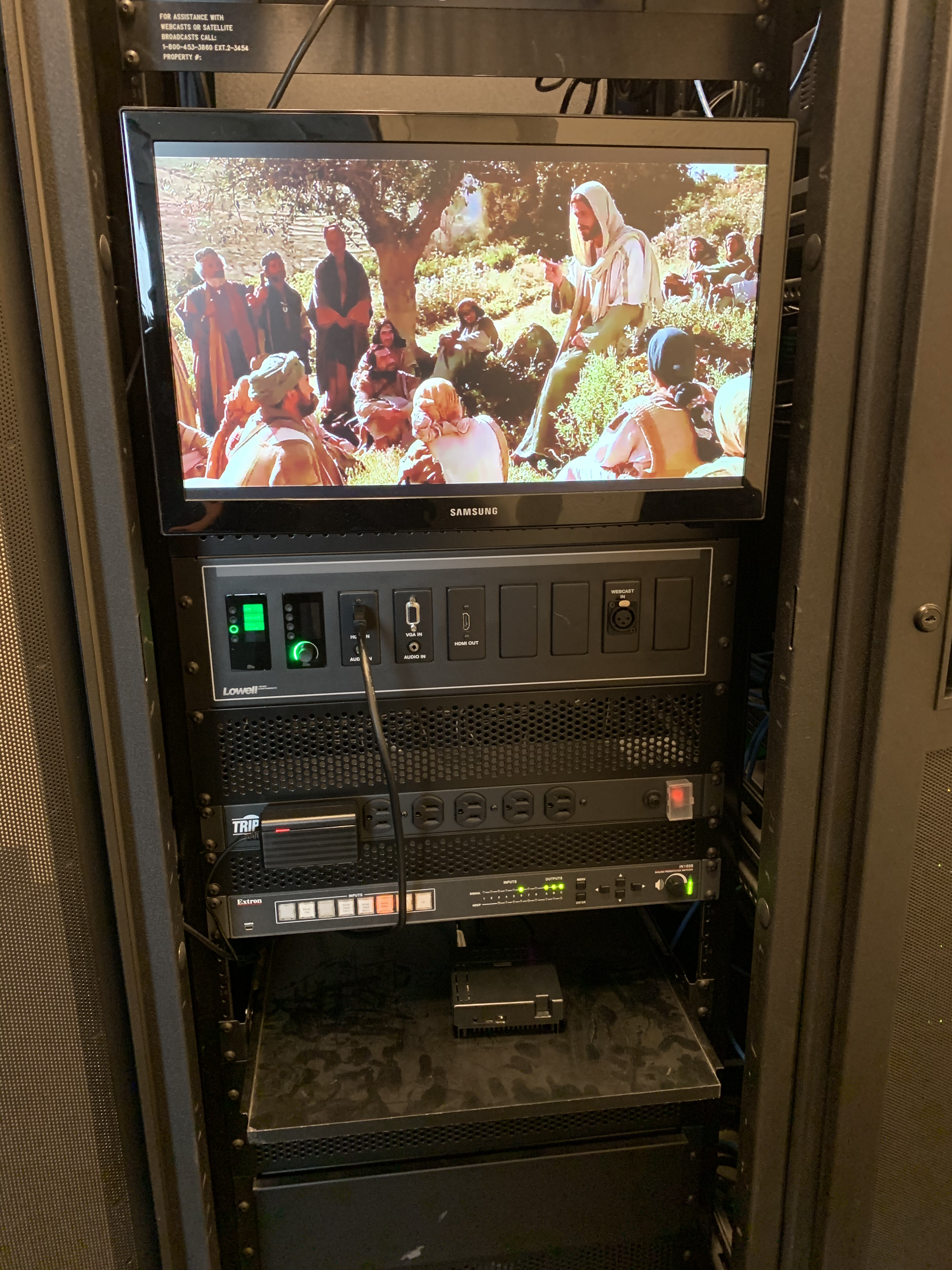
Here it is streaming:
https://photos.app.goo.gl/4pVbnsSrzYaug2Vb9
IMG_6439.png
Streaming
(17.46 MiB) Not downloaded yet
Community Administrator
#43
I understand that the church has something just starting beta. We'll hear more about it soon.

Given that they've recently made it much simpler to setup the VidiU webcast, I'm hopeful they'll make the receiver automatic as well.
Have you searched the Help Center? Try doing a Google search and adding "site:churchofjesuschrist.org/help" to the search criteria.

So we can better help you, please edit your Profile to include your general location.
New Member
#44
I got an email about this new streaming receiver as well. Hoping for simplicity.
Member
#45
Just use YouTube. You'll be able to use darn near anything.
Senior Member
#46
Hagothsen wrote:Just use YouTube. You'll be able to use darn near anything.
Nope, same problem, 'darn near anything' is the actual issue we're trying to solve.
“A long habit of not thinking a thing wrong, gives it a superficial appearance of being right, and raises at first a formidable outcry in defense of custom.”
― Thomas Paine, Common Sense
New Member
#47
I do agree with the OP about how nice it would be to have a standard 'supported' streaming box to greatly simplify the receiving sites reliability and experience. Church HQ already puts out a standard encoder for the broadcast site (which has been a VAST improvement), so why not complete the loop and provide a receive stream box as well? It is currently stressful enough for an STS to pull off a great broadcast with little to no interruptions with less than reliable Internet connections. I know that each Stake is different with their Internet connections, individuals helping, etc. but we have been very successful and fortunate broadcasting to 2 remote sites without too many glitches. We have 2 dedicated laptops with all notifications, scanning, and updates disabled (this is imperative to spend some time going over all the privacy settings and disabling all unnecessary items in Win 10 like the Microsoft store, Cortana, xbox, etc). All bloatware is removed, and they are used for one thing and that's broadcast receives. And it works very well. We use i7's with 8Gigs and HDMI and VGA out. The cost for these new was around $500 each which is very reasonable considering the value of everyone's time to come out on a Sunday to a meetinghouse to view Stake Conference. I believe that if you have update issues, virus scanning issues, etc, than you probably just need to grab a couple 16 yr olds to help you bulletproof the laptop better ...that is at least until the church provides a receive box :)

We have not had ANY issues with the encoding to the church media servers in the last 3 years, and since then, each of the remote broadcasts have only gotten better since we got the dedicated laptops (no one else uses or tampers with between Stake Conferences), and if you keep them that way, there's no reason they shouldn't perform the same each and every time.

Good luck with your broadcasts!
Community Administrator
#48
Since this thread started, the church has started a beta program for a receiver. At least a couple of us are in the program. We're waiting for for them to arrive and put them though their paces.

The program is by invite to the STS. I don't know as there's a way to volunteer to join.
johnv wrote:each of the remote broadcasts have only gotten better since we got the dedicated laptops (no one else uses or tampers with between Stake Conferences), and if you keep them that way, there's no reason they shouldn't perform the same each and every time.
Just as long as they don't try to update themselves during the broadcast. :)
Have you searched the Help Center? Try doing a Google search and adding "site:churchofjesuschrist.org/help" to the search criteria.

So we can better help you, please edit your Profile to include your general location.
Senior Member
#49
russellhltn wrote:Since this thread started, the church has started a beta program for a receiver. At least a couple of us are in the program. We're waiting for for them to arrive and put them though their paces.

The program is by invite to the STS. I don't know as there's a way to volunteer to join.
A couple of months ago, we in Europe were also given the same invitation to test a receiver Unfortunately I wasn't offered a place on the program. :(
Community Administrator
#50
russellhltn wrote:Since this thread started, the church has started a beta program for a receiver. At least a couple of us are in the program. We're waiting for for them to arrive and put them though their paces.
Just got mine. It's a commercial AndroidTV device. I haven't seen instruction or fired it up to see how intuitive or if it has anything already programmed.
Have you searched the Help Center? Try doing a Google search and adding "site:churchofjesuschrist.org/help" to the search criteria.

So we can better help you, please edit your Profile to include your general location.
New Member
#51
russellhltn wrote:
russellhltn wrote:Since this thread started, the church has started a beta program for a receiver. At least a couple of us are in the program. We're waiting for for them to arrive and put them though their paces.
Just got mine. It's a commercial AndroidTV device. I haven't seen instruction or fired it up to see how intuitive or if it has anything already programmed.
Does it come with a keyboard?
Community Administrator
#52
johnv wrote:Does it come with a keyboard?
It comes with a remote.
Have you searched the Help Center? Try doing a Google search and adding "site:churchofjesuschrist.org/help" to the search criteria.

So we can better help you, please edit your Profile to include your general location.
Community Moderators
#53
I started a new topic to discuss the church's beta webcast receiver here:

viewtopic.php?p=201500#p201500
So we can better help you, please edit your Profile to include your general location.
#54
Excellent news! This is a wonderful development that has been sorely needed. The experience we've had running Roku boxes has convinced us that this approach is not only more reliable and higher performance, but massively simplifies training, setup, and operation. Fewer drops, massively better video production and connection protocols dedicated for streaming are enormously impactful for the remote locations.

I note that this thread has run for 2.5 years. Over that time we've seen a couple of significant improvements for remote locations. The first was the recent update to the servers to allow 1080P. This is the second.

Making the remote locations as close to the live location as possible has proven to be extremely important in attendance and interest in our stake. These are very welcome steps.