Gospel Libary iPad Pro support

32 postsstarted by jensen.hamblin 13,224 viewsoriginal topic

New Member
#1
Hi I was wondering if there has been talk about support for the iPad Pro as well as split screen multitasking. I haven't been able to find anything on it but it would be a great feature to have.
Member
#2
I have not heard anything official for the iPad Pro, but it may take a while as iOS apps have been built for full screen usage/scenarios in the past.

One option to get the full spilt screen feature on the iPad Pro is to get something like the following. The Kangaroo http://www.kangaroo.cc/kangaroo.php basically is a portable version of the full Windows 10 experience (64bit) in a device about the size of an iPhone 5 for 6s Using an app called OS Linx, you can run Windows 10 (not the mobile version) on pretty much any iOS device, including the IPad Pro. (As far as I understand) It connects to the iOS device via the lightning cable.

Use Windows 10 on the iPad Pro or other iOS device you can run the Gospel Library and the Gospel Library Beta app side by side.

Again it is one option for now you can try if you want the split screen option on a iOS device.
New Member
#3
The split screen mode on iPad Pro would be a huge benefit for gospel students using Gospel library. The ability to bring up gospel library on half the screen and then being able to open other apps (i.e. notes, safari, evernote, etc.) would be a wonderful thing.
New Member
#4
I agree this would be of great benefit. However, the impact goes beyond the iPad Pro. Any iPad using iOS9 is able to use the split screen feature, so there is a larger pool of users that would benefit from an enhancement. By the way, I noticed that the lds tools app already supports split screen.
New Member
#5
I'd also like to add my hope that Gospel Library will soon support split view on my iPad Pro running iOS 9. As has been pointed out, it's more than just the iPad Pro. My daughter has one of the new iPad Minis running iOS 9 & split view apps work on that.
One nice thing to point out - although for me at least not as useful as split view - is that Gospel Library videos do support the iOS 9 picture-in-picture on supported devices. :D
Member
#6
The next update to Gospel Library will include Split View and iPad Pro support. However, it is currently delayed as we're in the middle of a major content system upheaval. I don't dare to speculate when it will be ready, but I would not expect it any time soon.
New Member
#7
Hiltonc any update on eta

Also will this support the ability to annote the margins using the apple pencil that would be incredible!
Member
#8
Things are moving along, but I still don't know when.

Yeah, Apple Pencil writing in the margins would be pretty awesome! We don't have any plans in that area yet, but will consider it.
New Member
#9
Thanks for the reply.

I've recently bought an iPad pro and am a bit disapointed I can't use gospel library and Evernote at the same time. So it's good to know things are moving along.

It would be great if plans could be made although I'm sure devolper time is limited and things need to be proprietized

It would be amazing to have a highlighter tool and a pen tool to use with the apple pencil and then we could highlight and annotate the app the same way we can annotate our paper scriptures.
New Member
#10

Re: Gospel Libary iPad How can I download the scriptures audio

How can I download scripture audio on my ipod
New Member
#11
I, too, am looking forward to the update which will enable multitasking. I am hopeful that Deseret Bookshelf will also add the multitasking feature so that the Gospel Library app can be used alongside the Deseret Bookshelf app. That would be awesome since I use both heavily in my daily study.
New Member
#12
Question: Any updates yet on the iPad Pro/Split Screen support for gospel library? Thanks!
#13
Here it is April 28. On update in the horizon? I saw recently that the church has licensed the content to a commercial app creator. Should we expect the church to abandon the gospel library? They drove everyone off with a great free app but updates and improvements are more and more sporadic. Did someone plan the tower and find out they could not finish it?
Community Moderators
#14
corwinslack wrote:Here it is April 28. On update in the horizon? I saw recently that the church has licensed the content to a commercial app creator. Should we expect the church to abandon the gospel library? They drove everyone off with a great free app but updates and improvements are more and more sporadic. Did someone plan the tower and find out they could not finish it?
The Church is still actively developing the Gospel Library app and there are no plans in the near future for development by the Church to stop. The team of programmers for iOS and Android is small, but active when it comes to the major apps like Gospel Library and LDS Tools. Where did you hear about content being licensed to a commercial app creator? It's possible that someone was given permission to use the Church's content on a limited basis, but the Church is still actively developing Gospel Library.
Samuel Bradshaw • If you desire to serve God, you are called to the work.
Community Administrator
#15
corwinslack wrote:I saw recently that the church has licensed the content to a commercial app creator.
Are you sure it wasn't for FamilySearch? Completely different situation there. The church does work with a number of partners on the Family History side. Although, I could see them being open toward licensing scriptures. But not anything membership related.
Have you searched the Help Center? Try doing a Google search and adding "site:churchofjesuschrist.org/help" to the search criteria.

So we can better help you, please edit your Profile to include your general location.
Member
#16
LDS Scriptures App (http://ldsscriptures.com/) has an official license to use most of the content available in Gospel Library.
New Member
#17
Any updates on iPad Pro or split screen support?
New Member
#18
benholland wrote:Any updates on iPad Pro or split screen support?
I second that question. Any chance of adding that functionality soon? It would be a great boon to my study (being able to have it open next to a note-taking app or lds.org in Safari).
New Member
#19
For now as we wait for the split screen enabled version of Gospel Library, I find that that lds.org in the browser is good enough right now to do split screen with the Onenote app so I can prepare lessons. It would be great to have it work with the native app but until then this workaround works for me.
New Member
#20
faziow wrote:
benholland wrote:Any updates on iPad Pro or split screen support?
I second that question. Any chance of adding that functionality soon? It would be a great boon to my study (being able to have it open next to a note-taking app or lds.org in Safari).
Add my name to the list of those curious to know if there is a chance that Split View support is getting any closer. Every morning when I check for Updates on the App Store app, I keep hoping to see Gospel Library there with Split View support. :)
New Member
#21
hiltonc wrote:Things are moving along, but I still don't know when.
Any estimate yet on split view support for iPad?
Thanks!
Community Moderators
#22
The current estimate (hope) for Gospel Library 4.0 is by the end of the year.

You can get the beta version of the app through LDSTech to try it out. Join the LDSTech project here:
https://tech.lds.org/projects?controlle ... ojectid=15
Then, the beta version of the app should be available to download from here:
http://tech.lds.org/dl/
Samuel Bradshaw • If you desire to serve God, you are called to the work.
New Member
#23
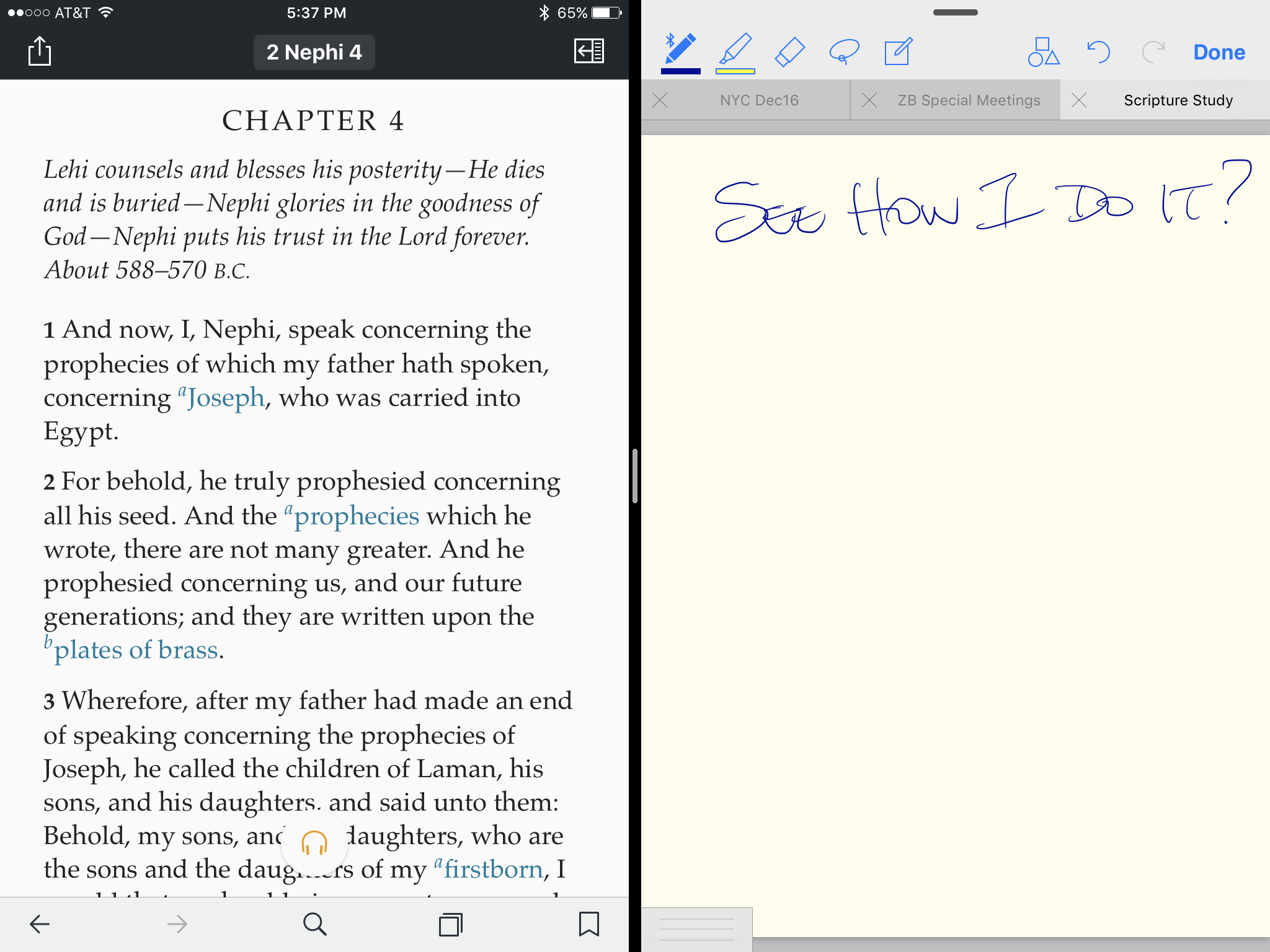
I can do split screen with GoodNotes. I would bet Evernote would work as well. See image.
IMG_0001.PNG
(602.73 KiB) Not downloaded yet
New Member
#24
Another vote for using the Apple Pencil to be able to mark up lessons and scriptures. I would be amazing to make notes for lessons we are teaching.


Thanks,

Jonathan
New Member
#25
How did you do the split screen with GoodNotes and Gospel Library?
New Member
#26
bethmidavaine wrote:How did you do the split screen with GoodNotes and Gospel Library?
You load up Gospel Library, slide in from the right and select GoodNotes. This slides over the top of Gospel Library (takes up about the right 1/3 of Gospel Library. To use both at the same time you adjust the width with the slider on the split. Even a slight nudge on that brings both apps active. Although I don't use GoodNotes for my scripture notes, I do have that app and it does work. I prefer GoodNotes (or DayOne in my case) on the right side. If you want to have Good Notes on the left side, repeat the same above, but open GoodNotes, and then slide in Gospel Library and then nudge the slider a little to activate the app that's covered slightly.
Community Moderators
#27
Full instructions for Apple's split view are here: Use Multitasking on your iPad
The feature requires an iPad 5th generation or later, iPad Pro 1st generation or later, iPad Air 2 or later, or iPad mini 4 or later, running iOS 9 or later.
Samuel Bradshaw • If you desire to serve God, you are called to the work.
Member
#28
For those running iOS 8 and later on an iPad, they could try this alternative option if their device does not have the built in split screen ability.
https://www.youtube.com/watch?v=RPllrtvFO3s

May not be for everyone, but it is an option that would run iOS and Windows 10 when you want (could be put in tablet mode if you want to ) When in the Windows 10 screen, you could use the current Gospel Library Beta (testing) app, which works really well even in tablet mode. In the standard desktop view, you can split the screen into 4 separate windows, so you can have 4 windowed apps or 4 instances of Gospel Library app running on the screen.

Again, not for every iOS user, but an option.
New Member
#29
Please do what you can to get Apple Pencil and LDS scriptures working together.
New Member
#30
Please add pencil support. Being able to underline with a pencil, like paper scriptures, would be so sweet!
New Member
#31
This: Another vote for using the Apple Pencil to be able to mark up lessons and scriptures. I would be amazing to make notes for lessons we are teaching.
This is the only thing that keeps me from relying on gospel
Library exclusively for my lessons.
#32
hiltonc wrote:Things are moving along, but I still don't know when.

Yeah, Apple Pencil writing in the margins would be pretty awesome! We don't have any plans in that area yet, but will consider it.
Another member here hoping this could become a reality! I think future generations would love to see a handwritten gospel library note or just idea in a margin. It’s awesome you can highlight and such, but handwriting would be so special. I keep a sort of a journal in the gospel library and would love to doodle and write my ideas instead of always typing.