user id and password

5 postsstarted by farwest 3,345 viewsoriginal topic

Member
#1
On one of the computers in family history center in family search the user and password automatically fills in for the same patron even after she has logged off and someone else uses it. When she comes back and click user it puts her name and password in automatically.

Thanks
Community Administrator
#2
What browser? Most browser has a feature to remember the login. But there's usually a setting to turn that off. In a FHC situation, it should be off.
Have you searched the Help Center? Try doing a Google search and adding "site:churchofjesuschrist.org/help" to the search criteria.

So we can better help you, please edit your Profile to include your general location.
Member
#3
We looked for the setting but couldn't find one. Using Chrome
Community Administrator
#4
farwest wrote:We looked for the setting but couldn't find one. Using Chrome
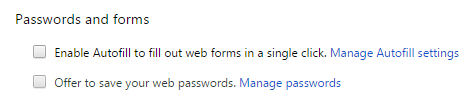
In Chrome, go to Settings. Choose "Show Advanced Settings" at the bottom of the basic settings section. Then you can see a section called "Passwords and Forms" (see screenshot below); uncheck the box by "Offer to save your web passwords." You can click the link for "Manage passwords" to remove any existing stored passwords.
Chrome-Passwords.png
Chrome-Passwords.png (7.03 KiB) Viewed 3321 times
Questions that can benefit the larger community should be asked in a public forum, not a private message.
Member
#5
thanks we will take care of it.