Building Scheduler Contact not showing on locations

14 postsstarted by ZundelMJ 3,451 viewsoriginal topic

New Member
#1
Our stake has 3 buildings. Today I discovered that none are showing the building scheduler contact. Where the name should be listed, only a "-" (dash) is displayed.

I have tried with IE, Safari, Firefox, and Chrome. When I edit the location, I can see that a building scheduler has been assigned.

Anyone else see this problem?
Community Administrator
#2
We had a recent problem where all building schedulers were removed. You might want a stake admin to verify that they are still building schedulers in the calendar system (not MLS/LCR).
Have you searched the Help Center? Try doing a Google search and adding "site:churchofjesuschrist.org/help" to the search criteria.

So we can better help you, please edit your Profile to include your general location.
New Member
#3
I am the admin and that was the first thing that I checked. Interesting that when I added myself as a scheduler and left the original scheduler, there are now 2 dashes (one above the other) where the name should be showing. That seems to suggest the system is trying to display a name but instead is showing a dash.
Community Administrator
#4
Where exactly are you looking to see the building scheduler?
Have you searched the Help Center? Try doing a Google search and adding "site:churchofjesuschrist.org/help" to the search criteria.

So we can better help you, please edit your Profile to include your general location.
New Member
#5
In the calendar, where you can see the events on the calendar, there are the locations listed on the left side. I can click on anyone of the locations (not placing the check in the check box but clicking on the location name itself) there is a dropdown that shows the address and the building scheduler. I have seen spotty results with handheld devices so I recommend you use a computer.
Community Administrator
#6
OK, now I see it. I'm seeing the same thing.
Have you searched the Help Center? Try doing a Google search and adding "site:churchofjesuschrist.org/help" to the search criteria.

So we can better help you, please edit your Profile to include your general location.
Church Employee
#7
We should have a fix deployed for this issue, this week.
#8
I'm having the same issue! Is there another way to look them up while waiting for the fix to come out?

Thanks!

Here is a screenshot...
http://imgur.com/oPdSw9r
New Member
#9
I can now see the building schedulers. Thank you for fixing the issue!
#10
Yay, thanks so much!!!
Church Employee
#11
Yes, this problem has been fixed. In our feedback today I did see one user complain that they disappeared again, but I can't recreate. Let me know if this is still a problem for you.

Dave Crockett - calendar product manager
#12
I still see them! Using Google Chrome!
Church Employee
#13
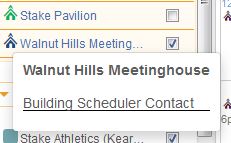
Attached is what I see for all the buildings in our stake when I click on the building to see the scheduler info - it just says "Building Scheduler Contact" with no names listed. Is this because the names have not been put in as the schedulers?
bldg_sched.JPG
bldg_sched.JPG (16.43 KiB)
Community Administrator
#14
nmecantwin73 wrote:Attached is what I see for all the buildings in our stake when I click on the building to see the scheduler info - it just says "Building Scheduler Contact" with no names listed. Is this because the names have not been put in as the schedulers?
Probably. There was a problem recently where the building schedulers were dropped. Also, building schedulers are not required, and may not be needed.
Have you searched the Help Center? Try doing a Google search and adding "site:churchofjesuschrist.org/help" to the search criteria.

So we can better help you, please edit your Profile to include your general location.