Cannot connect account to ward and stake

12 postsstarted by mwgrover 5,845 viewsoriginal topic

Member
#1
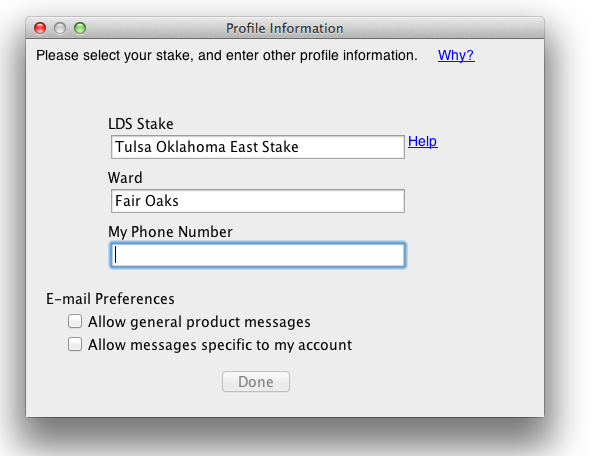
Members of my family are trying to start indexing for the first time. We are getting the screen where you type in your stake and ward. The stake field auto-populates when you start typing just fine. But the ward does not… and after filling out the ward and phone number fields, the "Done" button at the bottom remains grayed out. (See attached screenshot).

We can click the close button on this popup, but then our indexing accounts are not linked to our ward & stake and our efforts do not show up on stake reports.

Any ideas? Thanks.

(Using Mac OS X 10.8.5)
Community Moderators
#2
The ward field doesn't auto-complete; only the stake – since the stake is your "group," FamilySearch's auto-complete database doesn't include wards (all reporting is done at the stake level; this will change with the new indexing system). Whatever you type in "ward" is just to help out your stake indexing leaders.

Did you click on the stake when it auto-completed, or did you continue typing?

It looks like Phone Number is blank in the screenshot – perhaps it's a required field?
Samuel Bradshaw • If you desire to serve God, you are called to the work.
Community Moderators
#3
mwgrover wrote:. . . and after filling out the ward and phone number fields, the "Done" button at the bottom remains grayed out.
Did you click on one of the two email options? The second one will generate very few emails, but you have to select one or the other.

That may be what is keeping the Done button undone.
Member
#4
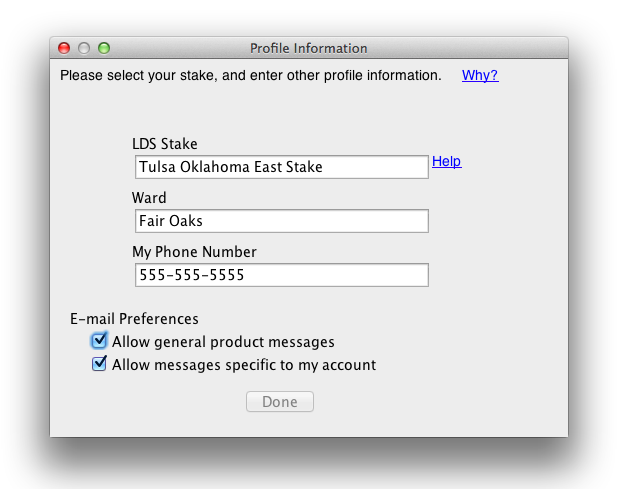
Tried everything I possibly can to get the "Done" button to activate. Added a phone number, checked the email options, removed, unchecked, tab tab tab… nothing. The Done button stays grayed out no matter what I do.
Member
#5
Also: I have already tried deleting the indexing program and re-downloaded it.

Also: I myself was able to get through this screen successfully and link my efforts to stake reports. But my wife and children cannot, despite the fact that they all have their own lds accounts and can log in successfully to lds.org and to family search. We just can't get this registration screen on the indexing program to work.
Member
#6
Anyone? :)
Community Moderators
#7
Have you tried a different browser?

Another suggestion would be to contact the Family History help desk and ask them for assistance.
Member
#8
Unfortunately, this doesn't have anything to do with any browser, it is within the Indexing app itself which is downloaded from the FamilySearch website.

Thanks, I will contact the help desk.
Community Moderators
#9
mwgrover wrote:Unfortunately, . . . it is within the Indexing app itself which is downloaded from the FamilySearch website.
Missed that, sorry. The help desk is your friend.

I suspect they will first want to make sure you are using the correct version of Java, and that may be the cause of the problem.
New Member
#10
I'm having the same problem. I've seen it with two other people. Is it a problem with the Mac indexing software?
Member
#11
evanmarc wrote:I'm having the same problem. I've seen it with two other people. Is it a problem with the Mac indexing software?
Nope. Here is the fix:

Go to https://indexing.familysearch.org/admin ... myinfo.jsf
Sign In with username and password.
Click Edit at the bottom of the screen. Note: Individuals with Administration privileges must click My Info in the upper right corner first.
Start to type the name of the stake in the LDS Stake field.
If the official name of the stake is unknown, type in the name of the city, state, or country and scroll through all the options for that locality. If several options for the locality are given or if the correct stake does not seem to be in the list contact FamilySearch.
Select the desired stake from the drop-down list by clicking the stake name.
Click Save.
New Member
#12
I am having this problem. I am on a Mac. Any help getting this Done button to actually work?