EVI-D80 Camera Controller

39 postsstarted by jswalberg 25,193 viewsoriginal topic

New Member
#1
We just installed a Sony EVI-D80 camera, and need to decide on whether to use a joystick or software to control it. What do you all recommend? Please site specific joysticks or software packages and cost.

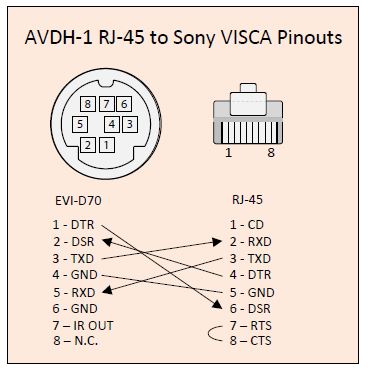
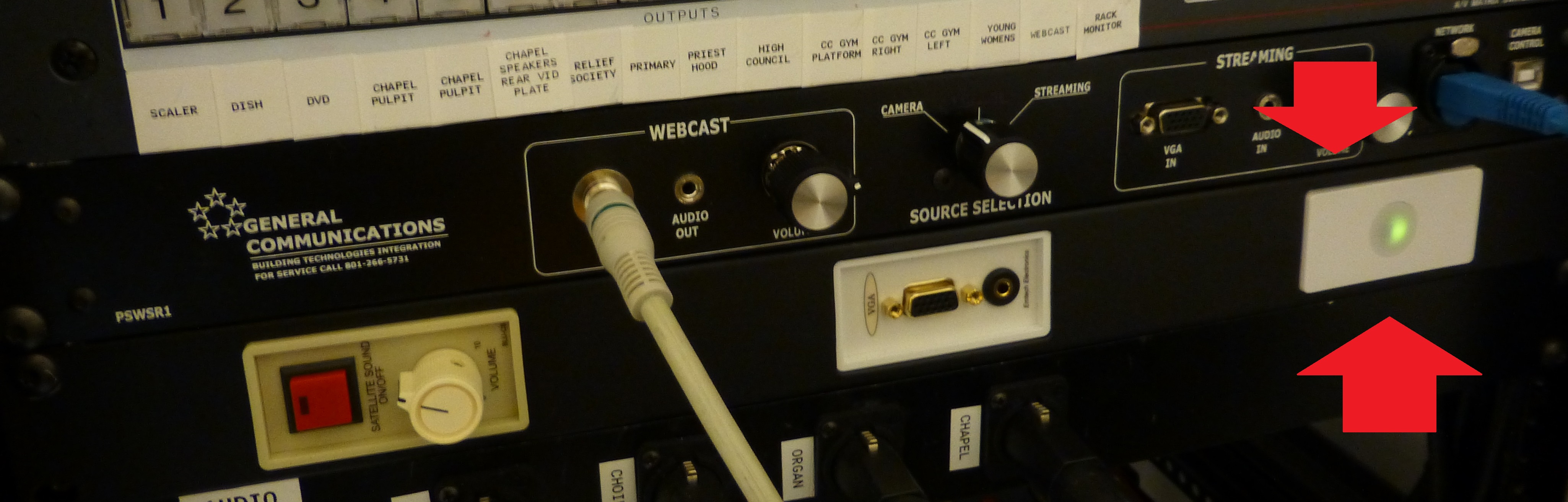
We ran a cat6 cable, but haven't terminated either end yet. Anyone have a schematic for how to connect it to the camera and also to the AVDH1 a/v panel? The a/v panel has a camera control port, but we nor the FM group know how to connect to it. It takes an RJ45 connector on the back it appears. What cable would you then hook into the front of the AVDH1 panel? Please link to a specific cable on Amazon if possible.

Thank you.

Justin
Member
#2
First Cable for the Visca control
http://www.emtechelectronics.com/produc ... /16-visca/


The Manual and info for the drivers are here

http://www.emtechelectronics.com/medias ... b-2013.pdf

Hub to computer is a standard USB A/B cable
Visca Cable.JPG
Visca Cable.JPG (32.32 KiB) Viewed 11734 times
Visca Pinout.JPG
Visca Pinout.JPG (32.1 KiB)
Roland
New Member
#3
Thank you very much Roland. Is the camera control port on the front of the AVDH1 panel just for hooking up to a computer in order to control the camera using software? What if we were to use a joystick controller (Sony RM-BR300)? Should we just by-pass the AVDH1 altogether in this situation, and perhaps put a keystone jack on the wall? Can you elaborate on the recommended cable setup when using a joystick with the EVI-D80? Our camera is ceiling mounted in the chapel, and the AVDH1 is about a 100-ft cable-length away.
Member
#4
I have no experience with the RM-BR300, and it does take its own type of cable.

The USB port on the AVDH-1 is there for your computer to connect to the camera after proper drivers are installed. They are described in the manual.
Roland
#5
There are several ways you can control the Sony EVI-D80. A joystick controller, computer mouse/keyboard, or Infrared Wireless remote.

I have had experience with several joystick controllers including Vaddio, Sony, Kato (a Chinese brand). The prices for these vary depending one features, ease of use, if you purchase it new or used, etc.

My personal preference is either the Vaddio or Sony. Used Sony's start at about $700, and Vaddio's at about $1,000. They offer the best 3-axis joystick control including variable speed servo control (PTZ action - from slowest the camera can do [14 or more incremental steps] to the fastest possible). These controllers are super easy to use and there is almost no learning curve. Sony PTZ cameras have 6 internal presets which memorize every setting of the camera (position, zoom, focus, color, brightness, etc.) and the controllers have buttons reserved for each preset.

One of the best features of these controllers is the ability to override automatic white balance settings and fine-tune brightness and color settings so you can achieve the best possible picture and match cameras if you are using more than one.

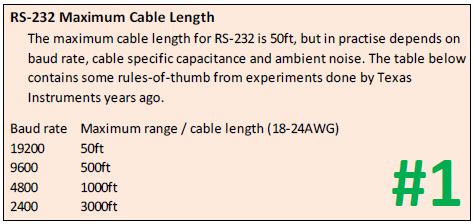
Camera control is achieved by RS-232 or RS-422 communication using a set of commands (protocol) developed by Sony called VISCA. RS-422 can go 4,000 feet, and connection is simple with CAT5 cable (only 4 wires are used). Most of us prefer to use RS-422 instead of the RS-232 (requires a special 8-pin DIN connector and the recommended cable length is less than 50 feet - however some have had success with longer lengths). For RS-422, simply strip 4 CAT5 wires and secure them to the correct pins on the 9-pin Phoenix connector (transmit+ goes to receive+ and so on). If you choose to daisy-chain additional cameras, the 4 other pins go to the next camera, with one of the pins reserved for ground.

Sony controllers are used by professional broadcasters (they call PTZ cameras "Robo's") and they're great for worship services. The controllers can connect to and control up to 7 cameras.

The Kato controller is about a third of the price of the Sony and the 3-axis control is just as good, but it's other features are difficult to use. Controlling anything other than the movement is difficult or not even possible. The only features worth using are PTZ control and memorizing presets. Connection is the same as the Sony.

Side note: Sony's broadcast quality line of PTZ cameras are BRC instead of EVI. The baby of their professional line-up is the BRC-300 which has incredible smooth and super-slow PTZ control. Good used cameras start at about $600.
New Member
#6
In the Wichita Stake Center they just use the remote that came with the camera and set the presets to different parts of the stage. Like 1 to the pulipit, 2 Organ, 3 Curister, 4 Paino, 5 stake president, 6 coir. Also if you need to put the camera some were different you could just pan that camera with the remote. Took the head ack out of the camera. Then they got a Iferred repeater in the AV closet that hooks up to the back of the camera. All it take is to push the Preset of pan the camera with the remote. This makes it easy if some one moves out of the ward or not in town for the use of the camera. The Picture is of the wall plate that had the infred repeater.
📎 camera.JPG (875.14 KiB)
New Member
#7
We are getting ready to mount our EVI-D70 camera, and I decided to write control software for it. It has basic functionality including pan, tilt, zoom, rates of pan/tilt/zoom, on/off, and presets. If anyone would like to try it before spending almost a $1,000 on a controller, or even $100 on a software controller, please contact me. There are only slight differences between control for the D70 and D80, and there should be no difference for the commands in this software.

If you would like to try my control software, I will make it available at no cost, and I'll support any issues that may come up. Contact me at jim@rnl3c.com
New Member
#8
My two cents worth if you have not gotten it solved yet. Is get a Joystick controller like the Sony brand. The software is not nearly as smooth to use.
New Member
#9
I have been continuing to work on the camera controller based on feedback from a couple of people. Now that I have 2 cameras I am able to test the multi camera capabilities and that work well after a few tweaks. I have added support for auto/manual exposure, auto/manual focus, EVI-D30, and a few other things. My main purpose was so I didn't have to spend the money a hardware controller costs, and I'm glad I did.

Again if anyone wants to try it contact me at jim@rnl3c.com
New Member
#10
Since my last post I have continued to make improvements to the software and we used it at our Stake Conference. It worked adequately, but I didn't like the effort needed to control the PTZ and rates at the same time. Therefore, I added joystick/gamepad integration and I really like it now. It's still free, and I have added a website with a little information and a download link.

http://www.rnl3c.com/ptzc shows the software and link and I will continue updating with operating instructions.
New Member
#11
michaelfish wrote:There are several ways you can control the Sony EVI-D80. A joystick controller, computer mouse/keyboard, or Infrared Wireless remote.

I have had experience with several joystick controllers including Vaddio, Sony, Kato (a Chinese brand). The prices for these vary depending one features, ease of use, if you purchase it new or used, etc.

My personal preference is either the Vaddio or Sony. Used Sony's start at about $700, and Vaddio's at about $1,000. They offer the best 3-axis joystick control including variable speed servo control (PTZ action - from slowest the camera can do [14 or more incremental steps] to the fastest possible). These controllers are super easy to use and there is almost no learning curve. Sony PTZ cameras have 6 internal presets which memorize every setting of the camera (position, zoom, focus, color, brightness, etc.) and the controllers have buttons reserved for each preset.

One of the best features of these controllers is the ability to override automatic white balance settings and fine-tune brightness and color settings so you can achieve the best possible picture and match cameras if you are using more than one.

Camera control is achieved by RS-232 or RS-422 communication using a set of commands (protocol) developed by Sony called VISCA. RS-422 can go 4,000 feet, and connection is simple with CAT5 cable (only 4 wires are used). Most of us prefer to use RS-422 instead of the RS-232 (requires a special 8-pin DIN connector and the recommended cable length is less than 50 feet - however some have had success with longer lengths). For RS-422, simply strip 4 CAT5 wires and secure them to the correct pins on the 9-pin Phoenix connector (transmit+ goes to receive+ and so on). If you choose to daisy-chain additional cameras, the 4 other pins go to the next camera, with one of the pins reserved for ground.

Sony controllers are used by professional broadcasters (they call PTZ cameras "Robo's") and they're great for worship services. The controllers can connect to and control up to 7 cameras.

The Kato controller is about a third of the price of the Sony and the 3-axis control is just as good, but it's other features are difficult to use. Controlling anything other than the movement is difficult or not even possible. The only features worth using are PTZ control and memorizing presets. Connection is the same as the Sony.

Side note: Sony's broadcast quality line of PTZ cameras are BRC instead of EVI. The baby of their professional line-up is the BRC-300 which has incredible smooth and super-slow PTZ control. Good used cameras start at about $600.
Michael,
I have 2 BRC Z700 cams and 3 EV1-HD1. I have a RM-BR300 and we will be using vMix to manage our inhouse screen media and the live stream. I have used vMix for several years doing live streaming and we are now getting our church updated :)
I wanted to put 1 or 2 of the EV1's down at the front of the sanctuary (in front of choir loft) mainly for events like graduation, weddings, etc where that camera view would be very helpful. However, the cable run would be an estimated 300 feet. Is there advise you can share? I don't think the EV1's support RS-422 so would heavier wire work with the long distance for RS-232?

Thanks for any help you or anyone can provide!
Senior Member
#12
WOW, where do you come up with the money for 5 of these cameras? You are talking over $18,000 in cameras. I have also been told that we are not to make things production and from it sounds like you have a major production going on. I'm lucky to get the EVI-D80 or the other Sony camera.

Terry
New Member
#13
I have been patient and buying them used looking for GREAT deals :) . I paid a fraction of that price. I agree on production. But you might have missed that this is a dual purpose setup. We want to be able to stream weddings, and other school events that are held in the sanctuary as well as our regular Sunday services. I am hoping Michael or someone can help shed some light on the setup.
Community Administrator
#14
tdurhamjr wrote:We want to be able to stream weddings, and other school events that are held in the sanctuary as well as our regular Sunday services.
This is an unusual situation. I think it's safe to say it's a situation that doesn't apply to 99.9% of us. Most of us are limited to 2 meetings a year from the chapel (Stake Conference) and perhaps a few more originating from other areas of the building.
Have you searched the Help Center? Try doing a Google search and adding "site:churchofjesuschrist.org/help" to the search criteria.

So we can better help you, please edit your Profile to include your general location.
New Member
#15
The control commands for the BRC-Z700 and EVI-HD1 cameras are the same as the commands for the EVI-D80 (30/70/90) cameras. The software described here: http://rnl3c.com/ptzc/ can control those cameras. I have just recently added joystick/gamepad capability so you can control your cameras using a joystick with many of the same features (presets, color balance, exposure control).
New Member
#16
Very nice info!! Do u know the realistic longest length the rs232 cable can be? I was planning on using cat5 or cat6 wire for the rs232.
Senior Member
#17
Tell me where you have gotten them used and for what price. I find on eBay that the cameras are still going for $3,000 to $4,000.

Also, in Church Handbook 2 section 21.2.10 it states:

Photographs, Video Recordings, and Broadcasts in Chapels

Taking photographs or making video recordings in chapels is not permitted. Meetings and other events that are held in the chapel may not be broadcast over the Internet or by any other means (see 18.3.1 for an exception).

and Section 18.3.1 is on stake conference and a paragraph in that section states:
If necessary, conference sessions may be broadcast to other locations in the stake.

So from the way that I read these two policies, by "stream weddings, and other school events that are held in the sanctuary (chapel) as well as our regular Sunday service," you are actually in violation of the policy of using the chapel. Like Russell says, as long as it is from any other room in the building it is allowed under the direction of church leaders.

Just to give you an example. In my stake we have a building that is scheduled to be dedicated in November. My stake president was hoping to broadcast the dedication to other chapels in our stake. He says, "There is NOT a need to broadcast to the rest of this stake. At this point, even if it was possible, it is not approved."
#18
tdurhamjr wrote:Do u know the realistic longest length the rs232 cable can be? I was planning on using cat5 or cat6 wire for the rs232.
It depends on the bauld rate and cable qualtity/type. The second post in this topic shows a chart listing the maximum length as 500 feet if you use 9600 buad (which is typical) over a category 5 cable.
#19
harddrive wrote:WOW, where do you come up with the money for 5 of these cameras? You are talking over $18,000 in cameras. Terry
For years I have tried to explain that it is possible to purchase equipment for a fraction of new, if you know what to look for and are patient.

For an example, I recently helped a stake find and purchase a complete Vaddio multi-camera system which included a ProductionVIEW Precision Camera Joystick Controller link, 3 Vaddio HD-18 cameras including CCU's and power supplies link.

Retail on the Vaddio™ WallVIEW™ CCU HD-18 = $5,395/ea, ProductionVIEW Precision Camera Joystick Controller = $2,495 or a total retail value at $18,680 plus tax and shipping.

We purchased all this for $2,950 on eBay.

My thoughts are simply this:
If you or your stake wants to emulate the same viewing experience as General Conference...why pay over $817 PLUS tax and shipping for a new Sony EVI-80 when you could have purchased TWO incredible, broadcast quality, super smooth P/T/Z Sony BRC-300's (link) for about the same price (eBay sold listings link)?

As churches, broadcasters and video professional companies upgrade to HD, many deals can be found and purchased for a fraction of the price of new!
Member
#20
Edited 1 time, last by kellymab on
tdurhamjr wrote: I wanted to put 1 or 2 of the EV1's down at the front of the sanctuary (in front of choir loft) mainly for events like graduation, weddings, etc where that camera view would be very helpful.
I'm sure I missed something, but why are there weddings in the chapel? I didn't think the church allowed that. Granted that could have been my stake at the time.
New Member
#21
You guys need to understand that 1) your forum is on the web, not in a closed network, and 2) you allow guest to join the forum. Even though I knew the thread was on the LDS website, I made the huge mistake of assuming the thread was a general thread about helping each other setup PTZ cameras. Instead I found out that it was about rule breaking, and what right did I have to purchase the equipment I have. I'm with a completely different domination. I have nothing to do with LDS. So you need to put an a big fat note that the top of your forum that lets outsiders know this is all about rules and not about learning to improve camera system in a church regardless of your domination.

Your last poster and Michael are the only ones who posted some good meaningful information on the topic of cameras. I will look elsewhere for my information while ya'll ponder your rule book :0
#22
tdurhamjr, I tried to personal message (PM) you but there was no option to do so.

I have a passion for what you are doing and I'd like to find out more about your set up.

Do you have the PM option to message me...Mike

If not, try this link PM

(edit: I just checked my box and found your previous one. Look for my reply...Mike)
Community Administrator
#23
michaelfish wrote:
tdurhamjr wrote:Do u know the realistic longest length the rs232 cable can be? I was planning on using cat5 or cat6 wire for the rs232.
It depends on the bauld rate and cable qualtity/type. The second post in this topic shows a chart listing the maximum length as 500 feet if you use 9600 buad (which is typical) over a category 5 cable.
And you can probably exceed that if you switch to RS-422. The camera supports that, you just need a RS-422 card or adapter on the computer.
Have you searched the Help Center? Try doing a Google search and adding "site:churchofjesuschrist.org/help" to the search criteria.

So we can better help you, please edit your Profile to include your general location.
Community Administrator
#24
tdurhamjr wrote:You guys need to understand that 1) your forum is on the web, not in a closed network, and 2) you allow guest to join the forum.
True and true.
tdurhamjr wrote:Even though I knew the thread was on the LDS website, I made the huge mistake of assuming the thread was a general thread about helping each other setup PTZ cameras.
That's not something we really considered. The general assumption is that everyone here is LDS. I think you're the first technical visitor that wasn't.

tdurhamjr wrote:Instead I found out that it was about rule breaking, and what right did I have to purchase the equipment I have.
As LDS, we have to work under rules that apply to all of LDS. We don't help each other break the rules. Had we known up front that you weren't LDS, you probably would have had a different experience. I suspected you weren't a member (we don't have sanctuaries) and tried to draw that out of you but failed to do so.
Have you searched the Help Center? Try doing a Google search and adding "site:churchofjesuschrist.org/help" to the search criteria.

So we can better help you, please edit your Profile to include your general location.
Senior Member
#25
tdurhamjr,

I did not realize that you were not of our domination. I should have realized that when you said sanctuary. However, I thank you for the information you have provided and I will look into the items. We of the church have guidelines that we need to follow. Our leaders want us to keep the sanctity and the sacredness of the meetings we hold. So we have a limited budget and limited ability of what we can do.

I'm sorry if my post offended you, I was just reacting to the setup you have and I would love to have a setup like that, but again, I must follow what my church leaders allow me to do. I have to work within their frame work.

Terry
New Member
#26

Sony EVI-d series pc based Camera Controller

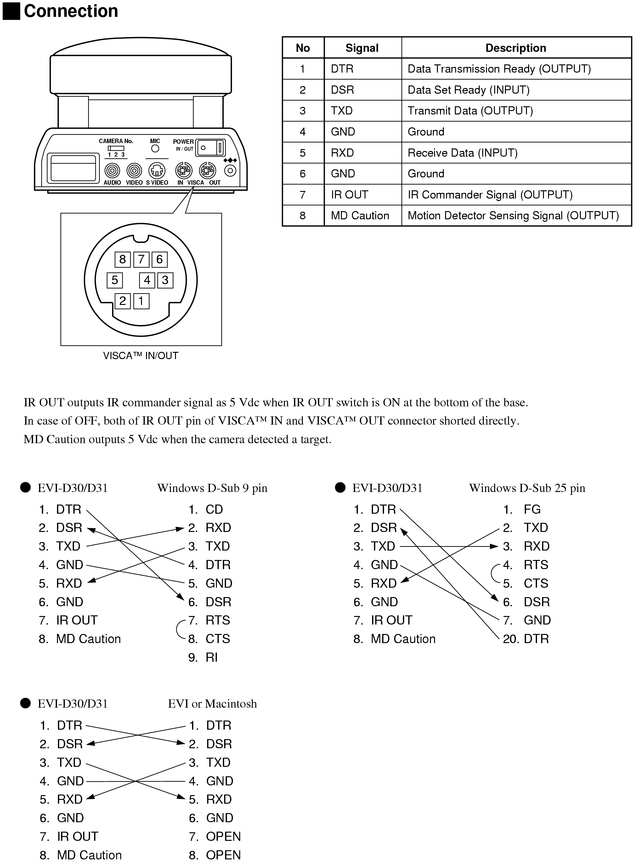
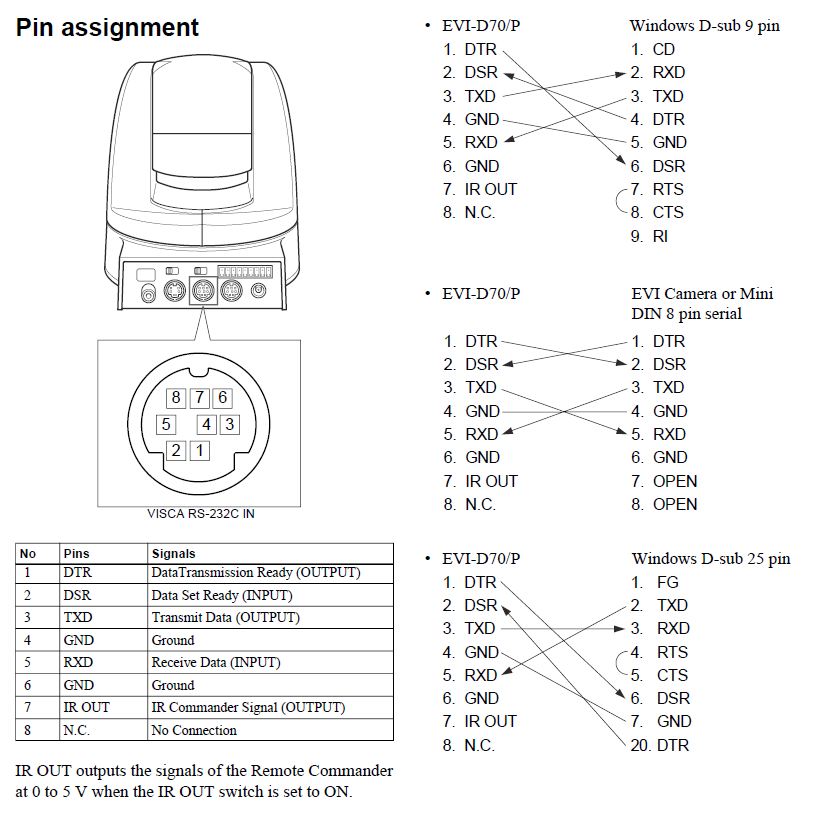
We just installed a new cat 5e cable going from our av rack to the camera, if you do some searching you can solder your own adapters to link the Sony viscapinout for db9 to rj45, and then on the camera end you make a rj45 to mini din connector using the 8 pin mini din pinout. Once that's done just take any old computer and plug in a USB serial adapter. We used control software from serial port tools website. $99 gets you the software licence for there ptz controller. This software allows you to use a joystick, save camera positions, and adjust most settings on the any Sony ptz camera. If you have more than 1 camera just run a cat 5 cable between the cameras solder on the mini dins using the Sony pinouts for camera to camera daisy chaining the signal. You can run up to 7 sony devices on one chain.
Visca_connector_and_wiring.png
(86.39 KiB) Not downloaded yet
Please note that it is easier for you to start by building a db9 to camera cable, cut it in half, and than crimp on your 2 rj45 connectors on each of the halfs ensuring that all wires are terminated in the exact location of each rj45, when you install the cable be sure to terminate the cable with jacks, not the rj 45 mod connectors. This ensures that your control cable doesn't have a built in "possible point of failure. When adding more cameras to your chain, simply use the pinouts on the middle left hand side of the Immage below. Make the cable mini din to mini din, cut in half and terminate again exact locations on 2 rj45 connectors make sure to label the " din to rj45 dongles" control, cam1 in, cam1 out, cam2in ext. This is because all the dongles will have tere own separate pinouts
capture2.jpg
(98.35 KiB) Not downloaded yet
Also note that this pinouts works with and Sony evi camera, this covers the evi d30, d70, d80, and d100 cameras. All of which can communicate on the visca protocol.

Also note that the cameras running thru visca automatically address themselves first camera in chain is cam1, second camera in chain is cam2 ext ext...

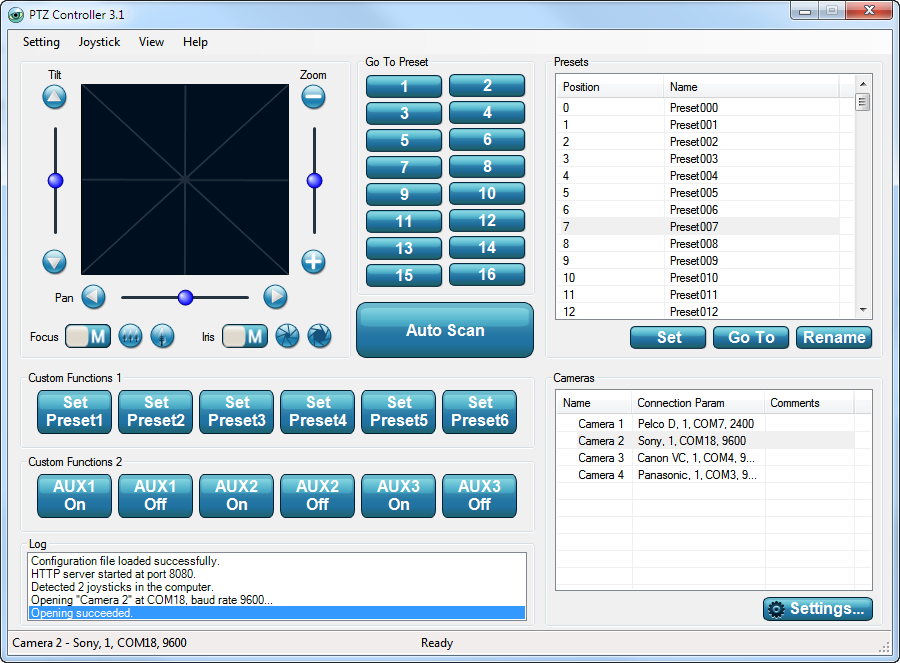
Once your done building the visca chain, check your cameras dip switches to ensure they will " play nicely" than bring up the software. I use
pad_screenshot.png
(98.66 KiB) Not downloaded yet
Note the settings tab in the lower right hand corner, simply click that button and select the protocol they will use, Sony visca, pelco, Panasonic.... And select add camera. After that your set up to control the cameras via computer, if your going to use a joystick be sure to install Microsoft direct x before trying to control the cameras via joystick.
New Member
#27
If you don't want to pay the $99 for controller, check out http://www.rnl3c.com/ptzc . It does all that and more (exposure and color control), and I'm not charging for it.

Also, I recommend RS-422 for longer control wire runs. A USB to RS-422 converter is about the same cost as USB to RS-232, and you don't have to deal with the mini-din 8 connectors. I just made screw terminal to RJ-45 cables for connecting to the camera and the RS-422 converter.
New Member
#28
I just updated the camera controller software to work with Windows 8 and later, for joystick/gamepad input to control the camera.
http://www.rnl3c.com/ptzc
New Member
#29
I am new to this. I do not blog and rarely check boards but thought this one might be worth it.
I have been helping with our stake's webcasts for years. I am now the leader of our webcast group since the others have moved away. I am most curious if the Sony EVI D70 is the norm and if it will stay the camera of choice for a while.

We use three cameras for our stake conferences. We used to daisy chain them but we now have a controller that can work with them individually (thanks to a local college who upgraded, we now have a Vaddio ProductionView controller). We still have two cat5 cables at each camera location (left, center, right) and a coax with BNC connectors. I have started using a video balun which sends the video over the cat5 cable and the picture is better. The BNC connected to the composite (RCA) plug of the camera. However, the balun plugs into the S-Video plug and converts it to the RJ45 for the cat5 (MuxLab 500016 S-Video Balun). We use another balun to bring the signal back to S-Video to go into our switchboard. We then send the signal throughout our building (overflow and cry rooms) and webcast it to another building in our stake.

We use the Vidiu webcaster with the Atluna converter. We used to use the less expensive converted until we had so many problems. Everything seems to work very well (when I remember all the right plugs).

We had problems with our regional conference in February. We decided to use the satellite feed as our fourth camera feed. This made it simple to change from local programming to the SLC feed. However, we had several times where the image would glitch, jerk, then momentarily go black, then catch up to the live feed. The audio stayed good the whole time.
Our other building tried to change from our webcast to the SLC feed but had problems. The sound and picture were so jerky they could not even understand what the speaker said. We eventually turned our webcast back on and let them view our feed. I know we were instructed not to webcast the SLC feed but we saw no other choice.

We also have members speaking Spanish. So we set up a room where translators watch our stake conference feed and translate it. The members can wear headsets to hear the translation while they watch from any place in our stake center.

Do most stakes have one camera? What do you use for members using another language?
#30
Welcome to the forum Jim,

I'm sure you'll be able to gain a lot of knowledge from the website and if you have questions, it's also a good place to ask.

The Sony EVI-D70 is now retired and Sony's replacement is the EVI-D80. The two cameras are pretty much the same but the new EVI-D80 model has better resolution. The EVI-D70 is still a great model and SUPER inexpensive if purchased used (link).

A lot of the stakes in my area have upgraded from EVI-D100 or EVI-D70 cameras to Sony's broadcast model BRC-300. This professional model's picture and servo zoom are superior to the EV-D70/80 and can be purchased used for less than a new EVI-D80 (link). It uses the same VISCA protocol as the EVI line, so PTZ is control is the same AND super smooth - the only difference is the video connector with BNC instead of RCA.
Member
#31
jmjoness wrote:Since my last post I have continued to make improvements to the software and we used it at our Stake Conference. It worked adequately, but I didn't like the effort needed to control the PTZ and rates at the same time. Therefore, I added joystick/gamepad integration and I really like it now. It's still free, and I have added a website with a little information and a download link.

http://www.rnl3c.com/ptzc shows the software and link and I will continue updating with operating instructions.
Thanks for the software, I have been playing with it with our EVI-D70 and a Microsoft Sidewinder Joystick ($2 at the thrift store).
Would there be a possibility to remap the joystick buttons? My joystick has a "throttle" on it and I was thinking that it would be interesting to use that for zoom.

Thanks

Aaron Z
New Member
#32
Yes, I could do that.
If your joystick twists, that is already set for zoom.
Member
#33
jmjoness wrote:Yes, I could do that.
If your joystick twists, that is already set for zoom.
I tried that, it does not twist.
Thinking more about it, I might just pickup a gamepad (Looks like a PS2ish clone is under $20 on Amazon) as I can see having some issues with bumping the zoom accidentally.
If anyone is looking for a cheap way to get a DIN connector that will plug into the camera, look for a cable for the old Kensington trackballs.
I have a serial to Kensington cable and am making it into a RS322 adapter by cutting it in half and putting a CAT5 jack on each end (pinouts and wire colors to follow).

Aaron Z
New Member
#34
A gamepad works on a PC is what you want. Mine is USB connected and has a X/D switch. I think I set it D (DirectInput).
New Member
#35
jmjoness wrote:Since my last post I have continued to make improvements to the software and we used it at our Stake Conference. It worked adequately, but I didn't like the effort needed to control the PTZ and rates at the same time. Therefore, I added joystick/gamepad integration and I really like it now. It's still free, and I have added a website with a little information and a download link.

http://www.rnl3c.com/ptzc shows the software and link and I will continue updating with operating instructions.
Any chance you could update the commands to include those for the BRC-300?
Josh Peterson
Stake Technology Clerk - Hunter Central Stake
New Member
#36
I just checked the codes for the BRC-300 camera control. The program should be compatible with that camera. There may be some features on the BRC-300 that the program doesn't access, but most features are accessed. If you find out that there are some problems we should be able to update the software if needed. You can contact me directly at visca@rnl3c.com
New Member
#37
I sent you an email. Thanks!
Josh Peterson
Stake Technology Clerk - Hunter Central Stake
New Member
#38
I have just updated my camera controller software to make it compatible with the Sony BRC-300. It has now been tested on the EVI-D30, EVI-D70, EVI-D80, EVI-D90, EVI-D100, and BRC-300. If you want to look at it or download and use it go to http://www.rnl3c.com/ptzc . Comments or questions are always accepted at visca@rnl3c.com
New Member
#39
jmjoness wrote:Since my last post I have continued to make improvements to the software and we used it at our Stake Conference. It worked adequately, but I didn't like the effort needed to control the PTZ and rates at the same time. Therefore, I added joystick/gamepad integration and I really like it now. It's still free, and I have added a website with a little information and a download link.

http://www.rnl3c.com/ptzc shows the software and link and I will continue updating with operating instructions.
This software works with great accuracy and simplified all our attempts to control the camera and provide a professional looking broadcast for our stake (Lethbridge Alberta East Stake Canada). We very much appreciate this information being posted. Thanks for all your work and efforts to help us non-techy people seem a little smarter!