Right click function does not work

17 postsstarted by dshep2020 3,853 viewsoriginal topic

Member
#1
Post v2.7.5, Right click on an existing event and selecting Copy Event or Delete Event does not function. Copy Event doesn't allow you to paste it. Delete Event does nothing.
Community Administrator
#2
What browser? I tried it in IE11. It seemed to take time to work the first time (as if a script had to initialize) but after that, it seemed to work fine.
Have you searched the Help Center? Try doing a Google search and adding "site:churchofjesuschrist.org/help" to the search criteria.

So we can better help you, please edit your Profile to include your general location.
Member
#3
Chrome 40.0.2214.115 (64-bit) and Safari 8.0.3
Community Administrator
#4
Works fine in Chrome Version 40.0.2214.111 m. I wonder if it's an issue with the 64-bit version? Or perhaps some security setting. I'm not sure what's running so that right-click works like that. Normally a right-click only gets you browser functions.
Have you searched the Help Center? Try doing a Google search and adding "site:churchofjesuschrist.org/help" to the search criteria.

So we can better help you, please edit your Profile to include your general location.
Member
#5
Well..I jumped on my PC to test IE11....right click options don't work there either. They show up, but nothing happens. Just like on chrome and safari. These are on different systems too. Mac and PC. PC also has Chrome v40 and that doesn't work either.

Not to digress or go off topic too much, but man...I feel like I am looking at a different calendar when using IE11! (joking). Is that what church developers primarily develop for?
Community Administrator
#6
I wonder if there's something in your connection or computers that's filtering a script.
Have you searched the Help Center? Try doing a Google search and adding "site:churchofjesuschrist.org/help" to the search criteria.

So we can better help you, please edit your Profile to include your general location.
Member
#7
Hmm...tried three different computers (two mac and a Win7 PC) on my network. All have the same issue. I'll try another different PC tomorrow. It worked fine for me prior to this last 2.7.5 upgrade a few weeks ago. I can't say much has changed on my network or computer configs. Just odd that it works fine for you in IE11. I literally never use IE11 and don't have any plugins or extensions running with it.
Member
#8
Tried on a different computer on a different network that was not mine. Same issue. Chrome and IE11. Really odd that it would work for someone else and not me specifically. As a stake building scheduler, right click was kind of handy...not a deal breaker or major bug. Made some scheduling a bit easier which didn't have a set recurring schedule. i.e. schedule once with title, comments and room. Copy and paste on the dates/times needed. Oh well...maybe it will begin working again someday! 3.0?? ;-)
Senior Member
#9

Re: Wireless Survey of church building with Netspot

In this kind of situation, I've found that using the Ctrl+C and Ctrl+V options work quite well.
Member
#10
But this is a web app specific right click function, not a OS native cut and copy where you can substitute a keyboard short cut for a system right click menu option.

If you hover over a particular calendar event and right click, you can see what I am referring to. The web app right click menu is not the system right click menu.
Community Administrator
#11
dshep2020 wrote:Post v2.7.5, Right click on an existing event and selecting Copy Event or Delete Event does not function. Copy Event doesn't allow you to paste it. Delete Event does nothing.
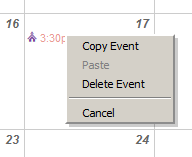
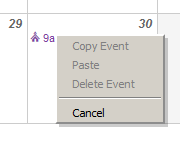
This discussion hasn't yet mentioned whether the menu options are enabled. If that's too obvious, I apologize, but for those who may be following this discussion, I would note that the right-click menu will always appear when you right click on a calendar event, but the options will only be enabled if you have edit permissions for that event.

The enabled menu looks like this:
rcenabled.png
rcenabled.png (2.46 KiB) Viewed 1503 times
And the disabled menu looks like this:
rcdisabled.png
rcdisabled.png (3.05 KiB) Viewed 1503 times
Is the Copy Event option enabled when you try to use it?
Questions that can benefit the larger community should be asked in a public forum, not a private message.
Member
#12
Yeah, it is enabled. Aebrown, is it working properly for you?
Community Administrator
#13
dshep2020 wrote:Yeah, it is enabled. Aebrown, is it working properly for you?
Yes. I can copy, paste, and delete using the right-click menu.
Questions that can benefit the larger community should be asked in a public forum, not a private message.
Member
#14
I can't figure out why this is a problem for me and/or the systems I am using. I know it is not a major bug, but it is bugging me that I can't figure it out! I even tried my wife's account thinking that it may be possibly linked to some permissions issues. Same issue.

Any other suggestions on how to diagnose? I have tried removing all extensions from browsers, different networks, browsers and OS. Kind of at a loss.

Mind you, this was working at the beginning of the year.

Here are systems/browsers/networks that I have tried:

CenturyLink DSL with Apple Airport Wifi, OpenDNS for DNS with content filtering
Windows 7 desktop wired- IE11, Firefox, Chrome
Mac OSX 10.10 iMac wired - Safari, Chrome
Fresh Windows 7 build VM (Using Fusion on OS X) wired- IE11 fresh download
Windows 7 laptop - IE11, Chrome
Mac OSX 10.10 on Macbook Pro on wifi - Safari, Chrome
iPad 3rd Gen on wifi - Safari

MiFi Network (Verizon)
Windows 7 laptop on wifi- IE11, Chrome
Mac OSX 10.10 macbook pro on wifi - Safari, Chrome

Work Network (T1 through Cisco Pix firewall)
Windows 7 laptop - IE11, Chrome
Windows 7 VDI at corporate DC in North Carolina - IE11, Chrome
Community Administrator
#15
dshep2020 wrote:I even tried my wife's account thinking that it may be possibly linked to some permissions issues. Same issue.
Well, maybe we should look harder at that. I'm a STS so I'm a default admin on the stake calender. aebrown is a default admin on his ward calendars. What is your permission level? Perhaps it's not turning on for people for are simply editors?
Have you searched the Help Center? Try doing a Google search and adding "site:churchofjesuschrist.org/help" to the search criteria.

So we can better help you, please edit your Profile to include your general location.
Community Administrator
#16
OK, I see you are a "Stake Building Scheduler". So, you may or may not have edit rights to any calendar. If you do, someone had to add permissions at some point.

In doing some more testing, I'm finding that right-click functions are disabled on the location calendar. What calendar are your events located on?
Have you searched the Help Center? Try doing a Google search and adding "site:churchofjesuschrist.org/help" to the search criteria.

So we can better help you, please edit your Profile to include your general location.
Member
#17
russellhltn wrote:OK, I see you are a "Stake Building Scheduler". So, you may or may not have edit rights to any calendar. If you do, someone had to add permissions at some point.
I have edit rights on our two main stake calendars. One official "stake" calendar and one we call the "resource" calendar which has all the events that are not church related. (receptions, out of stake reservations, family activities)
I am also the ward website administrator and have edit on all the ward calendars. There are four there.
russellhltn wrote:In doing some more testing, I'm finding that right-click functions are disabled on the location calendar. What calendar are your events located on?
I primarily schedule on the stake resource calendar. So that is where I mainly tested. I also tried on a couple of the ward calendars and same results. I also tried on the location calendar just for giggles and yes, I see that you can't even select copy event or delete event there.

Is there a way I can see if the code associated with clicking on the right click menu is even working or if there is an error? Would browser plugin like bugzilla or chrome developer mode catch the error? Sorry don't have much experience doing that sort of thing.