New Standard Webcasting solution

67 postsstarted by ThomsonMA 19,327 viewsoriginal topic

New Member
#1
It looks as though the new webcasting solution has gone live as of this week and the old solution with the webcast communicator and software is being "deprecated". See https://www.lds.org/help/support/meetin ... t?lang=eng

We are being asked to move to the new solution as soon as possible.

Is there a new forum where questions about the new solution are being taken and responded to? Or is this the right place?

With a stake conference coming up soon, I have a few questions:

1) The session at the recent LDSTech conference on the new solution indicated that multiple methods of encoding/transmitting would be offered, including the Terekek VidiU, Matrox Monarch HD, Telestream WireCast, and a software update to recent models of the Webcase communicator. However, all that is listed in the new instructions is the Teredek VidiU, along with a reference to buy it through store.lds.org. However, as noted in another post, it's not available there. Will other options be offered or must we buy the VidiU? Will this change over time?

2) Does the new solution provide the ability to offer streams to individuals as well as named receiving locations? We have historically provided the URL to shut-ins (we have many of these) and some couple missionaries serving from our stake around the world. We once had one of our Bishops who watched our stake conference while travelling on business in India. If so, how does this work in the new scheduling system?

3) Have the internet bandwidth guidelines referred to from the MHTECH page been updated to reflect broadcasts from HDMI sources? How much upstream bandwidth would really be required with a 1080p source?

I'm sure there will be plenty more questions as this new solution rolls out.

Thanks for any feedback!
Community Administrator
#2
ThomsonMA wrote:It looks as though the new webcasting solution has gone live as of this week and the old solution with the webcast communicator and software is being "deprecated". See https://www.lds.org/help/support/meetin ... t?lang=eng
Interesting. I read though it and got an idea of how it works. One of the frustrations I've seen reported here is current systems that test well but die during conference. It looks like this is set up to avoid that and have full real-time monitoring so you can see just where any problems are happening - including server CPU load.

I did notice that the church is pushing for single-camera operations. They're discouraging the multi-camera and titling.

ThomsonMA wrote:Is there a new forum where questions about the new solution are being taken and responded to? Or is this the right place?
At this point I don't foresee a new forum for the new system, I don't think it's that radically different. If that changes, then messages will be moved as appropriate. So this is fine for now.

ThomsonMA wrote:Teredek VidiU, along with a reference to buy it through store.lds.org. However, as noted in another post, it's not available there.
I suspect the store is just a bit behind in getting updated. Let's see what next week brings. (I'd like to see the cost of the Teredek.)

ThomsonMA wrote:Does the new solution provide the ability to offer streams to individuals as well as named receiving locations? ... If so, how does this work in the new scheduling system?
Reading though the instructions, it's clear that it does. However, "Webcasting to locations other than Church buildings should only be done under the direction of the event's presiding authority."

If the meeting is public, they just log into portal.ldswebcast.org with their LDS Account and they'll see events in their stake. If the meeting is private, they'll need a Event Code.

ThomsonMA wrote:How much upstream bandwidth would really be required with a 1080p source?
According to this review 5mbit/sec.
Have you searched the Help Center? Try doing a Google search and adding "site:churchofjesuschrist.org/help" to the search criteria.

So we can better help you, please edit your Profile to include your general location.
New Member
#3
Thank you, russellhltn! You are always very helpful!

I'd still like to know if encoding/transmitting solutions other than the Teredek VidiU will be supported any time soon. I investigated the options listed above, and found the Telestream Wirecast to be the best suited for our current environment. I already have a very powerful PC to run it, and it can make use of the way-over-priced Osprey video capture card we bought at the recommendation of the Church.

It's interesting that while you can't currently find the Teredek VidiU on the store.lds.org page, you CAN find the license for Telestream Wirecast. But unless I have some assurance that it will be supported by the new system, I won't spend the Church's funds to purchase it.

Actually that same objection applies to the VidiU. Why should I buy that now, only to find a better solution offered in a month or so?

Our broadcasts do use multiple cameras and overlaid titles, so I'm hoping this new solution does not require us to take a giant step backwards in production quality.

Unless there is a lot more information about plans and directions coming in the very near future, I expect I will do my Stake Conference next month using the old system.
Member
#4
Read a little closer and you will see the 5 MB upload is locked out to preserve resources.

You can use your current gear with a Composite to HDMI scaler, it is also discussed on the Mhtech tech site. the Teradek device is simply an encoder attached to the internet.

They are working on a software solution, not ready yet. but its called Wirecast.
Roland
Community Administrator
#5
rolandc wrote:Read a little closer and you will see the 5 MB upload is locked out to preserve resources.
Ah, so it is. So at this time, the church servers are limited to 720/2.2Mbit.
Have you searched the Help Center? Try doing a Google search and adding "site:churchofjesuschrist.org/help" to the search criteria.

So we can better help you, please edit your Profile to include your general location.
Senior Member
#6
ThomsonMA wrote:Our broadcasts do use multiple cameras and overlaid titles, so I'm hoping this new solution does not require us to take a giant step backwards in production quality.
I don't think there is a technical issue with using multiple cameras and overlays; the Church is just discouraging spending a lot of money on webcasts.
Craig
Saint George, UT
New Member
#7
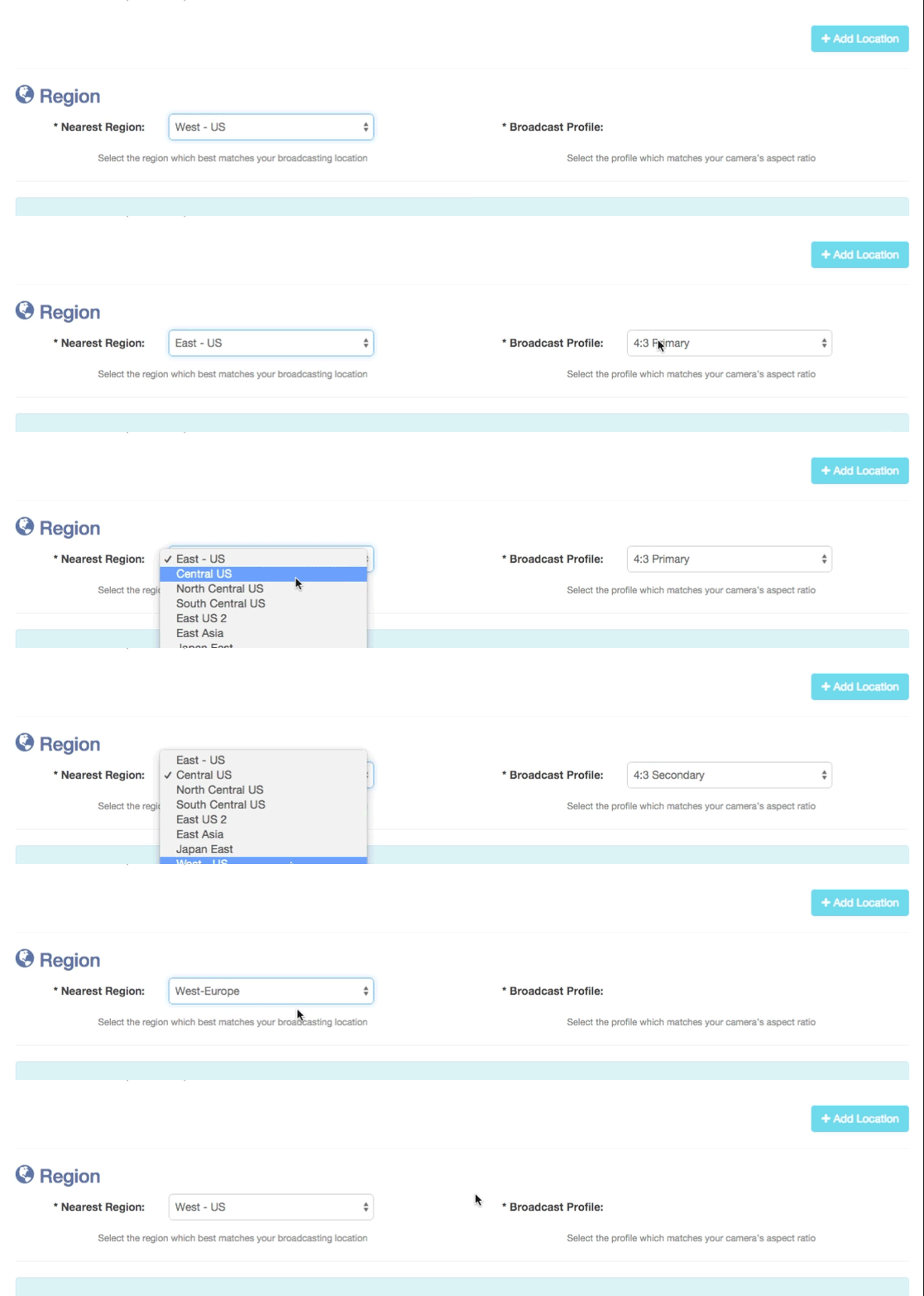
Anyone else having issues selecting a broadcast profile for the West-US area in the new LDS Webcast portal? I figure since the majority of webcasts will come from Utah and surrounding areas (I'm in Colorado), I think this region will be the most used. However, when you select it, you don't get an option to choose a profile, but the other regions do. I assume this is due to the fact that they just opened it up. Thoughts?
📎 region-west.gif (1.02 MiB)
Community Administrator
#8
gizmotek wrote:Anyone else having issues selecting a broadcast profile for the West-US area in the new LDS Webcast portal?
I saw that as well. I'm not sure if it's a show stopper or not. My big complaint is that the button for saving everything is a shade of blue that doesn't appear to be grayed out. I had problems trying to figure out how to make it "royal blue" so it became clickable.
Have you searched the Help Center? Try doing a Google search and adding "site:churchofjesuschrist.org/help" to the search criteria.

So we can better help you, please edit your Profile to include your general location.
New Member
#9
Well, it appears the portal answered my question! Just use another region until it's fixed.
📎 banner.jpg (22.95 KiB)
Community Administrator
#10
gizmotek wrote:Well, it appears the portal answered my question! Just use another region until it's fixed.
I don't remember "maintenance" but I do remember being told there was no available server in that region. So perhaps that's what happens if nothing is available.

I just wish there was a tool to help decide which region to pick.
Have you searched the Help Center? Try doing a Google search and adding "site:churchofjesuschrist.org/help" to the search criteria.

So we can better help you, please edit your Profile to include your general location.
Member
#11
I'm ecstatic about this new webcasting method. We were looking at buying an Elgato HD60 and using ustream or livestream. Using a church supported version of this is much more appealing especially since it doesn't require a PC on the broadcasting end.
russellhltn wrote:I just wish there was a tool to help decide which region to pick.
I agree.
Community Administrator
#12
justincy wrote:We were looking at buying an Elgato HD60 and using ustream or livestream.
Certainly a lot cheaper.
Have you searched the Help Center? Try doing a Google search and adding "site:churchofjesuschrist.org/help" to the search criteria.

So we can better help you, please edit your Profile to include your general location.
Member
#13
We ran a test on Sunday using the open source software Open Broadcaster. It worked well. The portal uses the RTMP protocol so any software/hardware that uses RTMP should work.

We noticed that there is a 1 to 2 minute delay in the live feed which is quite acceptable.

It appears that the new portal uses Microsoft Azure for the cloud. On this page, if you scroll to the bottom, you'll see a list of regions and their approximate location. In Utah I would use the US West region. But since those are "undergoing maintenance" I would use South Central US in Texas. But honestly you probably wouldn't notice a difference between any of the US locations.
Community Moderators
#14
justincy wrote:We ran a test on Sunday using the open source software Open Broadcaster. It worked well. The portal uses the RTMP protocol so any software/hardware that uses RTMP should work.
Thank you! I was hoping a solution would turn up that did NOT involve buying the VidiU product. Not that it wouldn't be a great solution for many, but I've already built a fast PC with a BlackMagic card and would hate to abandon it for a dedicated box that will (most likely) cost more than my PC did and just sit on the shelf between conferences.
So we can better help you, please edit your Profile to include your general location.
Member
#15
Adobe media encoder works great too....

However broadcast group tells me it will throw flags, they may not care either
Roland
#16

Results of tests with VidiU webcast device

“Rejoice in knowing that you have helped Hasten the Work!!!”

Meetinghouse Webcast

Results of tests with the new Teradek VidiU webcast device that have been suggested by headquarters to be used to simplify and improve the quality of webcasting
...Tested: on Wednesday 25Feb2015
...Private Event Code: 97010

Thanks to the following for helping:
o Troy (headquarters hero) for the loan of the Teradek VidiU device
o Roland (makes webcasting easy) for his expert skills and for his time spent to help with this and other testing
oo He is also a Sound & Satellite Consultant in the Florida area
o Brent (south Florida) for helping with the VidiU testing
o Wade and Tony (south Orlando) for their trailblazing work with webcasting
o Brent (headquarters EUP Development) and other local testers who worked on the “Next-Gen Meetinghouse Webcasting Project Testing” project
o Headquarters webcast team that provided cloud based services
oo Providing for webcasting with separate uploads in higher definition and with downloads that are different, for low speed players
oo Provides for webcast viewing on Microsoft Windows devices, Apple IOS and Android platforms
oo Event webcasting portal provides logs and charts of local and remote sites

Note: this webcast test was made with the following settings, to make sure that bandwidth and other Internet challenges would not be a factor
Just think what it would look like if they were set to higher resolutions:
...Video Quality: low
...Frame rate: half
...Audio Quality: low

Click below or copy and past into a browser to view the ten (10) second movie snippet, taken from a receiving player
http://tiny.cc/vidiumov

Click below or copy and into a browser past to view the Table of Contents
http://tiny.cc/vidiutoc

Click below or copy and past into a browser to view the images and movie folder
http://tiny.cc/vidiu
Thanks,
:cool:Your Fellow Member,
Pete Arnett
Sunny South Florida, USA
Senior Member
#17
I notice that the help link on the MWC dashboard is wrong - https://www.lds.org/help/support/meetin ... gy/webcast
Community Moderators
#18
aclawson wrote:I notice that the help link on the MWC dashboard is wrong - https://www.lds.org/help/support/meetin ... gy/webcast
Can you be a bit more specific? I can't find what you're seeing.
So we can better help you, please edit your Profile to include your general location.
Senior Member
#19
When logged into https://portal.ldswebcast.org, on every page there is a "need help" link in the left column. That "need help" link is not working consistently, frequently taking me to a dead page.
New Member
#20
Mikerowaved wrote:
justincy wrote:We ran a test on Sunday using the open source software Open Broadcaster. It worked well. The portal uses the RTMP protocol so any software/hardware that uses RTMP should work.
Thank you! I was hoping a solution would turn up that did NOT involve buying the VidiU product. Not that it wouldn't be a great solution for many, but I've already built a fast PC with a BlackMagic card and would hate to abandon it for a dedicated box that will (most likely) cost more than my PC did and just sit on the shelf between conferences.
This is very helpful! Based on this post I started playing with Open Broadcaster. It does appear to work with the new webcast system, and while I haven't played with Telestream Wirecast, OBS appears to have very similar capabilities and features, and is free vs. ~$500.

I recently built a fairly high powered PC to use for Webcasting using the old solution and I'd really rather leverage that existing investment than spend more of the church's money on something else that offers limited flexibility.

I would hope that the Church would evaluate this option as well, as it provides a low cost, clean migration path from the old broadcasting solution.
New Member
#21
The Teradek VidiU seems awfully expensive for what it does especially since it will only be used twice a year. Are there any better or cheaper options? How future proof is the VidiU?
#22
Wire cast is the standard webcast encoding software most professionals use. It is well maintained and documented. Open source is nice, but the price tag for wirecast is worth it, especially after you use it a time or two.
#23
Teradek VidiU Mini - new and appears to be about $200.00 cheaper (retail) at $499.00

Note: does not have an Ethernet port

BH Photo Video website says:
COMING SOON
Ship Time: Not available

Some the websites are showing the wrong images for the Mini, they are showing the standard VidiU
Thanks,
:cool:Your Fellow Member,
Pete Arnett
Sunny South Florida, USA
Member
#24
We have a desktop that has been setup as a webcasting computer with the old software. I installed Open Broadcaster on it and was able to run a test broadcast easily.
The hardest part was scheduling the meeting on portal.lds.org (apparently, I set the meeting length then changed the start time which reset the meeting length to 0 minutes) :D.

Planning on doing some more testing next week and using it on the 26th.

Aaron Z
Member
#25
Aczlan wrote:We have a desktop that has been setup as a webcasting computer with the old software. I installed Open Broadcaster on it and was able to run a test broadcast easily.
The hardest part was scheduling the meeting on portal.lds.org (apparently, I set the meeting length then changed the start time which reset the meeting length to 0 minutes) :D.

Planning on doing some more testing next week and using it on the 26th.

Aaron Z
Just wait till you figure out it will run multiple cameras and do text overlays.... :D
Roland
Member
#26
rolandc wrote:Just wait till you figure out it will run multiple cameras and do text overlays.... :D
I see that. It will also screencast the whole display or a window. I like the flexibility ;)

Aaron Z
Member
#27
If your laptop or computer has an HDMI output (simultaneously) or pass through - you can webcast and feed it into the in house CCTV for overflow purposes.

Just thinking outside of the 700.00 dollar Box. :p

HDMI to composite is a very easy to do conversion. its a lot tougher the other way around.
Roland
Community Administrator
#28
rolandc wrote:Just thinking outside of the 700.00 dollar Box. :p
How much is the capture card? And what about the computer to run it?
Have you searched the Help Center? Try doing a Google search and adding "site:churchofjesuschrist.org/help" to the search criteria.

So we can better help you, please edit your Profile to include your general location.
Community Moderators
#29
russellhltn wrote:
rolandc wrote:Just thinking outside of the 700.00 dollar Box. :p
How much is the capture card? And what about the computer to run it?
That is a very valid question if you are starting from scratch. But if you already own the laptop and the capture card, software is a serious consideration.

And even if you are starting from scratch, if you only use the box for two years before the next one comes along, that was still $400 per stake conference for the original Webcaster, and would be nearly $200 per conference for the new box.

Still, the new solution seems to be a very viable one if it lasts a while. And you can roll back the firmware when needed to be compatible. And whatever the other challenge with a new product will be. It's too bad that just about the time the bugs get worked out, the technology has changed enough that the box gets worked out, too.
Member
#30
russellhltn wrote:
rolandc wrote:Just thinking outside of the 700.00 dollar Box. :p
How much is the capture card? And what about the computer to run it?

Ran it on a four year old Dell clerk computer with a 50$ Startech USB capture, works perfect.


So cost to the Stake 50$

Feel the need to get fancy, that will cost a bit more.
Roland
Senior Member
#31
Do you have the specific model of the USB capture?
Member
#32
Startech SVID2USB2

http://www.amazon.com/gp/product/B000O5 ... UTF8&psc=1

With open broadcaster you can use several and eliminate the video mixer.
Roland
Community Administrator
#33
Do you run yours under Windows or LInux? Because if you're starting with a older computer, the Windows is likely out of date.
Have you searched the Help Center? Try doing a Google search and adding "site:churchofjesuschrist.org/help" to the search criteria.

So we can better help you, please edit your Profile to include your general location.
Member
#34
We are using W7 on everything but I have tested it on an older Clerk PC with XP, works fine. We even tried it on a Vista laptop, works.

Not a fan of Linux.
Roland
Member
#35
I was sent a PM asking how I setup Open Broadcaster to connect to the streaming server.
I thought that might be useful to have (somewhat) documented, so I am posting that info here.
You go into the event setup and copy the "Link" and the "Stream Name" under "Broadcast Info" (see the screenshot below):
Broadcast Portal Settings
BroadcastPortal.JPG (43.28 KiB) Viewed 2476 times
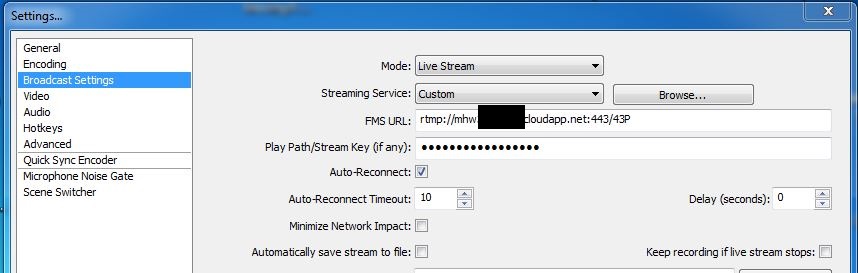
Those go into the OpenBroadcaster software by clicking on "Settings" then going to the "Broadcast Settings" section. The "Link" URL goes into the "FMD URL" box and the "Stream Name" goes into the "Play Path/Stream Key" box (as shown below):
OpenBroadcaster.JPG
Broadcast Settings page of Open Broadcaster
(61.12 KiB) Not downloaded yet
Hope that helps.

Aaron Z
Member
#36
Also, Open Broadcaster did NOT work on my laptop (2009ish Dell with a first generation i5 m430 processor and integrated graphics). Apparently the graphics don't support Directx10?

Aaron Z
New Member
#37
I just got an email forwarded 4 times that our Stake should purchase this equipment. Apparently the communication for technical issues such as using new hardware for Webcast goes this path?
CHQ -> FM Group -> Stake President -> Stake Clerk -> STS (ME). What a terrible way to communicate.
Eric Anderson
Lead Java Developer
Stake Technology Clerk
Senior Member
#38
eanderson wrote:I just got an email forwarded 4 times that our Stake should purchase this equipment. Apparently the communication for technical issues such as using new hardware for Webcast goes this path?
CHQ -> FM Group -> Stake President -> Stake Clerk -> STS (ME). What a terrible way to communicate.
I don't understand, how would any other method be better? Sometimes an STS is not in the picture. Sometimes a HC is doing webcasting, sometimes it is the stake clerk. And there is alredy a policy that defines this info available to this chain of command. So technically the email is redundant.
“A long habit of not thinking a thing wrong, gives it a superficial appearance of being right, and raises at first a formidable outcry in defense of custom.”
― Thomas Paine, Common Sense
Member
#39
johnshaw wrote:
eanderson wrote:I just got an email forwarded 4 times that our Stake should purchase this equipment. Apparently the communication for technical issues such as using new hardware for Webcast goes this path?
CHQ -> FM Group -> Stake President -> Stake Clerk -> STS (ME). What a terrible way to communicate.
I don't understand, how would any other method be better? Sometimes an STS is not in the picture. Sometimes a HC is doing webcasting, sometimes it is the stake clerk. And there is alredy a policy that defines this info available to this chain of command. So technically the email is redundant.
This may be the official chain of command, but a way for Stake Technology Specialists to get a "head's up" about coming changes would help us to be better prepared when the official requests finally reach us. In the Roles and Responsibilities page (https://www.lds.org/help/support/meetin ... lang=eng#4), the first responsibility listed for the STS is to "stay current on meetinghouse technology products, services, and policies". What is the best way to do this?
Community Administrator
#40
eanderson wrote:I just got an email forwarded 4 times that our Stake should purchase this equipment.
That's also listed in the Webcast Policies and Guidelines.

If you've got questions, the Help Center would be the starting point to look for information. Of course the forum is a good place to see what others are talking about.
Have you searched the Help Center? Try doing a Google search and adding "site:churchofjesuschrist.org/help" to the search criteria.

So we can better help you, please edit your Profile to include your general location.
New Member
#41
For all you guys creating your own solution i have some comments.

1st the church standardizes on tech so that when you "Computer Science Engineers" are sick, die or move away any layman ie. high council member or clerk can set it up and make it run.

2nd if you always try and cheep it together it may have a higher chance of failure.

3rd if you use the tech the church suggests the help desk can help trouble shoot the problem. you know the whole saying 2 heads are better than one.

I believe that study and prayer goes into the tech they choose and if this is for the lords work who are we to say they are doing it wrong. talk to the fm group they probably have budget to do it right.
Community Administrator
#42
telcommguy wrote:talk to the fm group they probably have budget to do it right.
Infrastructure (network), yes. The actual webcasting equipment, no. That's on the local unit's dime.
Have you searched the Help Center? Try doing a Google search and adding "site:churchofjesuschrist.org/help" to the search criteria.

So we can better help you, please edit your Profile to include your general location.
Member
#43
telcommguy wrote:For all you guys creating your own solution i have some comments.
1st the church standardizes on tech so that when you "Computer Science Engineers" are sick, die or move away any layman ie. high council member or clerk can set it up and make it run.
I agree, thats why I have a backup person who could run the old system if I were unavailable for any reason. Currently, we are testing the new system with some free broadcasting software while we wait for the dust to settle to see where things land with this new system before we spend any money.
telcommguy wrote:2nd if you always try and cheep it together it may have a higher chance of failure.
I agree on general principal, however pending more money doesn't always guarantee success. I have seen (in my personal and professional experience) a fair chunk of change get spent on the "best system" and then seen it break while the "cheap junk system" kept plugging away.
telcommguy wrote:3rd if you use the tech the church suggests the help desk can help trouble shoot the problem. you know the whole saying 2 heads are better than one.
I believe that study and prayer goes into the tech they choose and if this is for the lords work who are we to say they are doing it wrong.
Well, in this particular case (as I understand it), if we had purchased the "webcast box" from the church, we would not be able to adapt it to the new system and would have had to replace it vs being able to install a new piece of software on existing hardware and keep going.

My stake leaders are willing to spend what money I ask for to make things work, they trust that I will only ask for what is needed. As of yet, I am not ready to recommend spending money on the new system. I like it (especially the stats), but I want to see where the software side of things go before I recommend that we replace a perfectly functional computer with a "black box"
telcommguy wrote:talk to the fm group they probably have budget to do it right.
I talked to the FM group when we started down this road, they were not willing to pay to add anything cablewise to support a camera (beyond the existing cables for someone to sit in the audience and run a camera or a fixed camera near the back of the chapel). They were however willing to punch holes and run conduits where we needed them so we could run the CAT6 cable (which another member who does this for a living provided at cost) where it needed to go.

Aaron Z
Senior Member
#44
telcommguy wrote:For all you guys creating your own solution i have some comments.

1st the church standardizes on tech so that when you "Computer Science Engineers" are sick, die or move away any layman ie. high council member or clerk can set it up and make it run.
An Area Seventy told me to broadcast an upcoming conference, so I purchased the current standard, which is the VidiU, to be used with the webcast portal. I quickly learned that none of my counterparts who would receive this webcast had ever heard of the webcast portal. They had only used the old LDS MeetingHouse Webcast software.

A couple weeks later, the folks at Church HQ told me I should be doing a PVC, rather than a webcast, so I installed the PVC software on my laptop and started planning for a PVC. A week later, the Area Seventy told me a PVC was no longer needed, so I should switch back to a webcast. However, since the HD camera I had ordered from store.lds.org is still on back order, I could not use the VidiU. Therefore, I had to install the old LDS MeetingHouse Webcast software on my laptop, which made my counterparts happy, since they were familiar with that.
Dana Repouille, Plattsmouth, Nebraska
New Member
#45
Well i've been reading and understanding your posts i noticed a change to the purchasing webcast products page.

https://www.lds.org/help/support/webcas ... s?lang=eng

Webcast Encoding Device
PRODUCT NAME PRODUCT DESCRIPTION PURCHASING INFO
Teradek VidiU Encoder

All-in-one hardware capture/encoder device for webcasting.
Key Features: HDMI input, 3.5mm stereo audio input, control via front controls, web interface, or mobile app

See Meetinghouse Webcast Requirements for additional requirements.


Available through local FM Group at no charge to stakes and districts.
New Member
#46
russellhltn wrote:
telcommguy wrote:talk to the fm group they probably have budget to do it right.
Infrastructure (network), yes. The actual webcasting equipment, no. That's on the local unit's dime.
There has been a change

https://www.lds.org/help/support/webcas ... s?lang=eng
Senior Member
#47
This is pretty exciting... I wonder if there wasn't much of a rush to get off the old equipment and this is a way to speed up the acceptance?

Regardless, if the FM Budgets were not offset for this purchase it just isn't going to happen this way either.
“A long habit of not thinking a thing wrong, gives it a superficial appearance of being right, and raises at first a formidable outcry in defense of custom.”
― Thomas Paine, Common Sense
Community Administrator
#48
telcommguy wrote: There has been a change
Interesting. The Teradek VidiU itself is on FM's dime, but nothing else. But that does take a significant cost burden off the local stake. But I'm still intrigued by the computer-based encoding since it seems to add a number of features for free.

We just completed our second Stake Conference using a detached cultural hall as overflow. No complaints about being single camera, being SD or lack of titling or song verses. The only complaint was the audio was too low. I've put in to FM for the "SLC guys" to adjust that the next time they're out here.

I will say this does tend to follow a pattern I've seen a few times - when new technology comes out, it's on the unit's dime. Later, the church picks it up. I've see it with computers for MLS and Internet services. I think CHQ finds the budget after it's ready for deployment.
Have you searched the Help Center? Try doing a Google search and adding "site:churchofjesuschrist.org/help" to the search criteria.

So we can better help you, please edit your Profile to include your general location.
Senior Member
#49
I was in no rush to purchase a VidiU or HD camera. Just by coincidence, our Area Seventy asked me to broadcast a PLC exactly when the VidiU became available to order from the LDS store.

It will be interesting to see whether our stake presidency decides to webcast our next stake conference in August.
Dana Repouille, Plattsmouth, Nebraska
Community Administrator
#50
drepouille wrote:It will be interesting to see whether our stake presidency decides to webcast our next stake conference in August.
Same here. I think one big factor is that two of our chapels are in "internet dead zones". One can only get DSL and the other has to resort to 4G. Neither the cable company nor the phone company can connect them. And those are the two chapels that would benefit the most from webcasting as they are the farthest from the stake center.

The DSL would probably work out if I kill all other access, but the presidency might be reluctant to send people there if it won't be a good experience. So we might have to have a test run for one conference with only a few members at that location before we invite everyone.
Have you searched the Help Center? Try doing a Google search and adding "site:churchofjesuschrist.org/help" to the search criteria.

So we can better help you, please edit your Profile to include your general location.
Senior Member
#51
When I was doing a webcast last Saturday, I had disabled the Wi-Fi in the stake center. As the sisters came into the chapel, we could see them checking their phones and tablets, and frowning.

We had such a high bandwidth available from Cox that we easily could have left the Wi-Fi enabled. We even had a second laptop set up just to receive the webcast, and verify the quality of the audio and video. Even at "high quality 4x3 video" we were not coming close to using up our bandwidth.
Dana Repouille, Plattsmouth, Nebraska
Community Moderators
#52
drepouille wrote:When I was doing a webcast last Saturday, I had disabled the Wi-Fi in the stake center. As the sisters came into the chapel, we could see them checking their phones and tablets, and frowning.
One advantage to being able to disable WiFi through the Technology Manager site is that you can leave it on until just a few minutes before the webcast, then turn it off at the affected buildings. Then you can turn it back on right after the meeting.

Less frowning, but I still wouldn't risk having WiFi on during a webcast here, because we do not have the bandwidth to be all things to all members.
Senior Member
#53
I actually disabled the Wi-Fi from my home before anyone even arrived at the stake center. I can handle "Why is the wireless down?" better than "Why did you kill the wireless just before the meeting started?"
Dana Repouille, Plattsmouth, Nebraska
Community Moderators
#54
drepouille wrote:I can handle "Why is the wireless down?" better than "Why did you kill the wireless just before the meeting started?"
Most of our complaints come from parents whose youth's devices have suddenly stopped working and they have nothing to play with during the meeting. (At least, giving them the benefit of the doubt, we assume the parents are complaining on behalf of their children.) [grin]
Senior Member
#55
lajackson wrote:One advantage to being able to disable WiFi through the Technology Manager site is that you can leave it on until just a few minutes before the webcast, then turn it off at the affected buildings.
You may find it difficult to manage the firewall device with TM if you wait that long to disable the WiFi. When I started trying to disable the WiFi in each of 3 buildings, about 5 minutes before our last stake conference was to begin, the 881W firewalls were nearly non-responsive. Between the webcast streaming and the large number of active WiFi users, I think the 881W's were getting slammed. I kept getting timeouts in TM, using a wired connection, trying to drill down through the UI to get to the Disable All Access Points feature.

For what it's worth, all the firewalls had already been upgraded to the new configuration.
Community Moderators
#56
danpass wrote:You may find it difficult to manage the firewall device with TM if you wait that long to disable the WiFi. When I started trying to disable the WiFi in each of 3 buildings, about 5 minutes before our last stake conference was to begin, the 881W firewalls were nearly non-responsive. Between the webcast streaming and the large number of active WiFi users, I think the 881W's were getting slammed.
Good point. It did take me 10 minutes to shut down three buildings. And since you mention it, the firewall in the building with the most people (other than the stake center) did take the longest to respond.
Member
#57
lajackson wrote:
drepouille wrote:I can handle "Why is the wireless down?" better than "Why did you kill the wireless just before the meeting started?"
Most of our complaints come from parents whose youth's devices have suddenly stopped working and they have nothing to play with during the meeting. (At least, giving them the benefit of the doubt, we assume the parents are complaining on behalf of their children.) [grin]
It's interesting to hear you guys say that. At out last stake conference (which was our first) I didn't hear any complaints about the WiFi being turned off. Does it occur frequently?
Senior Member
#58
Most of our complaints come from parents whose youth's devices have suddenly stopped working and they have nothing to play with during the meeting.
This doesn't seem so hard to understand. Many parents I've seen in wards and stakes will purchase a cheaper tablet with no mobile plans for their younger kids/youth. They can have all the church apps, etc...

I inform our members, they always know that wireless will be turned off and I've not heard any issues with it. In the past there have been a few who bring in hotspots, etc...
“A long habit of not thinking a thing wrong, gives it a superficial appearance of being right, and raises at first a formidable outcry in defense of custom.”
― Thomas Paine, Common Sense
Community Moderators
#59
justincy wrote:It's interesting to hear you guys say that. At out last stake conference (which was our first) I didn't hear any complaints about the WiFi being turned off. Does it occur frequently?
No. I only get it from a few complaining members with different priorities not related to the purposes of the meeting, who feel entitled to whatever it is they feel entitled to have access to at the moment. These are the same ones who text and surf during meetings where the WiFi remains active.
Community Administrator
#60
lajackson wrote:Most of our complaints come from parents whose youth's devices have suddenly stopped working and they have nothing to play with during the meeting. (At least, giving them the benefit of the doubt, we assume the parents are complaining on behalf of their children.) [grin]
Ah, the modern busybook. And it's not just for children. [grin]

It was interesting to look at TM's usage statistics for this past stake conference. It wasn't streamed and I'm not aware of any official use of the interrnet. But we still peaked at 11Mbit. About a typical Sunday.
Have you searched the Help Center? Try doing a Google search and adding "site:churchofjesuschrist.org/help" to the search criteria.

So we can better help you, please edit your Profile to include your general location.
Community Administrator
#61
Well, this could get intersting. Our current "new" webcasting solution uses Microsoft Silverlight for the receiving system. But Microsoft has depreciated Silverlight in favor of HTML5.
Have you searched the Help Center? Try doing a Google search and adding "site:churchofjesuschrist.org/help" to the search criteria.

So we can better help you, please edit your Profile to include your general location.
Member
#62
We need a few people to setup receive only tests and see if the public 5 digit code is working. not the dedicated links for the wards.

2 days worth of troubles now.
Roland
Senior Member
#63
I can help out
“A long habit of not thinking a thing wrong, gives it a superficial appearance of being right, and raises at first a formidable outcry in defense of custom.”
― Thomas Paine, Common Sense
Member
#64
Thanks John, whatever the problem was. its fixed and working now.

And everyone please notice that the download streams have been upped to 900k, with the four core cpus. and it looks great. Thanks Broadcast team!
Roland
Member
#65
Got my first taste of the new system today, and was less than impressed, to put it mildly. We had conducted quite a few tests beforehand, and even had the full setup running at the Saturday evening adult session. To this point, I can't say that I was happy with the 500k or lower bitrates. So, I decided to bring in my photo and video editing rig, Sunday morning.

Two hours before the session started, we started the broadcast. With the stud computer, I could easily get the 2150k stream, with a CPU load < 5% (I was also running Open Broadcaster, to use it as a video mixer to the projector). Things looked good. BUT, 45 mins before the session, things started to go downhill (deja view all over again). There was an operator error of some such at the head end. It took 42 mins for the signal to come back strong. As the choir sang the intro music, things were going well to the opening prayer, then boom, screen frozen in middle of the prayer (should I say amen to what I did hear?). I was set to min 2150, max 2150. After a couple more drops and freezes, I set it to min 100, max 2150. Throughout the 2 hour session, we froze (albeit briefly) 8 more times. I wasn't running the stats window, but I doubt we ever saw faster rates than 300, MAYBE 500, and at that, only briefly. For the most part, the new system looked as humble as the old one, with perhaps a tad better connectivity.

The broadcast site has a measured 8000k+ upload capacity. The broadcast site was using a Vidiu to the new portal. The receiving site has a measured 3000k download. I not only disabled wireless, I removed the patch cables to the firewall, and directed the podium's connection directly into the modem. My receiving computer is an order of magnitude greater than what is required. And for all these improvements, it looked like we were uploading at 768k from an old meetinghouse communicator, to a site with barely 1000k down. Everything new, made old again.

I'm going to put into place a procedure wherein we ask the presiding authority to allow us to use an outside CDN provider. With every turn, I get "we used to travel 1.5 hours each way, to listen on a telephone connection, in the past". I hope we (as a church) haven't spent a lot on this new system. Nevertheless, it is what it is, and it's way above my spiritual pay grade to do anything about it.
Church Employee
#66
Mr. Hagothsen,
Maybe you should look at your stats on what happened and what your receive bitrate is before you start complaining.

Your first problem is that you set your min to 2150 and max to 2150. This means that if the download bitrate ever dropped below 2150 that you would freeze. This is what happened, you couldn't sustain that. Once you lowered it, things went better.

If you look at your stats you can tell why each time your site buffered....it is because your bandwidth dropped at the encoding site.

Your stats also show that the receive rate dropped, you couldn't sustain the 2M. You can't play what you don't have.

You need to look at your internet. Even though you determined that you get high speeds, doesn't mean that you get it all the time. There are peak and valleys that happen all the time that we are not aware about. A speedtest only tests how long it took a single file to be transferred from one location to another.
Another issue could be the silverlight player itself. Sometimes with erratic bandwidth the player decides for itself to jump down to a lower bandwidth and stay there. No idea why. To try and rectify this we are developing a new player using HTML5 technology. The player currently is in beta and could be used.

In order to fix this mess is there needs to have a test run for a long period of time, several times. From that it can be determined what the average bandwidth sustainability is and set the encoder to do so.

"Everything new, made old again." Nice.....was there a portal to schedule event from? Was there any stats available to use to determine what is going on with your broadcast? Was there an adaptive stream to view from? Could the stream be sustained above 300k? Could you choose what format you were able to watch the stream in and not be stuck at 4:3? Were users at home able to watch the stream? Was the stream available on mobile devices so that you could watch conference from anywhere in the world? Were you stuck using Windows media player? Could you choose where the closest media server was to encode to instead of everyone being sent to the data center in Provo, Utah?
"Everything new, made old again." Perhaps you would like to have audio only???

By the way, if you were using the old system, you would have been down and never come back up.
Member
#67
We did a webcast this weekend and (from what I have heard back) it went very well.
We used the VidiU with the Startech S-Video to HDMI adapter.
We had a couple of issues:
At one location, on Sat the Silverlight player locked at 100kbps for the video stream (got a call from someone in Salt lake on that one :D), and on Sunday, the silverlight plugin locked up and refused to re-start. We switched them to the HTML5 player and heard no further complaints.
At another location, they plugged in a HDMI to VGA adapter (to connect to the VGA input on the projector) and that switched the audio to use the HDMI.
I showed them how to switch the default audio device and all went well from there.

Aaron Z