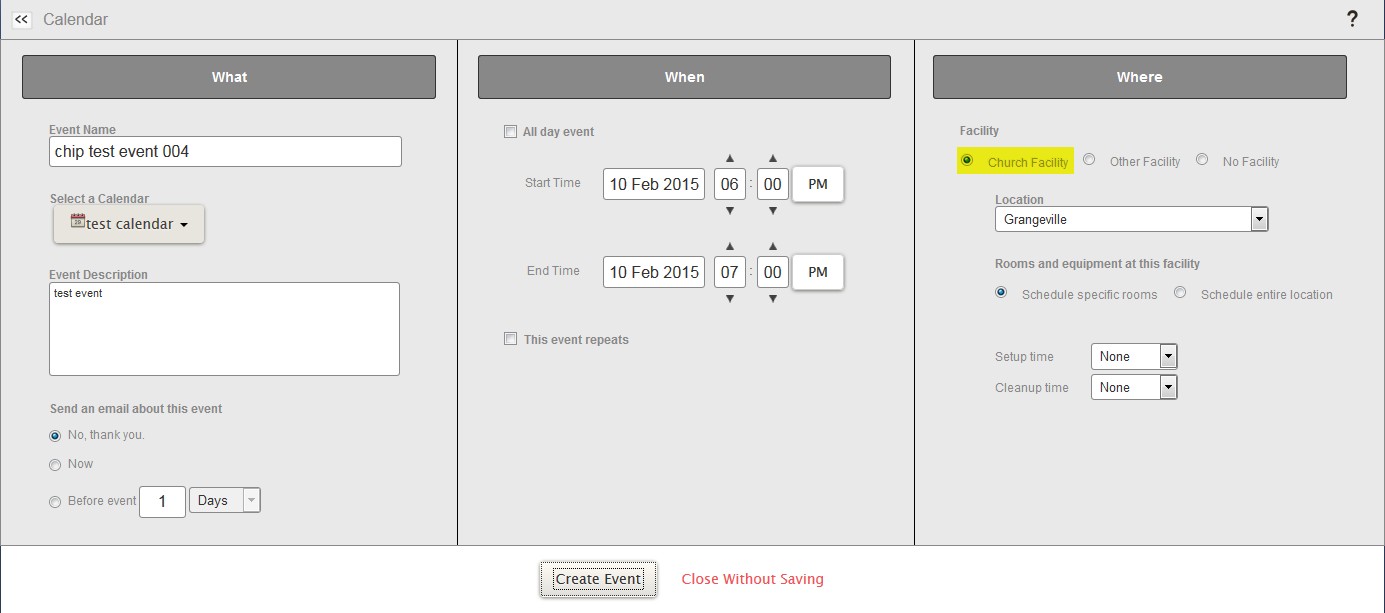
Event not saved when Church Facility selected

21 postsstarted by ckohrman 3,186 viewsoriginal topic

New Member
#1
Hello!

Our RS President can't save events on our ward calendar when "Church Facility" is selected. I've replicated the issue with my account (admin / exec secretary).

1 - create calendar (tried with private and entire ward)
2 - click calendar to create event
3 - enter event name and select "Church Facility" under "Where" section
4 - select ward name
5 - click "Create Event"

After step 5, nothing happens. The edit UI stays up. If I select "Other Facility" or "No Facility", the event is created.

No event appears on the calendar. I also noticed that there is no dropdown for selecting specific rooms... should that be visible?

Screenshot:
2015-01-30_100459.jpg
Event not saved when Church Facility selected
(76.75 KiB) Not downloaded yet
Thanks!
Community Administrator
#2
ckohrman wrote:Our RS President can't save events on our ward calendar when "Church Facility" is selected. I've replicated the issue with my account (admin / exec secretary).

1 - create calendar (tried with private and entire ward)
It's certainly worthy of note that you are trying to create a calendar and an event at the same time. Although that should work, that's a relatively rare process. Perhaps the problem is being caused by the attempt to reserve the building using an event that is on a calendar that is not yet approved.

In any case, are you (and the RS president) able to successfully save an event if you use an existing calendar? And can you (since you're an administrator) successfully create a new calendar? If the answer to both those questions is yes, then you can simply do those two steps separately and you'll achieve the result you want.
Questions that can benefit the larger community should be asked in a public forum, not a private message.
Community Administrator
#3
ckohrman wrote:After step 5, nothing happens. The edit UI stays up.
Try scrolling up to see if there's a message. There was a bug like that in the past, but I thought it was fixed.

Also activate the location calendar for that building (as well as show reservations) and make sure there is no conflict.

ckohrman wrote:I also noticed that there is no dropdown for selecting specific rooms... should that be visible?
Talk to the stake about setting up rooms for that location. Right now it's set such that you can only book the entire building - not just parts of it.
Have you searched the Help Center? Try doing a Google search and adding "site:churchofjesuschrist.org/help" to the search criteria.

So we can better help you, please edit your Profile to include your general location.
New Member
#4
Wow, thanks for the quick replies!
It's certainly worthy of note that you are trying to create a calendar and an event at the same time. Although that should work, that's a relatively rare process. Perhaps the problem is being caused by the attempt to reserve the building using an event that is on a calendar that is not yet approved..
Sorry, I should clarify, I created "test calendar," then after the calendar was created, I tried creating an event. I can create new calendars.
In any case, are you (and the RS president) able to successfully save an event if you use an existing calendar? And can you (since you're an administrator) successfully create a new calendar? If the answer to both those questions is yes, then you can simply do those two steps separately and you'll achieve the result you want
I can create events on existing calendars and test calendars - as long as I don't try to specify "Church Facility" as the location. If I select "Church Facility" in the "Where" section, nothing is saved (same result on all ward calendars).
Try scrolling up to see if there's a message. There was a bug like that in the past, but I thought it was fixed.
Nothing found after trying to scroll up - just the site header, menu, etc.
Also activate the location calendar for that building (as well as show reservations) and make sure there is no conflict.
Maybe this is the problem? I'm not sure how or where to do this...
Talk to the stake about setting up rooms for that location. Right now it's set such that you can only book the entire building - not just parts of it.
I'll definitely follow up with the stake on this part - thanks!
New Member
#5
Also activate the location calendar for that building (as well as show reservations) and make sure there is no conflict.
If activating the location calendar just means checking that location on the list of locations on the left of the calendar, then the location is activated and nothing is scheduled via the location calendar itself. Not sure if it matters, but I don't think we have a Building Specialist right now...
Community Administrator
#6
ckohrman wrote:
Also activate the location calendar for that building (as well as show reservations) and make sure there is no conflict.
Maybe this is the problem? I'm not sure how or where to do this...
You can find instructions in the 2.7 FAQ
Have you searched the Help Center? Try doing a Google search and adding "site:churchofjesuschrist.org/help" to the search criteria.

So we can better help you, please edit your Profile to include your general location.
New Member
#7
Thanks, the location is now checked and restricted as well. No scheduling conflicts exist.
location activated / restricted
2015-01-30_122957.jpg (9.11 KiB) Viewed 1347 times
Unfortunately, the result is the same :(
Community Administrator
#8
Can you scheduled a different facility? Is it just that one that has a problem? I think there's another thread here with someone with that issue.
Have you searched the Help Center? Try doing a Google search and adding "site:churchofjesuschrist.org/help" to the search criteria.

So we can better help you, please edit your Profile to include your general location.
New Member
#9
Yes, if I select "Other Facility" or "No Facility," I can create the event:
"Other Facility" works
2015-01-30_130505.jpg (16.95 KiB) Viewed 1345 times
The problem only occurs when I try to use "Church Facility."
Community Administrator
#10
But what happens if you pick a different building?
Have you searched the Help Center? Try doing a Google search and adding "site:churchofjesuschrist.org/help" to the search criteria.

So we can better help you, please edit your Profile to include your general location.
New Member
#11
I think we're getting somewhere now...

I tried the same steps using another ward building. It failed... but it also didn't have any room options listed. Gave me the same issue.

I tried the same steps using the stake center as the location. It DID have room options listed, and the event was successfully created.

Could it be that rooms have to be added before a building can be scheduled as a location?
Community Administrator
#12
ckohrman wrote:Could it be that rooms have to be added before a building can be scheduled as a location?
Shouldn't.
Have you searched the Help Center? Try doing a Google search and adding "site:churchofjesuschrist.org/help" to the search criteria.

So we can better help you, please edit your Profile to include your general location.
Community Administrator
#13
ckohrman wrote:I think we're getting somewhere now...

I tried the same steps using another ward building. It failed... but it also didn't have any room options listed. Gave me the same issue.

I tried the same steps using the stake center as the location. It DID have room options listed, and the event was successfully created.

Could it be that rooms have to be added before a building can be scheduled as a location?
That test may not be working as expected. See Duplicate locations for one event. You may have still be trying to schedule the first location. Try the test again while selecting/saving "No Location" between attempts. I'm thinking this is specific to the location.
Have you searched the Help Center? Try doing a Google search and adding "site:churchofjesuschrist.org/help" to the search criteria.

So we can better help you, please edit your Profile to include your general location.
New Member
#14
Sorry for the delay!

I tried the the following...

Test 1:
- log out, log back in
- enter event name and select "No Location" under "Where" section
- click "Create Event"
Result: Event is created

Test 2:
- log out, log back in
- enter event name and select "Church Facility" under "Where" section
- select ward facility (room options for facility are NOT listed to select)
- click "Create Event"
Result: Event creation fails; UI stays the same; no error displayed
Note: Every ward location in the stake is missing room options, and I've tested adding an event

Test 3:
- log out, log back in
- enter event name and select "Church Facility" under "Where" section
- select stake facility (note: room options for facility ARE listed)
- select facility room option
- click "Create Event"
Result: Event is created

Test 4:
- log out, log back in
- enter event name and select "Church Facility" under "Where" section
- select stake facility (room options for facility ARE listed)
- do NOT select facility room option (see screenshot)
- click "Create Event"
Result: Event creation fails; UI stays the same; no error displayed
room options for facility ARE listed, but not selected = failure to create event
2015-02-03_102349.jpg (31.88 KiB) Viewed 1218 times
I think this is a separate issue from "Duplicate locations for one event" - no events are being created, and I've made sure that settings aren't getting stuck by logging out in between tests.

I really feel like there's an issue with not specifying room options when a Church Facility is selected as the location... not sure how else to test this...
Senior Member
#15
I think there is a problem with the calendar today, as I have been trying to amend an event and it comes up with error, but doesn't save. I've also just tried creating a seperate Test event, but that won't save either.
Community Administrator
#16
ckohrman wrote:Test 2:
- log out, log back in
- enter event name and select "Church Facility" under "Where" section
- select ward facility (room options for facility are NOT listed to select)
- click "Create Event"
Result: Event creation fails; UI stays the same; no error displayed
Note: Every ward location in the stake is missing room options, and I've tested adding an event
Wasn't there another location that didn't have rooms? Can you try and create an event there?

I've successfully created events in locations that didn't have rooms, so I think it's something more complex than that. At this point you can create an event at the stake center, but can't at a particular ward building. So we haven't ruled out a problem with that one building.
Have you searched the Help Center? Try doing a Google search and adding "site:churchofjesuschrist.org/help" to the search criteria.

So we can better help you, please edit your Profile to include your general location.
New Member
#17
I've tried specifying several other ward locations for events - I can't create an event using any other ward locations. Only using the stake center location will let me successfully create an event.
Community Administrator
#18
Hmmmm. I'm running into a problem as well. I find I can work around it by selecting "Schedule entire location".
Have you searched the Help Center? Try doing a Google search and adding "site:churchofjesuschrist.org/help" to the search criteria.

So we can better help you, please edit your Profile to include your general location.
New Member
#19
Cool, thanks so much for working through this with me... a couple of questions...

How can the issue be reported to the developers?
Who can add room options to a Church Facility location?

PS - I just tested "Schedule entire location," and it works for me too.
Community Administrator
#20
ckohrman wrote:How can the issue be reported to the developers?
I checked, they are aware of it.

ckohrman wrote:Who can add room options to a Church Facility location?
The stake admins. You might want to create a list of rooms that you think will be needed for scheduling. It's usually not necessary to list every single room, just the ones that will have scheduled events in them.
Have you searched the Help Center? Try doing a Google search and adding "site:churchofjesuschrist.org/help" to the search criteria.

So we can better help you, please edit your Profile to include your general location.
New Member
#21
Thank you for all the help!