thanks
thanks
Re: iCal not importing to computer or phone despite correct
When you are using more than one device (and it sounds like you are using 3 devices), 15 minutes is way too fast. It's possible that everything is working completely correctly, and yet you get no data on your devices. Suppose that the computer refreshes at 1:00, 1:15, 1:30, etc. Then the phone tries at 1:03, 1:18, 1:33, etc., and the iPad tries at 1:06, 1:21, 1:36, etc. Then in each 15 minute interval, the computer is going to hit the sync URL successfully, then 3 minutes later the phone tries (and fails, because it's less than 9 minutes after the computer accessed the sync URL), then the iPad tries again 3 minutes after that (and fails, because it still hasn't been 9 minutes). Then at 1:15, the computer tries and succeeds, followed by the phone and iPad failing, in an endless cycle.lukepatrickmoran wrote:i have checked this morning and the calendar is now working on my computer but on my phone and the iPad the calendars (which is the same linked calendar all on iCloud) are not working- though i can edit the name in the computer and it will change on the devices- there are still no events displayed on the devices
the refresh rate on the computer is ever 15 mins- i don't know what is is on the devices- i would assume the same as its using the iCloud calendar ??
Re: iCal not importing to computer or phone despite correct
aebrown wrote:When you are using more than one device (and it sounds like you are using 3 devices), 15 minutes is way too fast. It's possible that everything is working completely correctly, and yet you get no data on your devices. Suppose that the computer refreshes at 1:00, 1:15, 1:30, etc. Then the phone tries at 1:03, 1:18, 1:33, etc., and the iPad tries at 1:06, 1:21, 1:36, etc. Then in each 15 minute interval, the computer is going to hit the sync URL successfully, then 3 minutes later the phone tries (and fails, because it's less than 9 minutes after the computer accessed the sync URL), then the iPad tries again 3 minutes after that (and fails, because it still hasn't been 9 minutes). Then at 1:15, the computer tries and succeeds, followed by the phone and iPad failing, in an endless cycle.lukepatrickmoran wrote:i have checked this morning and the calendar is now working on my computer but on my phone and the iPad the calendars (which is the same linked calendar all on iCloud) are not working- though i can edit the name in the computer and it will change on the devices- there are still no events displayed on the devices
the refresh rate on the computer is ever 15 mins- i don't know what is is on the devices- i would assume the same as its using the iCloud calendar ??
To make this reliable, you need to be able to control both the interval and the starting time. To give yourself a safety margin, you could have each device try at one-hour intervals, with the computer hitting the sync URL on the hour, the phone 20 minutes later, and the iPad 20 minutes after that. I don't know if you have that much control over the refresh settings, but doing 3 devices on overlapping 15 minute cycles just won't work.
Re: iCal not importing to computer or phone despite correct
I don't know Apple well enough to know. Are you putting in the URL in only one place?danielsbrown wrote:If all my devices are receiving the lds calendar via iCloud as submitted by the calendar on my Apple desktop computer, the refresh rate on the devices is not pertinent, correct?
Re: iCal not importing to computer or phone despite correct
and this is the document I got:
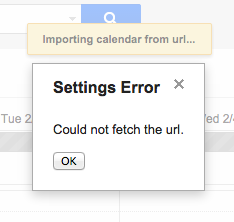
<html><body><center><h1><b>Not Available</b></h1><i>This page is unavailable. Error code: 2-1919</i></center></body></html>
Re: iCal not importing to computer or phone despite correct
I don't have any ideas on your previous post (I'm not an Apple user), but this problem you mention here sounds exactly like the expected behavior if you (or any of your devices or applications) access the URL less than 9 minutes after the last access. There is a 9-minute throttle in place for all accesses to your sync URL.clivesidney wrote:A quick update - Google calendar has just accepted the URL (before it would not even accept it as a valid calendar and would return an error) but it seems the data stream is blank, as there are no events at all (I know there are events on my LDS calendar, as I do most of the ward updating. . .)
Re: iCal not importing to computer or phone despite correct
And resetting the URL doesn't reset the timer - so it's really any thing that syncs to your account.aebrown wrote:There is a 9-minute throttle in place for all accesses to your sync URL.
Re: iCal not importing to computer or phone despite correct
Code:
$ wget -qO- http://www.lds.org/church-calendar/services/lucrs/ical/subscribe/...
<html><body><center><h1><b>Not Available</b></h1><i>This page is unavailable. Error code: 2-1919</i></center></body></html>Code:
$ wget -qO- http://files.apple.com/calendars/US32Holidays.ics
BEGIN:VCALENDAR
METHOD:PUBLISH
VERSION:2.0
PRODID:-//Apple Inc.//iPhoto//EN
X-WR-CALNAME:US Holidays
...
Re: iCal not importing to computer or phone despite correct
Seems to be working OK for me. Keep in mind that there is a 9-minute throttle. You can only use your sync once every 9 minutes. Changing the URL doesn't reset the timer. If you have a number of devices, then it becomes that much more complex to make sure they don't bump into each other.tleish wrote:So, clearly something is wrong with the server.
Re: iCal not importing to computer or phone despite correct
Code:
$ wget -qO- http://www.lds.org/church-calendar/services/lucrs/ical/subscribe/...
BEGIN:VCALENDAR
VERSION:2.0
PRODID:-//Church of Jesus Christ of Latter Day Saints//LDS Calendar 2.0//EN
CALSCALE:GREGORIAN
METHOD:PUBLISH
BEGIN:VEVENT
...
Re: iCal not importing to computer or phone despite correct
This gave me a clue that my spouse was using the same URL on her google calendar. It hadn't occurred to me that only one of us could use it.russellhltn wrote:Do you have anything else using that URL?
Re: iCal not importing to computer or phone despite correct
Odd. My experience has been that Google only updates once every 24 hours. It shouldn't be an issue. But I suppose that if both of you are using it, one may update right after the other leading one to have a problem.tleish wrote:This gave me a clue that my spouse was using the same URL on her google calendar.
Re: iCal not importing to computer or phone despite correct
Those checkboxes only affect the display. You have to change your subscription to remove them from the sync. (And when you do that, you no longer have the option to display them.)clivesidney wrote:I have several ward calendars and a stake calendar which I can select or deselect in the online (LDS.org) version of the calendar, but even when I deselect there they still all come to iCloud.
Re: iCal not importing to computer or phone despite correct
On the left hand side of the screen, immediately above the "Churchwide Calendars" there is a small button with two right arrows on it. Click that button and the left hand panel will expand and provide you options to subscribe and unsubscribe from calendars.clivesidney wrote:So how can I remove them from my subscription? I have looked everywhere and can't find how to. I am on our ward bishopric, and it looks to me that I am stuck with them - unless there is a non-obvious way of removing the stake subscription.
C.
Re: iCal not importing to computer or phone despite correct