Edit contact info

15 postsstarted by bsummie 4,118 viewsoriginal topic

Member
#1
Hello,
I can't seem to find how to edit my families profile information. I thought a member could edit their profile ie change phone number or address, but it looks like I can only edit those who can view it (ie stake or ward members). Any thoughts?
Thanks!
Community Administrator
#2
It looks like I can do that in the android version. Just tap on the "pencil" at the top, and then I can go into those fields to make changes.

If you can't find that feature in the iOS LDS Tools, you can always go to the Directory on lds.org and do it there.
Have you searched the Help Center? Try doing a Google search and adding "site:churchofjesuschrist.org/help" to the search criteria.

So we can better help you, please edit your Profile to include your general location.
Member
#3
Thanks I tried that too. My only option is to edit, and that just changes my visibility.
Community Administrator
#4
What is your household situation? I think the ability to edit is limited to the "parents". If you are a "child" of a household, even if you are 18 or over, it may not work.
Have you searched the Help Center? Try doing a Google search and adding "site:churchofjesuschrist.org/help" to the search criteria.

So we can better help you, please edit your Profile to include your general location.
Member
#5
I'm an adult. We talked about it in PEC and our bishop said he had the same issue, and had to go through the clerk. I could have sworn I did it before.
Community Moderators
#6
jtsummie wrote:Thanks I tried that too. My only option is to edit, and that just changes my visibility.
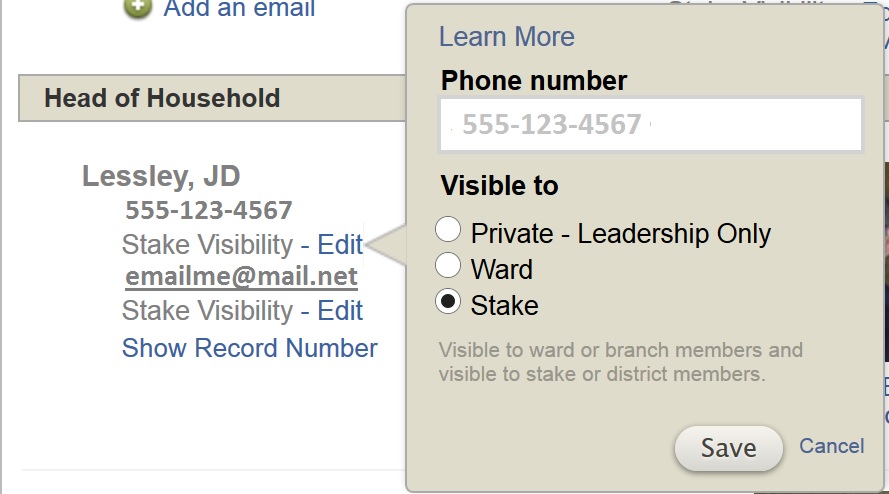
So when you click the Edit link next to your phone number or e-mail address you do not see a dialog like the one below?
phone_edit.jpg
Edit Phone Number
(85.47 KiB) Not downloaded yet
The image is a capture from the online Directory. In this case I can edit the phone number in the Phone number text box.
JD Lessley
Have you tried finding your answer on the ChurchofJesusChrist.org Help Center or Tech Wiki?
Member
#7
I only get the bottom half of the box from visible down. Same thing happened when I loged onto a windows computer.
Member
#8
Edited 1 time, last by bsummie on
See picture
Community Moderators
#9
The image you are showing is showing just the visibility setting because you cannot edit your address. Only your clerk can do that. Try your telephone number or e-mail address. I think you will find you can edit those.
JD Lessley
Have you tried finding your answer on the ChurchofJesusChrist.org Help Center or Tech Wiki?
Member
#10
Good call thank you. We moved within our same Ward boundaries and thought we could update it. Now that you mention it.... It may have been because of my previous calling I could do it. Thanks so much for the help!
Community Moderators
#11
jtsummie wrote:It may have been because of my previous calling I could do it.
For others reading this thread, take note that nobody, not even a ward clerk, can edit addresses from within the online Directory. Clerks can, however, edit addresses from Leader and Clerk Resources on LDS.org.
JD Lessley
Have you tried finding your answer on the ChurchofJesusChrist.org Help Center or Tech Wiki?
Member
#12
Correct i got the two mixed up.
New Member
#13
LDS tools on iPad and iPhone do not have editing power. Android, (which I'm partial to), can edit all information if your sign in has the credentials (i.e. your a ward clerk). Sometimes the security of Apple has it's down sides. :confused:
Community Moderators
#14
clarkg1 wrote:LDS tools on iPad and iPhone do not have editing power. Android, (which I'm partial to), can edit all information if your sign in has the credentials (i.e. your a ward clerk).
Only contact information can be edited in Android LDS Tools. The address cannot be edited.
JD Lessley
Have you tried finding your answer on the ChurchofJesusChrist.org Help Center or Tech Wiki?
Community Moderators
#15
Phone numbers and email addresses can indeed be edited on the iPad and iPhone (within your permissions).
Samuel Bradshaw • If you desire to serve God, you are called to the work.