v2.7: Error when generating PDF for printing

27 postsstarted by bromark 6,704 viewsoriginal topic

New Member
#1
[Moderator Note: This topic was split out from v2.7: Blank Printing, since it deals with a separate issue.]
fguthier wrote:
dahlfam wrote:The print calendar events is not working with this new release. I can print events in a month that are tied to a location but what I really need is to print all of the events from a calendar. Most of the events on this stake calendar are not tied to a location therefore do not print. This was working on the prior version and I am needing to print this ASAP for our stake directory
Also recognized that. Thats important to fix. Is there at least a workaround for now?
Regards
Flo
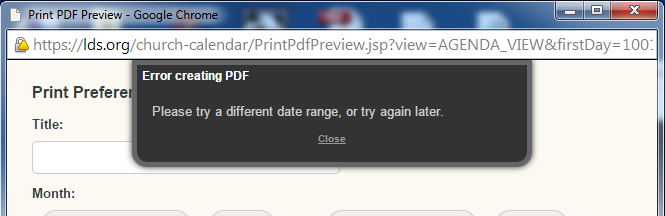
I also noticed print problem, the message says something about not being able to create the pdf. I tried to download the pdf anyway and there was nothing in the downloaded file.
Community Administrator
#2

Re: v2.7 bug: Blank agenda printing

I get "Error creating PDF" regardless of which type of calendar I select.
Have you searched the Help Center? Try doing a Google search and adding "site:churchofjesuschrist.org/help" to the search criteria.

So we can better help you, please edit your Profile to include your general location.
Community Administrator
#3

Re: v2.7 bug: Blank printing

Still not working for me. Regardless of type or date range. If I try to download a PDF, I get a file, but it's corrupted.
๐Ÿ“Ž Cal_PrintError.png (48.28 KiB)
Have you searched the Help Center? Try doing a Google search and adding "site:churchofjesuschrist.org/help" to the search criteria.

So we can better help you, please edit your Profile to include your general location.
Community Administrator
#4

Re: v2.7 bug: Blank printing

russellhltn wrote:Still not working for me. Regardless of type or date range. If I try to download a PDF, I get a file, but it's corrupted.
This sounds like a different issue -- everyone else reporting here could successfully print (even before the fix), but the calendar was blank.
Questions that can benefit the larger community should be asked in a public forum, not a private message.
Community Administrator
#5

Re: v2.7 bug: Blank printing

The problem appears to be the locations. If I add certain locations, I get the error. If I remove them, I get a preview. Out of 6 locations, only 2 do not give me any errors. Some locations that create the error have minimal or even no events. The error happens across multiple months, so I don't think it's event related.

I'm unable to see any pattern.
Have you searched the Help Center? Try doing a Google search and adding "site:churchofjesuschrist.org/help" to the search criteria.

So we can better help you, please edit your Profile to include your general location.
New Member
#6

Re: v2.7 bug: Blank printing

Jeff..
So you can put you efforts to the best use. I have check out the print problem. I appears to be only on Default Administrators. Users with View only access and added administrators can print.
Calender editors entered by name work ok. I did not check by calendar editors by position.
AT least we can get a calendar printer if we need by having one of the view only members log on to LDS.ORG.
Thank you in advance for your hard work and efforts.
Stake Website Administrator of my Stake.
Community Administrator
#7

Re: v2.7 bug: Blank printing

walterfwildman wrote:I have check out the print problem. I appears to be only on Default Administrators.
I suppose it's possible that this printing problem only happens to default administrators, but it definitely doesn't happen to all default administrators -- I am a default administrator, and I have never seen an error generating the PDF for printing.
Questions that can benefit the larger community should be asked in a public forum, not a private message.
Community Administrator
#8

Re: v2.7 bug: Blank printing

aebrown wrote:I have never seen an error generating the PDF for printing.
And I assume you've selected all the locations in your stake when trying to print? (Just double-checking.)
Have you searched the Help Center? Try doing a Google search and adding "site:churchofjesuschrist.org/help" to the search criteria.

So we can better help you, please edit your Profile to include your general location.
Community Administrator
#9

Re: v2.7 bug: Blank printing

russellhltn wrote:
aebrown wrote:I have never seen an error generating the PDF for printing.
And I assume you've selected all the locations in your stake when trying to print? (Just double-checking.)
Yep. No error. I've included restrictions or not, I've included any or all or none of the locations, I've tried Week, Agenda, and Month view. It always generates the PDF with no error.
Questions that can benefit the larger community should be asked in a public forum, not a private message.
Community Administrator
#10
I did finally spot a pattern, but it doesn't make much sense. The two locations that work are multi-ward buildings. If I look at the number of units assigned it's 4-5. But all the locations that don't work are single unit locations. Only the stake and the one ward are assigned. But assigning additional units didn't fix it. I've tried every option I can think of to make this other locations work with no luck.
Have you searched the Help Center? Try doing a Google search and adding "site:churchofjesuschrist.org/help" to the search criteria.

So we can better help you, please edit your Profile to include your general location.
New Member
#11

Calendar 2.7 - Print function not working

I have just tried to print the Cheltenham England Stake Calendar and I get an error immediately that the date range is not valid.

Changing the date range and clicking print also produces the error and a pdf file is generated but is not valid (it cannot be opened in PDF reader).

I have tried this in Google Chrome and Internet explorer using Windows 8.1.

I was planning to get this printed for the Stake this week!
Community Administrator
#12

Re: Calendar 2.7 - Print function not working

[Moderator note: I merged this post with the existing topic for this issue.]
sharpep wrote:I have just tried to print the Cheltenham England Stake Calendar and I get an error immediately that the date range is not valid.

Changing the date range and clicking print also produces the error and a pdf file is generated but is not valid (it cannot be opened in PDF reader).
Some of the other posts in this topic suggest that you might have success in printing the calendar if you make sure that no locations are selected when you print.
Questions that can benefit the larger community should be asked in a public forum, not a private message.
New Member
#13
For me (Cheltenham England Stake) this also happens. But I do not use Locations. I unticked the one location defined in the calendar view and then I was able to print my calendar.

I don't use the locations because I prepare the ics file outside of LDS.org and then import it, but the locations were not imported (I did this prior to 2.7 update - maybe it does now).

Hope that helps.
#14

Unable to print

As of this week, I am unable to print or save the PDF of a calendar. I get an error saying "Error creating .pdf. Please try a different date range or try again later." This is occuring in Month Week or Agenda view. Is this a known bug or a specific error for me?
Community Administrator
#15

Re: Unable to print

markapeterson@gmail.com wrote:As of this week, I am unable to print or save the PDF of a calendar. I get an error saying "Error creating .pdf. Please try a different date range or try again later." This is occuring in Month Week or Agenda view. Is this a known bug or a specific error for me?
No, some of us get that error as well. It seems to help to uncheck all locations.
Have you searched the Help Center? Try doing a Google search and adding "site:churchofjesuschrist.org/help" to the search criteria.

So we can better help you, please edit your Profile to include your general location.
Church Employee
#16
Some fixes were put in today on print problems. Please try again and let us know.
Community Administrator
#17
CrockettDR wrote:Some fixes were put in today on print problems. Please try again and let us know.
Still broken for me.
Have you searched the Help Center? Try doing a Google search and adding "site:churchofjesuschrist.org/help" to the search criteria.

So we can better help you, please edit your Profile to include your general location.
New Member
#18
In our stake, we have been and are still having the same calender printing problem, since the 2.7 update.
They were able to print it by logging in with one of the administrators wife's accounts. Dec 4th 9:33 pm PDT
Note: our Exec Sec does not use location, when he posts events???
#19
I seem to be able to print the calendar only if I download the pdf to my computer and then print from a pdf program (I used adobe reader 10.1.12). If I try to print directly from the print window generated by lds.org I get nothing. The file isn't sent to my printer. I tried using both firefox 33.1 and chrome 39.0.2171.71 on a mac running 10.9.5.
Community Moderators
#20
With 2.7.1 if I download a PDF file to my computer for printing, and then try to open it, I get a message that the file is corrupted and Adobe cannot open it.

And to begin with, when I click on the Print icon, the popup where you should be able to select a date range and other options opens, and another popup shows that the PDF file is already being created, followed by an error message that says the PDF file could not be created. I never even get the chance to select options.
New Member
#21
I tried again and still cannot generate PDF File of Calendar. 12-4 and 12-5.
I have been the an Assistant Stake Clerk, Stake Website Administrator and Ward Website Administrator since Jan 2009. I tried printing on the day the update was installed, and could not create the PDF file to print. Since that time, I verified with 3 Default Stake Administrators and all can print. I verified with 3 Ward Administrators and all can print. I verified 3 users without administrative rights can print.
I assigned my wife to be Stake Website Administrator and as Administrator in the Calendar and she could print both before and after the actions.
I had myself removed (Tuesday 12-2) from the Callings on the Stake and Ward levels and waited 24 hours. I did not appear in the Leadership in the Directories. I did a Leadership update on the Stake Computer. I still was not able to print. I was added (Thursday 12-4) as Assistant Stake Clerk and Website Administrator. Still unable to print, Still try another date rage or try again error.
I tried today at 12:50 PM MST about 24 hours after fixes added. No change in who can print.
Could it possibly be individual users profiles?
I appreciate your time and efforts to solve this problem. I would be glad to help you in testing as you try fixes. You could call or text me.
Twin Falls South Stake, Twin Falls 24th Ward
Community Administrator
#22
I just tried it again and it seems to be working now. I tried selecting all locations and it worked. Previously it would fail on all but two locations.
Have you searched the Help Center? Try doing a Google search and adding "site:churchofjesuschrist.org/help" to the search criteria.

So we can better help you, please edit your Profile to include your general location.
New Member
#23
I tried again just now 2:44 PM MST 12-8-2014, and it still does not work for me. I still get the Error creating PDF. I used my wife's account and it still works, just as it did before.
Church Employee
#24
We are still working on this one, hopefully with have another fix by Thursday.
New Member
#25
Eureka! I finally got to try it late Thursday Night and i am now able to print the Calendar. I tried again this morning, 8:00 AM and it still works. I tried my wife's account and she can still print. It's great to be like the rest of the Stake members. Thank you for your hard work in resolving this problem.
Church Employee
#26
Good. We put in yet another fix on Thursday. Hope we got this one, it was been a nasty one to get figured out.
New Member
#27
I am a stake executive secretary and had this trouble for months, and it's getting kind of frustrating. Any way I can work around this until it gets fixed. This feature used to work great.

rcummard