v2.7: Building icon color doesn't match

17 postsstarted by RBeatse 2,970 viewsoriginal topic

Member
#1
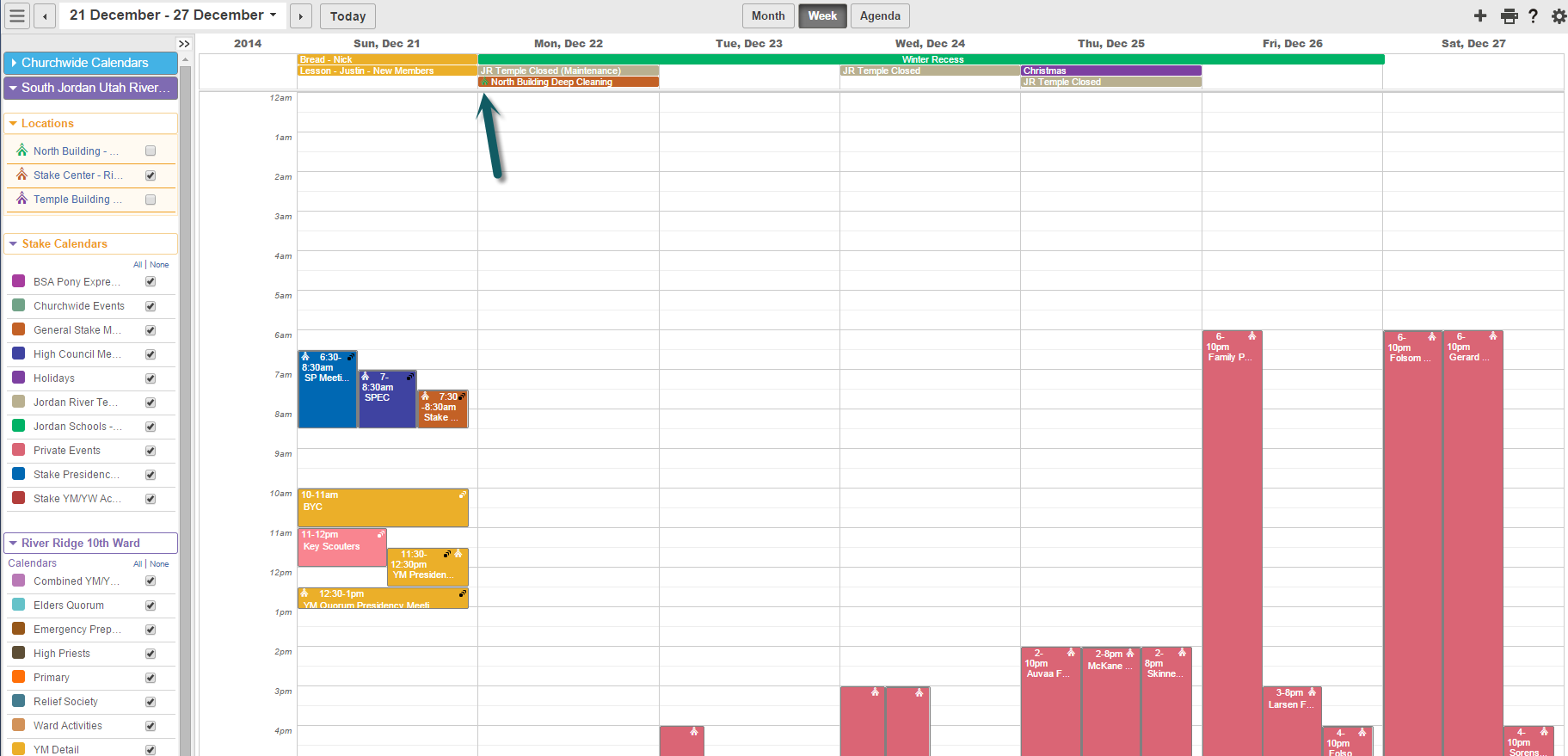
The building icon next to events does not color correctly to match the color that is set for that location. They are colored to match the color of the calendar that they are on, which defeats the purpose of the icon. In Week view, the buildings are all colored white if on a colored calendar bar or black on a white calendar bar.
Community Administrator
#2
RBeatse wrote:The building icon next to events does not color correctly to match the color that is set for that location. They are colored to match the color of the calendar that they are on, which defeats the purpose of the icon. In Week view, the buildings are all colored white if on a colored calendar bar or black on a white calendar bar.
I see this too, and I agree that it is a problem. It doesn't help a bit to see the icon in the color of the calendar, but it was very helpful in previous versions to have the icon match the color of the building. I hope this can be fixed.
Questions that can benefit the larger community should be asked in a public forum, not a private message.

Community Administrator
#3
We can select colors for the buildings, but it doesn't apply to displayed calendar events - only to "location event" display.
Have you searched the Help Center? Try doing a Google search and adding "site:churchofjesuschrist.org/help" to the search criteria.

So we can better help you, please edit your Profile to include your general location.
Church Employee
#4
Calendar events are always the color of the calendar they are on. The icon of the building is in the corner is the color of the building.

Building calendars do color events there color if they are not tied to any organization aka calendar.
LDS.org Team
Community Administrator
#5
jeffevannelson wrote:The icon of the building is in the corner is the color of the building.
That's what I'd expect, but not what I'm seeing. I've tried IE11 and Chrome.
Have you searched the Help Center? Try doing a Google search and adding "site:churchofjesuschrist.org/help" to the search criteria.

So we can better help you, please edit your Profile to include your general location.
Member
#6
russellhltn wrote:
jeffevannelson wrote:The icon of the building is in the corner is the color of the building.
That's what I'd expect, but not what I'm seeing. I've tried IE11 and Chrome.
Not seeing it in multiple browsers on an iPad either (Safari, Chrome, Atomic Web, etc.). I never realized how much I rely on that as a scheduler for all the buildings in my Stake.
Church Employee
#7
I believe I understand and see the problem - Dave Crockett (calendar product manager)
Member
#8
Someone get that man a cookie!!
Church Employee
#9
Yes I see the problem now The Building Icon is going with the calendar color for some reason I misunderstood. So yes this is a problem we are looking at thanks.
LDS.org Team
Community Moderators
#10
I do think it looks nicer this way, but for those that have been using that feature, I can see how it can be frustrating. All I use the building icon for is to see if an event is actually tied to any specific location.
Samuel Bradshaw • If you desire to serve God, you are called to the work.
Community Administrator
#11
I think for most events, just knowing the calendar the event is on is usually a good indication of the building. But that's not always the case. And it's the exceptions that makes this feature desirable.
Have you searched the Help Center? Try doing a Google search and adding "site:churchofjesuschrist.org/help" to the search criteria.

So we can better help you, please edit your Profile to include your general location.
Church Employee
#12
We should have this fixed this week.
New Member
#13
This is a big problem for me too. You cannot see at a glance what building is booked and is not an improvement. Before, at a glance, you could see the calendar it was booked on and the location by the color of the text and the building icon.
Community Administrator
#14
This has been fixed in 2.7.1.
Have you searched the Help Center? Try doing a Google search and adding "site:churchofjesuschrist.org/help" to the search criteria.

So we can better help you, please edit your Profile to include your general location.
Member
#15
russellhltn wrote:This has been fixed in 2.7.1.
I'm not sure when 2.7.1 will be released but, if it helps, I found this interesting today:

Linked is an image where you can see that on Dec 22, one of the calendar items has the correct color icon. The rest on the page do not.

I will be opening a new item using the same screen shot since you can see that I unchecked two of the buildings but all buildings' events stayed on.
📎 Screen shot.png (121.92 KiB)
Community Administrator
#16
RBeatse wrote:I'm not sure when 2.7.1 will be released
It's already been released. What you're seeing is with 2.7.1.
RBeatse wrote:Linked is an image where you can see that on Dec 22, one of the calendar items has the correct color icon. The rest on the page do not.
Note that the item that shows the correct building color icon is one up in the All-day events section in Week View; it looks like those work correctly, but all the events with times associated with them have a white or black icon (depending on the background color). And Month View works correctly for both kinds of events.

So it looks like this bug is not entirely fixed.
Questions that can benefit the larger community should be asked in a public forum, not a private message.
Church Employee
#17
We should get the week view fixed next week for a 12/18 fix release.