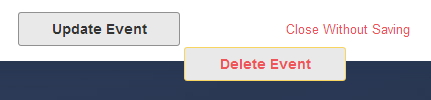
Editing Event: button placement

2 postsstarted by tannkar 12,721 viewsoriginal topic

New Member
#1
With the browser window at about 1/2 the width of my screen, the button placement of "Delete Event" drops down (Image 002). If I continue to narrow the width of the window, the "Close without Saving" button drops (Image 003), even though it appears that there is ample space horizontally still. See images attached.
Image 002.jpg
Image 002.jpg (18.9 KiB) Viewed 12719 times
Image 003.jpg
(20.34 KiB) Not downloaded yet
Ward YM Pres
Chrome browser
Community Administrator
#2
tannkar wrote:With the browser window at about 1/2 the width of my screen, the button placement of "Delete Event" drops down (Image 002). If I continue to narrow the width of the window, the "Close without Saving" button drops (Image 003), even though it appears that there is ample space horizontally still.
Yes, I noticed that, too. The Delete Event button drops down if the browser window width is under about 1800 pixels, and Close Without Saving drops down at about 1400 pixel width. So these are hardly narrow windows, and as tannkar noted, there is plenty of room for these buttons to remain in the bottom panel with proper layout unless the window width is substantially smaller.
Questions that can benefit the larger community should be asked in a public forum, not a private message.