No send button on Send Message?

6 postsstarted by jcarper 2,118 viewsoriginal topic

New Member
#1
When I create a message to go out to the Stake Presidency and Bishops in the Stake, I can select the correct individuals, type in a message. But I cannot find a button that actually sends the message. What am I missing?

Br. Carper
Stake Clerk
High Point, NC Stake

Community Administrator
#2
jcarper wrote:I cannot find a button that actually sends the message. What am I missing?
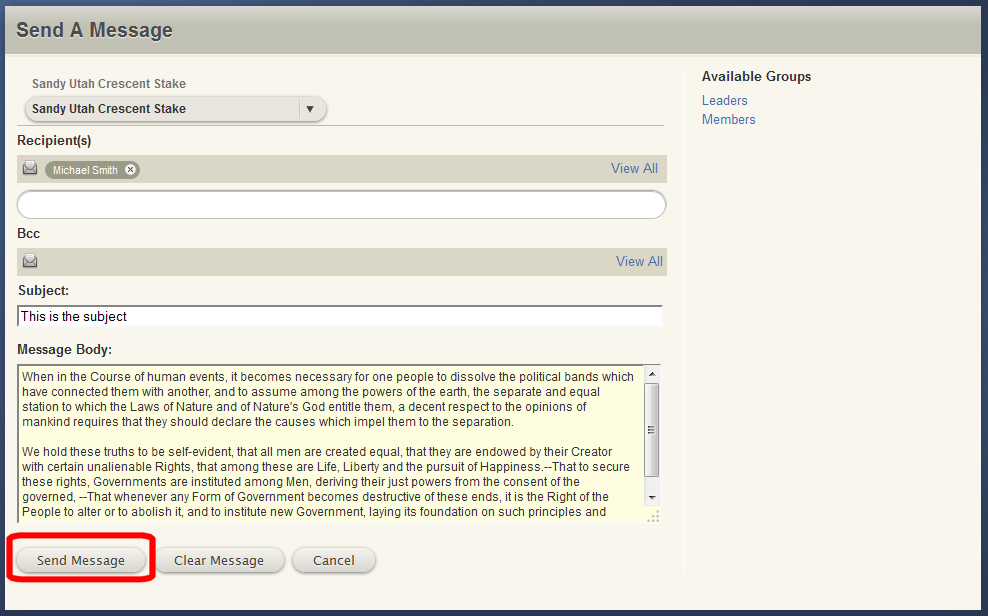
The "Send Message" button is in the lower left corner of the Send a Message page. See the screen shot below. Does that match what you are seeing?
SendMessage.png
(51.38 KiB) Downloaded 536 times
Questions that can benefit the larger community should be asked in a public forum, not a private message.
New Member
#3
No. Those buttons do not show up on my laptop. Even if I scroll the screen.

I just checked my wife's laptop. The buttons do show up when using the Send Message application.

Java Versions?
New Member
#4
Another interesting tidbit. I created a message then clicked in the area where the buttons should be. I got a popup that the message was sent.
Community Administrator
#5
jcarper wrote:No. Those buttons do not show up on my laptop. Even if I scroll the screen.

I just checked my wife's laptop. The buttons do show up when using the Send Message application.

Java Versions?
This problem isn't related to the Java installed on your laptop. It's related to your browser. You might try adjusting the zoom back to normal (Ctrl+0 on most browsers). Or maximize your browser window. Or try a different browser. Or temporarily disable your Internet filter or ad blocker.
Questions that can benefit the larger community should be asked in a public forum, not a private message.
New Member
#6
The Ctrl+0 did it. Thank you.