How to remove tags

26 postsstarted by kkruger 9,965 viewsoriginal topic

New Member
#1
I created a tag in Gospel Library on my Android device. I want to delete it. I removed all the content from the tag but cannot find a way to remove the tag itself. I logged in to lds.org and went to Notes and could see the deleted contents for the tag but the tag is not listed there. I tried clearing the trash. Resynced on my tablet but the tag is still showing. So current state, tag is on Android tablet but not showing on lds.org Notes. Anyone have any idea how to removed tags?
Member
#2
Unless something has changed, go to the notebook, open the tag as if you wanted to see all the things with that tag, and since it's empty, it should ask if you want to remove the tag.

Liz
New Member
#3
I have exactly the same problem. Tag is empty but cannot be removed. I really would appreciate a hint here.
Thank you
Georg
Community Moderators
#4
georggreindl wrote:I have exactly the same problem. Tag is empty but cannot be removed. I really would appreciate a hint here.
Have you tried using a long press on the tag? You should receive a trash can in the menu that may be of assistance. If not, you may have a software glitch.
New Member
#5
Yes I have tried that. No trash can. What do you recommend?
Community Moderators
#6
On my Android (Galaxy S2), anytime I highlight a tag there is a trash can in the menu at the bottom. I do not even need to long-press,

If you are not seeing that, perhaps you may wich to reload the app.
Community Administrator
#7
lajackson wrote:On my Android (Galaxy S2), anytime I highlight a tag there is a trash can in the menu at the bottom. I do not even need to long-press,
I don't think we're talking about the same thing. It's not a question of removing a tag from a particular section of content that I have highlighted. That works fine, and indeed there is always a trash can available when I highlight the annotation.

Instead, the question concerns the item called Notes at the top level of Library. Choosing that gives you options for All, Journal, Tags, or Notebooks. If you choose Tags, then you see your list of tags. The question is how to remove an item from that list. I created a tag called "testing" and applied it to a couple of passages. Then I removed that tag from every passage. But the "testing" tag still appears in the list of tags, even though it is not connected to any annotation. There is no interface provided for removing that tag from the list.
Questions that can benefit the larger community should be asked in a public forum, not a private message.

New Member
#8
Exactly as aebrown says. It seems that the tags in that sense are not removable. I have also not found a way to edit the name of a tag.
#9
I just highlighted a random scripture on LDS.org and tagged it 'testing'. Closed everything out and then went back in again. I clicked on the tag and opened the note with the random scripture. I went to the place underneath my note where you choose which tag you want to use, and clicked on the x. The tag disappeared from my list. I *think* that if you do the same thing but tag it with the one you don't want, it should DELETE the tag you don't want from your list.

Unless it's capitalized. Online Study Notebook does not support capital letters in tags but I believe the GL version does. So, you would be unable to do the above to get rid of your tag because OSN would not recognize it.

The only way to edit a tag is to click on the tag on the left hand side of OSN. From the middle column, click on each individual note that you made and in the right hand column tag it with the new name you want it to have, then delete the old tag name. When there are none left and non are capitalized, the old tag should disappear and your notes should all have the new tag name.

One thing to check - if your Trash or your Unassigned Items folder have items with those tags, the tag will not disappear because it is still being used.
Community Administrator
#10
PamelaBonta wrote:I just highlighted a random scripture on LDS.org and tagged it 'testing'. Closed everything out and then went back in again. I clicked on the tag and opened the note with the random scripture. I went to the place underneath my note where you choose which tag you want to use, and clicked on the x. The tag disappeared from my list. I *think* that if you do the same thing but tag it with the one you don't want, it should DELETE the tag you don't want from your list.
Thanks for trying to help, Sister Bonta. But this discussion is about Android Gospel Library, not the Notes on LDS.org. I have no problem removing a tag from LDS.org, just as you said. But if that tag has ever been synced to my Android Gospel Library (or was created there), then it never goes away, even if I remove all references to the tag and it no longer appears on LDS.org anywhere.

The only option I've found for removing obsolete tags is to completely clear all my content from my Android Gospel Library and start over, but that's very tedious, since it makes me download again all content I want to have on my device.
Questions that can benefit the larger community should be asked in a public forum, not a private message.
#11
Yes, I realize this is an Android discussion. But if something is not working or not available yet in Android and there is a way around it until it becomes available, I think people should know about it. Lowercase tags should work using what I described. Uppercase ones...no idea. :)
Community Administrator
#12
PamelaBonta wrote:Yes, I realize this is an Android discussion. But if something is not working or not available yet in Android and there is a way around it until it becomes available, I think people should know about it. Lowercase tags should work using what I described. Uppercase ones...no idea. :)
But your workaround does not work on Android Gospel Library, regardless of whether the tag is lowercase or uppercase. Your workaround only applies to LDS.org, where it really isn't necessary -- the tag disappears on LDS.org as expected when the last reference to that tag is deleted.

If I'm missing something, please let me know, but I didn't hear you say anything about what will fix the problem in Android Gospel Library.
Questions that can benefit the larger community should be asked in a public forum, not a private message.
#13
I just had someone else on the LDS.ord Response Team who has an Android device check this out. Here is the conversation:

Me: Can you create a 'test' tag on your mobile device (or if you already one called that, a different unique tag name) and highlight a random scripture and tag it with that? Then sync it with LDs.org. Go to LDS.org and see if the 'test' tag is there. If so, click on it. Then click on the scripture in the middle column that has the tag. And then go to the right hand side and scroll down to where you choose which tags are used. Click on the x to delete the tag from the scripture. Did the tag disappear from the list in the left-hand column? and when you sync again, has it disappeared from your Gospel Library?

Her: No the tag did not disappear from Gospel Library. Not only that but I tried another experiment and changed the name of the tag on LDS.org, synced again and the name on the tag was still test on my Android. Hope this helps. It also would not let me delete the tag from LDS.org, when I synced it but would let me delete it from the Android on the website when I synced it....

Me: how did you delete on your Android? and you are using Gospel Library 3.0, right?

Her: I am using version 3.0.2.11. I was unable to delete the tag when I was on the website...even though I deleted it there it would pop up on the Android when I synced them and then would be back on the website as if I hadn't deleted it. On the other hand when I deleted the tag on the Android and synced with the website, it was gone from both places.. You delete it on Android similar to the way that it is deleted on the website. When the tag is highlighted, there is a trashcan that is an option that can be touched. When the trashcan is touched, a screen comes up that says This annotation contains additional content. Do you really want to delete it? If you touch no, the tag remains. If you touch yes, the tag is deleted.

Me: Does the name of the tag delete?

Her: yes...everything about it is deleted...any additional notes, highlighting....all deleted. however what does remain is the name is in the list of previously used notes...a shortcut library so that you don't have to type out frequently used notes....it doesn't appear in the text, just in the library...
********
So,it appears that one can delete the tag from Android, but that it is not syncing properly. I am in the process of writing a report for my supervisor at his request to forward to the appropriate person to look at this. If you could provide any additional information, it would be most appreciated and I will add it to my report. God bless.
Community Administrator
#14
PamelaBonta wrote:So,it appears that one can delete the tag from Android, but that it is not syncing properly.
Thanks for following up on this. But neither you nor the person you quoted explains how to delete the tag. Several people have tried (I've tried myself) and although I'm an experienced Android user, I cannot find any way to do it. It would sure be helpful if someone could give more details than "I deleted the tag".
Questions that can benefit the larger community should be asked in a public forum, not a private message.
#15
She said: When the tag is highlighted, there is a trashcan that is an option that can be touched. When the trashcan is touched, a screen comes up that says This annotation contains additional content. Do you really want to delete it? If you touch no, the tag remains. If you touch yes, the tag is deleted.

When you do this, she says: ...everything about it is deleted...any additional notes, highlighting....all deleted. however what does remain is the name is in the list of previously used notes...a shortcut library so that you don't have to type out frequently used notes....it doesn't appear in the text, just in the library...
Community Moderators
#16
PamelaBonta wrote:She said: When the tag is highlighted, there is a trashcan that is an option that can be touched. When the trashcan is touched, a screen comes up that says This annotation contains additional content. Do you really want to delete it? If you touch no, the tag remains. If you touch yes, the tag is deleted.
For me and my Android, the tag cannot be removed. Remember, as aebrown said,
the question concerns the item called Notes at the top level of Library. Choosing that gives you options for All, Journal, Tags, or Notebooks. If you choose Tags, then you see your list of tags. The question is how to remove an item from that list.

I created a tag called "testing" and applied it to a couple of passages. Then I removed that tag from every passage.

But the "testing" tag still appears in the list of tags, even though it is not connected to any annotation. There is no interface provided for removing that tag from the list.
That is the problem we are trying to solve. It may be helpful to include aebrown's quote in your trouble report.

The tags in the content come and go as advertised, but I cannot remove the tag from the main list, even if the content is no longer tagged. Once on the main list the tag never goes away.

We do appreciate your help in working on this bug.
#17
Thanks for the info. I will add it to my report!
Member
#18
3.0.2.11 on Samsung Galaxy Note 8: Starting at the GL home page...

1. Tap "Notes"
2. Tap "Tags"
3. Tap the tag I want gone (this brings up a list of items tagged with this term)
4. Remove the tag from each item
5. On the last item, I removed this tag and replaced it with another (on my first test; on my second test, I just removed the highlight altogether by hitting the trash can icon):
* Click on the box at the right side of the line with the highlight
* in the toolbar, click on the tag icon
* in the popup, click the "x" in the tag I want removed
* in the "Remove Tag" confirm popup, click OK
* Pick a different tag (ah, on trying to repeat this, I see the previously-deleted tag, though it wasn't showing up any more in the list from #2 above; perhaps this is where everyone is saying it cannot be deleted)
* click the checkmark icon to close the tag popup
6. I then pressed the back/return button on the tablet to go back to the list of items in the tag (list is now empty).
7. Then press back again (to go the list of tags); in this list, the "deleted" or "empty" tag does not appear.
8. But the tag still appears in the list of potential tags that I get when I highlight text (e.g. in the scriptures), click the tag icon, and get the popup "dialog" wherein I can select an existing tag or type a new one. I can see no way to get "empty" tags removed from this list. (Though I'll bet there's a way to hack it out of the database - but I don't have time tonight to fiddle with that.)

Prior to this experiment, I thought everyone was saying the empty tag still shows up in the list from #2 above; in my experience, it doesn't - only in the list of potential tags (which to me acts like your browser history - having all the stuff you previously typed).

FWIW,

Liz
Community Administrator
#19
lmcguire wrote:Prior to this experiment, I thought everyone was saying the empty tag still shows up in the list from #2 above; in my experience, it doesn't - only in the list of potential tags (which to me acts like your browser history - having all the stuff you previously typed).
I am most definitely talking about your step #2, and it is still a problem on my Gospel Library. However, I am unable to duplicate the problem from scratch. If I follow your steps (and I have done this many times), the newly created tag will go away from the list of tags.

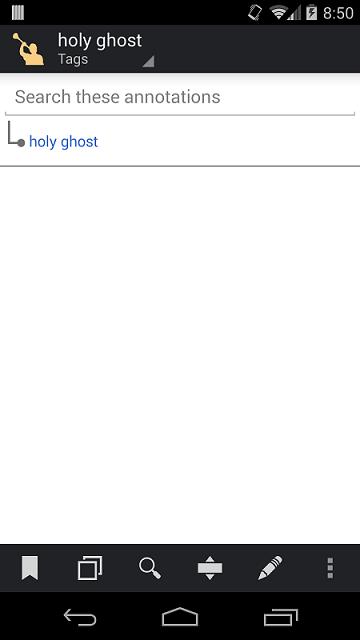
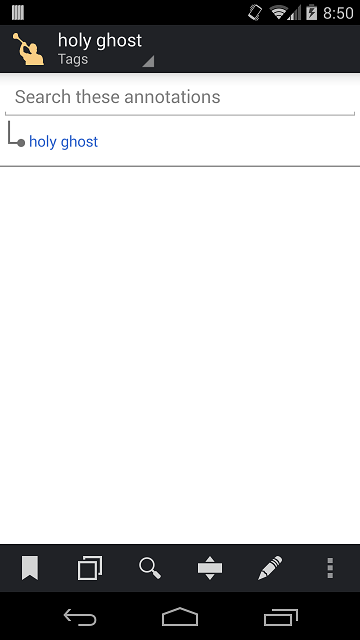
But the fact remains that I have 2 tags that have no content, and yet they appear in the list. One of them has what looks like an orphaned tag (first screen shot), and the other used to have 3 orphaned tags. On that one (called "test") I used the long press to select them all, then deleted them. The orphaned tags went away, but "test" still appears in the list in your step #2.

I'm confident that if I deleted all my content and started over, they would go away (I did that with a third tag that had caused me problems earlier, and it's truly gone now). But I don't want to lose all my downloads again.

And I'd still like to be able to remove obsolete tags from the pick list as well.
hg.png
(27.84 KiB) Downloaded 192 times
test.png
(24.53 KiB) Downloaded 192 times
Questions that can benefit the larger community should be asked in a public forum, not a private message.
New Member
#20
I am "glad" that the issue is verified by an admin. However, now what? How can one post feature requests? The way it started is that I had a typo in the tag and I simply cannot make it go
away.
I am also missing the "justify text" feature that was there before the big update.
Georg
Community Administrator
#21
georggreindl wrote:I am "glad" that the issue is verified by an admin.
Although I am a Community Administrator for the LDSTech Forum, I have no special position in relation to Gospel Library -- I'm just the same as you in this regard.
georggreindl wrote:However, now what? How can one post feature requests?
Send Feedback from within the App. On the menu, tap Help, and then Send Feedback. That will prepare an email with some of your system information along with whatever text you want to add, and then you just send the email using your regular email app on your device.
Questions that can benefit the larger community should be asked in a public forum, not a private message.
New Member
#22
I am a new service missionary for LDS Tech. Someone just forwarded this question to us through the Help feature in Gospel Library.

I tried to reproduce this problem by following the steps you have described here. You are right. I now have a "Testing" tags category that is empty and cannot be deleted.

I will report this to the developers. Thanks for finding this bug.

Diane Evans
LDSTech Service Missionary
New Member
#23
Has any more progress been made on this issue?

I'm having similar problems on my Gospel Library for Android. It would be helpful to have more control over tags--so that we could delete tags in bulk (like the tag itself and all the entries for that tag) or rename the tags if we wanted.

I've been trying to find a good solution to reorganize a lot of my tags but it seems like the only option is go on the website and delete/rename each entry one at a time. And that would take hours upon hours. I even tried downloading the XML for my notebook, running a find/replace search, and renaming the tags that way. This actually worked, but then I discovered that while you can backup an XML version of a notebook, that backup currently doesn't serve any purpose since it's impossible to restore the back up. So I'm pretty stumped. I really like tagging things--it helps keep me focused on what I'm reading--but it's currently very difficult to keep things organized the way you want it.

Thanks you for all you guys do!
New Member
#24
Hey everyone! First forum comment here for me. I've run into the same issue here with the inability to delete tag categories from my notes section on my Android devices. Honestly, the only effective solution I've found is to use my work iPhone to delete the tag category. Deleting tag categories on IOS is a cinch. I realize not everyone may have devices on both platforms, but if someone does, it's worth giving it a try, at least to get rid of the annoying/unwanted tag.
New Member
#25
Any answer yet? I have half a dozen empty tags... There must be a way to edit the list.
New Member
#26
my tag dont exclue =[ android app