New Member
Why do you have to scroll down through all of the previous years from 2003 to get to 2014 when entering the date of an event? It seems like it should just show the current year and maybe two or three years in the future.
How are you creating events? What are the steps you take? I tried three methods and in all three of those methods the default is the current year.kerrybird wrote:Why do you have to scroll down through all of the previous years from 2003 to get to 2014 when entering the date of an event?

When you are in the Edit Event Details popup, if you click in any date field, the date picker pops up. Clicking on the year, shows a list box of years:jdlessley wrote:In these three methods, the date (day and year) can be manually changed by typing in the date text box any date desired. I see no list box of year in any method I use.
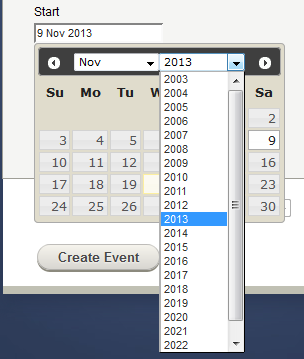
Clearly it is helpful to have at least one previous year listed, but I would agree that 10 is a bit excessive. But why is it a problem of any significance? Since the default value is the current year, picking a year before or after the default value is simple enough.kerrybird wrote:See the illustration above. My question is why it has the 10 previous years listed.